Vista to Windows 7 Upgrade

pc2015phx

New member
Local time
8:54 AM
Messages
3
hello all,

i joined this forum to learn more about Windows because I am not a techie and hope that you can help me fix my problem.

I have an hp g60 laptop 64 bit circa 2009. when i purchased this laptop, it had vista home premium but it came with a free windows 7 upgrade.
i upgraded to 7
over that past 4 years my computer ran slow and had possible viruses
i decided to backup to an external hard drive, wipe the laptop, restoring to factory settings
i am now back at vista and want to reinstall windows 7
however, i have no windows 7 back up discs and no windows 7 product key..NOTHING (all was lost during a move)
i called hp and microsoft and none can help me without the windows 7 product key for the upgrade
am i stuck with vista?
QUESTIONS:
DID WINDOWS 7 GET RESTORED ON EXTERNAL HARD DRIVE BECAUSE I BACKED UP PRIOR TO WIPING?
IF SO, CAN I REINSTALL WINDOWS 7 FROM MY EXTERNAL HARD DRIVE?
IF YES, WILL IT BRING VIRUSES WITH IT? (This is why I chose o start fresh..because of viruses)
Thank you all for any assistance you can provide.
Robert
 

My Computer My Computer

At a glance

Windows Vista Home Premium 64-bit
Computer type
PC/Desktop
Computer Manufacturer/Model Number
HP G60
OS
Windows Vista Home Premium 64-bit
i decided to backup to an external hard drive, wipe the laptop, restoring to factory settings

How exactly you performed the backup ?. Is it a simple copy-paste operation or have you performed a full disk backup ( if yes, which software is used ? ).
 

My Computer My Computer

At a glance

Windows 7 Ultimate x64
Computer type
PC/Desktop
OS
Windows 7 Ultimate x64
Thanks for your reply. I did the normal back up offered by Windows prior to doing a system restore function. I backed up to my seagate hard drive.
 

My Computer My Computer

At a glance

Windows Vista Home Premium 64-bit
Computer type
PC/Desktop
Computer Manufacturer/Model Number
HP G60
OS
Windows Vista Home Premium 64-bit
You probably had the Vista>Win7 Upgrade Kit which was a program to help retailers keep selling Vista PC's with the promise of an Upgrade as soon as Win7 was released. Those disks were retail Upgrade disks that shipped with the key on them. So if you didn't preserve yours as you would any other $100+ value item, then it is lost.

You could have audited the key from your old install using a keyfinder like Belarc Advisor if you hadn't been in a hurry to restore to Vista, which wasn't even necessary since you can use the Upgrade to Clean Install with a Upgrade Windows 7 Version.

Look in your C: drive to see if there's any chance it made a windows.old folder which makes it possible the old install can be restored to audit the Product Key. How to restore a Windows 7-based computer to a previous Windows installation by using the Windows.old folder

If you are able to restore to audit the Key with Belarc or Magic Jellybean, then preserve the key and do a Clean Reinstall Windows 7, this time making the proper preparations and using the media for your licensed version which the tutorial explains how to obtain in Step 1.

Otherwise you can buy a retail copy of Win7 which we see often for around $89 on Tiger Direct and New Egg, or are stuck with Vista if your OEM Tech Support can't provide you with the Upgrade key - which I doubt but is worth a try. If stuck with Vista then to improve performance Clean Up Factory Bloatware.

You should also scan the data on your external drive from the old install to disinfect it before reimporting. Do a full scan with Malwarebytes and SUPERAntiSpyware - Downloads
making sure you include the external drive.
 
Hi

A factory restore operation is less likely to backup old installation to "Windows.old" folder. But fortunately you should be able to pull out the "Windows 7" key from the backup. Usually Windows backup will create an exact replica of the partitions to backup and store them in VHD ( Virtual Hard Drive ) format. We can mount the VHD and recover the key from it. Please try the below steps.

1. Mount the Windows backup VHD as per How To Extract Individual Files From a Windows 7 System Image Backup


2. Use a key recovery tool like "Belarc" or "Nirsoft Product Key" to recover the key from the mounted VHD drive.


Nirsoft Product Key : ProduKey - Recover lost product key (CD-Key) of Windows/MS-Office/SQL Server

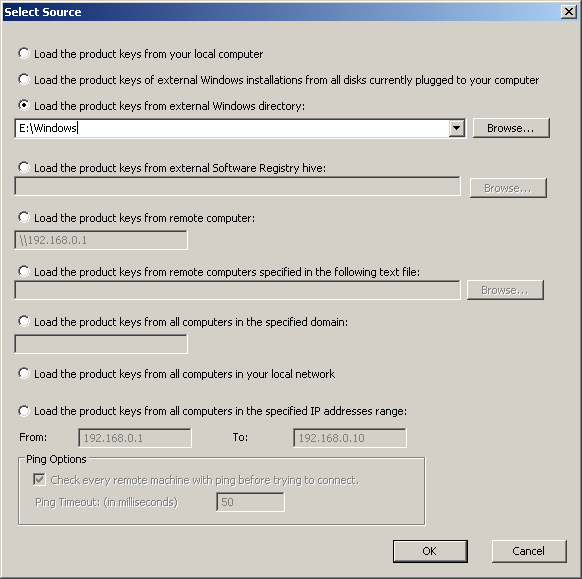
Run the tool and select File-->Select Source and choose the Windows directory on the mounted VHD drive.

produkey_select_source.gif


3. If product key is successfully recovered, try the key to download "Windows 7" ISO from "Microsoft software recovery" service.

Microsoft Software Recovery


Usually they only accept full retail keys but it will worth a try as it is the only legal way to obtain a copy of "Windows 7" install media. If that is unsuccessful, you may need to rely on other ways which are described in Greg's excellent tutorial http://www.sevenforums.com/tutorials/219487-clean-reinstall-factory-oem-windows-7-a.html#post1839164
 

My Computer My Computer

At a glance

Windows 7 Ultimate x64
Computer type
PC/Desktop
OS
Windows 7 Ultimate x64
thanks to all for their replies!
i appreciate the support. i have had no luck
as you know, i do not know a lot about computers. since we are expecting a child and money is tight i figured i'd just use vista.
since i am now using vista, will my 2009 hp g60 pc (pentium, 2.1ghz 4gb,64bit) be fine for running ms office, cruising the internet, managing family photos, running itunes, etc.?
if not let me know your opinions. i mean i can get a new laptop for 500 or less. if i did so is it necessary for what my uses are?
thanks all
robert
 

My Computer My Computer

At a glance

Windows Vista Home Premium 64-bit
Computer type
PC/Desktop
Computer Manufacturer/Model Number
HP G60
OS
Windows Vista Home Premium 64-bit
Robert first try tapping the ESC or F11 key at boot to see if theres any access to Vista Recovery partition. If so check for a Minimal Recovery option which is as use to a Clean Reinstall as Recovery gets.

If not do you have any discs and how are they labeled? if not Vista can be Clean Installed from any Vista disk as they contain all versions and will install yours based on the Product Key on COA sticker on bottom.

Steps for getting and keeping a perfect install are the same as for http://www.sevenforums.com/tutorials/219487-clean-reinstall-factory-oem-windows-7-a.html#post1839164 Including how to find safe media.
 
Last edited:
Back
Top