Win 7 upgrade from Vista for VAIO laptop VGN-S38GP

Iluvatar

New member
Local time
2:12 AM
Messages
11
I wish to do an upgrade to my old VAIO laptop VGN-S38GP. I DO NOT want to contribute to the mountains of e-waste destroying the planet as we write !!!

I performed such an upgrade using an OEM installation disk I purchased for a now, dead PC. This went OK, but it is sadly deficient in some drivers. I have tried configuring a number of devices from the original Vista CD, but some do not work at all, despite using the appropriate compatibility options.

I have read that there WAS an upgrade path offered by SONY, if one applied for same, whereby they sent the applicant a special Windows 7 upgrade disk. I didn't know about this at the time.

My question is:

Can anyone help me with configuring working drivers for my new Win 7 installation?

OR

Help me to find a copy of the iso for the Win 7 upgrade disk for this model VAIO laptop ?

A supplementary request is: can anyone help me locate a valid 'VAIO Care' package for this m/c from a source that isn't riddled with malware and viruses ?

The SONY support websites yield NO drivers or useful information, for this model, anywhere in the world :(

All help would be gratefully received and acknowledged on this forum.

Thanks in Advance,
MD
 

My Computer My Computer

At a glance

New South Wales
Computer type
PC/Desktop
OS
New South Wales
How much memory it has?
Did you install 32 or 64 bits?

I first suggest you update your computer using Single file with all updates - Simplix

The way to find the missing drivers is finding the driver ID and search on the internet.
- Open device manager. There will be some yellow remarks of missing drivers.
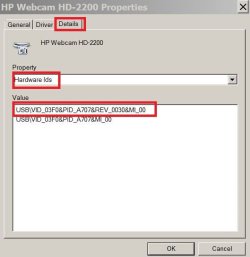
- Right click on one of them - properties - Details tab - pull down - Hardware ID
- it is something like USB\VID_03F0&PID_A707&REV_0030&MI_00
- Click on the first line - right click - copy
- Search for the hardware ID driver on the internet

HardwareID.JPG


I once upgraded a Sony Vaio from Win Vista to Win 7.
Was very hard to find the camera driver

- - - Updated - - -

How much memory it has?
Did you install 32 or 64 bits?

I first suggest you update your computer using Single file with all updates - Simplix

The way to find the missing drivers is finding the driver ID and search on the internet.
- Open device manager. There will be some yellow remarks of missing drivers.
- Right click on one of them - properties - Details tab - pull down - Hardware ID
- it is something like USB\VID_03F0&PID_A707&REV_0030&MI_00
- Click on the first line - right click - copy
- Search for the hardware ID driver on the internet

HardwareID.JPG


I once upgraded a Sony Vaio from Win Vista to Win 7.
Was very hard to find the camera driver
 

My Computers My Computers

  • At a glance

    Windows 7 HP 64i5 6600K - 800MHz to 4200MHz4+4G GSkill DDR4 3000IG - Intel 530
    Computer type
    PC/Desktop
    Computer Manufacturer/Model Number
    custom build
    OS
    Windows 7 HP 64
    CPU
    i5 6600K - 800MHz to 4200MHz
    Motherboard
    GA-Z170-HD3P
    Memory
    4+4G GSkill DDR4 3000
    Graphics Card(s)
    IG - Intel 530
    Monitor(s) Displays
    Samsung 226BW
    Screen Resolution
    1680x1050
    Hard Drives
    (1) -1 SM951 – 128GB M.2 AHCI PCIe SSD drive for Windows 7 and Lubuntu
    (2) -1 WD SATA 3 - 1T for Data
    (3) -1 WD SATA 3 - 1T for backup
    PSU
    Thermaltake 450W TR2 gold
    Keyboard
    Old and good Chicony mechanical keyboard
    Mouse
    Logitech mX performance - 9 buttons (had to disable some)
    Internet Speed
    500Mb/s
    Browser
    Firefox 64
    Other Info
    TinyWall firewall
  • At a glance

    Windows 7 Proi7-4500U 800MHz to 3.0GHz(4+4)G DDR3 1600IG intel 4400 + NVIDIA GeForce GT 745M
    Computer type
    Laptop
    System Manufacturer/Model Number
    Asus Q550LF
    OS
    Windows 7 Pro
    CPU
    i7-4500U 800MHz to 3.0GHz
    Motherboard
    Asus Q550LF
    Memory
    (4+4)G DDR3 1600
    Graphics Card(s)
    IG intel 4400 + NVIDIA GeForce GT 745M
    Sound Card
    Realtek
    Monitor(s) Displays
    LG Display LP156WF4-SPH1
    Screen Resolution
    1920 x 1080
    Hard Drives
    BX500 120G SSD for Windows and programs +
    1T HDD for data
    Internet Speed
    500 Mb/s
    Browser
    Firefox
    Other Info
    TinyWall firewall
Thanks Megahertz07,

The machine has 4GB of memory and is a 32 bit machine.

Could you please clarify why you suggested that I run Simplix? Doesn't this simply install all the Win 7 updates.

I think my problem lies with the VAIO-specific drivers which, of course, would not be included in a generic Win 7 installation disc.

So, could anyone tell me where I might
download VAIO Windows 7 Upgrade Utility?

Regards
MD
 

My Computer My Computer

At a glance

New South Wales
Computer type
PC/Desktop
OS
New South Wales
Hi
The Vaio upgrade disc utility would not have contained drivers, all it did was introduce a specific set of registry items/files and folders.
W7 actually came with most core generic drivers dated 2006, ie Vista era, This ensured that any comp had a working base
Once windows update came into operational mode the major component drivers started to be updated, motherboard/ graphics cards etc. Yes there are specific OEM drivers, but MOST of them are unneccessary duplicates of whats included in a vanilla, non OEM, ISO.
note... OEM's use 3rd party components and just rebrand them,
The only important missing update will be for your BIOS
i Vanilla installed my Acer Vista machine, just no bloatware and it updated fine.

Wait until your comp has updated, then we can have a look at whats missing in Device Manager
Yes Simplex is for updates only, its alledgedly quicker and Customisable... no telemetry. but does not contain drivers you will have to turn on Windows updates so your system checks for newer drivers.. default is ON
 

My Computer My Computer

At a glance

W7 home premium 32bit/W7HP 64bit/w10 tp insid...E5300 dual core3gbNvidia Geforce 7100 Nforce 630i
Computer type
PC/Desktop
Computer Manufacturer/Model Number
medionl/Aspire 6930G/acer x55a
OS
W7 home premium 32bit/W7HP 64bit/w10 tp insider ring
CPU
E5300 dual core
Motherboard
medion MS7366
Memory
3gb
Graphics Card(s)
Nvidia Geforce 7100 Nforce 630i
Monitor(s) Displays
avixc
Internet Speed
n (isp resticted to 72)
Antivirus
mse/pands
Browser
palemoon
Other Info
Belkin Fd7050 n USB using Railink RT2870 drivers, more upto date
on January 14, 2020 MS stopped to deliver updates to general users but continued to deliver updates for those who paid for them.
Simplix has all updates on a single file including those delivered after January 14, 2020, (without those KB with telemetry).
 

My Computers My Computers

  • At a glance

    Windows 7 HP 64i5 6600K - 800MHz to 4200MHz4+4G GSkill DDR4 3000IG - Intel 530
    Computer type
    PC/Desktop
    Computer Manufacturer/Model Number
    custom build
    OS
    Windows 7 HP 64
    CPU
    i5 6600K - 800MHz to 4200MHz
    Motherboard
    GA-Z170-HD3P
    Memory
    4+4G GSkill DDR4 3000
    Graphics Card(s)
    IG - Intel 530
    Monitor(s) Displays
    Samsung 226BW
    Screen Resolution
    1680x1050
    Hard Drives
    (1) -1 SM951 – 128GB M.2 AHCI PCIe SSD drive for Windows 7 and Lubuntu
    (2) -1 WD SATA 3 - 1T for Data
    (3) -1 WD SATA 3 - 1T for backup
    PSU
    Thermaltake 450W TR2 gold
    Keyboard
    Old and good Chicony mechanical keyboard
    Mouse
    Logitech mX performance - 9 buttons (had to disable some)
    Internet Speed
    500Mb/s
    Browser
    Firefox 64
    Other Info
    TinyWall firewall
  • At a glance

    Windows 7 Proi7-4500U 800MHz to 3.0GHz(4+4)G DDR3 1600IG intel 4400 + NVIDIA GeForce GT 745M
    Computer type
    Laptop
    System Manufacturer/Model Number
    Asus Q550LF
    OS
    Windows 7 Pro
    CPU
    i7-4500U 800MHz to 3.0GHz
    Motherboard
    Asus Q550LF
    Memory
    (4+4)G DDR3 1600
    Graphics Card(s)
    IG intel 4400 + NVIDIA GeForce GT 745M
    Sound Card
    Realtek
    Monitor(s) Displays
    LG Display LP156WF4-SPH1
    Screen Resolution
    1920 x 1080
    Hard Drives
    BX500 120G SSD for Windows and programs +
    1T HDD for data
    Internet Speed
    500 Mb/s
    Browser
    Firefox
    Other Info
    TinyWall firewall
Back
Top