VMware Player Lost Network Connection

chamlin

New member
Local time
4:56 PM
Messages
97
Not sure when it happened as I don't use VMware player too often.

  • My main desktop is Win 7 Pro.
  • VMware Player: 6.0.2 build - 1744117
  • In the player, is XP Pro.
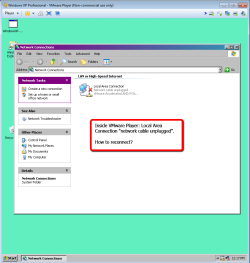
In XP Pro inside the player, when I opened up Windows Explorer, Network, I briefly saw my desktop drives (in the Win 7 system), then they disappeared and now nothing is shown via the network.

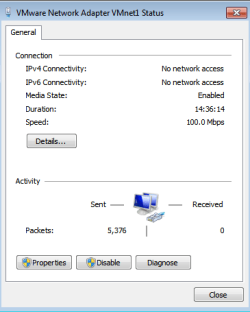
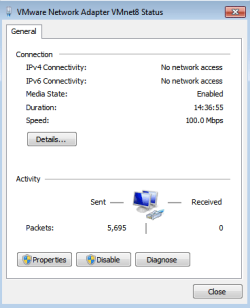
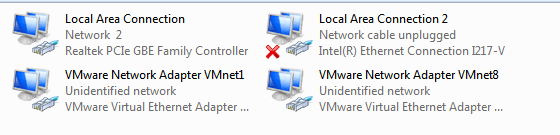
Here are some images of the Network settings on the Win 7 system.


Appreciate any help you can give on reestablishing the connection.


Thanks,
Chamlin
 

Attachments
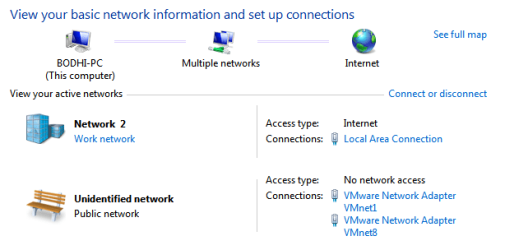
  • Network_&_Sharing_Center.png
    Network_&_Sharing_Center.png
    33.3 KB · Views: 18
  • VMware_Network_Adapter_VMnet1.png
    VMware_Network_Adapter_VMnet1.png
    20 KB · Views: 18
  • VMware_Network_Adapter_VMnet8.png
    VMware_Network_Adapter_VMnet8.png
    20.1 KB · Views: 18

My Computer

Computer type
PC/Desktop
Computer Manufacturer/Model Number
Custom Build
OS
Windows 7 Professional 64-bit
CPU
Intel Core i5-4670K Haswell 3.4GHz Quad-Core 84w CPU
Motherboard
ASUS Z87 Deluxe 1150 Intel Z87 Motherboard
Memory
16GB (2 x 8GB) Kingston DDR3 1600
Graphics Card(s)
FANLESS ASUS Radeon HD 6450 1GB
Hard Drives
c: SSD Intel 520 Series 180GB SATA III (for OS/programs)
e: WD 2TB Green (general data)
f: WD 600 GB Velociraptor (audio recording data)
g: WD 150 GB Velociraptor (open)
Antivirus
Emsisoft Internet Security (AV/Firewall)
Browser
Firefox
Anyone out there with an understanding of VM's networked to Win 7 workgroups (or not in my case)?
 

My Computer

Computer type
PC/Desktop
Computer Manufacturer/Model Number
Custom Build
OS
Windows 7 Professional 64-bit
CPU
Intel Core i5-4670K Haswell 3.4GHz Quad-Core 84w CPU
Motherboard
ASUS Z87 Deluxe 1150 Intel Z87 Motherboard
Memory
16GB (2 x 8GB) Kingston DDR3 1600
Graphics Card(s)
FANLESS ASUS Radeon HD 6450 1GB
Hard Drives
c: SSD Intel 520 Series 180GB SATA III (for OS/programs)
e: WD 2TB Green (general data)
f: WD 600 GB Velociraptor (audio recording data)
g: WD 150 GB Velociraptor (open)
Antivirus
Emsisoft Internet Security (AV/Firewall)
Browser
Firefox
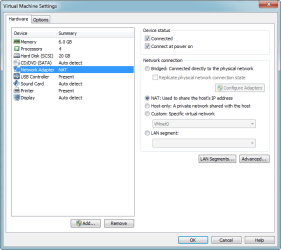
What does the Network Adapter settings show?

1.png
 

My Computer

Computer type
PC/Desktop
Computer Manufacturer/Model Number
Golden Mk. I.4
OS
Windows 10 Pro x64 ; Xubuntu x64
CPU
Intel i7 860 @ 2.80 GHz O/C'ed to 4.0GHz
Motherboard
Gigabyte P55A-UD3R Rev.1. Award BIOS F13
Memory
16GB Corsair Vengance DDR3 @ 661 MHz Dual Channel (9-9-9-24)
Graphics Card(s)
EVGA NVidia GTX 560 1024MB
Sound Card
Realtek Integrated
Monitor(s) Displays
Dual Samsung SyncMaster 2494HS
Screen Resolution
1920*1080 and 1920*1080
Hard Drives
1*Samsung 840 EVO 120GB SSD;
1*OCZ Vertex 2 60GB SSD;
2*Samsung F3 SpinPoint 1TB in RAID0;
1*Samsung F1 SpinPoint 1TB;
2*Western Digital 1TB External USB 3.0
1*Western Digital 500GB External USB 3.0
1*Seagate 500GB External USB 2.0
PSU
Thermaltake ToughPower QFan 750W
Case
Thermaltake Element S VK60001W2Z
Cooling
Corsair H60 Water Cooling, 2*230mm and 2*80mm case fans
Keyboard
Logitech G110
Mouse
Logitech MX518
Thanks, Golden.
 

Attachments

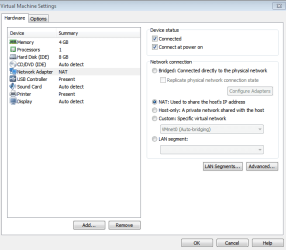
  • VM_Settings.png
    VM_Settings.png
    39.1 KB · Views: 9

My Computer

Computer type
PC/Desktop
Computer Manufacturer/Model Number
Custom Build
OS
Windows 7 Professional 64-bit
CPU
Intel Core i5-4670K Haswell 3.4GHz Quad-Core 84w CPU
Motherboard
ASUS Z87 Deluxe 1150 Intel Z87 Motherboard
Memory
16GB (2 x 8GB) Kingston DDR3 1600
Graphics Card(s)
FANLESS ASUS Radeon HD 6450 1GB
Hard Drives
c: SSD Intel 520 Series 180GB SATA III (for OS/programs)
e: WD 2TB Green (general data)
f: WD 600 GB Velociraptor (audio recording data)
g: WD 150 GB Velociraptor (open)
Antivirus
Emsisoft Internet Security (AV/Firewall)
Browser
Firefox
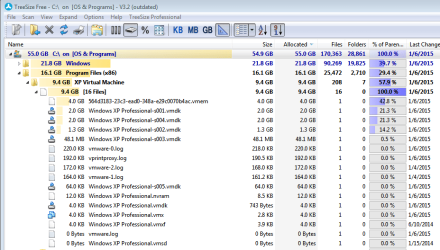
Some additional "clues?".
 

Attachments

  • network_cable_unplugged.png
    network_cable_unplugged.png
    61 KB · Views: 0
  • Networks_List.png
    Networks_List.png
    17.8 KB · Views: 9
  • Tree_-_Jump_in_XP_VM_Size.png
    Tree_-_Jump_in_XP_VM_Size.png
    103.3 KB · Views: 0

My Computer

Computer type
PC/Desktop
Computer Manufacturer/Model Number
Custom Build
OS
Windows 7 Professional 64-bit
CPU
Intel Core i5-4670K Haswell 3.4GHz Quad-Core 84w CPU
Motherboard
ASUS Z87 Deluxe 1150 Intel Z87 Motherboard
Memory
16GB (2 x 8GB) Kingston DDR3 1600
Graphics Card(s)
FANLESS ASUS Radeon HD 6450 1GB
Hard Drives
c: SSD Intel 520 Series 180GB SATA III (for OS/programs)
e: WD 2TB Green (general data)
f: WD 600 GB Velociraptor (audio recording data)
g: WD 150 GB Velociraptor (open)
Antivirus
Emsisoft Internet Security (AV/Firewall)
Browser
Firefox
Thinking it might have been an issue with the firewall not allowing a public network (did before though); I used the Local Security Policy Editor to change "unidentified networks" to private. Didn't help. Not sure if I should leave it that way.
 

My Computer

Computer type
PC/Desktop
Computer Manufacturer/Model Number
Custom Build
OS
Windows 7 Professional 64-bit
CPU
Intel Core i5-4670K Haswell 3.4GHz Quad-Core 84w CPU
Motherboard
ASUS Z87 Deluxe 1150 Intel Z87 Motherboard
Memory
16GB (2 x 8GB) Kingston DDR3 1600
Graphics Card(s)
FANLESS ASUS Radeon HD 6450 1GB
Hard Drives
c: SSD Intel 520 Series 180GB SATA III (for OS/programs)
e: WD 2TB Green (general data)
f: WD 600 GB Velociraptor (audio recording data)
g: WD 150 GB Velociraptor (open)
Antivirus
Emsisoft Internet Security (AV/Firewall)
Browser
Firefox
Also, restored back to an earlier place in time and space (Nov. 24) and the networking worked.

So...my challenge is, what should I be looking for that's different? Needle? Haystack?
 

My Computer

Computer type
PC/Desktop
Computer Manufacturer/Model Number
Custom Build
OS
Windows 7 Professional 64-bit
CPU
Intel Core i5-4670K Haswell 3.4GHz Quad-Core 84w CPU
Motherboard
ASUS Z87 Deluxe 1150 Intel Z87 Motherboard
Memory
16GB (2 x 8GB) Kingston DDR3 1600
Graphics Card(s)
FANLESS ASUS Radeon HD 6450 1GB
Hard Drives
c: SSD Intel 520 Series 180GB SATA III (for OS/programs)
e: WD 2TB Green (general data)
f: WD 600 GB Velociraptor (audio recording data)
g: WD 150 GB Velociraptor (open)
Antivirus
Emsisoft Internet Security (AV/Firewall)
Browser
Firefox
Try turning off the firewall temporarily - see if that helps.
 

My Computer

Computer type
PC/Desktop
Computer Manufacturer/Model Number
Golden Mk. I.4
OS
Windows 10 Pro x64 ; Xubuntu x64
CPU
Intel i7 860 @ 2.80 GHz O/C'ed to 4.0GHz
Motherboard
Gigabyte P55A-UD3R Rev.1. Award BIOS F13
Memory
16GB Corsair Vengance DDR3 @ 661 MHz Dual Channel (9-9-9-24)
Graphics Card(s)
EVGA NVidia GTX 560 1024MB
Sound Card
Realtek Integrated
Monitor(s) Displays
Dual Samsung SyncMaster 2494HS
Screen Resolution
1920*1080 and 1920*1080
Hard Drives
1*Samsung 840 EVO 120GB SSD;
1*OCZ Vertex 2 60GB SSD;
2*Samsung F3 SpinPoint 1TB in RAID0;
1*Samsung F1 SpinPoint 1TB;
2*Western Digital 1TB External USB 3.0
1*Western Digital 500GB External USB 3.0
1*Seagate 500GB External USB 2.0
PSU
Thermaltake ToughPower QFan 750W
Case
Thermaltake Element S VK60001W2Z
Cooling
Corsair H60 Water Cooling, 2*230mm and 2*80mm case fans
Keyboard
Logitech G110
Mouse
Logitech MX518
Back
Top