VMWARe question

iraklis1987

New member
Local time
8:46 PM
Messages
8
Yesterday i installed vmware workstation 7 and in the virtual pc i run Mac os x snow leopard . My main Os is Windows 7 Ultimate x64 bit . I got dual screen connection in the main screen its win 7 and in the second mac . My question is how i can make the virtual pc starts automatically in the second screen every time i turn on the pc . Now i have to run Vmware manually and move the window that opens in the 2nd screen . Also during the load of the 2nd OS from the virtual pc i enter the deskop screen and everything freezes for 2-3 minutes is this normal ?

Thanks !!
 

My Computer

OS
win 7 x64
Yesterday i installed vmware workstation 7 and in the virtual pc i run Mac os x snow leopard . My main Os is Windows 7 Ultimate x64 bit . I got dual screen connection in the main screen its win 7 and in the second mac . My question is how i can make the virtual pc starts automatically in the second screen every time i turn on the pc . Now i have to run Vmware manually and move the window that opens in the 2nd screen . Also during the load of the 2nd OS from the virtual pc i enter the deskop screen and everything freezes for 2-3 minutes is this normal ?

Thanks !!

Hi!
I tried to install mac os in vmware (as well as c drive) many times, but it is a story of grand failure every time. I congratulate you, and request you to please tell me the vm settings that made it possible. Wish you a good luck.
 

My Computer

Computer type
PC/Desktop
Computer Manufacturer/Model Number
Self Assembled
OS
Microsoft Windows 10 Pro Insider Preview 64-bit
CPU
Intel(R) Core(TM) i3-4130 CPU @ 3.40GHz
Motherboard
Gigabyte Technology Co., Ltd. B85M-D3H
Memory
Corsair Vengence 4GB x2 (8.00GB Dual-Channel DDR3 @ 798MHz)
Graphics Card(s)
2047MB GeForce GTS 450 (ZOTAC International)
Sound Card
Onboard (Realtek High Definition Audio)
Monitor(s) Displays
LG Flatron E2040T
Screen Resolution
1600x900
Hard Drives
Western Digital 1 TB
Seagate 500 GB
PSU
Corsair VS550
Case
Cooler Master K380
Cooling
Cooler Master Seidon 120V Plus
Keyboard
Logitech MK260r
Mouse
Logitech MK260r
Internet Speed
PMPL Broadband
Antivirus
Windows Defender + MBAM
Browser
Firefox
Other Info
Dell Studio 15" Laptop
Hi there
Running a MAC OS-X as a VM is not very simple -- How did you do it.
Using "Bootcamp" or other stuff like Parallels you can run Windows Virtual machines ON a MAC but it's almost impossible to do it the other way round so what's the hardware and how did you do it.

The only site I know where people have had some limited success in running OS-X on non Apple hardware (and then not as a Virtual Machine) is this one.

Hackintosh Instructions, Hackintosh How To Guides @ Hackintosh.com

Parallels

http://www.parallels.com/uk/

Apple bootcamp

http://www.versiontracker.com/dyn/moreinfo/macosx/29549

cheers
jimbo
 

My Computer

Computer type
PC/Desktop
Computer Manufacturer/Model Number
Custom built, several laptops HP/ASUS
OS
Linux CENTOS 7 / various Windows OS'es and servers
CPU
Intel i7 Intel i5
Memory
8GB, 16GB
Graphics Card(s)
On Motherboard
Sound Card
Realtek HD audio
Monitor(s) Displays
Apple Cinema display, Samsung LCD
Screen Resolution
1920 X 1080
Hard Drives
4 X 1TB SATA
Mouse
Toshiba wireless laser
Internet Speed
> 20MB up
Hi there
Running a MAC OS-X as a VM is not very simple -- How did you do it.
Using "Bootcamp" or other stuff like Parallels you can run Windows Virtual machines ON a MAC but it's almost impossible to do it the other way round so what's the hardware and how did you do it.

The only site I know where people have had some limited success in running OS-X on non Apple hardware (and then not as a Virtual Machine) is this one.

Hackintosh Instructions, Hackintosh How To Guides @ Hackintosh.com

Parallels

Mac Virtual Machines and Virtual PC. Automation and Virtualization Software for Desktops, Servers, Hosting, SaaS - Parallels

Apple bootcamp

Apple Boot Camp 2.1 software download - Mac OS X - VersionTracker

cheers
jimbo

Hi Jimbo!
I agree with you that it is a very hard nut to crack! But lets hope that Iraklis may have a way-out to that, and help us (I and others who want to do it) thereby :)
 

My Computer

Computer type
PC/Desktop
Computer Manufacturer/Model Number
Self Assembled
OS
Microsoft Windows 10 Pro Insider Preview 64-bit
CPU
Intel(R) Core(TM) i3-4130 CPU @ 3.40GHz
Motherboard
Gigabyte Technology Co., Ltd. B85M-D3H
Memory
Corsair Vengence 4GB x2 (8.00GB Dual-Channel DDR3 @ 798MHz)
Graphics Card(s)
2047MB GeForce GTS 450 (ZOTAC International)
Sound Card
Onboard (Realtek High Definition Audio)
Monitor(s) Displays
LG Flatron E2040T
Screen Resolution
1600x900
Hard Drives
Western Digital 1 TB
Seagate 500 GB
PSU
Corsair VS550
Case
Cooler Master K380
Cooling
Cooler Master Seidon 120V Plus
Keyboard
Logitech MK260r
Mouse
Logitech MK260r
Internet Speed
PMPL Broadband
Antivirus
Windows Defender + MBAM
Browser
Firefox
Other Info
Dell Studio 15" Laptop
Hi there
Running a MAC OS-X as a VM is not very simple -- How did you do it.
Using "Bootcamp" or other stuff like Parallels you can run Windows Virtual machines ON a MAC but it's almost impossible to do it the other way round so what's the hardware and how did you do it.

The only site I know where people have had some limited success in running OS-X on non Apple hardware (and then not as a Virtual Machine) is this one.

Hackintosh Instructions, Hackintosh How To Guides @ Hackintosh.com

Parallels

Mac Virtual Machines and Virtual PC. Automation and Virtualization Software for Desktops, Servers, Hosting, SaaS - Parallels

Apple bootcamp

Apple Boot Camp 2.1 software download - Mac OS X - VersionTracker

cheers
jimbo

Hi Jimbo!
I agree with you that it is a very hard nut to crack! But lets hope that Iraklis may have a way-out to that, and help us (I and others who want to do it) thereby :)


Hi there

I'd like to have a go as well -- certainly as a Virtual Machine - but I don't think that even running another version of OS-X as a Virtual Machine on a HOST OS-X system is possible - if it were I'm sure there would be plenty of "Virtual Appliances" or VHD's running around "out in the wild".

Cheers
jimbo
 

My Computer

Computer type
PC/Desktop
Computer Manufacturer/Model Number
Custom built, several laptops HP/ASUS
OS
Linux CENTOS 7 / various Windows OS'es and servers
CPU
Intel i7 Intel i5
Memory
8GB, 16GB
Graphics Card(s)
On Motherboard
Sound Card
Realtek HD audio
Monitor(s) Displays
Apple Cinema display, Samsung LCD
Screen Resolution
1920 X 1080
Hard Drives
4 X 1TB SATA
Mouse
Toshiba wireless laser
Internet Speed
> 20MB up
Hi installing mac os on vmware its pretty simple but it can be also pretty hard . I spend hours of trials and error only to find the correct disc to boot from (since i used pirate mac os ) . I think it will be a lot of easier if u have the original copy of the dvd since from a research i made if u download the iso image of mac from internet , windows cant burn it properly . Anyway i used this guide , there is a file inside with the settings of vmware

Install Mac OS X Snow Leopard on a PC using VMware


good luck


my set up is
intel i7 920
asus rampage II extreme
6gb Corsair dominator GT 1866 mhz
albatron 8600 GTS (lol):P
and 640 gb WD HDD


PS please answear though my questions :P ( how i make both os start at the same time at the time i boot my pc and start in separate screens )
 

My Computer

OS
win 7 x64
Hi there.

vmware workstation 7 gives message after a few seconds into the boot process :

Kernel Panic and then crashes.

-- so on some W7 machines -- No go.


(This was using a "Bog standard" LEGAL OS-X install disk) - I'm not using some modifed stuff available on the Internet such as the well known "Darwin.iso" for fixing screen resolution etc etc.

Now in answer to your other question the best way of starting a VM automatically is to use vmware SERVER (free download) instead and then the VM's can be started automatically as a system service at boot time.

They can also run in the background which means you (or other users) can access the Virtual Machine directly without having to be logged on to a HOST session.

Cheers
jimbo
 

My Computer

Computer type
PC/Desktop
Computer Manufacturer/Model Number
Custom built, several laptops HP/ASUS
OS
Linux CENTOS 7 / various Windows OS'es and servers
CPU
Intel i7 Intel i5
Memory
8GB, 16GB
Graphics Card(s)
On Motherboard
Sound Card
Realtek HD audio
Monitor(s) Displays
Apple Cinema display, Samsung LCD
Screen Resolution
1920 X 1080
Hard Drives
4 X 1TB SATA
Mouse
Toshiba wireless laser
Internet Speed
> 20MB up
Hi installing mac os on vmware its pretty simple but it can be also pretty hard . I spend hours of trials and error only to find the correct disc to boot from (since i used pirate mac os ) . I think it will be a lot of easier if u have the original copy of the dvd since from a research i made if u download the iso image of mac from internet , windows cant burn it properly . Anyway i used this guide , there is a file inside with the settings of vmware

Install Mac OS X Snow Leopard on a PC using VMware


good luck


my set up is
intel i7 920
asus rampage II extreme
6gb Corsair dominator GT 1866 mhz
albatron 8600 GTS (lol):P
and 640 gb WD HDD


PS please answear though my questions :P ( how i make both os start at the same time at the time i boot my pc and start in separate screens )

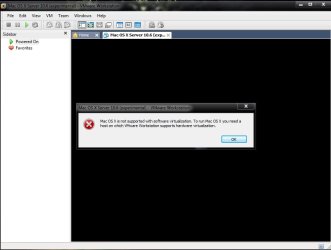
Hi!
I followed the tutorial and got this(after powering on the vm)
 

Attachments

  • Untitled.jpg
    Untitled.jpg
    80.1 KB · Views: 45

My Computer

Computer type
PC/Desktop
Computer Manufacturer/Model Number
Self Assembled
OS
Microsoft Windows 10 Pro Insider Preview 64-bit
CPU
Intel(R) Core(TM) i3-4130 CPU @ 3.40GHz
Motherboard
Gigabyte Technology Co., Ltd. B85M-D3H
Memory
Corsair Vengence 4GB x2 (8.00GB Dual-Channel DDR3 @ 798MHz)
Graphics Card(s)
2047MB GeForce GTS 450 (ZOTAC International)
Sound Card
Onboard (Realtek High Definition Audio)
Monitor(s) Displays
LG Flatron E2040T
Screen Resolution
1600x900
Hard Drives
Western Digital 1 TB
Seagate 500 GB
PSU
Corsair VS550
Case
Cooler Master K380
Cooling
Cooler Master Seidon 120V Plus
Keyboard
Logitech MK260r
Mouse
Logitech MK260r
Internet Speed
PMPL Broadband
Antivirus
Windows Defender + MBAM
Browser
Firefox
Other Info
Dell Studio 15" Laptop
Yeah, I haven't seen a way to load an actual legit OS X disc onto VMWare running on a PC and get it installed, without having to use hacked copies of the OS and patch files and such...which I simply do not trust.
 

My Computer

Computer Manufacturer/Model Number
Self-Built in July 2009
OS
Windows 7 Ultimate x64
CPU
Intel Q9550 2.83Ghz OC'd to 3.40Ghz
Motherboard
Gigabyte GA-EP45-UD3R rev. 1.1, F12 BIOS
Memory
8GB G.Skill PI DDR2-800, 4-4-4-12 timings
Graphics Card(s)
EVGA 1280MB Nvidia GeForce GTX570
Sound Card
Realtek ALC899A 8 channel onboard audio
Monitor(s) Displays
23" Acer x233H
Screen Resolution
1920x1080
Hard Drives
Intel X25-M 80GB Gen 2 SSD
Western Digital 1TB Caviar Black, 32MB cache. WD1001FALS
PSU
Corsair 620HX modular
Case
Antec P182
Cooling
stock
Keyboard
ABS M1 Mechanical
Mouse
Logitech G9 Laser Mouse
Internet Speed
15/2 cable modem
Other Info
Windows and Linux enthusiast. Logitech G35 Headset.
Hi installing mac os on vmware its pretty simple but it can be also pretty hard . I spend hours of trials and error only to find the correct disc to boot from (since i used pirate mac os ) . I think it will be a lot of easier if u have the original copy of the dvd since from a research i made if u download the iso image of mac from internet , windows cant burn it properly . Anyway i used this guide , there is a file inside with the settings of vmware

Install Mac OS X Snow Leopard on a PC using VMware


good luck


my set up is
intel i7 920
asus rampage II extreme
6gb Corsair dominator GT 1866 mhz
albatron 8600 GTS (lol):P
and 640 gb WD HDD


PS please answear though my questions :P ( how i make both os start at the same time at the time i boot my pc and start in separate screens )

Hi!
I followed the tutorial and got this(after powering on the vm)


i had the same problem and i think its solved with the lastest version of vmware workstation i thinks its 7.0.1 (check ur version)
 

My Computer

OS
win 7 x64
No! my version is just 7. So it is not latest. If I afford the latest version, then may it work?

You said that you also had the problem.... so in which version? 7 or 7.0.1?
 

My Computer

Computer type
PC/Desktop
Computer Manufacturer/Model Number
Self Assembled
OS
Microsoft Windows 10 Pro Insider Preview 64-bit
CPU
Intel(R) Core(TM) i3-4130 CPU @ 3.40GHz
Motherboard
Gigabyte Technology Co., Ltd. B85M-D3H
Memory
Corsair Vengence 4GB x2 (8.00GB Dual-Channel DDR3 @ 798MHz)
Graphics Card(s)
2047MB GeForce GTS 450 (ZOTAC International)
Sound Card
Onboard (Realtek High Definition Audio)
Monitor(s) Displays
LG Flatron E2040T
Screen Resolution
1600x900
Hard Drives
Western Digital 1 TB
Seagate 500 GB
PSU
Corsair VS550
Case
Cooler Master K380
Cooling
Cooler Master Seidon 120V Plus
Keyboard
Logitech MK260r
Mouse
Logitech MK260r
Internet Speed
PMPL Broadband
Antivirus
Windows Defender + MBAM
Browser
Firefox
Other Info
Dell Studio 15" Laptop
If you own VMWare Workstation 7.0...you should get a free upgrade to 7.0.1...
 

My Computer

Computer Manufacturer/Model Number
Self-Built in July 2009
OS
Windows 7 Ultimate x64
CPU
Intel Q9550 2.83Ghz OC'd to 3.40Ghz
Motherboard
Gigabyte GA-EP45-UD3R rev. 1.1, F12 BIOS
Memory
8GB G.Skill PI DDR2-800, 4-4-4-12 timings
Graphics Card(s)
EVGA 1280MB Nvidia GeForce GTX570
Sound Card
Realtek ALC899A 8 channel onboard audio
Monitor(s) Displays
23" Acer x233H
Screen Resolution
1920x1080
Hard Drives
Intel X25-M 80GB Gen 2 SSD
Western Digital 1TB Caviar Black, 32MB cache. WD1001FALS
PSU
Corsair 620HX modular
Case
Antec P182
Cooling
stock
Keyboard
ABS M1 Mechanical
Mouse
Logitech G9 Laser Mouse
Internet Speed
15/2 cable modem
Other Info
Windows and Linux enthusiast. Logitech G35 Headset.
No! my version is just 7. So it is not latest. If I afford the latest version, then may it work?

You said that you also had the problem.... so in which version? 7 or 7.0.1?


i got the 7.0.1 version but i can not quarantee you that if u buy it , it is going to work 100 % . Before i made it work i made lots of test with different mac cd's . My opinion ( dont now if its allowed buy the site) download a cracked version of vmware wokrstation 7.0.1 and if its work buy it


also use the latest version of mac os i think its 10,62
 

My Computer

OS
win 7 x64
Hi installing mac os on vmware its pretty simple but it can be also pretty hard . I spend hours of trials and error only to find the correct disc to boot from (since i used pirate mac os ) . I think it will be a lot of easier if u have the original copy of the dvd since from a research i made if u download the iso image of mac from internet , windows cant burn it properly . Anyway i used this guide , there is a file inside with the settings of vmware

Install Mac OS X Snow Leopard on a PC using VMware


good luck


my set up is
intel i7 920
asus rampage II extreme
6gb Corsair dominator GT 1866 mhz
albatron 8600 GTS (lol):P
and 640 gb WD HDD


PS please answear though my questions :P ( how i make both os start at the same time at the time i boot my pc and start in separate screens )

Hi!
I followed the tutorial and got this(after powering on the vm)


Hi Arc,

This is from the link iraklis provided.

*In order for this to work, your computer must have a processor that supports virtualization. If it does not, you may receive errors. For the most part, any newer processor lines: Core 2 Duo, Quad Core, and Core i7 should all work fine.

But, don’t expect to not get errors if you are using an older Pentium 4 machine. The processor must be Intel and not AMD*
 
Last edited:

My Computer

Computer type
Laptop
Computer Manufacturer/Model Number
HP EliteBook 8530w Mobile Workstation
OS
Windows 7 Ultimate x64 (XP, 98SE, 95, 3.11, DOS 7.10 on VM) + Ubuntu 10.04 LTS Lucid Lynx
CPU
Intel Core 2 Duo Processor P8600 (2.40 GHz, 3 MB L2 cache)
Motherboard
Mobile Intel PM45 Express Chipset ICH9M-Enhanced
Memory
4GB 800 MHz DDR2 SDRAM
Graphics Card(s)
ATI Mobility FireGL V5700 with 256 MB
Sound Card
SoundMAX Integrated Digital HD Audio
Monitor(s) Displays
15.4-inch WXGA anti-glare (1280 x 800 resolution)
Screen Resolution
1280 x 800
Hard Drives
500GB + 1TB
Mouse
Synaptics PS/2 Port Touchpad, USB Mouse
Internet Speed
4 Mbps
Antivirus
MSE
Browser
Firefox, Chrome, IE
Other Info
Authentec AES2810 Fingerprint Reader
Hi guys
Current version of vmware workstation is 7.01 build 227600

Any chance of showing some screen shots of your OS-X running in a Virtual machine on a Host W7 computer.

Most people I know (including me - and I've been using VM's for years) have been unable to get this to work using a LEGAL un-hacked OS-X disc.

To the other question - the simplest way of getting VM's to start at boot time so you don't have to logon to the HOST system and start them manually is to use VMWARE SERVER (Free) then you can start your vm's at boot time automatically as a system SERVICE.

As explained previously - another advantage in this approach is that a user can then logon DIRECTLY to the VM without needing an account on the HOST machine either.

Even more use is the fact that if the VM ITSELF is a server such as W2K3 server then a user can connect directly to an application running on that server such as say SAP or ORACLE without needing a logon or an account on the SERVER either - and can also connect to the application from anywhere without needing RDP etc etc - so long as you know the IP address or domain name of the VM and have set up the relevant ports on your router when accessing the VM remotely from the Internet.

Cheers
jimbo
 

My Computer

Computer type
PC/Desktop
Computer Manufacturer/Model Number
Custom built, several laptops HP/ASUS
OS
Linux CENTOS 7 / various Windows OS'es and servers
CPU
Intel i7 Intel i5
Memory
8GB, 16GB
Graphics Card(s)
On Motherboard
Sound Card
Realtek HD audio
Monitor(s) Displays
Apple Cinema display, Samsung LCD
Screen Resolution
1920 X 1080
Hard Drives
4 X 1TB SATA
Mouse
Toshiba wireless laser
Internet Speed
> 20MB up
I also go with Jimbo.
Please post a screenshot of your desktop running a vm where the host is windows 7 and the guest is mac os x. I heared (never seen) that some guys have done it. I also want to have it, but at present I just want to see it.
 

My Computer

Computer type
PC/Desktop
Computer Manufacturer/Model Number
Self Assembled
OS
Microsoft Windows 10 Pro Insider Preview 64-bit
CPU
Intel(R) Core(TM) i3-4130 CPU @ 3.40GHz
Motherboard
Gigabyte Technology Co., Ltd. B85M-D3H
Memory
Corsair Vengence 4GB x2 (8.00GB Dual-Channel DDR3 @ 798MHz)
Graphics Card(s)
2047MB GeForce GTS 450 (ZOTAC International)
Sound Card
Onboard (Realtek High Definition Audio)
Monitor(s) Displays
LG Flatron E2040T
Screen Resolution
1600x900
Hard Drives
Western Digital 1 TB
Seagate 500 GB
PSU
Corsair VS550
Case
Cooler Master K380
Cooling
Cooler Master Seidon 120V Plus
Keyboard
Logitech MK260r
Mouse
Logitech MK260r
Internet Speed
PMPL Broadband
Antivirus
Windows Defender + MBAM
Browser
Firefox
Other Info
Dell Studio 15" Laptop
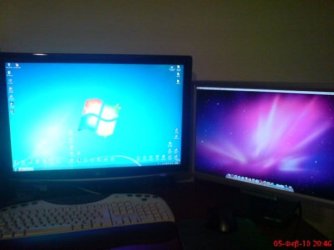
i have attached the image . i dont know if thats what u wanted
 

Attachments

  • 20337_287003152156_571312156_3534988_2610891_n.jpg
    20337_287003152156_571312156_3534988_2610891_n.jpg
    32.4 KB · Views: 17

My Computer

OS
win 7 x64
i have attached the image . i dont know if thats what u wanted

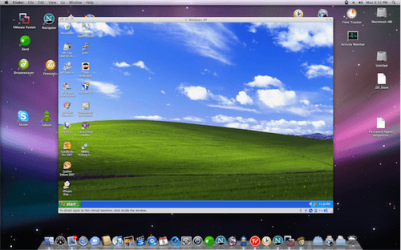
Not exactly this image... I wanted an image where there is a windows 7 desktop with a vmware window opened, and a mac os x is running in that vmware window.

This is an image I collected from net. I want an image where the situation is the reverse.... that is the host is a windows os and the guest is a mac os.
 

Attachments

  • vmware_window.png
    vmware_window.png
    256.9 KB · Views: 6

My Computer

Computer type
PC/Desktop
Computer Manufacturer/Model Number
Self Assembled
OS
Microsoft Windows 10 Pro Insider Preview 64-bit
CPU
Intel(R) Core(TM) i3-4130 CPU @ 3.40GHz
Motherboard
Gigabyte Technology Co., Ltd. B85M-D3H
Memory
Corsair Vengence 4GB x2 (8.00GB Dual-Channel DDR3 @ 798MHz)
Graphics Card(s)
2047MB GeForce GTS 450 (ZOTAC International)
Sound Card
Onboard (Realtek High Definition Audio)
Monitor(s) Displays
LG Flatron E2040T
Screen Resolution
1600x900
Hard Drives
Western Digital 1 TB
Seagate 500 GB
PSU
Corsair VS550
Case
Cooler Master K380
Cooling
Cooler Master Seidon 120V Plus
Keyboard
Logitech MK260r
Mouse
Logitech MK260r
Internet Speed
PMPL Broadband
Antivirus
Windows Defender + MBAM
Browser
Firefox
Other Info
Dell Studio 15" Laptop
Hi there
We need to see an image of the HOST running Win 7 and a Guest (in Windowed mode) running OS-X ON A SINGLE SCREEN.

It's SIMPLE to get Windows to run in a VM on OS-X -- we need it THE OTHER WAY AROUND please.

Cheers
jimbo
 

My Computer

Computer type
PC/Desktop
Computer Manufacturer/Model Number
Custom built, several laptops HP/ASUS
OS
Linux CENTOS 7 / various Windows OS'es and servers
CPU
Intel i7 Intel i5
Memory
8GB, 16GB
Graphics Card(s)
On Motherboard
Sound Card
Realtek HD audio
Monitor(s) Displays
Apple Cinema display, Samsung LCD
Screen Resolution
1920 X 1080
Hard Drives
4 X 1TB SATA
Mouse
Toshiba wireless laser
Internet Speed
> 20MB up
Back
Top