Volume Bar Missing

RobinDawn

New member
Local time
9:57 PM
Messages
6
The volume bar that always pops up on the screen when I adjust the sound has decided to go missing tonight. Can anyone tell me how to get it back, and what happened? I did not change any settings on the computer, although right before I noticed this I changed the audio settings on a Farmville game.
 

My Computer

Computer Manufacturer/Model Number
Compaq Presario CQ56
OS
Windows 7 Home Premium 64bit
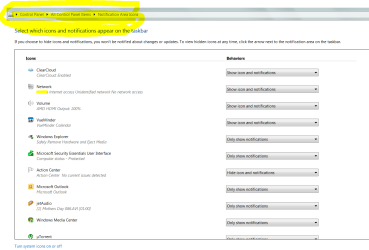
Try this... Control Panel.

There is an another way, but this works.
 

Attachments

  • Capture.PNG
    Capture.PNG
    35.7 KB · Views: 3,117

My Computer

OS
Windows 7 Ultimate x64
CPU
P4 3.2
Motherboard
Intel 815GM
Memory
DDR 400
Graphics Card(s)
ATI HD3850
Sound Card
C-Media 7.1
Monitor(s) Displays
SyncMaster 244T
Screen Resolution
1920*1200
Hard Drives
Several
PSU
500
Case
PowerSpec $24
Cooling
ThermalTake copper
Internet Speed
Blazing
No not the icon on the taskbar, the bar/display thingy that appears on the screen when you adjust the volume. Mine suddenly doesn't show up any more so I have no idea where my volume is set until I hear it.
 

My Computer

Computer Manufacturer/Model Number
Compaq Presario CQ56
OS
Windows 7 Home Premium 64bit
No not the icon on the taskbar, the bar/display thingy that appears on the screen when you adjust the volume. Mine suddenly doesn't show up any more so I have no idea where my volume is set until I hear it.


Are you changing your volume through your keyboard?
 

My Computer

OS
Windows 7 Ultimate x64
CPU
AMD Phenom II X4 920 3.2GHZ
Motherboard
ASUS M3N72-D
Memory
G.SKILL 4GB DDR2 800
Graphics Card(s)
XFX RADEON 5770
Sound Card
X-FI TATANIUM 5.1
Monitor(s) Displays
ASUS 20"
Hard Drives
SAMSUNG SPINPOINT F1 1TB, SAMSUNG SPINPOINT F3 1TB
PSU
ANTEC EARTHWATTS 650W
Case
ANTEC 300
Cooling
AIR
Keyboard
G110
Mouse
COOLER MASTER STORM SENTINEL
Internet Speed
CABLE
Yes. The volume keys on the keyboard work. I can right click on the volume icon in the task bar and adjust it there too, and see where it's set. It's just that the visual meter doesn't appear on the screen like it always have. I've only had the computer about a month and I swear I didn't change any settings. I have all my updates. I just can't understand it.
 

My Computer

Computer Manufacturer/Model Number
Compaq Presario CQ56
OS
Windows 7 Home Premium 64bit
Research is getting me nowhere.

If this were happening to me, and I could not find an answer, I would:

a) perform a system restore
or
b) uninstall my audio driver, boot, re-install my audio driver

AND
c) absolutely never play any Facebook games, but that's just me.
 

My Computer

OS
Windows 7 Ultimate x64
CPU
P4 3.2
Motherboard
Intel 815GM
Memory
DDR 400
Graphics Card(s)
ATI HD3850
Sound Card
C-Media 7.1
Monitor(s) Displays
SyncMaster 244T
Screen Resolution
1920*1200
Hard Drives
Several
PSU
500
Case
PowerSpec $24
Cooling
ThermalTake copper
Internet Speed
Blazing
Yes. The volume keys on the keyboard work. I can right click on the volume icon in the task bar and adjust it there too, and see where it's set. It's just that the visual meter doesn't appear on the screen like it always have. I've only had the computer about a month and I swear I didn't change any settings. I have all my updates. I just can't understand it.


What kind of keyboard do you have? Most keyboards software is what displays the volume bar that one sees on the screen.
 

My Computer

OS
Windows 7 Ultimate x64
CPU
AMD Phenom II X4 920 3.2GHZ
Motherboard
ASUS M3N72-D
Memory
G.SKILL 4GB DDR2 800
Graphics Card(s)
XFX RADEON 5770
Sound Card
X-FI TATANIUM 5.1
Monitor(s) Displays
ASUS 20"
Hard Drives
SAMSUNG SPINPOINT F1 1TB, SAMSUNG SPINPOINT F3 1TB
PSU
ANTEC EARTHWATTS 650W
Case
ANTEC 300
Cooling
AIR
Keyboard
G110
Mouse
COOLER MASTER STORM SENTINEL
Internet Speed
CABLE
Hi Robindawn

On a laptop these images are usually supplied by a Launch Manager program or similar like on my acer laptop. Try to reinstall whatever HPs version of this is.
 
Last edited:

My Computer

Computer Manufacturer/Model Number
acer aspire 5935g
OS
Windows 7 Home Premium x64 SP1
CPU
intel(R)core(TM)2 duo CPU T6600 @ 2.20GHz
Motherboard
intel gm45/gm47 revision 07
Memory
3 gb ddr3
Graphics Card(s)
ati radeon hd4570/512mb
Monitor(s) Displays
lop156wh2-tle1 15.3 flat
Screen Resolution
1366x768
Hard Drives
OCZ-Agility3 60gig ssd
320gig external hdd
500gig external hdd
Mouse
Optical
Internet Speed
30Mbps Down/30Mbps Up
Did You Ever Get This Fixed? My Volume Bar Has Suddely Disappeared A Few Days Ago I Didnt Change Anything Either Ive Had This Computer Just Over A Month I Know Exactly What You Are Saying It Has Nothing To Do W/The Icon Or Volume Buttons The Volume Still Works Can Be Adjusted Etc But The Volume Bar That Comes Up Every Time You Adjust It Has Disappeared& Its Pretty Inconvenient Once You Have Experienced Having It So I Know Exactly What You Are Saying I Found Your Post Because I Was Searching For A Way To Fix This So If You Were Able To Fix This Please Let Me Know Id Like Mine Fixed Too Thanks - Lisa =)
 

My Computer

Computer Manufacturer/Model Number
hp 610-1000z
OS
windows home premium 64bit

My Computer

Computer type
PC/Desktop
Computer Manufacturer/Model Number
Self Built
OS
Windows 10 Pro x64
CPU
Intel i7 2600K @ 4.4GHz
Motherboard
Asus P8Z77-V LX2
Memory
16GB Corsair Vengeance Pro DDR3 1600 MHz
Graphics Card(s)
ZOTAC GTX 1070 AMP Edition
Sound Card
Asus Xonar D2
Monitor(s) Displays
Viewsonic 24" VX2439WM LCD/LG 22" W2261VP LCD
Screen Resolution
1920x1080 DVI 1080p 16:9 on both screens
Hard Drives
1x SanDisk Extreme 120GB SSD SATA III (OS), 1x Samsung EVO 250GB SSD SATA III (Games), 1x Seagate Barracuda 1TB SATA III (Storage)
PSU
Corsair TX850W
Case
Corsair Carbide 200R
Cooling
3x 120mm Fans (Front, Bottom and Rear)
Keyboard
Roccat Isku
Mouse
Corsair M65 RGB
Internet Speed
Virgin Media 100Mb
Antivirus
Windows Defender
Browser
Firefox
Other Info
Logitech Z640 5.1 Speakers. Kingston HyperX Cloud Headset. M-Audio Oxygen 25/88 Keystation ES Midi Keyboard's
ok ill check it out thanks =)
 

My Computer

Computer Manufacturer/Model Number
hp 610-1000z
OS
windows home premium 64bit
Fix That I Did

So ya someone had previously stated something about the lmanager and I use norton security for my laptop. I went to my admin account and into startup control and found the lmanager off. I checked it on and hit apply, restarted, and waited like 2 minutes and tried it and it worked again. Thx to whoever gave this information. And yes i now am quite sure that lmanager controls the volume appearing on ur screen so search lmanager on your laptop and try and do the do lol.

[only reason to make this account was to say thx]
 

My Computer

OS
idk
Ditto, zenalot. This worked for me too. I think it was HP Media Smart that I re-enabled in startup.
 

My Computer

Computer Manufacturer/Model Number
HP/Pavilion
OS
Windows 7 Home Premium x64
CPU
Intel Core DuoT6400 2GHz
Memory
2G
Thanks for listing that program LINK. I have an Alienware laptop and it did the trick.
 

My Computer

Computer type
Laptop
Computer Manufacturer/Model Number
Dell
OS
Windows 7 Home Premium 64bit
Back
Top