
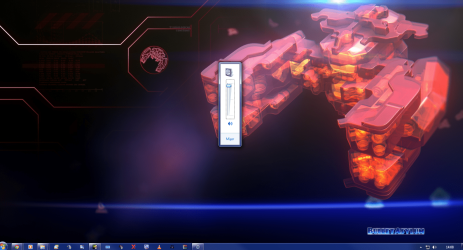
Volume control in middle of screen.

spoons27

New member
Member
Local time
12:43 AM
Messages
43
Will not move seems to have happened after Catalyst update. Running dual monitors.
 

Attachments

  • volume.png
    volume.png
    429.3 KB · Views: 56

My Computer My Computer

At a glance

Windows 7 64bitIntel I7 2600k4GbATI Radeon 5850HD
OS
Windows 7 64bit
CPU
Intel I7 2600k
Motherboard
ASUS P8P67
Memory
4Gb
Graphics Card(s)
ATI Radeon 5850HD
Sound Card
Realtek HD onboard
Monitor(s) Displays
LG Flatron L226WTQ + LG Flatron L1710B
Screen Resolution
1680*1050 + 1280*1024
Hard Drives
1 SSD Intel X25M 80 Gb Boot drive
5 Drives 1774 GB Total
PSU
550 Watt
Case
Antec P180
Keyboard
Logitech G15
Mouse
Logitech MX518
Internet Speed
upto 8MB usually 3.5
1) Right-click the Start icon and select Properties.
Click Taskbar tab > click 'Customize...' in Motification area' section.
Uncheck 'Always show all icons and notifications on the taskbar' (it looks like you have this on)
Click 'Restore default icon behaviors'
test to see if taht fixes the issue.

If all is OK, Re-check the 'Always show all icons and notifications on the taskbar' if you like and test again.

I hope this helps.

DragonARMY http://www.facebook.com/100003250779989
 
Last edited:

My Computer My Computer

At a glance

Dual Booting Windows 7 Ultimate x64 & BackTra...@2.53GHz
OS
Dual Booting Windows 7 Ultimate x64 & BackTrack 5
CPU
@2.53GHz
Screen Resolution
1366 X 768 (Higher)
Ok thanks 'Always show all icons and notifications on the taskbar' was off setting it to on then off again fixed it.
 

My Computer My Computer

At a glance

Windows 7 64bitIntel I7 2600k4GbATI Radeon 5850HD
OS
Windows 7 64bit
CPU
Intel I7 2600k
Motherboard
ASUS P8P67
Memory
4Gb
Graphics Card(s)
ATI Radeon 5850HD
Sound Card
Realtek HD onboard
Monitor(s) Displays
LG Flatron L226WTQ + LG Flatron L1710B
Screen Resolution
1680*1050 + 1280*1024
Hard Drives
1 SSD Intel X25M 80 Gb Boot drive
5 Drives 1774 GB Total
PSU
550 Watt
Case
Antec P180
Keyboard
Logitech G15
Mouse
Logitech MX518
Internet Speed
upto 8MB usually 3.5
After a reboot it seems problem is back again.:confused:
 

My Computer My Computer

At a glance

Windows 7 64bitIntel I7 2600k4GbATI Radeon 5850HD
OS
Windows 7 64bit
CPU
Intel I7 2600k
Motherboard
ASUS P8P67
Memory
4Gb
Graphics Card(s)
ATI Radeon 5850HD
Sound Card
Realtek HD onboard
Monitor(s) Displays
LG Flatron L226WTQ + LG Flatron L1710B
Screen Resolution
1680*1050 + 1280*1024
Hard Drives
1 SSD Intel X25M 80 Gb Boot drive
5 Drives 1774 GB Total
PSU
550 Watt
Case
Antec P180
Keyboard
Logitech G15
Mouse
Logitech MX518
Internet Speed
upto 8MB usually 3.5
I know that this thread is old, but just in case someone else finds this using Google (like I did) - you were right to suggest that this could be caused by a Catalyst Upgrade, as in my case it's caused by HydraVision Desktop Manager's option to Enable Dialog Repositioning.

Cheers.
 

My Computer My Computer

At a glance

Windows 8 Pro x64
OS
Windows 8 Pro x64
Back
Top