
Volume differs depending on source

robert808

New member
Member
Local time
5:22 AM
Messages
85
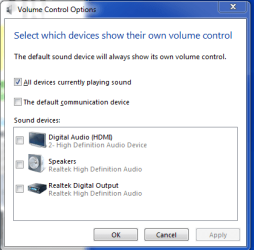
I have a TV set-top box connected via HDMI to my computer. Comfortable sound level for TV is the number 36. But other sounds, such as email arrival notification or streams from the web, will be much too loud at this number. Is there a way to control the volume from each source separately? I see this in the Systray.
 

Attachments
  • volume control options.PNG
    volume control options.PNG
    12.5 KB · Views: 16

My Computer

Computer type
PC/Desktop
Computer Manufacturer/Model Number
Dell XPS One 2710
OS
windows 7 home premium 64 bit SP1
CPU
Intel Core i7 3770S @ 3.10GHz
Motherboard
Dell 02XMCT (CPU 1)
Memory
DDR3 16384 MBytes
Graphics Card(s)
Intel(R) HD Graphics 4000, NVIDIA GeForce GT 640M
Sound Card
Realtek High Definition Audio
Monitor(s) Displays
XPS One 2710 on Intel HD Graphics 4000 27"
Screen Resolution
2560x1440@59Hz
Hard Drives
1863GB
Case
All-in-One
Keyboard
Changed to old multimedia wireless set I had on XP machine
Internet Speed
1 Gb
Antivirus
Norton 360
Browser
IE, Chrome & Firefox
Other Info
A little worried about CPU temp that gets up to 180 F when watching TV via Media Center. 140-150 F normally.
When you use HDMI, you are using the sound chip (card) built into the video card. The PC sound, In your case the RealTek, is not being used.

I don't recall anyone else posting about this. Based on the Volume Control Options panel you show, the volume control in the notification area (lower right) should have active applications. Right click on the speaker icon and then select "Open Volume Mixer".
 

My Computer

Computer type
PC/Desktop
Computer Manufacturer/Model Number
My Own Build
OS
Windows 10 64 bit
CPU
Intel i7 6700K
Motherboard
ASUS ROG Maximus VIII Hero
Memory
16GB Corsair Dominator
Graphics Card(s)
Intel CPU Graphics
Sound Card
RealTek
Monitor(s) Displays
27" Dell S2719dgf
Screen Resolution
2560X1440
Hard Drives
1 TB Samsung 850 EVO SSD for Win 10 Pro
500GB Samsung 850 EVO SSD for Win 10 Insider
2 TB drive for backup
PSU
EVGA Supernova 750G2
Case
BeQuiet Silent Base 600
Cooling
Deepcool Captain 120EX
Keyboard
Microsoft Wireless 2000
Mouse
Microsoft wireless
Internet Speed
100 MB/sec (Cable)
Antivirus
Microsoft Defender and Malwarebytes
Browser
Edge/Firefox
Other Info
Cakewalk (Sonar) by BandLab and Studio One 4.1 Pro recording studio software. MOTU 896Mk3 Hybrid recording interface, Frontier Tranzport wireless control unit, Behringer X-Touch Control Surface.
Five USB connected optical drives for CD Audio production using Nero BurningROM
Right click on the Notification Area Speaker icon and click Open Volume Mixer.
Different Applications will be displayed at different times, depending on when they play Sound.
So, when you get an email alert, open the Volume Mixer and you should see your email program.

VolumeMixer.png
 

My Computer

Computer type
PC/Desktop
Computer Manufacturer/Model Number
home built
OS
Multi-Boot W7_Pro_x64 W8.1_Pro_x64 W10_Pro_x64 +Linux_VMs +Chromium_VM
CPU
AMD Athlon II x4 620
Motherboard
Gigabyte GA-MA785G-UD3H
Memory
6GB GSkill DDR2 800
Graphics Card(s)
AMD 4670 GPU + AMD 4200 IGP
Sound Card
on board Realtek ALC889A
Monitor(s) Displays
RCA 40" LCD TV, Insignia 32" LCD TV, HP 15" LCD monitor
Screen Resolution
1680 x 1050
Hard Drives
OCZ Vertex 3 120GB,
Samsung F3 1TB (3),
Several others - WD, Seagate, Hitachi, ...
PSU
Corsair 500 W
Case
Rosewill mid tower
Cooling
CM 90mm rifle
Keyboard
Gyration wireless, Logitech wireless, Dell USB wired
Mouse
Gyration wireless, Logitech wireless, V7 USB wired
Internet Speed
Spectrum - 100Mbps D / 10Mbps U
Antivirus
Avast, MBAM3, EMET, WinPatrol
Browser
Pale Moon, Firefox, IE
Other Info
2 multi-boot PC's
Mainly HTPC/Office/Gen purpose (no gaming).
Trendnet USB KVM.
LG DVD burner/Blue Ray Player.
Tray system for removable SATA backup drives.

Not currently OCd, under-volted.
I use Hybrid sleep, rarely re-boot or shutdown.

Hauppauge HD-PVR, Avermedia PCIe TV Tuner, Hauppauge PCI TV Tuner.
Thank you very much. It seems the mixer only shows applications that have been recently used. I had not seen the Inbox application before. If I open the Volume Mixer again the Inbox is not showing. Oddly, moving the Device/Speakers slider moves any application sliders in sync. Also, moving one of the Application sliders up above the line extending to the right of the Device slider moves the Device slider. Anyway, I seem to have lowered the volume of the Inbox notification.

Big Mahalo!
 

Attachments

  • volume control options 2.PNG
    volume control options 2.PNG
    11.1 KB · Views: 13

My Computer

Computer type
PC/Desktop
Computer Manufacturer/Model Number
Dell XPS One 2710
OS
windows 7 home premium 64 bit SP1
CPU
Intel Core i7 3770S @ 3.10GHz
Motherboard
Dell 02XMCT (CPU 1)
Memory
DDR3 16384 MBytes
Graphics Card(s)
Intel(R) HD Graphics 4000, NVIDIA GeForce GT 640M
Sound Card
Realtek High Definition Audio
Monitor(s) Displays
XPS One 2710 on Intel HD Graphics 4000 27"
Screen Resolution
2560x1440@59Hz
Hard Drives
1863GB
Case
All-in-One
Keyboard
Changed to old multimedia wireless set I had on XP machine
Internet Speed
1 Gb
Antivirus
Norton 360
Browser
IE, Chrome & Firefox
Other Info
A little worried about CPU temp that gets up to 180 F when watching TV via Media Center. 140-150 F normally.
Thank you very much. It seems the mixer only shows applications that have been recently used. I had not seen the Inbox application before.
You're welcome.

Yes, the mixer only shows an application for a short period of time after that application played "sound".
That's what i tried to explain in my previous post :p
That's why you have to open the mixer SOON after you hear a sound from a particular app.

If you keep the mixer open, any app that plays sound will be displayed as long as you don't close the mixer.
Unfortunately you can't minimize the mixer :( but you can have other windows on top of the mixer so you don't always see it.

You can "force" an app to be shown in the mixer by causing that app to play a sound.
i.e.
Send yourself an email to cause an incoming alert, play a video with your preferred program, etc.

That's how i fine-tuned all my programs for individual loudness ;)
 

My Computer

Computer type
PC/Desktop
Computer Manufacturer/Model Number
home built
OS
Multi-Boot W7_Pro_x64 W8.1_Pro_x64 W10_Pro_x64 +Linux_VMs +Chromium_VM
CPU
AMD Athlon II x4 620
Motherboard
Gigabyte GA-MA785G-UD3H
Memory
6GB GSkill DDR2 800
Graphics Card(s)
AMD 4670 GPU + AMD 4200 IGP
Sound Card
on board Realtek ALC889A
Monitor(s) Displays
RCA 40" LCD TV, Insignia 32" LCD TV, HP 15" LCD monitor
Screen Resolution
1680 x 1050
Hard Drives
OCZ Vertex 3 120GB,
Samsung F3 1TB (3),
Several others - WD, Seagate, Hitachi, ...
PSU
Corsair 500 W
Case
Rosewill mid tower
Cooling
CM 90mm rifle
Keyboard
Gyration wireless, Logitech wireless, Dell USB wired
Mouse
Gyration wireless, Logitech wireless, V7 USB wired
Internet Speed
Spectrum - 100Mbps D / 10Mbps U
Antivirus
Avast, MBAM3, EMET, WinPatrol
Browser
Pale Moon, Firefox, IE
Other Info
2 multi-boot PC's
Mainly HTPC/Office/Gen purpose (no gaming).
Trendnet USB KVM.
LG DVD burner/Blue Ray Player.
Tray system for removable SATA backup drives.

Not currently OCd, under-volted.
I use Hybrid sleep, rarely re-boot or shutdown.

Hauppauge HD-PVR, Avermedia PCIe TV Tuner, Hauppauge PCI TV Tuner.
Thanks again
 

My Computer

Computer type
PC/Desktop
Computer Manufacturer/Model Number
Dell XPS One 2710
OS
windows 7 home premium 64 bit SP1
CPU
Intel Core i7 3770S @ 3.10GHz
Motherboard
Dell 02XMCT (CPU 1)
Memory
DDR3 16384 MBytes
Graphics Card(s)
Intel(R) HD Graphics 4000, NVIDIA GeForce GT 640M
Sound Card
Realtek High Definition Audio
Monitor(s) Displays
XPS One 2710 on Intel HD Graphics 4000 27"
Screen Resolution
2560x1440@59Hz
Hard Drives
1863GB
Case
All-in-One
Keyboard
Changed to old multimedia wireless set I had on XP machine
Internet Speed
1 Gb
Antivirus
Norton 360
Browser
IE, Chrome & Firefox
Other Info
A little worried about CPU temp that gets up to 180 F when watching TV via Media Center. 140-150 F normally.
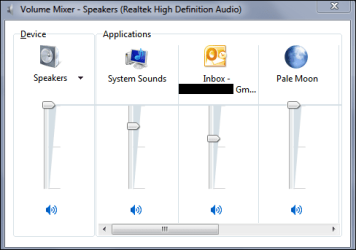
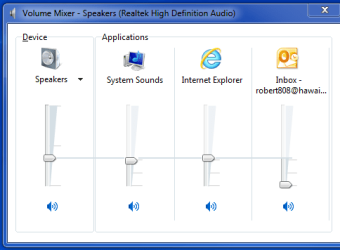
I doubt if it is pertinent but in addition to HDMI connection from set-top box for TV I also have a coax from set-top connected to TV tuner card in PC. This allows TV viewing in an adjustable Windows Media Center window while doing internet with browser at the same time. I change volume using knob on keyboard or remote control device.

Volume number for WMC must be half that of HDMI or it is too loud. Changing level for either of these affects Inbox and IE. Raising (doubling) HDMI level from 20 to 40 will double Inbox from 2 to 4. Same for IE. Apparently not really independent. I think the only solution is to have no sound notification for Inbox.
 

My Computer

Computer type
PC/Desktop
Computer Manufacturer/Model Number
Dell XPS One 2710
OS
windows 7 home premium 64 bit SP1
CPU
Intel Core i7 3770S @ 3.10GHz
Motherboard
Dell 02XMCT (CPU 1)
Memory
DDR3 16384 MBytes
Graphics Card(s)
Intel(R) HD Graphics 4000, NVIDIA GeForce GT 640M
Sound Card
Realtek High Definition Audio
Monitor(s) Displays
XPS One 2710 on Intel HD Graphics 4000 27"
Screen Resolution
2560x1440@59Hz
Hard Drives
1863GB
Case
All-in-One
Keyboard
Changed to old multimedia wireless set I had on XP machine
Internet Speed
1 Gb
Antivirus
Norton 360
Browser
IE, Chrome & Firefox
Other Info
A little worried about CPU temp that gets up to 180 F when watching TV via Media Center. 140-150 F normally.
Back
Top