Greetings everybody,
This is not a problem, but an inconvenience. When I plug in my headphones the level of volume is very loud. Meaning the volume doesn't automatically go down a bit. Hell, this isn't safe... :shock:
Is there a way for the Windows 7 audio program to remember my audio level for the headphones, which is 4 instead of 100... I bet a few of you have encountered this.
I always have to waste a few seconds manually switching the volume level.
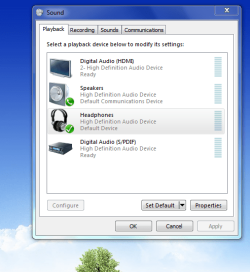
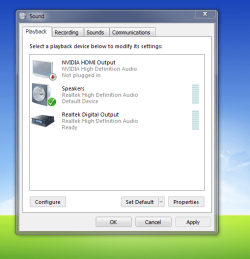
I've included an attachment, as you can see there, there is no "Headphones". This is when I have my headphones plugged in, also it is the same as when they're plugged out. It appears that my headphones are not being recognized as a different device.
This is not a problem, but an inconvenience. When I plug in my headphones the level of volume is very loud. Meaning the volume doesn't automatically go down a bit. Hell, this isn't safe... :shock:
Is there a way for the Windows 7 audio program to remember my audio level for the headphones, which is 4 instead of 100... I bet a few of you have encountered this.
I always have to waste a few seconds manually switching the volume level.
I've included an attachment, as you can see there, there is no "Headphones". This is when I have my headphones plugged in, also it is the same as when they're plugged out. It appears that my headphones are not being recognized as a different device.
Attachments
Last edited:
My Computer
- Computer Manufacturer/Model Number
- Custom
- OS
- Windows 8 Professional 64-bit
- CPU
- Intel Core i3-2100
- Motherboard
- ASRock Intel Z68M/USB3
- Memory
- 4GB
- Graphics Card(s)
- GeForece GTX 550 Ti
- Screen Resolution
- 1680 x 1050
- PSU
- 750w