Volume level constant between hardware

Skulblaka

Are you Alive?
Guru
VIP
Local time
6:55 PM
Messages
1,105
Location
Minnesota
Greetings everybody,

This is not a problem, but an inconvenience. When I plug in my headphones the level of volume is very loud. Meaning the volume doesn't automatically go down a bit. Hell, this isn't safe... :shock:

Is there a way for the Windows 7 audio program to remember my audio level for the headphones, which is 4 instead of 100... I bet a few of you have encountered this.

I always have to waste a few seconds manually switching the volume level.

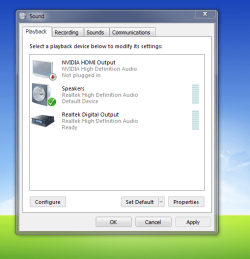
I've included an attachment, as you can see there, there is no "Headphones". This is when I have my headphones plugged in, also it is the same as when they're plugged out. It appears that my headphones are not being recognized as a different device.
 

Attachments
  • Capture.PNG
    Capture.PNG
    29.2 KB · Views: 2
Last edited:

My Computer

Computer Manufacturer/Model Number
Custom
OS
Windows 8 Professional 64-bit
CPU
Intel Core i3-2100
Motherboard
ASRock Intel Z68M/USB3
Memory
4GB
Graphics Card(s)
GeForece GTX 550 Ti
Screen Resolution
1680 x 1050
PSU
750w
Greetings everybody,

This is not a problem, but an inconvenience. When I plug in my headphones the level of volume is very loud. Meaning the volume doesn't automatically go down a bit. Hell, this isn't safe... :shock:

Is there a way for the Windows 7 audio program to remember my audio level for the headphones, which is 4 instead of 100... I bet a few of you have encountered this.

I always have to waste a few seconds manually switching the volume level.

I've included an attachment, as you can see there, there is no "Headphones". This is when I have my headphones plugged in, also it is the same as when they're plugged out. It appears that my headphones are not being recognized as a different device.


They really aren't a device unless they're USB headphones. (but that's another story) The audio card mechanically switches the connections so you're getting the same output normally going to speakers.

At least that's the way it is on my system.... and yes, the phones are too loud.
 

My Computer

Computer Manufacturer/Model Number
Assembled in my workshop
OS
Windows 7 Home Premium
CPU
Intel Core 2 Duo @ 3.00gHz
Motherboard
Gigabyte GA-P35-S3G
Memory
4 GB
Graphics Card(s)
ATI Radeon HD 2600 XT
Sound Card
RME 24/96 Card, Realtek Internal Audio PreSonus FireStudio
Monitor(s) Displays
Acer 1917 (x2)
Screen Resolution
1280 x 1024 on both monitors
Hard Drives
Three 250GB Seagate SATA Barracuda 7200rpm
PSU
Rosewill 500-watt
Case
Rosewill mid-tower
Cooling
Noctua NH-U9B (CPU), PwrSupply fan + single large case Fan
Keyboard
Macally w/2/USB ports.
Mouse
Trackman Wheel
Other Info
Event 20/20 bas studio monitors, Yamaha sub.
Rackmount Korg/Roland/Yamaha synthesizers,
Cubase MIDI/audio recording. Sony Soundforge audio/mastering software. CD Architect Mastering. RME & Presonus audio interfaces.
Then what you mean is, there's no solution?
 

My Computer

Computer Manufacturer/Model Number
Custom
OS
Windows 8 Professional 64-bit
CPU
Intel Core i3-2100
Motherboard
ASRock Intel Z68M/USB3
Memory
4GB
Graphics Card(s)
GeForece GTX 550 Ti
Screen Resolution
1680 x 1050
PSU
750w
I'll add in here, what Aphellion stated is correct - the way it is.

Cut the PC's volume down and use the volume control on your external speakers to jack up the level. That way it won't be too loud for your headset.
 

My Computer

Computer type
PC/Desktop
Computer Manufacturer/Model Number
My Own Build
OS
Windows 10 64 bit
CPU
Intel i7 6700K
Motherboard
ASUS ROG Maximus VIII Hero
Memory
16GB Corsair Dominator
Graphics Card(s)
Intel CPU Graphics
Sound Card
RealTek
Monitor(s) Displays
27" Dell S2719dgf
Screen Resolution
2560X1440
Hard Drives
1 TB Samsung 850 EVO SSD for Win 10 Pro
500GB Samsung 850 EVO SSD for Win 10 Insider
2 TB drive for backup
PSU
EVGA Supernova 750G2
Case
BeQuiet Silent Base 600
Cooling
Deepcool Captain 120EX
Keyboard
Microsoft Wireless 2000
Mouse
Microsoft wireless
Internet Speed
100 MB/sec (Cable)
Antivirus
Microsoft Defender and Malwarebytes
Browser
Edge/Firefox
Other Info
Cakewalk (Sonar) by BandLab and Studio One 4.1 Pro recording studio software. MOTU 896Mk3 Hybrid recording interface, Frontier Tranzport wireless control unit, Behringer X-Touch Control Surface.
Five USB connected optical drives for CD Audio production using Nero BurningROM
Hm, I'll attempt to at least find some application which may be of some use.

I'll report if I have any success.
 

My Computer

Computer Manufacturer/Model Number
Custom
OS
Windows 8 Professional 64-bit
CPU
Intel Core i3-2100
Motherboard
ASRock Intel Z68M/USB3
Memory
4GB
Graphics Card(s)
GeForece GTX 550 Ti
Screen Resolution
1680 x 1050
PSU
750w
Also, forgot to add, if Windows 7 only recognizes individual hardware via USB ports, then that is a very flawed design, in my opinion.
 

My Computer

Computer Manufacturer/Model Number
Custom
OS
Windows 8 Professional 64-bit
CPU
Intel Core i3-2100
Motherboard
ASRock Intel Z68M/USB3
Memory
4GB
Graphics Card(s)
GeForece GTX 550 Ti
Screen Resolution
1680 x 1050
PSU
750w
Also, forgot to add, if Windows 7 only recognizes individual hardware via USB ports, then that is a very flawed design, in my opinion.

Headphones that simply plug into a jack are passive. The connection that cuts off the speakers when headphones are plugged in is mechanical (on most systems) in nature. The Output of the audio system is the same for both speaker and headphone... it's the motherboard hardware (audio card) that is the determining factor, not Windows... if the headphone was a separate device then Windows would recognize it.

Ap
 
Last edited:

My Computer

Computer Manufacturer/Model Number
Assembled in my workshop
OS
Windows 7 Home Premium
CPU
Intel Core 2 Duo @ 3.00gHz
Motherboard
Gigabyte GA-P35-S3G
Memory
4 GB
Graphics Card(s)
ATI Radeon HD 2600 XT
Sound Card
RME 24/96 Card, Realtek Internal Audio PreSonus FireStudio
Monitor(s) Displays
Acer 1917 (x2)
Screen Resolution
1280 x 1024 on both monitors
Hard Drives
Three 250GB Seagate SATA Barracuda 7200rpm
PSU
Rosewill 500-watt
Case
Rosewill mid-tower
Cooling
Noctua NH-U9B (CPU), PwrSupply fan + single large case Fan
Keyboard
Macally w/2/USB ports.
Mouse
Trackman Wheel
Other Info
Event 20/20 bas studio monitors, Yamaha sub.
Rackmount Korg/Roland/Yamaha synthesizers,
Cubase MIDI/audio recording. Sony Soundforge audio/mastering software. CD Architect Mastering. RME & Presonus audio interfaces.
Also, forgot to add, if Windows 7 only recognizes individual hardware via USB ports, then that is a very flawed design, in my opinion.

Headphones that simply plug into a jack are passive. The connection that cuts off the speakers when headphones are plugged in is mechanical (on most systems) in nature. The Output of the audio system is the same for both speaker and headphone... it's the motherboard hardware (audio card) that is the determining factor, not Windows... if the headphone was a separate device than Windows would recognize it.

Ap

Hm, very interesting.
 

My Computer

Computer Manufacturer/Model Number
Custom
OS
Windows 8 Professional 64-bit
CPU
Intel Core i3-2100
Motherboard
ASRock Intel Z68M/USB3
Memory
4GB
Graphics Card(s)
GeForece GTX 550 Ti
Screen Resolution
1680 x 1050
PSU
750w
As you are asking about USB, which type of headphones do you actually have? I don't see that ever noted on your posts. If you have the standard type headphones with the 1/8" (3.5mm) stereo plug, that you plug into a headset jack on the PC (not the speakers) then what we have presented is correct.
 

My Computer

Computer type
PC/Desktop
Computer Manufacturer/Model Number
My Own Build
OS
Windows 10 64 bit
CPU
Intel i7 6700K
Motherboard
ASUS ROG Maximus VIII Hero
Memory
16GB Corsair Dominator
Graphics Card(s)
Intel CPU Graphics
Sound Card
RealTek
Monitor(s) Displays
27" Dell S2719dgf
Screen Resolution
2560X1440
Hard Drives
1 TB Samsung 850 EVO SSD for Win 10 Pro
500GB Samsung 850 EVO SSD for Win 10 Insider
2 TB drive for backup
PSU
EVGA Supernova 750G2
Case
BeQuiet Silent Base 600
Cooling
Deepcool Captain 120EX
Keyboard
Microsoft Wireless 2000
Mouse
Microsoft wireless
Internet Speed
100 MB/sec (Cable)
Antivirus
Microsoft Defender and Malwarebytes
Browser
Edge/Firefox
Other Info
Cakewalk (Sonar) by BandLab and Studio One 4.1 Pro recording studio software. MOTU 896Mk3 Hybrid recording interface, Frontier Tranzport wireless control unit, Behringer X-Touch Control Surface.
Five USB connected optical drives for CD Audio production using Nero BurningROM
I have a stereo jack which I plug it in, it's not a USB.
 

My Computer

Computer Manufacturer/Model Number
Custom
OS
Windows 8 Professional 64-bit
CPU
Intel Core i3-2100
Motherboard
ASRock Intel Z68M/USB3
Memory
4GB
Graphics Card(s)
GeForece GTX 550 Ti
Screen Resolution
1680 x 1050
PSU
750w
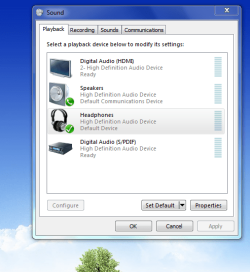
I ran into a few problems and had to do a clean install, this time the OS recognizes the headphones as a different device. Strange...
 

Attachments

  • Capture.PNG
    Capture.PNG
    37.4 KB · Views: 5

My Computer

Computer Manufacturer/Model Number
Custom
OS
Windows 8 Professional 64-bit
CPU
Intel Core i3-2100
Motherboard
ASRock Intel Z68M/USB3
Memory
4GB
Graphics Card(s)
GeForece GTX 550 Ti
Screen Resolution
1680 x 1050
PSU
750w
I ran into a few problems and had to do a clean install, this time the OS recognizes the headphones as a different device. Strange...


Hey, that's great, what was different during this install? Were the headphones plugged in by any chance?

Ap
 

My Computer

Computer Manufacturer/Model Number
Assembled in my workshop
OS
Windows 7 Home Premium
CPU
Intel Core 2 Duo @ 3.00gHz
Motherboard
Gigabyte GA-P35-S3G
Memory
4 GB
Graphics Card(s)
ATI Radeon HD 2600 XT
Sound Card
RME 24/96 Card, Realtek Internal Audio PreSonus FireStudio
Monitor(s) Displays
Acer 1917 (x2)
Screen Resolution
1280 x 1024 on both monitors
Hard Drives
Three 250GB Seagate SATA Barracuda 7200rpm
PSU
Rosewill 500-watt
Case
Rosewill mid-tower
Cooling
Noctua NH-U9B (CPU), PwrSupply fan + single large case Fan
Keyboard
Macally w/2/USB ports.
Mouse
Trackman Wheel
Other Info
Event 20/20 bas studio monitors, Yamaha sub.
Rackmount Korg/Roland/Yamaha synthesizers,
Cubase MIDI/audio recording. Sony Soundforge audio/mastering software. CD Architect Mastering. RME & Presonus audio interfaces.
They were not, but I believe something is different that could have interfered. A "Realtek HD Audio Control Panel" is not installed. That could have been the problem, since the default audio controller now is the Windows 7 audio driver.
 

My Computer

Computer Manufacturer/Model Number
Custom
OS
Windows 8 Professional 64-bit
CPU
Intel Core i3-2100
Motherboard
ASRock Intel Z68M/USB3
Memory
4GB
Graphics Card(s)
GeForece GTX 550 Ti
Screen Resolution
1680 x 1050
PSU
750w
Back
Top