
Hello guys,
I searched the forum for common problems but unfortunately I could not find any useful information for this issue.
I hope you can assist me as the Windows 7 volume mixer is freaking me out and I cant seem to find a way out with this...
I run Windows 7 on a Dell Inspiron 6400 and I use the volume buttons on front a lot to increase/decrease/mute the sounds... however this feature is not working with Windows 7 or maybe I have not fixed the correct settings.
Also I have a Logitech MX610 mouse with volume buttons on it that don`t work as well.
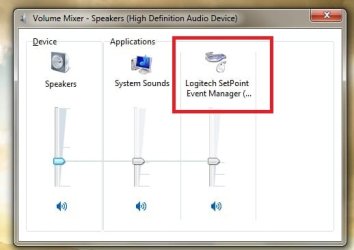
Here is a screenshot of the volume mixer.. I`m not sure if that`s helpful..
Any help will be much appreciated.
Thanks in advance guys
I searched the forum for common problems but unfortunately I could not find any useful information for this issue.
I hope you can assist me as the Windows 7 volume mixer is freaking me out and I cant seem to find a way out with this...
I run Windows 7 on a Dell Inspiron 6400 and I use the volume buttons on front a lot to increase/decrease/mute the sounds... however this feature is not working with Windows 7 or maybe I have not fixed the correct settings.
Also I have a Logitech MX610 mouse with volume buttons on it that don`t work as well.
Here is a screenshot of the volume mixer.. I`m not sure if that`s helpful..
Any help will be much appreciated.
Thanks in advance guys
Attachments
My Computer
- OS
- Windows 7


