VPN Configuration for Remote Access to Home Network

Sigma47

New member
Local time
5:49 PM
Messages
7
Hello, I am trying to configure a VPN to connect to my home network so that I can access files on my home computer whilst at the office. I have succeeded in being able to access a folder on my home desktop which I added using "add network location" on my laptop. However, while I'm connected through this VPN, I am using my home internet connection, going in through the router and then back out to the internet. So, is there a possibility of only using the VPN when I access the files on my home network and use the office internet for browsing... etc? Is this VPN configuration efficient or are there better ways to get access to files on my home PC remotely. Also, using this method I believe my router forwards all traffic on the VPN to my main home PC which assigns my laptop an IP. Is there anyway that I could just log into the router so that I was just another computer on the home network. As is I can only see files on the main home PC but it would be nice as well to have access to my HTPC.
 

My Computer My Computer

At a glance

7AMD 4550e4 Gig OCZAMD 780G
OS
7
CPU
AMD 4550e
Motherboard
Asus MP378
Memory
4 Gig OCZ
Graphics Card(s)
AMD 780G
Sound Card
Realtek HD
Monitor(s) Displays
BenQ 19" + NEC 17"
Hard Drives
1x 80 GB WD velociraptor
2x 320 GB Seagate .10
PSU
Thermaltake 450 W
Case
Lian Li
You can enable offline files that will sync up docs every time you get back to your home network, but if you have GBs and GBs of file, may not be efficient.

Windows Live Sync
from MS, can sync all of you files and folder between 2 computers free and efficiently. Very awesome for someone who has a PC and laptop.

Dropbox is also another program that can do it.
http://www.getdropbox.com/

I would need to hear more about how you are using the VPN connection and what hardware/method.... if it is just for accessing files, I would use one of the 2 above, preferably Windows Live Sync.
 

My Computer My Computer

At a glance

Windows 7 7600.16384 x64Intel Core i7 OC'd to 3.20 GHz6GB GSkillz Triple Channel DDR3 OC'd to 1600 MHzNvidia GTX 280
Computer Manufacturer/Model Number
Built Myself
OS
Windows 7 7600.16384 x64
CPU
Intel Core i7 OC'd to 3.20 GHz
Motherboard
Gigabyte
Memory
6GB GSkillz Triple Channel DDR3 OC'd to 1600 MHz
Graphics Card(s)
Nvidia GTX 280
Sound Card
X-Fi Platinum
Monitor(s) Displays
Dual 2001FWP
Screen Resolution
1680x1050 x 2
Hard Drives
System - Dual 150GB Raptors Raid0
Doc Storage - 1TB SATA 32MB cache Samsung
TV Recordings - 1TB SATA 32MB cache Samsung
PSU
Gigawatt Antec
Case
Antec 900
Keyboard
Saitek
Mouse
logitech MX 10000
Internet Speed
30 mb/s
Can you tell me how you set up this VPN? Is this one that your router has built in, and you installed a client and access it that way?

Or are you using the built in advanced connection to create a vpn tunnel?
 

My Computer My Computer

At a glance

Windows 7 7600.16384 x64Intel Core i7 OC'd to 3.20 GHz6GB GSkillz Triple Channel DDR3 OC'd to 1600 MHzNvidia GTX 280
Computer Manufacturer/Model Number
Built Myself
OS
Windows 7 7600.16384 x64
CPU
Intel Core i7 OC'd to 3.20 GHz
Motherboard
Gigabyte
Memory
6GB GSkillz Triple Channel DDR3 OC'd to 1600 MHz
Graphics Card(s)
Nvidia GTX 280
Sound Card
X-Fi Platinum
Monitor(s) Displays
Dual 2001FWP
Screen Resolution
1680x1050 x 2
Hard Drives
System - Dual 150GB Raptors Raid0
Doc Storage - 1TB SATA 32MB cache Samsung
TV Recordings - 1TB SATA 32MB cache Samsung
PSU
Gigawatt Antec
Case
Antec 900
Keyboard
Saitek
Mouse
logitech MX 10000
Internet Speed
30 mb/s
You could always use remote desktop, and connect via IP address or use a dynamically updated host redirect (dynupdate, No-ip.com, etc.) and set your router to allow incoming connections on port 3389 (used by Remote Desktop) and you're set.

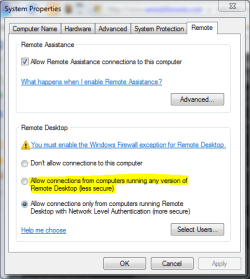
If you are running Vista or XP at work, you'll need to install the RDP Client - and set your W7 machine at home to allow connections from any RDP client, and then you'll be set. On the W7 machine, go to Control Panel --> System and Security --> System --> Remote settings (on the left side) to access the settings page. If your machines at work are running W7, you're golden - it's all there, ready to go. You'll still need to set the settings I mentioned on your router, regardless.

The only disadvantage I know of is that with a RD session, any user on the machine will be forced out of the system, as RD only allows for a single log in (a security feature).

This solution works perfectly well for me - I use W7 on both machines, my desktop and laptop, and I can access my desktop from my laptop from anywhere with a decent connection that is not blocking port 3389.

RDP Settings.PNG

In my picture, I have it set for allowing only RDP Clients from W7 / Server 2008 R2. Use the one I have highlighted if you are connecting from an RDP Client on Vista or XP. Use the one below (that I have selected) if you're using W7 at work, too.
 

My Computers My Computers

  • At a glance

    Windows 11 21H2 Current buildAMD Ryzen 9 3950X4 * 32 GB - Corsair Vengeance 3600 MHzEVGA GeForce RTX 3080 Ti XC3 ULTRA GAMING (12...
    Computer type
    PC/Desktop
    Computer Manufacturer/Model Number
    The Beast Model A (homebrew)
    OS
    Windows 11 21H2 Current build
    CPU
    AMD Ryzen 9 3950X
    Motherboard
    MSI MEG X570 GODLIKE
    Memory
    4 * 32 GB - Corsair Vengeance 3600 MHz
    Graphics Card(s)
    EVGA GeForce RTX 3080 Ti XC3 ULTRA GAMING (12G-P5-3955-KR)
    Sound Card
    Realtek® ALC1220 Codec
    Monitor(s) Displays
    2x Eve Spectrum ES07D03 4K Gaming Monitor (Matte) | Eve Spec
    Screen Resolution
    3x 3840 x 2160
    Hard Drives
    3x Samsung 980 Pro NVMe PCIe 4 M.2 2 TB SSD (MZ-V8P2T0B/AM) } 3x Sabrent Rocket NVMe 4.0 1 TB SSD
    PSU
    PC Power & Cooling’s Silencer Series 1050 Watt, 80 Plus Plat
    Case
    Fractal Design Define 7 XL Dark ATX Full Tower Case
    Cooling
    SteelSeries Apex Pro Wired Gaming Keyboard
    Keyboard
    SteelSeries Apex Pro
    Mouse
    Logitech MX Master 3S | MX Master 3 for business
    Internet Speed
    AT&T LightSpeed Gigabit Duplex Ftth
    Antivirus
    Windows Defender + MB 3
    Browser
    Nightly (default) + Firefox (stable),Chrome, Edge
  • At a glance

    ChromeOS Flex Dev Channel (current)Intel(R) Core(TM) i5-6300U CPU @ 2.40GHz, 250...16 GBIntel(R) HD Graphics 520
    Computer type
    PC/Desktop
    System Manufacturer/Model Number
    Dell Latitude E5470
    OS
    ChromeOS Flex Dev Channel (current)
    CPU
    Intel(R) Core(TM) i5-6300U CPU @ 2.40GHz, 2501 Mhz, 2 Core(s), 4 Logical Processor(s)
    Motherboard
    Dell
    Memory
    16 GB
    Graphics Card(s)
    Intel(R) HD Graphics 520
    Sound Card
    Intel(R) HD Graphics 520 + RealTek Audio
    Monitor(s) Displays
    Dell laptop display 15"
    Screen Resolution
    1920 * 1080
    Hard Drives
    Toshiba 128GB M.2 22300 drive
    INTEL Cherryville 520 Series SSDSC2CW180A 180 GB SATA III SSD
    PSU
    Dell
    Case
    Dell
    Cooling
    Dell
    Keyboard
    Dell
    Mouse
    Logitech MX Master 3S (shared w. Sys 1) | Dell TouchPad
    Internet Speed
    AT&T LightSpeed Gigabit Duplex Ftth
the only problem to that is that the port forwarding will only forward tcp 3389 to one machine. You will have to reg hack you other machines to run RDP on a different port, like 3390. Then forward that port on the router that machine.

That is how I use to do it before I built my smoothwall and now use OpenVPN.

Computer - port
Computer1 - 3389
Computer2 - 3390
Computer3 - 3391

set the RDP ports in the reg file, then forward those ports on your router. Then you have to setup a dynamic dns service on your router after registering one. Most routers support dyndns, no-ip, etc....


It all sounds crazy but its not.


It sounded though like you wanted to work on files from another machine though, and for that I would suggest a real VPN connection (some routers have this capability built in) or using one of the sync tools.

ps i thought it logged out the machine when RDP'ing in because of licensing and how you can only have 1 active session.
 

My Computer My Computer

At a glance

Windows 7 7600.16384 x64Intel Core i7 OC'd to 3.20 GHz6GB GSkillz Triple Channel DDR3 OC'd to 1600 MHzNvidia GTX 280
Computer Manufacturer/Model Number
Built Myself
OS
Windows 7 7600.16384 x64
CPU
Intel Core i7 OC'd to 3.20 GHz
Motherboard
Gigabyte
Memory
6GB GSkillz Triple Channel DDR3 OC'd to 1600 MHz
Graphics Card(s)
Nvidia GTX 280
Sound Card
X-Fi Platinum
Monitor(s) Displays
Dual 2001FWP
Screen Resolution
1680x1050 x 2
Hard Drives
System - Dual 150GB Raptors Raid0
Doc Storage - 1TB SATA 32MB cache Samsung
TV Recordings - 1TB SATA 32MB cache Samsung
PSU
Gigawatt Antec
Case
Antec 900
Keyboard
Saitek
Mouse
logitech MX 10000
Internet Speed
30 mb/s
PS if you want to RDP in to multiple machines, and need to change the reg key on each, here is where it is located...

HKEY_LOCAL_MACHINE\SYSTEM\CurrentControlSet\Control\TerminalServer\WinStations\RDP-Tcp

make sure you set it to decimal and not Hex.

I could have swore though if you RDP in to your machine machine at home, and from there RDP in to another machine on your home network it will connect you, but I could be wrong.
 

My Computer My Computer

At a glance

Windows 7 7600.16384 x64Intel Core i7 OC'd to 3.20 GHz6GB GSkillz Triple Channel DDR3 OC'd to 1600 MHzNvidia GTX 280
Computer Manufacturer/Model Number
Built Myself
OS
Windows 7 7600.16384 x64
CPU
Intel Core i7 OC'd to 3.20 GHz
Motherboard
Gigabyte
Memory
6GB GSkillz Triple Channel DDR3 OC'd to 1600 MHz
Graphics Card(s)
Nvidia GTX 280
Sound Card
X-Fi Platinum
Monitor(s) Displays
Dual 2001FWP
Screen Resolution
1680x1050 x 2
Hard Drives
System - Dual 150GB Raptors Raid0
Doc Storage - 1TB SATA 32MB cache Samsung
TV Recordings - 1TB SATA 32MB cache Samsung
PSU
Gigawatt Antec
Case
Antec 900
Keyboard
Saitek
Mouse
logitech MX 10000
Internet Speed
30 mb/s
Only a single computer was mentioned, hence the suggestion of RDP.
 

My Computers My Computers

  • At a glance

    Windows 11 21H2 Current buildAMD Ryzen 9 3950X4 * 32 GB - Corsair Vengeance 3600 MHzEVGA GeForce RTX 3080 Ti XC3 ULTRA GAMING (12...
    Computer type
    PC/Desktop
    Computer Manufacturer/Model Number
    The Beast Model A (homebrew)
    OS
    Windows 11 21H2 Current build
    CPU
    AMD Ryzen 9 3950X
    Motherboard
    MSI MEG X570 GODLIKE
    Memory
    4 * 32 GB - Corsair Vengeance 3600 MHz
    Graphics Card(s)
    EVGA GeForce RTX 3080 Ti XC3 ULTRA GAMING (12G-P5-3955-KR)
    Sound Card
    Realtek® ALC1220 Codec
    Monitor(s) Displays
    2x Eve Spectrum ES07D03 4K Gaming Monitor (Matte) | Eve Spec
    Screen Resolution
    3x 3840 x 2160
    Hard Drives
    3x Samsung 980 Pro NVMe PCIe 4 M.2 2 TB SSD (MZ-V8P2T0B/AM) } 3x Sabrent Rocket NVMe 4.0 1 TB SSD
    PSU
    PC Power & Cooling’s Silencer Series 1050 Watt, 80 Plus Plat
    Case
    Fractal Design Define 7 XL Dark ATX Full Tower Case
    Cooling
    SteelSeries Apex Pro Wired Gaming Keyboard
    Keyboard
    SteelSeries Apex Pro
    Mouse
    Logitech MX Master 3S | MX Master 3 for business
    Internet Speed
    AT&T LightSpeed Gigabit Duplex Ftth
    Antivirus
    Windows Defender + MB 3
    Browser
    Nightly (default) + Firefox (stable),Chrome, Edge
  • At a glance

    ChromeOS Flex Dev Channel (current)Intel(R) Core(TM) i5-6300U CPU @ 2.40GHz, 250...16 GBIntel(R) HD Graphics 520
    Computer type
    PC/Desktop
    System Manufacturer/Model Number
    Dell Latitude E5470
    OS
    ChromeOS Flex Dev Channel (current)
    CPU
    Intel(R) Core(TM) i5-6300U CPU @ 2.40GHz, 2501 Mhz, 2 Core(s), 4 Logical Processor(s)
    Motherboard
    Dell
    Memory
    16 GB
    Graphics Card(s)
    Intel(R) HD Graphics 520
    Sound Card
    Intel(R) HD Graphics 520 + RealTek Audio
    Monitor(s) Displays
    Dell laptop display 15"
    Screen Resolution
    1920 * 1080
    Hard Drives
    Toshiba 128GB M.2 22300 drive
    INTEL Cherryville 520 Series SSDSC2CW180A 180 GB SATA III SSD
    PSU
    Dell
    Case
    Dell
    Cooling
    Dell
    Keyboard
    Dell
    Mouse
    Logitech MX Master 3S (shared w. Sys 1) | Dell TouchPad
    Internet Speed
    AT&T LightSpeed Gigabit Duplex Ftth
i thought he wanted an PC and his HTPC.
 

My Computer My Computer

At a glance

Windows 7 7600.16384 x64Intel Core i7 OC'd to 3.20 GHz6GB GSkillz Triple Channel DDR3 OC'd to 1600 MHzNvidia GTX 280
Computer Manufacturer/Model Number
Built Myself
OS
Windows 7 7600.16384 x64
CPU
Intel Core i7 OC'd to 3.20 GHz
Motherboard
Gigabyte
Memory
6GB GSkillz Triple Channel DDR3 OC'd to 1600 MHz
Graphics Card(s)
Nvidia GTX 280
Sound Card
X-Fi Platinum
Monitor(s) Displays
Dual 2001FWP
Screen Resolution
1680x1050 x 2
Hard Drives
System - Dual 150GB Raptors Raid0
Doc Storage - 1TB SATA 32MB cache Samsung
TV Recordings - 1TB SATA 32MB cache Samsung
PSU
Gigawatt Antec
Case
Antec 900
Keyboard
Saitek
Mouse
logitech MX 10000
Internet Speed
30 mb/s
Clarification

Hey All

thanks much for all the response, I am able to connect remotely to one host via the native VPN functionality within 7. I have setup the dyndns and all that... So my router is set up to direct my remote request to the host and when I am out (remote) I can't see HTPC or my shares on it even when explicitly typing in the locations; I get an error with all the troubleshoot hooha. Furthermore, I thought my host computer would show up as a network computer when I was out (remote) but it currently doesn't, meaning if I want to access a folder I need to know its location. I really don't want a RDC I just want the access to my data, preferably all the computers on my home network on one VPN. So can this happen. Is there a method so that I tunnel to my router and it lets my remote laptop in to the home network and just sees my laptop as another computer behind the router without forwarding it to my main host? And to make it even more interesting, is there a way so that when I am using this remote VPN that it only uses it to get data off the computers and not for typical internet browsing which is much faster if I do it off the work connection.

Thanks
 

My Computer My Computer

At a glance

7AMD 4550e4 Gig OCZAMD 780G
OS
7
CPU
AMD 4550e
Motherboard
Asus MP378
Memory
4 Gig OCZ
Graphics Card(s)
AMD 780G
Sound Card
Realtek HD
Monitor(s) Displays
BenQ 19" + NEC 17"
Hard Drives
1x 80 GB WD velociraptor
2x 320 GB Seagate .10
PSU
Thermaltake 450 W
Case
Lian Li
What is the ip scheme of your home network?

eg. 192.168.1.x or 192.168.1.0/255

After you VPN in to home, can you do an ipconfig from command line and show me your IPs configured on your laptop from the remote network?

Can you ping any of your machines from the laptop when working remotely and connected via VPN?

You should be able to access lll of you home PCs via a VPN tunnel.

It may be one of the following:

1) You cannot resolve DNS names thru the tunnel (instead of access the PC by \\PCNAME, try \\192.168.1.x (or whatever that machine's IP is)

or
2) you firewall exceptions don't allow the remote IP acess to the network, because it is on another subnet. Basically, you firewall only allows 192.168.1.x machines to communicate with your LAN, and if the VPN adapter is getting assigned 192.168.2.x it sees it as a public connection and blocks it.

I have an old article on my old website on how to make these changes in Vista. Should be the same on 7. But it really depends on what the IP address the VPN adapter on the remote machine is getting... so if i cold see the ipconfig it would help.

Here is my old article, haven't migrated it yet to my new web server

http://www.techtronic.us:8008/index.php?option=com_content&task=view&id=138&Itemid=27
 

My Computer My Computer

At a glance

Windows 7 7600.16384 x64Intel Core i7 OC'd to 3.20 GHz6GB GSkillz Triple Channel DDR3 OC'd to 1600 MHzNvidia GTX 280
Computer Manufacturer/Model Number
Built Myself
OS
Windows 7 7600.16384 x64
CPU
Intel Core i7 OC'd to 3.20 GHz
Motherboard
Gigabyte
Memory
6GB GSkillz Triple Channel DDR3 OC'd to 1600 MHz
Graphics Card(s)
Nvidia GTX 280
Sound Card
X-Fi Platinum
Monitor(s) Displays
Dual 2001FWP
Screen Resolution
1680x1050 x 2
Hard Drives
System - Dual 150GB Raptors Raid0
Doc Storage - 1TB SATA 32MB cache Samsung
TV Recordings - 1TB SATA 32MB cache Samsung
PSU
Gigawatt Antec
Case
Antec 900
Keyboard
Saitek
Mouse
logitech MX 10000
Internet Speed
30 mb/s
thanks this thread is solved

It was the DDNS config on my router that was wrong thanks for all the suggestions and time.
 

My Computer My Computer

At a glance

7AMD 4550e4 Gig OCZAMD 780G
OS
7
CPU
AMD 4550e
Motherboard
Asus MP378
Memory
4 Gig OCZ
Graphics Card(s)
AMD 780G
Sound Card
Realtek HD
Monitor(s) Displays
BenQ 19" + NEC 17"
Hard Drives
1x 80 GB WD velociraptor
2x 320 GB Seagate .10
PSU
Thermaltake 450 W
Case
Lian Li
Back
Top