W L Photo Gallery

RudeDawg

New member
Member
VIP
Local time
8:30 AM
Messages
51
Location
Wrangell, Alaska
I installed Windows Live Photo gallery when I installed Windows Live Mail. Windows Live Mail showed up on my Start menu but Windows Live Photo Gallery didn't. When I ran a search Windows 7 took me to the Msft download site which said I already have a newer version installed already. How can I find the program icon/shortcut so I can pin it to my taskbar?
 

My Computer My Computer

Computer Manufacturer/Model Number
self built
OS
Windows 7 Ultimate/ Windows XP Professional
CPU
AMD Phenom 2 965 Deneb 3.4Ghz Black Edition
Motherboard
Gigabyte GA-MA790XT-UD4P
Memory
2X Mushkin 2GB DDR3 1333
Graphics Card(s)
Sapphire Radeon HD 5750 1 GB GDDR5
Sound Card
Onboard
Monitor(s) Displays
Dell E770
Hard Drives
2X Western Digital Caviar Blue 320Gb
PSU
Thermaltake Toughpower XT 750 Cable Management
Case
Thermaltake Element G
Cooling
Cooler Master Hyper 212 Plus
uninstall essentials and try installing it again
 

My Computer My Computer

Computer type
PC/Desktop
Computer Manufacturer/Model Number
Custom Asus Build
OS
Microsoft Windows 8.1 Pro 64-bit
CPU
Intel(R) Core(TM) i3-4130 CPU @ 3.40GHz
Motherboard
B85M-E
Memory
8.00 GB
Graphics Card(s)
None
Sound Card
Realtek High Definition Audio
Monitor(s) Displays
Asus 23.6" Monitor
Screen Resolution
1920 x 1080 x 32 bits (4294967296 colors) @ 60 Hz
Hard Drives
INTEL SSDSC2BW180A4
Samsung SSD 840 PRO Series
PSU
Seasonic S12II-380Bronze
Case
Lian Li
Cooling
Fan, Passive
Keyboard
Logitech K120
Mouse
Microsoft Touch Mouse
Internet Speed
4ms Ping, 19.0 Mbps Download, 19.0 Mbps Upload
Antivirus
Eset Endpoint
Browser
Internet Explorer, Chrome
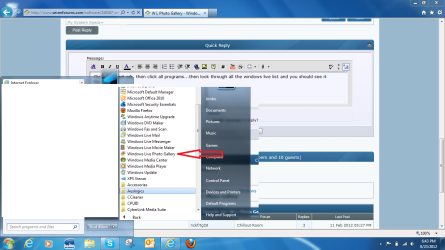
Click the start orb, then click all programs...then look through all the windows live list and you should see it there...


WLPG.png
 

My Computer My Computer

Computer Manufacturer/Model Number
Custom built
OS
Windows 7 Ultimate 64 bit
CPU
AMD Phenom II X4 965 Black Edition
Motherboard
Gigabyte GA-MA790X-DS4
Memory
GSkill 4 X 2 GB PC 8500
Graphics Card(s)
XFX Radeon HD 6790 D
Sound Card
On board RealTek HD
Monitor(s) Displays
Dual monitors:Samsung SyncMaster S20B300
Screen Resolution
1600 X 900
Hard Drives
Seagate Barracuda 1TB (primary)
Seagate Barracuda 2 X 320 GB
PSU
Ultra X4 750 watt fully modular
Case
Thermaltake Overseer RX 1 full tower
Cooling
Core-Contact 92 mm CPU Cooler
Keyboard
Logitech G510
Mouse
Razor DeathAdder
Internet Speed
50/5 Mbps UL/DL
Other Info
Optical: Super Muliti DVD burner w/lightscribe, Hauppauge WinTV HVR-1800
I was thinking of uninstalling and reinstalling. Looks like that is going to have to the solution.
 

My Computer My Computer

Computer Manufacturer/Model Number
self built
OS
Windows 7 Ultimate/ Windows XP Professional
CPU
AMD Phenom 2 965 Deneb 3.4Ghz Black Edition
Motherboard
Gigabyte GA-MA790XT-UD4P
Memory
2X Mushkin 2GB DDR3 1333
Graphics Card(s)
Sapphire Radeon HD 5750 1 GB GDDR5
Sound Card
Onboard
Monitor(s) Displays
Dell E770
Hard Drives
2X Western Digital Caviar Blue 320Gb
PSU
Thermaltake Toughpower XT 750 Cable Management
Case
Thermaltake Element G
Cooling
Cooler Master Hyper 212 Plus
It shouldn't be a problem, nothing will change.
 

My Computer My Computer

Computer type
PC/Desktop
Computer Manufacturer/Model Number
Custom Asus Build
OS
Microsoft Windows 8.1 Pro 64-bit
CPU
Intel(R) Core(TM) i3-4130 CPU @ 3.40GHz
Motherboard
B85M-E
Memory
8.00 GB
Graphics Card(s)
None
Sound Card
Realtek High Definition Audio
Monitor(s) Displays
Asus 23.6" Monitor
Screen Resolution
1920 x 1080 x 32 bits (4294967296 colors) @ 60 Hz
Hard Drives
INTEL SSDSC2BW180A4
Samsung SSD 840 PRO Series
PSU
Seasonic S12II-380Bronze
Case
Lian Li
Cooling
Fan, Passive
Keyboard
Logitech K120
Mouse
Microsoft Touch Mouse
Internet Speed
4ms Ping, 19.0 Mbps Download, 19.0 Mbps Upload
Antivirus
Eset Endpoint
Browser
Internet Explorer, Chrome
Back
Top