W7-64 UpGrade won't boot from DVD

VidE

New member
Local time
9:16 AM
Messages
4
I have a Win 7 64 bit DVD (from MS), that I've inserted into my DVD drive and it doesn't boot up at all. And yes, both in the BIOS and using the F8 key, I've done everything I can to start the boot from the CD/DVD drive which otherwise works fine.

The DVD doesn't boot at all and when I try to start it from the WinXp explorer window I get an error message that says that the operating system cannot start the program. I know that the system can handle the 64 bit OS. Any ideas?
 

My Computer My Computer

At a glance

XPIntel q94504Gb
Computer Manufacturer/Model Number
Custom
OS
XP
CPU
Intel q9450
Motherboard
Asus P5k
Memory
4Gb
hello and welcome to the forums :) have you set the bios to boot from your dvd/cd drive?

CLEAN INSTALL


A clean install of Windows 7 uses Microsoft's Interactive Setup wizard. The install process has been vastly improved from previous versions of Windows for the most streamlined install process yet. Follow these steps to install Windows 7 as a clean install:

Insert the Windows 7 DVD in your system's optical drive and boot the system (or reboot). Depending on your basic input/output system (BIOS) settings, you may need to press a key to change the boot order, so the machine boots from the DVD; or you may get a message to press any key to boot from CD or DVD; or you may not get a message at all and see a black screen with a pulsating Windows logo and the "Starting Windows" text.

The initial setup windows will appear showing Windows 7 and three options. This is where you may select the language, time, and currency format, and keyboard input type. These options are only for the setup but also for the actual Windows 7 installation as an administrator may install Windows 7 in different language than the end user. Select Next when the correct options have been selected.

This window will give you the main option to install and two other options. Selecting Install now will do just that. Selecting What to know before installing Windows will pop up a document that provides general information that you should know before installing Windows 7, including the difference between an upgrade and custom install. Selecting the Repair your computer will bring up the Windows Recovery Environment, which includes Startup Repair. Select Install now to continue the installation.

A Setup is starting… window will appear briefly, depending on your hardware. The next window that requires interaction is the Microsoft End User License Agreement, also known as the EULA. It is recommended that you read this agreement before agreeing to it. In actuality, the end user should also read this. Administrators know this rarely occurs, but for legal purposes we must recommend you read this. If you accept the agreement, check the check box stating I accept the license terms and click Next.

The following screen allows the selection of installation type. As we are performing a clean install, the Custom installation option will be selected. Note that Microsoft reiterates that this option does not keep your files, settings, and programs and includes a recommendation to back up files before proceeding. As this is a clean install to a new hard drive or computer, there should not be data that needs to be backed up. Select Custom and proceed.

In the next window, you will select where to install Windows 7. This screen varies depending on how many physical hard drives and partitions are configured in your system. This screen also gives you Drive options (advanced) to configure your physical disks and partitions. A new system with a blank hard drive will display Disk 0 Unallocated Space and Next may be selected if you do not want to partition the disk and want to let Windows Setup handle it.

If there is more than one physical drive, then Disk 0, Disk 1, and so on will display for the number of physical discs. If there is more than one partition on a disk, then Disk 0 Partition 1, Disk 0 Partition 2, and so on will appear for each partition on a physical disc. You may select the disk and partition where you want to install Windows 7 and click Next, but clicking Drive options (advanced) will provide more options.

Selecting Drive options (advanced) allows for more options than just selecting where to install. Here you may delete a partition, format a partition, create a partition, and extend a partition if the physical disk has unallocated space. It is recommended that the partition where you plan to install Windows 7 be formatted before continuing. Once the disk and partition for Windows 7 install is highlighted, select Next.

If a disk drive does not show up, it could be because Windows Setup does not have the driver for it. A Load Driver option is available to load the driver for the drive. This can be found in the hard disk manufacturer's Web site or provided with the drive and/or card used in the system. This may occur if Redundant Array of Inexpensive Disks (RAID), Small Computer Serial Interface (SCSI), or a new type of disk drive is used. Select Load Driver and follow the wizard so the drive appears or select Browse to manually assign it. Refresh can be clicked to refresh the list.

Once Next is selected from the Where do you want to install Windows? screen, Windows 7 will install on your system. A progress window will appear warning of several restarts. Depending on the hardware on this system, this process will take from as little as 10 min up to 45 min; allow more time for slower systems.

A few reboots, screen flickers, and other hard work by your system will finish with a final reboot and a greeting welcoming you to Setup Windows. The system will reboot and Windows will ask you for a user name and computer name. These two criteria are very important.

User name – The user name setup in this step will be given administrator privileges. Unlike Windows XP but like Windows Vista, only one user will be created here and the "Administrator" account is not a visible account for security reasons. A user name of "Administrator" cannot be created for security reasons. Because this user name will be an administrator, you should create an administrative user name that will not be used on a daily basis. We recommend using "OSInstaller" or a similar name.
Computer name – the computer name or host name is how this machine will be identified on the network. Remember that no two like names should exist on the same network. It is a best practice to have a naming convention in place and to follow it. A security identifier (SID) will be created based on the computer name, so changing the computer name later will not change the SID.
Ease of access – Notice the Ease of Access button on the bottom left of the screen. This feature may be used from this point forward to narrate, magnify, see high contrast, and use the on-screen keyboard, sticky keys, and filter keys.
The next screen is to set a password for the account originally created. Next to Type a password is a (recommended) inference. This is absolutely necessary. Recall the user name created previously has administrative privileges. For that user, please create a password that is complex and that only you and/or a limited number of administrators have access to.

After setting a password, you may or may not be asked for a product key. This depends on the version and media used to install. If you are prompted for a product key, you may enter it now and select to automatically activate Windows after getting online. You may opt out of entering the license key at this point but will only have 30 days to input it later. The following screen will ask whether to enable automatic updates. The following are the three options to choose from:

Use recommended settings – This option will download and install important and recommended updates automatically by checking every day at 3:00 a.m. by default. It will also allow all users to install updates on the system and get Microsoft product updates for software such as Microsoft Office and other Microsoft applications. These are the recommended settings for security purposes.
Install important updates only – This option will only download and install important updates, including security updates, automatically by checking every day at 3:00 a.m. by default. This option is recommended as an alternative to the above.
Ask me later – This option will allow you to configure automatic updates later and will make the machine unsecure as updates are already out, meaning that your machine will be vulnerable as soon as it gets connected to the Internet. This option is not recommended.
The next window will ask for the time zone and setting the correct time. It is a best practice to choose the correct time zone and time for administrative purposes. If Windows 7 detected and installed your network hardware drivers correctly and detects a wired or wireless network, the following windows may appear:

Wireless Network Setup – If a wireless network is in range, this window will appear. Here you may select the wireless network to connect to as well as provide the security key if it has one. Select your computer's current location - This window will pop up every time the user connects to a new network. It is very important that the end user be trained to select the correct network type the system is connecting to. Depending on this selection, certain networking and security features are configured.

Home network – The home network is considered a private network for security purposes, meaning that it is trusted. Furthermore, it will ask to set up a HomeGroup.
Work network – The work network is also considered a private network for security purposes, meaning that it is trusted as well.
Public network – This network selection is for any public or other network that is not trusted such as cyber cafés, wireless hot spots, and any network that may be hostile. It is extremely important that this is selected when on these networks as the firewall and other security features will be defensively configured.
The Windows 7 desktop should now be visible and some of the above steps may have been skipped.

 
Last edited:

My Computer My Computer

At a glance

Operating System : Windows 7 Home Premium Edi...Processor : Intel Core 2 Quad Q8300 @ 2500 MHzPhysical Memory :8GB Corsair4x 2GB 800MHz C5 ...Video Card : XFX 6700 AMD
Computer Manufacturer/Model Number
packard bell IXTREME M5722
OS
Operating System : Windows 7 Home Premium Edition 6.01.7600 SP1 (x64)
CPU
Processor : Intel Core 2 Quad Q8300 @ 2500 MHz
Motherboard
Mainboard : Packard Bell (Acer EG43M )
Memory
Physical Memory :8GB Corsair4x 2GB 800MHz C5 DDR2
Graphics Card(s)
Video Card : XFX 6700 AMD
Monitor(s) Displays
Maestro 234DL - BenQ V2220 - BenQ VW2420H
Screen Resolution
Current Display :1920x1080p pixels at 60 Hz in HD LED
Hard Drives
Hard Disks : WDC (1000 GB)
Drive C: (Hard Disk) : 428 GB available on 491 GB
Drive D: (Hard Disk) : 426 GB available on 492 GB
SAMSUNG spinpoint HD103SJ 1000.2 GB
(X 2) KINGSTON SSD NOW V 30GB
PSU
XFX ProSeries 550W PSU
Case
PACKARD BELL IXTREME
Cooling
System Blower Current: 150mA Air Flow16CFM ;Akasa 90mm rear
Keyboard
Gigabyte Aivia K8100
Mouse
TRUST-Wireless Laser Mouse - Carbon edition MI-7770C
Internet Speed
TP-LINK > TL-WN951N / AV500 Gigabit Powerline Adapters
Browser
chrome dev
Other Info
EXTRA COOLING>(FAN CONTROLLER) PC Bay Cooler 3 x 40mm fans; Akasa AK-HD-BL Blue hard drive cooler 2 x 40 mm fan 4500 rpm 29.7 dBA
Bios> American Megatrends Inc.
Version : P01-A1
Date : 08/31/2009
I've seen at least two other threads where upgrade media, even from Microsoft, was not bootable. My guess is Microsoft doesn't want you doing a clean install with an upgrade version. They are trying to force you to install it from another version of windows. Programs like magic iso or ultra iso should be able to tell you if the DVD is in fact bootable. Either one or both should be available as a trial. It's too bad disk management wouldn't list this info for optical media.
 

My Computer My Computer

At a glance

Windows 10 Education 64 bitAMD Phenom II X4 980 Black Edition Deneb 3.7GHz8GB 4GBx2 Kingston PC10600 DDR3 1333 MemoryZotac NVIDIA Geforce GT640 2 Gig DDR3 PCIe
Computer type
PC/Desktop
Computer Manufacturer/Model Number
Home Built
OS
Windows 10 Education 64 bit
CPU
AMD Phenom II X4 980 Black Edition Deneb 3.7GHz
Motherboard
Asus M4N68T-M V2 µATX Motherboard
Memory
8GB 4GBx2 Kingston PC10600 DDR3 1333 Memory
Graphics Card(s)
Zotac NVIDIA Geforce GT640 2 Gig DDR3 PCIe
Sound Card
VIA VT1708s High Definition Audio 8-channel Onboard
Monitor(s) Displays
22" LG E2242 1080p and 2 19" I-INC AG191D
Screen Resolution
1280x1024 - 1920x1080 - 1280x1024
Hard Drives
Crucial M100 256 GB SSD and 500 GB WD Blue SATA
PSU
Thermaltake TR 620
Case
Power Up Black ATX Mid-Tower Case
Cooling
Stock heatsink and fan
Keyboard
Logitech Wireless K350 Wave
Mouse
Logitech Wireless M570 Trackman Wheel
Internet Speed
80 Mbps Down 30 Mbps Up
Antivirus
Windows Defender
Browser
Internet Explorer 11
Other Info
HP DVD1040e Lightscribe - External USB2
^^Yes, it seems to somewhat of a crapshoot. I have an upgrade academic version ($19.99 at the school bookstore) that boots just fine. Could also be user error.
 

My Computer My Computer

At a glance

Windows 7 Pro/32 Academic. Build 7600Intel 2.3 Duo core4 GB DDRNvidia GeForce 9500 GT
Computer Manufacturer/Model Number
Custom Build
OS
Windows 7 Pro/32 Academic. Build 7600
CPU
Intel 2.3 Duo core
Motherboard
EliteGroup G31T-M
Memory
4 GB DDR
Graphics Card(s)
Nvidia GeForce 9500 GT
Sound Card
Built in
Monitor(s) Displays
Viewsonic 15" 4:3
Screen Resolution
1280 x 1024
Hard Drives
WD Caviar Black 750 GB
WD 250 GB External
PSU
Antec 450w
Keyboard
Standard windows
Mouse
Logitech USB
Internet Speed
Bellsouth DSL 6.0
Thanks for the replys. Brianzon, currently, your info is not much help. If you read my post thru, I have made sure the cd/dvd drive is the first selected for booting up.

Alphanumeric, it's on a computer with a registered version of WinXP and I get no options for either a clean or custom install. When I duble click in explorer it tells me the DVD program isn't compatible with the OS.

MBorner-User Error? - That's what I'm trying to find out.
 

My Computer My Computer

At a glance

XPIntel q94504Gb
Computer Manufacturer/Model Number
Custom
OS
XP
CPU
Intel q9450
Motherboard
Asus P5k
Memory
4Gb
Once you have changed your BIOS to boot from the CD, save and exit the BIOS and continue to boot into Windows with the install DVD removed from the drive. When Windows is fully booted, insert the install disk and close the drawer. If autoplay starts the DVD, close or cancel the installation. You should now be at your desktop with the Windows Installation DVD in the drive.
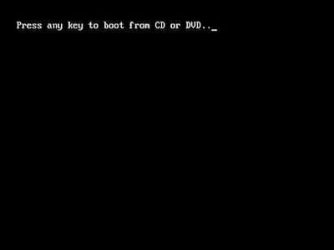
Restart the PC. When the message "press any key to boot from CD" appears,
01.jpg
press any key. Be quick with this because you will only have a few seconds while the message is there. You'll begin to see files loading. Continue to the boot menu from there.
 

My Computer My Computer

At a glance

Windows 7 Pro/32 Academic. Build 7600Intel 2.3 Duo core4 GB DDRNvidia GeForce 9500 GT
Computer Manufacturer/Model Number
Custom Build
OS
Windows 7 Pro/32 Academic. Build 7600
CPU
Intel 2.3 Duo core
Motherboard
EliteGroup G31T-M
Memory
4 GB DDR
Graphics Card(s)
Nvidia GeForce 9500 GT
Sound Card
Built in
Monitor(s) Displays
Viewsonic 15" 4:3
Screen Resolution
1280 x 1024
Hard Drives
WD Caviar Black 750 GB
WD 250 GB External
PSU
Antec 450w
Keyboard
Standard windows
Mouse
Logitech USB
Internet Speed
Bellsouth DSL 6.0
Also try tapping the F10, F11, or F12 keys during boot up. This sometimes brings up the Bios Boot-Up menu.
 

My Computer My Computer

At a glance

Win7 Enterprise, Win7 x86 (Ult 7600), Win7 x6...AMD fx8350 4ghz, AMD-32 2400mhz, AMD-64 3200m...2gb, 4gb on the Ult 7600, 4gb on Technet RTM,...Draw my own Graphics, several nVidia cards
Computer type
PC/Desktop
Computer Manufacturer/Model Number
Built them myself, Science Experiments !
OS
Win7 Enterprise, Win7 x86 (Ult 7600), Win7 x64 Ult 7600, TechNet RTM on AMD x64 (2.8Ghz)
CPU
AMD fx8350 4ghz, AMD-32 2400mhz, AMD-64 3200mhz, AMDx64 2.8G
Motherboard
SIS 755, ECS-K8M890M-M (Ult 7600), GigaByte & others
Memory
2gb, 4gb on the Ult 7600, 4gb on Technet RTM, 32gb on FX8350
Graphics Card(s)
Draw my own Graphics, several nVidia cards
Sound Card
on motherboard
Monitor(s) Displays
19" flat scr, 28" I-Inc widescr,22" Emprex Widescr, 23" Acer
Screen Resolution
1280 x 1024, 1440 x 900, 1920 x 1080
Hard Drives
6 pata Ide HD's & 2 Sata HD's
added 80gb external on Ult 7600 computer,
numerous extra 1tb, 2TB, 3Tb SATA HD's
A collection of ext HD Docks w/ HDs
PSU
430w, 550w, 600w, 700, 800, etc
Case
All Generic Full Towers
Cooling
Open Air & a few fans, some w/ colored LEDs
Keyboard
Compaq & Dell recycled from GoodWill
Mouse
Made in China Optical Wired Mouse
Internet Speed
Fast Cable InterNet
Antivirus
AVG Free on 24 different Desktops, NO Problems!
Browser
IE 8 is preferred, but use FireFox sometimes
Other Info
Linksys Routers, switches, & Hubs
Too Many USB Flash Drives to count, Biggest is 64GB !
Eight computers in my home network.
Sixteen computers at my business network.
Linked via TeamViewer !
Lots of old used spare computer parts everywhere!
Thanks for the replys. Brianzon, currently, your info is not much help. If you read my post thru, I have made sure the cd/dvd drive is the first selected for booting up.

Alphanumeric, it's on a computer with a registered version of WinXP and I get no options for either a clean or custom install. When I duble click in explorer it tells me the DVD program isn't compatible with the OS.

MBorner-User Error? - That's what I'm trying to find out.

okey dokey its there if you need it:D in my bios i have to change two settings otherwise mine does not boot one is priority over the boot order if that's not set no go. all bios have a different set up according to the manufacturer do you know who yours is?
 

My Computer My Computer

At a glance

Operating System : Windows 7 Home Premium Edi...Processor : Intel Core 2 Quad Q8300 @ 2500 MHzPhysical Memory :8GB Corsair4x 2GB 800MHz C5 ...Video Card : XFX 6700 AMD
Computer Manufacturer/Model Number
packard bell IXTREME M5722
OS
Operating System : Windows 7 Home Premium Edition 6.01.7600 SP1 (x64)
CPU
Processor : Intel Core 2 Quad Q8300 @ 2500 MHz
Motherboard
Mainboard : Packard Bell (Acer EG43M )
Memory
Physical Memory :8GB Corsair4x 2GB 800MHz C5 DDR2
Graphics Card(s)
Video Card : XFX 6700 AMD
Monitor(s) Displays
Maestro 234DL - BenQ V2220 - BenQ VW2420H
Screen Resolution
Current Display :1920x1080p pixels at 60 Hz in HD LED
Hard Drives
Hard Disks : WDC (1000 GB)
Drive C: (Hard Disk) : 428 GB available on 491 GB
Drive D: (Hard Disk) : 426 GB available on 492 GB
SAMSUNG spinpoint HD103SJ 1000.2 GB
(X 2) KINGSTON SSD NOW V 30GB
PSU
XFX ProSeries 550W PSU
Case
PACKARD BELL IXTREME
Cooling
System Blower Current: 150mA Air Flow16CFM ;Akasa 90mm rear
Keyboard
Gigabyte Aivia K8100
Mouse
TRUST-Wireless Laser Mouse - Carbon edition MI-7770C
Internet Speed
TP-LINK > TL-WN951N / AV500 Gigabit Powerline Adapters
Browser
chrome dev
Other Info
EXTRA COOLING>(FAN CONTROLLER) PC Bay Cooler 3 x 40mm fans; Akasa AK-HD-BL Blue hard drive cooler 2 x 40 mm fan 4500 rpm 29.7 dBA
Bios> American Megatrends Inc.
Version : P01-A1
Date : 08/31/2009
I have a Win 7 64 bit DVD (from MS), that I've inserted into my DVD drive and it doesn't boot up at all. And yes, both in the BIOS and using the F8 key, I've done everything I can to start the boot from the CD/DVD drive which otherwise works fine.

The DVD doesn't boot at all and when I try to start it from the WinXp explorer window I get an error message that says that the operating system cannot start the program. I know that the system can handle the 64 bit OS. Any ideas?

Look at this tutorial. You should not have a problem if it is followed. If so, get back to us. http://www.sevenforums.com/installa...-clean-install-upgrade-windows-7-version.html
 

My Computer My Computer

At a glance

Windows 7 Home Premium 32-Bit - Build 7600 SP1Intel Core i3-2120 3.30GhzKingston 4 GB DDR3 1333 mhzAMD Radeon HD6670
Computer type
PC/Desktop
Computer Manufacturer/Model Number
Custom Build
OS
Windows 7 Home Premium 32-Bit - Build 7600 SP1
CPU
Intel Core i3-2120 3.30Ghz
Motherboard
Asus P8Z68-V LX Intel Z68 Socket H2 ATX
Memory
Kingston 4 GB DDR3 1333 mhz
Graphics Card(s)
AMD Radeon HD6670
Sound Card
Sound Blaster Audigy SE 24-Bit
Monitor(s) Displays
Asus VE228
Screen Resolution
1440 X 900
Hard Drives
OCZ Vertex 3 120 GB Sata 3 SSD ==
Kingston SH103/S3 120 G Hyper X 120 GB SSD ==
Western Digital 500 GB Caviar Green 7200 RPM ==
PSU
Corsair CX600M == 600 Watt
Case
NZXT Apollo - Silver with Clear Side Panel
Cooling
Three 120 mm Fans
Keyboard
Microsoft Natural 4000
Mouse
Microsoft Custom Optical 3000
Internet Speed
AT&T Fiber Optic Wireless Network
Antivirus
Microsoft Security Essentials
Browser
Chrome
Other Info
120 mm Blue LED Fan -- Three Blue LED Lazer Light Sticks
is your dvd/cd drive ok? have you tried another if you can? i had this same trouble could not boot into a drive so i whipped out the old one and put a new one in and it booted first time are you using a drive connected to the motherboard (sata)? i tried to boot from external drive with usb connection once but that did not boot.
 

My Computer My Computer

At a glance

Operating System : Windows 7 Home Premium Edi...Processor : Intel Core 2 Quad Q8300 @ 2500 MHzPhysical Memory :8GB Corsair4x 2GB 800MHz C5 ...Video Card : XFX 6700 AMD
Computer Manufacturer/Model Number
packard bell IXTREME M5722
OS
Operating System : Windows 7 Home Premium Edition 6.01.7600 SP1 (x64)
CPU
Processor : Intel Core 2 Quad Q8300 @ 2500 MHz
Motherboard
Mainboard : Packard Bell (Acer EG43M )
Memory
Physical Memory :8GB Corsair4x 2GB 800MHz C5 DDR2
Graphics Card(s)
Video Card : XFX 6700 AMD
Monitor(s) Displays
Maestro 234DL - BenQ V2220 - BenQ VW2420H
Screen Resolution
Current Display :1920x1080p pixels at 60 Hz in HD LED
Hard Drives
Hard Disks : WDC (1000 GB)
Drive C: (Hard Disk) : 428 GB available on 491 GB
Drive D: (Hard Disk) : 426 GB available on 492 GB
SAMSUNG spinpoint HD103SJ 1000.2 GB
(X 2) KINGSTON SSD NOW V 30GB
PSU
XFX ProSeries 550W PSU
Case
PACKARD BELL IXTREME
Cooling
System Blower Current: 150mA Air Flow16CFM ;Akasa 90mm rear
Keyboard
Gigabyte Aivia K8100
Mouse
TRUST-Wireless Laser Mouse - Carbon edition MI-7770C
Internet Speed
TP-LINK > TL-WN951N / AV500 Gigabit Powerline Adapters
Browser
chrome dev
Other Info
EXTRA COOLING>(FAN CONTROLLER) PC Bay Cooler 3 x 40mm fans; Akasa AK-HD-BL Blue hard drive cooler 2 x 40 mm fan 4500 rpm 29.7 dBA
Bios> American Megatrends Inc.
Version : P01-A1
Date : 08/31/2009
Fast reponses on this forum:-) mborner-Interesting idea, I tried it and got the same message: that my WinXP OS is incompatible with the program on the hard drive. Doc-been doing that. On my box it's the f8 key and I get the dialogue box, select the 'cd drive' and still no go. Brianzon- My mobo is an Asus P5KC and yes, I did have the proper order Maybe there is 2nd setting aside from the f8 key? And the cd/dvd drive is relatively new and works fine. BigMac- the tutorials are all based on the assumption I will see an installation dialogue box. So far that has not been the case. The title on the DVD says "Sptember 2009, Systems, Windows, Client:Business". The big title says "Microsoft Licensing" and there is small print at the top that says "English, Microsft Windows 7 Professional, 64-bit upgrade:Pre-Existing License Required". And just so you know, I do have a licensed version of WinXP Pro currently running the computer.
I got this from Tech Soup, a non-profit discount organization because I work for a non-profit. I'll check in their forums and see if there is an issue with that.
 

My Computer My Computer

At a glance

XPIntel q94504Gb
Computer Manufacturer/Model Number
Custom
OS
XP
CPU
Intel q9450
Motherboard
Asus P5k
Memory
4Gb
Have you tried to boot it on any other computer?

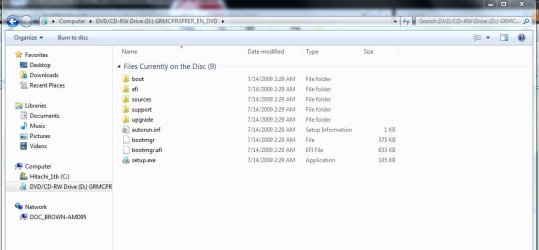
Here is a snip of the files on My win7 Pro x64 Microsoft DVD:
 

Attachments

  • Win7_pro_64bit_DVD-Files.JPG
    Win7_pro_64bit_DVD-Files.JPG
    53.9 KB · Views: 31

My Computer My Computer

At a glance

Win7 Enterprise, Win7 x86 (Ult 7600), Win7 x6...AMD fx8350 4ghz, AMD-32 2400mhz, AMD-64 3200m...2gb, 4gb on the Ult 7600, 4gb on Technet RTM,...Draw my own Graphics, several nVidia cards
Computer type
PC/Desktop
Computer Manufacturer/Model Number
Built them myself, Science Experiments !
OS
Win7 Enterprise, Win7 x86 (Ult 7600), Win7 x64 Ult 7600, TechNet RTM on AMD x64 (2.8Ghz)
CPU
AMD fx8350 4ghz, AMD-32 2400mhz, AMD-64 3200mhz, AMDx64 2.8G
Motherboard
SIS 755, ECS-K8M890M-M (Ult 7600), GigaByte & others
Memory
2gb, 4gb on the Ult 7600, 4gb on Technet RTM, 32gb on FX8350
Graphics Card(s)
Draw my own Graphics, several nVidia cards
Sound Card
on motherboard
Monitor(s) Displays
19" flat scr, 28" I-Inc widescr,22" Emprex Widescr, 23" Acer
Screen Resolution
1280 x 1024, 1440 x 900, 1920 x 1080
Hard Drives
6 pata Ide HD's & 2 Sata HD's
added 80gb external on Ult 7600 computer,
numerous extra 1tb, 2TB, 3Tb SATA HD's
A collection of ext HD Docks w/ HDs
PSU
430w, 550w, 600w, 700, 800, etc
Case
All Generic Full Towers
Cooling
Open Air & a few fans, some w/ colored LEDs
Keyboard
Compaq & Dell recycled from GoodWill
Mouse
Made in China Optical Wired Mouse
Internet Speed
Fast Cable InterNet
Antivirus
AVG Free on 24 different Desktops, NO Problems!
Browser
IE 8 is preferred, but use FireFox sometimes
Other Info
Linksys Routers, switches, & Hubs
Too Many USB Flash Drives to count, Biggest is 64GB !
Eight computers in my home network.
Sixteen computers at my business network.
Linked via TeamViewer !
Lots of old used spare computer parts everywhere!
Brianzion, Asus P5KC mobo and yes the cd/dvd drive works. I press the f8 button and get the dialogue box for booting, set it to cd drive and still nothing. mborner's idea worked insofar as the dvd was 'talked to' but the same message, that the program was incompatibe with the WinXp OS still came up. It's a Win 7 64 Professional upgrade disk and yes, I have a registered version of WinXP Pro as the current OS. BigMac- the tutorials assume that I will get a Win7 installation dialogue box. Haven't got there yet.
 

My Computer My Computer

At a glance

XPIntel q94504Gb
Computer Manufacturer/Model Number
Custom
OS
XP
CPU
Intel q9450
Motherboard
Asus P5k
Memory
4Gb
Your current WinXP Pro is probably 32bit, that is why the incompat message with the Win7 64 bit. Therefore a clean install is needed.
 

My Computer My Computer

At a glance

Win7 Enterprise, Win7 x86 (Ult 7600), Win7 x6...AMD fx8350 4ghz, AMD-32 2400mhz, AMD-64 3200m...2gb, 4gb on the Ult 7600, 4gb on Technet RTM,...Draw my own Graphics, several nVidia cards
Computer type
PC/Desktop
Computer Manufacturer/Model Number
Built them myself, Science Experiments !
OS
Win7 Enterprise, Win7 x86 (Ult 7600), Win7 x64 Ult 7600, TechNet RTM on AMD x64 (2.8Ghz)
CPU
AMD fx8350 4ghz, AMD-32 2400mhz, AMD-64 3200mhz, AMDx64 2.8G
Motherboard
SIS 755, ECS-K8M890M-M (Ult 7600), GigaByte & others
Memory
2gb, 4gb on the Ult 7600, 4gb on Technet RTM, 32gb on FX8350
Graphics Card(s)
Draw my own Graphics, several nVidia cards
Sound Card
on motherboard
Monitor(s) Displays
19" flat scr, 28" I-Inc widescr,22" Emprex Widescr, 23" Acer
Screen Resolution
1280 x 1024, 1440 x 900, 1920 x 1080
Hard Drives
6 pata Ide HD's & 2 Sata HD's
added 80gb external on Ult 7600 computer,
numerous extra 1tb, 2TB, 3Tb SATA HD's
A collection of ext HD Docks w/ HDs
PSU
430w, 550w, 600w, 700, 800, etc
Case
All Generic Full Towers
Cooling
Open Air & a few fans, some w/ colored LEDs
Keyboard
Compaq & Dell recycled from GoodWill
Mouse
Made in China Optical Wired Mouse
Internet Speed
Fast Cable InterNet
Antivirus
AVG Free on 24 different Desktops, NO Problems!
Browser
IE 8 is preferred, but use FireFox sometimes
Other Info
Linksys Routers, switches, & Hubs
Too Many USB Flash Drives to count, Biggest is 64GB !
Eight computers in my home network.
Sixteen computers at my business network.
Linked via TeamViewer !
Lots of old used spare computer parts everywhere!
Thanks for the replys. Brianzon, currently, your info is not much help. If you read my post thru, I have made sure the cd/dvd drive is the first selected for booting up.

Alphanumeric, it's on a computer with a registered version of WinXP and I get no options for either a clean or custom install. When I duble click in explorer it tells me the DVD program isn't compatible with the OS.

MBorner-User Error? - That's what I'm trying to find out.

There are a couple of things going on here. One is you can't directly upgrade from XP to windows 7. You have to do a custom install if you launch the install from XP. The second problem is your windows XP is 32 bit and you're trying to run the windows 7 64 bit install. If your XP install was 64 bit it would likely work but 32 bit XP can't run a 64 bit app so it errors out. That leads you back to booting from the DVD to do the install. Like I said earlier I would make sure that the DVD is in fact bootable. If it's not you can play around with BIOS settings all day and never get anywhere. Also don't confuse autorun with being bootable. Autorun is just a windows function to make launching installers etc from a DVD easier. It has nothing to do with the disk being bootable or not. I only mention this because I've seen people assume that just because the setup started in windows when they put the disk in the drive, that it is bootable. One has nothing to do with the other.
 

My Computer My Computer

At a glance

Windows 10 Education 64 bitAMD Phenom II X4 980 Black Edition Deneb 3.7GHz8GB 4GBx2 Kingston PC10600 DDR3 1333 MemoryZotac NVIDIA Geforce GT640 2 Gig DDR3 PCIe
Computer type
PC/Desktop
Computer Manufacturer/Model Number
Home Built
OS
Windows 10 Education 64 bit
CPU
AMD Phenom II X4 980 Black Edition Deneb 3.7GHz
Motherboard
Asus M4N68T-M V2 µATX Motherboard
Memory
8GB 4GBx2 Kingston PC10600 DDR3 1333 Memory
Graphics Card(s)
Zotac NVIDIA Geforce GT640 2 Gig DDR3 PCIe
Sound Card
VIA VT1708s High Definition Audio 8-channel Onboard
Monitor(s) Displays
22" LG E2242 1080p and 2 19" I-INC AG191D
Screen Resolution
1280x1024 - 1920x1080 - 1280x1024
Hard Drives
Crucial M100 256 GB SSD and 500 GB WD Blue SATA
PSU
Thermaltake TR 620
Case
Power Up Black ATX Mid-Tower Case
Cooling
Stock heatsink and fan
Keyboard
Logitech Wireless K350 Wave
Mouse
Logitech Wireless M570 Trackman Wheel
Internet Speed
80 Mbps Down 30 Mbps Up
Antivirus
Windows Defender
Browser
Internet Explorer 11
Other Info
HP DVD1040e Lightscribe - External USB2
Back
Top