Sony VAIO laptop, S series, Windows 7 won't boot

cjay2

New member
Local time
12:11 PM
Messages
18
Location
Italy
COMPUTER/SYSTEM INFO:

Sony Vaio Laptop
Model: SVS13AA11L
Product: SVS13A1EGXB
Bought: Sept 2012
OS: Windows 7 Pro 64-bit SP1
CPU: Intel i7 3520M 2.90GHz
RAM: 8.00GB
BIOS: Insyde Corp. Version: R0142C5
HHD: 1TB Western Digital WD10JPVX

Hi folks, new member here. I discovered this problem 2 weeks ago, when I did a Restart to satisfy my AV's request for it. I experienced it again last week, when I wanted to boot from my USB Acronis key to do my annual HHD clone.

WHAT THE COMPUTER IS DOING:

From a cold boot - Press power switch: green light flashes briefly, there's a single click sound that I believe is the optical drive searching for a disc, then computer goes off. The screen is black during this process.
From within a Restart cycle - computer goes off, then brief green light from power key, then off. Screen always black.
From a cold boot, with my USB Acronis rescue/cloning key plugged in, Green light when power is pressed, then off. Screen always black.
Removed USB key.
Repeated attempts to start computer by pressing power button are the same (flash of green power light & click sound), but after many tries, HHD finally spun up and Windows launched normally.

Computer works perfectly normal: I close cover at end of day, it goes into hibernation, and opens back to its current status from hibernation normally.
The computer has no problem operating with my usual full load - 2 open pro-audio editor sessions, plus open video editor session, 5 or 6 Firefox windows, 4 or more Windows Explorer windows, several Notepad files, all open on the taskbar.
Closing the cover at end of day, it goes into hibernation, awaiting next day's work, recovering without problem.
Before 2 weeks ago, I would shut down or Restart whenever my Kaspersky AV or another program requested, with no problems ever.

WHAT I'VE DONE:

I've only allowed this to happen twice: the first time 2 weeks ago, when the AV requested a Restart, and once when I took the following actions after shutting it down:

Thinking it was a faulty HHD, I put in my last year's clone, which worked perfectly when made and tested last year (2017).
There was no change in the situation.
I put in the Vaio's original 2012 HHD which still works, with no change.
I tried booting from my USB Acronis key, with no response.
I put back the current drive, and spent 5 minutes re-pressing the power button, and it finally took hold and booted into windows, where it is currently, hibernating every night.
Kaspersky still wants a reboot, but I'm finishing up a video project, so it will have to wait.

I've joined SevenForums and tested its operation on my smartphone, so I should be able to get back here, if the computer won't come up at some point.

The last time I went into the BIOS, last year, I left the boot order as:
1st: USB
2nd: Optical drive
3rd: HHD
so I can boot from my Acronis USB cloning key, to clone the HHD every year.
This problem just began 2 weeks ago, with the recent attempt to Restart for the AV.
The computer has worked almost flawlessly for over 6 years. I did a complete recovery from my Sony 6-DVD set bought at purchase, once, about 2 years ago, to try and solve the typical Centrino Wifi-card failure problem, ending up buying a USB wifi key after giving up, like everyone else on the Internet does.

So again, once in Windows, the machine works fine and normally, with ZERO issues.

These are my ideas:

I'm thinking it's a hardware issue. Perhaps a dying CMOS battery, perhaps a faulty Bios chip.
I can't see RAM or my main battery as problems because once in W7, everythings fine. Vaio Care says my battery is in excellent state.
As stated above, I've put 2 other working HHD's in, and the problem remains.

I'd like some advice from you folks as to my next step, because once I power down to do something about this, there's no guarantee it'll come back until the problem is solved.

Thanks in advance.
 

My Computer My Computer

At a glance

windows 7 pro 64i7-3520M8GBNVIDIA GeForce GT 640M LE
Computer type
Laptop
Computer Manufacturer/Model Number
sony vaio SVS13A1EGXB
OS
windows 7 pro 64
CPU
i7-3520M
Memory
8GB
Graphics Card(s)
NVIDIA GeForce GT 640M LE
Hard Drives
1TB WD10JPVT
Antivirus
Kaspersky
Browser
FF57
Hi cjay2, and welcome to seven forums

What is your computer doing, sounds like you only have problem after when inserting USB Acronis key. Am I correct?
 

My Computer My Computer

At a glance

Windows 7 x64, Vista x64, 8.1 smartphoneIntel E8400 65W 64-bitDDR2 2 x 2GB, 1GB x 2XFX Radeon HD5750
Computer type
PC/Desktop
OS
Windows 7 x64, Vista x64, 8.1 smartphone
CPU
Intel E8400 65W 64-bit
Motherboard
Gigabyte EP45-UD3LR
Memory
DDR2 2 x 2GB, 1GB x 2
Graphics Card(s)
XFX Radeon HD5750
Sound Card
AMD High Definition Audio; Realtek High Definition Audio
Monitor(s) Displays
iiyama prolite X2377HDS
Screen Resolution
1920 x 1080
Hard Drives
500GB 7200 rpm Seagate ST3500413AS 16MB, 500GB 5400 rpm Toshiba MQ02ABF050H 32MB, 200GB 7200 rpm Seagate ST3200820AS 8MB, 2TB 7200 rpm Western Digital WD20EZRX 64MB
PSU
Enermax Liberty Modular
Case
Antec P193 Midi Tower
Keyboard
Mionix ZIBAL 60
Mouse
Razer USB 2.0 Diamondback Mouse or Huion Graphics Tablet
Browser
Internet Explorer, Lunascape, Firefox, Opera, Avast Safezone
Hi iko22,

No, the computer simply will not start up from power-off state. It won't launch into a bootable Usb key if one is there, it won't launch from power-off into the operating system. However, as stated, if I continue to press the power key over and over, after waiting for a response after each press, it has eventually started normally and gone into Windows7. The problem is that I can't just press once and expect it to act normally - go thru the boot process and into Windows. I'm finding that I have to press many times, until one time works.
As stated, it doesn't even boot into my bootable USB key.
Once it has booted and gone into Windows, the computer works fine, goes into hibernation when I'm finished using it, and awakening again when I want to use it. The entire computer is working normally until it is powered off, either by shutting it down or from attempting a Restart cycle when requested by a program.
It doesn't power on, until (at this point in time) you have pressed power many times, and then it eventually (up thru this point in time) will start normally.

I'm hoping that someone has seen this before and can tell me something to try that might have a chance at success. Lacking that, I'll have to take a chance and shut it down, disassemble it and replace the CMOS battery cell, in the hope that maybe that is the problem. The computer is in use since 2012, so the cell has over 7 years on it. Other than that, I have no idea of what to do.
 

My Computer My Computer

At a glance

windows 7 pro 64i7-3520M8GBNVIDIA GeForce GT 640M LE
Computer type
Laptop
Computer Manufacturer/Model Number
sony vaio SVS13A1EGXB
OS
windows 7 pro 64
CPU
i7-3520M
Memory
8GB
Graphics Card(s)
NVIDIA GeForce GT 640M LE
Hard Drives
1TB WD10JPVT
Antivirus
Kaspersky
Browser
FF57
Thank you, I understand better now. Repalcing the CMOS battery would be a good suggestion. However, like you say, you want to avoid that because it means powering off your computer, and powering off and on your computer brings about the launch instability.
So, before attempting to replace the CMOS battery, there are a few things you can do, for piece of mind.

Do you have created a Windows System Repair disk? If not then you can create one following this tutorial: System Repair Disk - Create - Windows 7 Help Forum. This will protect you, in case you have to power down at any time.
Secondly, run a checkdisk on the USB stick.
With Windows logged on, insert the USB stick into the computer.
Open the Computer Folder
Right mouse-click on the USB stick, and select Properties
Then select Tools, and click on the Check now button.
Have ticked the two boxes that appear, then click start.
On completion, Note the results​
.
You can follow these simple tips, to provide you more information, about the health of your computer, without having to power down.
 

My Computer My Computer

At a glance

Windows 7 x64, Vista x64, 8.1 smartphoneIntel E8400 65W 64-bitDDR2 2 x 2GB, 1GB x 2XFX Radeon HD5750
Computer type
PC/Desktop
OS
Windows 7 x64, Vista x64, 8.1 smartphone
CPU
Intel E8400 65W 64-bit
Motherboard
Gigabyte EP45-UD3LR
Memory
DDR2 2 x 2GB, 1GB x 2
Graphics Card(s)
XFX Radeon HD5750
Sound Card
AMD High Definition Audio; Realtek High Definition Audio
Monitor(s) Displays
iiyama prolite X2377HDS
Screen Resolution
1920 x 1080
Hard Drives
500GB 7200 rpm Seagate ST3500413AS 16MB, 500GB 5400 rpm Toshiba MQ02ABF050H 32MB, 200GB 7200 rpm Seagate ST3200820AS 8MB, 2TB 7200 rpm Western Digital WD20EZRX 64MB
PSU
Enermax Liberty Modular
Case
Antec P193 Midi Tower
Keyboard
Mionix ZIBAL 60
Mouse
Razer USB 2.0 Diamondback Mouse or Huion Graphics Tablet
Browser
Internet Explorer, Lunascape, Firefox, Opera, Avast Safezone
It doesn't sounds good.
" Press power switch: green light flashes briefly, there's a single click sound that I believe is the optical drive searching for a disc, then computer goes off. The screen is black during this process.

It doesn't give any message.
Sad to say but I think you have you have a damage MoBo or CPU.
 

My Computers My Computers

  • At a glance

    Windows 7 HP 64i5 6600K - 800MHz to 4200MHz4+4G GSkill DDR4 3000IG - Intel 530
    Computer type
    PC/Desktop
    Computer Manufacturer/Model Number
    custom build
    OS
    Windows 7 HP 64
    CPU
    i5 6600K - 800MHz to 4200MHz
    Motherboard
    GA-Z170-HD3P
    Memory
    4+4G GSkill DDR4 3000
    Graphics Card(s)
    IG - Intel 530
    Monitor(s) Displays
    Samsung 226BW
    Screen Resolution
    1680x1050
    Hard Drives
    (1) -1 SM951 – 128GB M.2 AHCI PCIe SSD drive for Windows 7 and Lubuntu
    (2) -1 WD SATA 3 - 1T for Data
    (3) -1 WD SATA 3 - 1T for backup
    PSU
    Thermaltake 450W TR2 gold
    Keyboard
    Old and good Chicony mechanical keyboard
    Mouse
    Logitech mX performance - 9 buttons (had to disable some)
    Internet Speed
    500Mb/s
    Browser
    Firefox 64
    Other Info
    TinyWall firewall
  • At a glance

    Windows 7 Proi7-4500U 800MHz to 3.0GHz(4+4)G DDR3 1600IG intel 4400 + NVIDIA GeForce GT 745M
    Computer type
    Laptop
    System Manufacturer/Model Number
    Asus Q550LF
    OS
    Windows 7 Pro
    CPU
    i7-4500U 800MHz to 3.0GHz
    Motherboard
    Asus Q550LF
    Memory
    (4+4)G DDR3 1600
    Graphics Card(s)
    IG intel 4400 + NVIDIA GeForce GT 745M
    Sound Card
    Realtek
    Monitor(s) Displays
    LG Display LP156WF4-SPH1
    Screen Resolution
    1920 x 1080
    Hard Drives
    BX500 120G SSD for Windows and programs +
    1T HDD for data
    Internet Speed
    500 Mb/s
    Browser
    Firefox
    Other Info
    TinyWall firewall
It doesn't sounds good.
" Press power switch: green light flashes briefly, there's a single click sound that I believe is the optical drive searching for a disc, then computer goes off. The screen is black during this process.

It doesn't give any message.
Sad to say but I think you have you have a damage MoBo or CPU.

I also tell him to create a system repair disk. If he can boot into the repair DVD first time without a black screen, then I think his motherboard is safe.
 

My Computer My Computer

At a glance

Windows 7 x64, Vista x64, 8.1 smartphoneIntel E8400 65W 64-bitDDR2 2 x 2GB, 1GB x 2XFX Radeon HD5750
Computer type
PC/Desktop
OS
Windows 7 x64, Vista x64, 8.1 smartphone
CPU
Intel E8400 65W 64-bit
Motherboard
Gigabyte EP45-UD3LR
Memory
DDR2 2 x 2GB, 1GB x 2
Graphics Card(s)
XFX Radeon HD5750
Sound Card
AMD High Definition Audio; Realtek High Definition Audio
Monitor(s) Displays
iiyama prolite X2377HDS
Screen Resolution
1920 x 1080
Hard Drives
500GB 7200 rpm Seagate ST3500413AS 16MB, 500GB 5400 rpm Toshiba MQ02ABF050H 32MB, 200GB 7200 rpm Seagate ST3200820AS 8MB, 2TB 7200 rpm Western Digital WD20EZRX 64MB
PSU
Enermax Liberty Modular
Case
Antec P193 Midi Tower
Keyboard
Mionix ZIBAL 60
Mouse
Razer USB 2.0 Diamondback Mouse or Huion Graphics Tablet
Browser
Internet Explorer, Lunascape, Firefox, Opera, Avast Safezone
iko22,

So you're suggesting both to try replacing the CMOS cell, as well as create a DVD repair disk to try and test to see whether or not the machine will boot into the DVD drive (which has always worked well).
I'll look at the link you provided to the repair disk.

Ok, I inserted the Acronis USB key into the computer, and ran through the check, with both boxes checked as you said. It said that the USB key is healthy and ready to use (it's a small 4GB key).

Question:
I have the entire recovery 6-DVD set that I bought with the computer. Would placing the first disk into the optical drive and pressing the power to see if it boots the DVD be sufficient to show that the MB is functional? I don't have to follow any of the instructions on the DVD if it boots. I do NOT want to reformat and reinstall windows on this HHD, because it's working fine. The entire computer works normal, outside of this cold-boot issue. I would just be exercising the pathway that boots from the optical drive, thus showing some sort of operational success.

Then, I can create the repair disk, if the pathway to booting from the drive is working, and if it gives me functions that don't already exist on the recovery disks from my Sony DVD set.

Megahertz mentioned that he felt that the MB or CPU could be bad, but the entire computer is functional, fully loaded with four heavy programs going at once, and many folders and files open, including media files being edited. I'm not able to understand how a CPU could be defective whilst still running everything normally.

It also seems that, whatever is wrong, the computer can, after several tries (I'm referring to THIS point in time here), eventually go through the entire boot-up and launching of Windows, and then operate fine, so to me, it seems that there is nothing that is catastrophically broken on the MB, but that something *is* intermittently preventing normal cold-booting (booting from power-off state).

Question:
If booting from the optical is possible, could that indicate a corrupted/intermittent Bios chip?
I don't know of anything else that stands in the boot procedure besides the power switch, the bios, and finally a working bootable device. I don't know how the boot process works in this computer, so I can't diagnose and troubleshoot this by myself, without outside help.

So, to finish up, the USB key is in good health, and the next step according to you would be to try and boot from the optical drive, using a disk that can demonstrate that the optical booting path is functional.

I find myself wondering why it won't directly boot from the healthy USB key, that I've used in the past, twice, to clone my backup C-drive HHD's.

Ok, back to you...
cj
 

My Computer My Computer

At a glance

windows 7 pro 64i7-3520M8GBNVIDIA GeForce GT 640M LE
Computer type
Laptop
Computer Manufacturer/Model Number
sony vaio SVS13A1EGXB
OS
windows 7 pro 64
CPU
i7-3520M
Memory
8GB
Graphics Card(s)
NVIDIA GeForce GT 640M LE
Hard Drives
1TB WD10JPVT
Antivirus
Kaspersky
Browser
FF57
iko22,

So you're suggesting both to try replacing the CMOS cell, as well as create a DVD repair disk ...
No, not exactly. You said you wanted to defer replacing the CMOS, so I made some alternative suggestions that might work.
Question:
I have the entire recovery 6-DVD set that I bought with the computer. Would placing the first disk into the optical drive and pressing the power to see if it boots the DVD be sufficient to show that the MB is functional?
Are those Disks boot-able? Or are they a clone of your system? The two are not of the same meaning.
Megahertz mentioned that he felt that the MB or CPU could be bad, but the entire computer is functional, fully loaded with four heavy programs going at once, and many folders and files open, including media files being edited. I'm not able to understand how a CPU could be defective whilst still running everything normally.
Yes, he is still correct. Even if the system stabilises eventually, the power transients across the motherboard are different at start up.

It also seems that, whatever is wrong, the computer can, after several tries (I'm referring to THIS point in time here), eventually go through the entire boot-up and launching of Windows, and then operate fine, so to me, it seems that there is nothing that is catastrophically broken on the MB, but that something *is* intermittently preventing normal cold-booting (booting from power-off state).
Will have to wait and see.
Question:
If booting from the optical is possible, could that indicate a corrupted/intermittent Bios chip?
I don't know of anything else that stands in the boot procedure besides the power switch, the bios, and finally a working bootable device. I don't know how the boot process works in this computer, so I can't diagnose and troubleshoot this by myself, without outside help.
If I were you, I would replace the CMOS battery. When you are more confident to do so.
So, to finish up, the USB key is in good health, and the next step according to you would be to try and boot from the optical drive, using a disk that can demonstrate that the optical booting path is functional.

That is exactly what I was thinking.
 

My Computer My Computer

At a glance

Windows 7 x64, Vista x64, 8.1 smartphoneIntel E8400 65W 64-bitDDR2 2 x 2GB, 1GB x 2XFX Radeon HD5750
Computer type
PC/Desktop
OS
Windows 7 x64, Vista x64, 8.1 smartphone
CPU
Intel E8400 65W 64-bit
Motherboard
Gigabyte EP45-UD3LR
Memory
DDR2 2 x 2GB, 1GB x 2
Graphics Card(s)
XFX Radeon HD5750
Sound Card
AMD High Definition Audio; Realtek High Definition Audio
Monitor(s) Displays
iiyama prolite X2377HDS
Screen Resolution
1920 x 1080
Hard Drives
500GB 7200 rpm Seagate ST3500413AS 16MB, 500GB 5400 rpm Toshiba MQ02ABF050H 32MB, 200GB 7200 rpm Seagate ST3200820AS 8MB, 2TB 7200 rpm Western Digital WD20EZRX 64MB
PSU
Enermax Liberty Modular
Case
Antec P193 Midi Tower
Keyboard
Mionix ZIBAL 60
Mouse
Razer USB 2.0 Diamondback Mouse or Huion Graphics Tablet
Browser
Internet Explorer, Lunascape, Firefox, Opera, Avast Safezone
iko22,

The process of replacing the Cmos cell requires accessing the side of the motherboard where the CPU lives. Unfortunately on this model, that requires completely removing the MB from the unit, a process that I did about 1 and a half years ago, to clean the fan assembly. It took me 3 hours and involved keeping track of over 20 screws and many connectors, plugs, and fine details of wire-routing, etc. I'm trying to put off having to do it again, but at some point, eventually, that CMOS cell will need attention. The worst part is unsnapping and resnapping the case-halves together - there's always this fear of breaking the plastic tabs.
Thus my desire to avoid it for a while, if possible, as some of these CMOS cells can last a decade or more.

Yes, the set of 6 DVDs that the Sony store made me, are full recovery DVD's, and they completely contain everything that was on the computer when I bought it. The first DVD in the set is bootable - the others are asked for as you proceed through the recovery process. They are NOT a clone of the system, to be clear. I used them once to do a full system recovery/restart about 2 years ago. They work.

I'm wondering if there is a way to find the complete booting sequence for this computer, in order to help diagnose this problem better.

So, therefore, your opinion at this point, is that I should replace the CMOS cell, and see if that clears the problem.
Then, if not, try to boot from my first recovery DVD, or should I specifically create the repair disk that you linked to?

Thanks again!
cj
 

My Computer My Computer

At a glance

windows 7 pro 64i7-3520M8GBNVIDIA GeForce GT 640M LE
Computer type
Laptop
Computer Manufacturer/Model Number
sony vaio SVS13A1EGXB
OS
windows 7 pro 64
CPU
i7-3520M
Memory
8GB
Graphics Card(s)
NVIDIA GeForce GT 640M LE
Hard Drives
1TB WD10JPVT
Antivirus
Kaspersky
Browser
FF57
Do you have a Legacy-MBR or a UEFI-GPT disk?

For what you described on post#1, I don't think it's a disk boot failure or a dead CMos battery.
- Disk boot failure or any other boot failure you see something going on. You described a computer that couldn't even turn on and start POST.
- On laptops with main battery on, the CMos battery should last forever. My question is: Does your laptop has the main battery and is it good?
- The fist thing we notice with a dead battery is that the clock is wrong every time we boot. Did you noticed wrong clock after boot?
 

My Computers My Computers

  • At a glance

    Windows 7 HP 64i5 6600K - 800MHz to 4200MHz4+4G GSkill DDR4 3000IG - Intel 530
    Computer type
    PC/Desktop
    Computer Manufacturer/Model Number
    custom build
    OS
    Windows 7 HP 64
    CPU
    i5 6600K - 800MHz to 4200MHz
    Motherboard
    GA-Z170-HD3P
    Memory
    4+4G GSkill DDR4 3000
    Graphics Card(s)
    IG - Intel 530
    Monitor(s) Displays
    Samsung 226BW
    Screen Resolution
    1680x1050
    Hard Drives
    (1) -1 SM951 – 128GB M.2 AHCI PCIe SSD drive for Windows 7 and Lubuntu
    (2) -1 WD SATA 3 - 1T for Data
    (3) -1 WD SATA 3 - 1T for backup
    PSU
    Thermaltake 450W TR2 gold
    Keyboard
    Old and good Chicony mechanical keyboard
    Mouse
    Logitech mX performance - 9 buttons (had to disable some)
    Internet Speed
    500Mb/s
    Browser
    Firefox 64
    Other Info
    TinyWall firewall
  • At a glance

    Windows 7 Proi7-4500U 800MHz to 3.0GHz(4+4)G DDR3 1600IG intel 4400 + NVIDIA GeForce GT 745M
    Computer type
    Laptop
    System Manufacturer/Model Number
    Asus Q550LF
    OS
    Windows 7 Pro
    CPU
    i7-4500U 800MHz to 3.0GHz
    Motherboard
    Asus Q550LF
    Memory
    (4+4)G DDR3 1600
    Graphics Card(s)
    IG intel 4400 + NVIDIA GeForce GT 745M
    Sound Card
    Realtek
    Monitor(s) Displays
    LG Display LP156WF4-SPH1
    Screen Resolution
    1920 x 1080
    Hard Drives
    BX500 120G SSD for Windows and programs +
    1T HDD for data
    Internet Speed
    500 Mb/s
    Browser
    Firefox
    Other Info
    TinyWall firewall
Hello cjay2


I'm wondering if there is a way to find the complete booting sequence for this computer, in order to help diagnose this problem better.
i. BIOS Firmware boot
ii. Windows OS loader
iii. Kernel mode startup (Windows 7 Logo screen)

Source: Windows 7 startup
So, therefore, your opinion at this point, is that I should replace the CMOS cell, and see if that clears the problem.
Then, if not, try to boot from my first recovery DVD, or should I specifically create the repair disk that you linked to?

Pick the last option, "specifically create the repair disk" that I linked to. This option has more tools that might help. You can use a repair disk created on any 64-bit Windows 7 machine.
 

My Computer My Computer

At a glance

Windows 7 x64, Vista x64, 8.1 smartphoneIntel E8400 65W 64-bitDDR2 2 x 2GB, 1GB x 2XFX Radeon HD5750
Computer type
PC/Desktop
OS
Windows 7 x64, Vista x64, 8.1 smartphone
CPU
Intel E8400 65W 64-bit
Motherboard
Gigabyte EP45-UD3LR
Memory
DDR2 2 x 2GB, 1GB x 2
Graphics Card(s)
XFX Radeon HD5750
Sound Card
AMD High Definition Audio; Realtek High Definition Audio
Monitor(s) Displays
iiyama prolite X2377HDS
Screen Resolution
1920 x 1080
Hard Drives
500GB 7200 rpm Seagate ST3500413AS 16MB, 500GB 5400 rpm Toshiba MQ02ABF050H 32MB, 200GB 7200 rpm Seagate ST3200820AS 8MB, 2TB 7200 rpm Western Digital WD20EZRX 64MB
PSU
Enermax Liberty Modular
Case
Antec P193 Midi Tower
Keyboard
Mionix ZIBAL 60
Mouse
Razer USB 2.0 Diamondback Mouse or Huion Graphics Tablet
Browser
Internet Explorer, Lunascape, Firefox, Opera, Avast Safezone
Replying to Megahertz07 first:

I don't know if the disk #1 of my Sony recovery set is a Legacy-MBR or a UEFI-GPT disk.

>>> Your questions:
"For what you described on post#1, I don't think it's a disk boot failure or a dead CMos battery."

I'm tending to agree with you on these points. I tried two other working HHD's that have operated in this computer before (the original HHD and the working clone that I made last year). The condition of the CMOS battery is always in question, but let's allow that to pass for now.

"- Disk boot failure or any other boot failure you see something going on. You described a computer that couldn't even turn on and start POST."

Exactly. Until one of my button-presses 'catches', and the computer goes through its usual boot-up and into Windows, there's just a quick flash of the green light, that slight single mechanical 'click', and then all goes dead. The screen never shows any sign of life during this activity. I'd consider a faulty power button, but the green light always lights when it's pressed, so it's working to that extent. Also, I assume that if the green light comes on at all, then any further operations in the boot process should also start up, if all is in order.

"- On laptops with main battery on, the CMos battery should last forever. My question is: Does your laptop has the main battery and is it good?"

My Vaio Care tells me periodically (since the day I bought this laptop) that the battery "is in excellent health". I have it in the 'extended battery-life mode', in which it is charged to 50% of its capacity, instead of full charge. This is to extend its life, as well as because I never use the computer off of the power supply. I have no use for portable operation. When I DO run the computer from the battery in order to occasionally 'exercise' it, it runs for about 1.5 hours, then a red sign comes up stating that there's about 2% charge left and that the computer must be plugged into the AC to charge it.

"- The first thing we notice with a dead battery is that the clock is wrong every time we boot. Did you noticed wrong clock after boot?"

Never. This computer has always, and continues to run excellently (once up in Windows). The date-and-time functions are always correct without fault.

I've been searching the Internet trying to find a source for the CMOS cell assembly. The only ones I see are 'used'-condition offers on eBay of the exact same part, taken from old Vaio SVS13 laptops. I would like to have the option of being able to replace the CMOS cell once I've disassembled the laptop, if and when I need to. If I could find ANY Sony tech info on this laptop and discover which cell is being used in the 'sealed' assembly, I could consider buying a new cell and soldering it into the original assembly. I haven't found one bit of real technical support or info about any aspect of this or any other Sony laptop. I have their 'Service Manual'. Empty and useless - no parts numbers, no parts values; just some block diagrams and some rough drawings of part assemblies.

See my up-coming reply to iko22 for further discussion of my possible future actions on this.

Thanks for your thoughts!!!
 

My Computer My Computer

At a glance

windows 7 pro 64i7-3520M8GBNVIDIA GeForce GT 640M LE
Computer type
Laptop
Computer Manufacturer/Model Number
sony vaio SVS13A1EGXB
OS
windows 7 pro 64
CPU
i7-3520M
Memory
8GB
Graphics Card(s)
NVIDIA GeForce GT 640M LE
Hard Drives
1TB WD10JPVT
Antivirus
Kaspersky
Browser
FF57
iko22,

You wrote:

"Pick the last option, "specifically create the repair disk" that I linked to. This option has more tools that might help. You can use a repair disk created on any 64-bit Windows 7 machine."

I should be able to purchase a blank DVD locally here (or a pack of 5) and create this 'repair disk' that you linked to. I'm just wondering what features it might offer over and beyond what my disk#1 (of my set) offers, that would make it worth the trouble of going out and getting some blank disks, because I'm living here in Florence, Italy, and it's not at all a 'high-tech' place. There's no Frye's Electronics around here to pop into and pick up a HHD or some resistors, let alone a blank DVD or 2. There is a 'Media World' big-box store here, a 25min bus-ride away, where I can find a limited stock of computer-related accessories for sale.
So if you think that it would be a good thing to have around, then I'll get some blank DVD or CD and make that disk. Let me know.

This machine is working without any issues, once booted. I'm using it right now to type this. This is why I want to continue using it, as well as the fact that I've got thousands of dollars of paid-for audio & video-restoration & editing SW on here that all works fine together, and all work well on Windows 7.

That Windows 7 Startup link is exactly what I was searching for, and never found. I neglected using the word 'startup' in google, and was using variations of 'boot', which just brought me sites dealing with Bios issues. I am truly amazed at the quantity and availability of real information here at SevenForums, as well as being able to actually speak with people about these things.

I guess it's time to make a repair disk, and read up on the W-7 Startup process. I'm definitely up for resolving whatever problem is occurring with this machine, at the component level. I have none of my tools with me, but I want to at least pinpoint the problem, if not solve it myself, so that if/when I find competent service, I can instruct them on what to do. It's annoying not to be able to restart when I need to.

Thanks very much for your help.
 

My Computer My Computer

At a glance

windows 7 pro 64i7-3520M8GBNVIDIA GeForce GT 640M LE
Computer type
Laptop
Computer Manufacturer/Model Number
sony vaio SVS13A1EGXB
OS
windows 7 pro 64
CPU
i7-3520M
Memory
8GB
Graphics Card(s)
NVIDIA GeForce GT 640M LE
Hard Drives
1TB WD10JPVT
Antivirus
Kaspersky
Browser
FF57
Yes you want the DVD Repair Disk created so you can test the boot path to the optical drive. You can create this disk without powering off the computer. I want to know if the DVD boot is successful, or whether there is more black screen. If the optical drive boot test is successful, then you can run a CHKDSK on the system drive from the DVD command prompt. Running CHKDSK will check the disk for file corruption. There is a possibility that the C: drive is corrupt, and that the corrupt files were cloned to the USB Acronis key.

In the UK, blank DVDs are also available from a stationary shop. You may want to try from where you are.

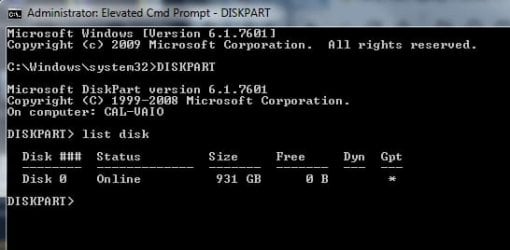
I know that you are waiting for a reply from Megahertz07, in the meantime use DISKPART to find whether your disks are MBR or GPT. Start DISKPART from an elevated command prompt, and then type LIST DISK. Take a picture of the results and post on the Forum here.
 

My Computer My Computer

At a glance

Windows 7 x64, Vista x64, 8.1 smartphoneIntel E8400 65W 64-bitDDR2 2 x 2GB, 1GB x 2XFX Radeon HD5750
Computer type
PC/Desktop
OS
Windows 7 x64, Vista x64, 8.1 smartphone
CPU
Intel E8400 65W 64-bit
Motherboard
Gigabyte EP45-UD3LR
Memory
DDR2 2 x 2GB, 1GB x 2
Graphics Card(s)
XFX Radeon HD5750
Sound Card
AMD High Definition Audio; Realtek High Definition Audio
Monitor(s) Displays
iiyama prolite X2377HDS
Screen Resolution
1920 x 1080
Hard Drives
500GB 7200 rpm Seagate ST3500413AS 16MB, 500GB 5400 rpm Toshiba MQ02ABF050H 32MB, 200GB 7200 rpm Seagate ST3200820AS 8MB, 2TB 7200 rpm Western Digital WD20EZRX 64MB
PSU
Enermax Liberty Modular
Case
Antec P193 Midi Tower
Keyboard
Mionix ZIBAL 60
Mouse
Razer USB 2.0 Diamondback Mouse or Huion Graphics Tablet
Browser
Internet Explorer, Lunascape, Firefox, Opera, Avast Safezone
iko22

Here's a cropped screenshot of my brief Diskpart session on cmd prompt.
 

Attachments

  • Diskpart-1.jpg
    Diskpart-1.jpg
    19 KB · Views: 22

My Computer My Computer

At a glance

windows 7 pro 64i7-3520M8GBNVIDIA GeForce GT 640M LE
Computer type
Laptop
Computer Manufacturer/Model Number
sony vaio SVS13A1EGXB
OS
windows 7 pro 64
CPU
i7-3520M
Memory
8GB
Graphics Card(s)
NVIDIA GeForce GT 640M LE
Hard Drives
1TB WD10JPVT
Antivirus
Kaspersky
Browser
FF57
Thank you for the answers on post #12. I would say that the problem isn't on the CMOS battery. By the way, 99.9% of the CMos battery is the CR2032 coin battery. It may be on a slot or soldered to a cable with a socket.

I have seen same thing you described on a desktop. It was a bad function of the fan speed sensor. The fan was running but it wasn't sending the info to the MB. To protect the CPU, the MB was turning off the computer.
Do you hear the fan speeding up when you turn the computer on?

FYI, your disk is UEFI - GPT.
 
Last edited:

My Computers My Computers

  • At a glance

    Windows 7 HP 64i5 6600K - 800MHz to 4200MHz4+4G GSkill DDR4 3000IG - Intel 530
    Computer type
    PC/Desktop
    Computer Manufacturer/Model Number
    custom build
    OS
    Windows 7 HP 64
    CPU
    i5 6600K - 800MHz to 4200MHz
    Motherboard
    GA-Z170-HD3P
    Memory
    4+4G GSkill DDR4 3000
    Graphics Card(s)
    IG - Intel 530
    Monitor(s) Displays
    Samsung 226BW
    Screen Resolution
    1680x1050
    Hard Drives
    (1) -1 SM951 – 128GB M.2 AHCI PCIe SSD drive for Windows 7 and Lubuntu
    (2) -1 WD SATA 3 - 1T for Data
    (3) -1 WD SATA 3 - 1T for backup
    PSU
    Thermaltake 450W TR2 gold
    Keyboard
    Old and good Chicony mechanical keyboard
    Mouse
    Logitech mX performance - 9 buttons (had to disable some)
    Internet Speed
    500Mb/s
    Browser
    Firefox 64
    Other Info
    TinyWall firewall
  • At a glance

    Windows 7 Proi7-4500U 800MHz to 3.0GHz(4+4)G DDR3 1600IG intel 4400 + NVIDIA GeForce GT 745M
    Computer type
    Laptop
    System Manufacturer/Model Number
    Asus Q550LF
    OS
    Windows 7 Pro
    CPU
    i7-4500U 800MHz to 3.0GHz
    Motherboard
    Asus Q550LF
    Memory
    (4+4)G DDR3 1600
    Graphics Card(s)
    IG intel 4400 + NVIDIA GeForce GT 745M
    Sound Card
    Realtek
    Monitor(s) Displays
    LG Display LP156WF4-SPH1
    Screen Resolution
    1920 x 1080
    Hard Drives
    BX500 120G SSD for Windows and programs +
    1T HDD for data
    Internet Speed
    500 Mb/s
    Browser
    Firefox
    Other Info
    TinyWall firewall
Megahertz07

Yes, the fan become audible about 20 seconds after the computer begins a successful (normal) startup.

An interesting sidenote here is that about two and a half years ago, I turned on the computer one day, and the fans, after about 20 seconds, went into their high-speed mode, and remained there through the session, rather than staying in their silent low-speed mode. And ever-after that startup, the fans have come on after about 20 seconds, in their high-speed mode. They stay that way for as long as I'm using the computer. They shut down when the computer is placed into hibernation, and come on again, after 20 seconds, when the computer is opened back up to continue working.

Shortly after its occurrence, I scheduled a calm and bright day and bought a can of compressed air, and disassembled the computer, in order to clean out the fan assembly. It wasn't very dusty, but I sprayed the assembly clean, and put it all back together. I did NOT disassemble the heatpipes from the CPU and GPU chips, as I didn't have any way to find new thermal pads to replace them with.

Incidentally, I found a 11-minute video on Youtube in which an asian tech completely disassembles this very computer. It's been on there for years. Title of video:
Sửa Laptop Sony Vaio SVS13 không lên gì

The fan speed was NOT affected at all. This situation still exists. I found and purchased a brand-new Sony fan assembly on eBay for this exact model. It comes with the two heatsink thermal pads attached, and the entire double-heatpipe and fan and fan radiator assembly. It's sitting in its box awaiting a time when the fan should go bad.


It doesn't seem to me that this fan-speed abberation is a part of this new current problem, as it's been going on for almost three years now. But I wanted to bring it up, in case someone has had an issue that involved this additional situation. I monitor the CPU core temperatures with CPUID Hardware Monitor, which indicates a temperature range of about 42 - 50C in winter, and about 50 - 59C in summer. The CPU is currently reading 49-51C (122F) in my room, without air conditioning. Outside temps are around 32C today.


To fix the fan speed issue, I've tried cleaning the fan assembly and updating the BIOS. Nothing has changed it. The only other thing to do, physically, would have been to put in new thermal pads (and possibly heatsink compound???, but I don't know if thermal pads require heatsink compound) and anyway, neither Sony nor anyone else has ever had these pads available anywhere online. So, I just live with the high-speed running fan.


I've purchased a blank DVD locally, and will now work on creating a repair disk via that link that iko22 gave me.
 

My Computer My Computer

At a glance

windows 7 pro 64i7-3520M8GBNVIDIA GeForce GT 640M LE
Computer type
Laptop
Computer Manufacturer/Model Number
sony vaio SVS13A1EGXB
OS
windows 7 pro 64
CPU
i7-3520M
Memory
8GB
Graphics Card(s)
NVIDIA GeForce GT 640M LE
Hard Drives
1TB WD10JPVT
Antivirus
Kaspersky
Browser
FF57
iko22, Megahertz07,

I have created a DVD 'Repair Disc Windows 7 64-bit'.

CJ
 

My Computer My Computer

At a glance

windows 7 pro 64i7-3520M8GBNVIDIA GeForce GT 640M LE
Computer type
Laptop
Computer Manufacturer/Model Number
sony vaio SVS13A1EGXB
OS
windows 7 pro 64
CPU
i7-3520M
Memory
8GB
Graphics Card(s)
NVIDIA GeForce GT 640M LE
Hard Drives
1TB WD10JPVT
Antivirus
Kaspersky
Browser
FF57
Hello cjay2,

In your own time, re-boot into the System Repair DVD. See if the boot succeeds the first time, without any black screens. While the computer is carrying out the startup sequence, the DVD may start to rattle, but listen out for any fan noises - does the fans suddenly get louder? And what is happening on the screen? Is it always black, or do you get past the Logo screen? Also, do you see the mouse and keyboard LED lights, momentarily?

If this test is successful, and you get past the Windows Logo screen, then run CHKDSK, on the C: drive, from a command prompt Window in the System Recovery Environment.
 

My Computer My Computer

At a glance

Windows 7 x64, Vista x64, 8.1 smartphoneIntel E8400 65W 64-bitDDR2 2 x 2GB, 1GB x 2XFX Radeon HD5750
Computer type
PC/Desktop
OS
Windows 7 x64, Vista x64, 8.1 smartphone
CPU
Intel E8400 65W 64-bit
Motherboard
Gigabyte EP45-UD3LR
Memory
DDR2 2 x 2GB, 1GB x 2
Graphics Card(s)
XFX Radeon HD5750
Sound Card
AMD High Definition Audio; Realtek High Definition Audio
Monitor(s) Displays
iiyama prolite X2377HDS
Screen Resolution
1920 x 1080
Hard Drives
500GB 7200 rpm Seagate ST3500413AS 16MB, 500GB 5400 rpm Toshiba MQ02ABF050H 32MB, 200GB 7200 rpm Seagate ST3200820AS 8MB, 2TB 7200 rpm Western Digital WD20EZRX 64MB
PSU
Enermax Liberty Modular
Case
Antec P193 Midi Tower
Keyboard
Mionix ZIBAL 60
Mouse
Razer USB 2.0 Diamondback Mouse or Huion Graphics Tablet
Browser
Internet Explorer, Lunascape, Firefox, Opera, Avast Safezone
Due to the size, Laptops work at higher temperatures than desktop.
Normally you have a power saver plan that allow the CPU to run at very low clocks (10%) when not in use. If the CPU is almost not in use and the clock is low, heat generated is low and the fan can also run at low speed.
But if the power plan sets the lower clock to 80% or higher, heat generated is high and the fan must run at high speed.
 

My Computers My Computers

  • At a glance

    Windows 7 HP 64i5 6600K - 800MHz to 4200MHz4+4G GSkill DDR4 3000IG - Intel 530
    Computer type
    PC/Desktop
    Computer Manufacturer/Model Number
    custom build
    OS
    Windows 7 HP 64
    CPU
    i5 6600K - 800MHz to 4200MHz
    Motherboard
    GA-Z170-HD3P
    Memory
    4+4G GSkill DDR4 3000
    Graphics Card(s)
    IG - Intel 530
    Monitor(s) Displays
    Samsung 226BW
    Screen Resolution
    1680x1050
    Hard Drives
    (1) -1 SM951 – 128GB M.2 AHCI PCIe SSD drive for Windows 7 and Lubuntu
    (2) -1 WD SATA 3 - 1T for Data
    (3) -1 WD SATA 3 - 1T for backup
    PSU
    Thermaltake 450W TR2 gold
    Keyboard
    Old and good Chicony mechanical keyboard
    Mouse
    Logitech mX performance - 9 buttons (had to disable some)
    Internet Speed
    500Mb/s
    Browser
    Firefox 64
    Other Info
    TinyWall firewall
  • At a glance

    Windows 7 Proi7-4500U 800MHz to 3.0GHz(4+4)G DDR3 1600IG intel 4400 + NVIDIA GeForce GT 745M
    Computer type
    Laptop
    System Manufacturer/Model Number
    Asus Q550LF
    OS
    Windows 7 Pro
    CPU
    i7-4500U 800MHz to 3.0GHz
    Motherboard
    Asus Q550LF
    Memory
    (4+4)G DDR3 1600
    Graphics Card(s)
    IG intel 4400 + NVIDIA GeForce GT 745M
    Sound Card
    Realtek
    Monitor(s) Displays
    LG Display LP156WF4-SPH1
    Screen Resolution
    1920 x 1080
    Hard Drives
    BX500 120G SSD for Windows and programs +
    1T HDD for data
    Internet Speed
    500 Mb/s
    Browser
    Firefox
    Other Info
    TinyWall firewall
Back
Top