Solved W7 cant copy and paste

rocks911

New member
Member
VIP
Local time
8:21 PM
Messages
100
Mostly it seems I cant copy.
Not web pages, not in Word, it just doesnt copy.

I get a menu when I right click on text, I choose "Copy" then I attempt to paste into, well anything, and I get nothing. Nothing in or between Word/IE/Firefox/Pale Moon 64

I cleared the clipboard with CC Cleaner but it made no difference
This is new to me.
Any help would be appreciated
 

My Computer My Computer

At a glance

Windows 7 home premium 64 bitAMD Phenom IIx6 1065T 2.90 GHz8 GBATI Radeon HD 5570
Computer Manufacturer/Model Number
HP model HPE-519C
OS
Windows 7 home premium 64 bit
CPU
AMD Phenom IIx6 1065T 2.90 GHz
Motherboard
Foxconn H-RS880-UATX (ALOE)
Memory
8 GB
Graphics Card(s)
ATI Radeon HD 5570
Nevermind, I restarted the PC and the problem is gone.
 

My Computer My Computer

At a glance

Windows 7 home premium 64 bitAMD Phenom IIx6 1065T 2.90 GHz8 GBATI Radeon HD 5570
Computer Manufacturer/Model Number
HP model HPE-519C
OS
Windows 7 home premium 64 bit
CPU
AMD Phenom IIx6 1065T 2.90 GHz
Motherboard
Foxconn H-RS880-UATX (ALOE)
Memory
8 GB
Graphics Card(s)
ATI Radeon HD 5570
Hi rocks911,

Doing a restart will effectively clear the clipboard and also any memory in your machines ram, but there may be an underling problem here. Your 8GB of ram that you show in your system specs should be sufficient to handle anything you throw at it, but there have been reports that:

  • Outlook can use memory for itself but won't release it when you close out the session, and there may be other programs you are using that won't release the ram they used when closed out, these programs are called ram hogs.
  • mstsc.exe, Microsoft.com says, this is a component of Terminal Services that comes into play if you are using Remote Desktop.
  • Using a virtual machine with a shared clipboard.
  • rdpclip.exe You could try killing the rdpclip process in taskmanager, then close and reopen taskmanager, choose file >new task (run) then type in rdpclip.exe and hit enter. The remote clip service will restart, and usually the copy you wanted to paste immediately becomes available.
  • Any type of ram managing programs or system tweakers.

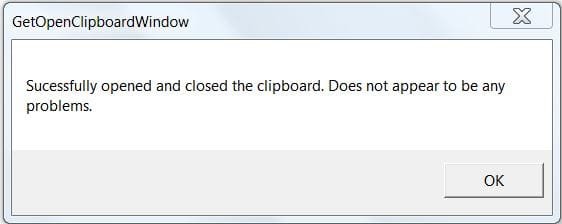
If you encounter this problem again you could use this tool to check what is causing the problem.
http://windowsxp.mvps.org/temp/GetOpenClipboardWindow.zip
Unzip and run the tool. Post back what it reports. For best results, run this utility during the time you encounter the Copy\Paste problem.

It is a direct download and I ran three malware scans on it and they all came up "clean" It does say windowsxp, but ran fine on my machine and reported no problems.
clipboard.JPG
 

My Computer My Computer

At a glance

Originally Win 7 Hm Prem x64 Ver 6.1.7600 Bui...Intel i3 530 2.93GHz, 2933MHz 2 Cores 4 Logic...6GB of 1,333MHz DDR3 SDRAM32MB Intel Graphics Media Accelerator HD IGChip
Computer type
PC/Desktop
Computer Manufacturer/Model Number
Gateway DX4831-01e (Mid-Tower Desktop)
OS
Originally Win 7 Hm Prem x64 Ver 6.1.7600 Build 7601-SP1 | Upgraded to Windows 10 December 14, 2019
CPU
Intel i3 530 2.93GHz, 2933MHz 2 Cores 4 Logical Processors
Motherboard
Gateway H57M01 133 megahertz
Memory
6GB of 1,333MHz DDR3 SDRAM
Graphics Card(s)
32MB Intel Graphics Media Accelerator HD IGChip
Sound Card
Realtek High Definition Audio
Monitor(s) Displays
Gateway HX2000 20inch TFT active matrix TN
Screen Resolution
1600 x 900 x 59 hertz
Hard Drives
WDC WD10EADS-00M2B0 [HDD] (1000.20 GB) -- drive 0,
HL-DT-ST DVDRAM GH41N [CD-ROM dr]
Four card readers, and Four USB 2.0
PSU
300watts.
Case
Mid-Tower Desktop
Cooling
Stock from Gateway
Keyboard
Natural Ergonomic Keyboard 4000, see Other Info
Mouse
Orig. Gateway wore out now using Insignia USB wired optical
Internet Speed
Vz FIOS 10ms png 57.64Mbps down 65.53Mbps up Speedtest.org
Antivirus
Zamana Anti-logger with Anti-malware, MSE, Windows Firewall,
Browser
IE11.0.9600.19399-Upd ver11.0.135, Firefox 68.0.1 x64
Other Info
System Specs by Belarc.

BIOS: American Megatrends Inc. P01-A0 11/17/2009

Replaced the MS 'Natural' Standard PS/2 Enhanced 101-102 Keyboard with a new Natural Ergonomic Keyboard 4000 on August 1st 2014.

Canon Pixma MG3222 Printer.

Updated to IE11 on 12102015 | Fios Quantum Router g1100

Additional AV: SpywareBlaster, manual Mbam, SAS
Back
Top