

This should be simple to fix, but it's been so long since I've had to hack W7 that I've forgotten most of the stuff I used to know.
I uninstalled GIMP 2.10.38.1 and then reinstalled GIMP 2.10.36 (because the latest version has annoying minor bugs).
Everything seemed to go smoothly.
However I discovered that the Context Menu for image files is now broken.
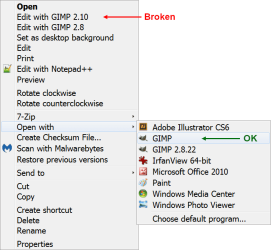
The entry in the main area is broken (it triggers the "Choose default program..." option from the "Open with" menu).
The entry in the "Open with" menu works correctly.
I haven't tried reinstalling GIMP 2.10.36 again (yet).
I uninstalled GIMP 2.10.38.1 and then reinstalled GIMP 2.10.36 (because the latest version has annoying minor bugs).
Everything seemed to go smoothly.
However I discovered that the Context Menu for image files is now broken.
The entry in the main area is broken (it triggers the "Choose default program..." option from the "Open with" menu).
The entry in the "Open with" menu works correctly.
I haven't tried reinstalling GIMP 2.10.36 again (yet).
Attachments
Last edited:
My Computer
At a glance
W7 Ultimate SP1, LM19.2 MATE, W10 Home 1703, ...AMD Phenom II x6 1100T, 3.3 GHz12GB DDR3 1333 G-Skill (4GB x 2), G-Skill (2G...NVIDIA GeForce GTX 660
- Computer type
- PC/Desktop
- Computer Manufacturer/Model Number
- n/a
- OS
- W7 Ultimate SP1, LM19.2 MATE, W10 Home 1703, W10 Pro 1703 VM, #All 64 bit
- CPU
- AMD Phenom II x6 1100T, 3.3 GHz
- Motherboard
- ASUS M4A88T-M/USB3 (AM3)
- Memory
- 12GB DDR3 1333 G-Skill (4GB x 2), G-Skill (2GB x 2)
- Graphics Card(s)
- NVIDIA GeForce GTX 660
- Sound Card
- Realtek?
- Monitor(s) Displays
- Samsung S23B350
- Screen Resolution
- 1920x1080
- Hard Drives
- WD Green 2TB (SATA), WD Green 3TB (SATA), WD Blue 4TB (SATA), WD Blue 6TB (SATA)
- PSU
- Cooler Master
- Case
- Antec GX300 Tower
- Cooling
- 3x Antec TRICOOL 120mm Fans
- Mouse
- Wired Optical
- Internet Speed
- DSL
- Antivirus
- Avast
- Browser
- Pale Moon (64 bit)
- Other Info
- 2018-12-27 Upgraded HDDs
2015-12-10 Upgraded case, graphics card, storage
2015-08-15 Upgraded motherboard & RAM
2015-07-15 Upgraded LM17.1 to LM17.2


