Solved W7 Doesn't load, can't see drive

speedgamer01

concert? use earplugs
Guru
Local time
10:12 AM
Messages
917
Hi guys, I got a bsod a few hours ago and now windows gives me wired lines instead of loading. I have it set to no boot GUI so I'm familiar with the eight blue dots in the corner of the screen, but now there are more dots.
I have booted with the windows recovery cd into a command prompt and had a look at the disks, it doesn't see my system disk :/ the other drives are listed though.
Any help would be highly respected, I'm desperate.
DSC_0099.jpg
 
Last edited:

My Computer

Computer type
PC/Desktop
Computer Manufacturer/Model Number
Custom Built PC
OS
Windows 7 Ultimate 64 bit SP1
CPU
Intel(R) Core(TM) i5-2500K
Motherboard
Gigabyte Technology Co., Ltd. Z68X-UD3-B3
Memory
12GB Kingston Hyperx 1600MHz
Graphics Card(s)
Asus GTS 450
PSU
500W Coolink
Other Info
Genius G-Pen F610 (PenPad)
Ok, first off I managed to start windows successfully :cool:
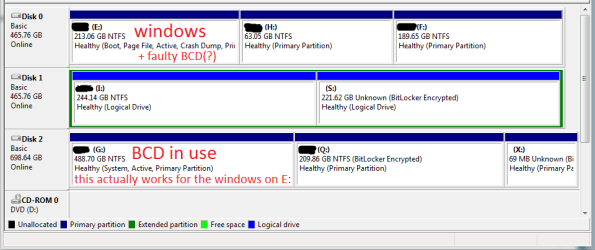
The mbr or bcd is the faulty somehow. After I had run the startup repair new entried were created on drive G: (It could access drive E: which I have windows on, because it is in RAID with an other drive) I set the boot prior. to begin with drive G: one of the entries were pointing to E: so I could start windows normally.
I am working on the deletion of the old mbr on E: and copying the new one from G: to E: to see if it works, I think it's better to have the mbr on the system drive.
 

My Computer

Computer type
PC/Desktop
Computer Manufacturer/Model Number
Custom Built PC
OS
Windows 7 Ultimate 64 bit SP1
CPU
Intel(R) Core(TM) i5-2500K
Motherboard
Gigabyte Technology Co., Ltd. Z68X-UD3-B3
Memory
12GB Kingston Hyperx 1600MHz
Graphics Card(s)
Asus GTS 450
PSU
500W Coolink
Other Info
Genius G-Pen F610 (PenPad)
Please post back a screenshot of your maximized Disk Mgmt drive map and listings, using Snipping Tool in Start Menu. Tell us what is on each partition.
 
bootexplan0.png
i prefer alt+prntscrn :D
 

My Computer

Computer type
PC/Desktop
Computer Manufacturer/Model Number
Custom Built PC
OS
Windows 7 Ultimate 64 bit SP1
CPU
Intel(R) Core(TM) i5-2500K
Motherboard
Gigabyte Technology Co., Ltd. Z68X-UD3-B3
Memory
12GB Kingston Hyperx 1600MHz
Graphics Card(s)
Asus GTS 450
PSU
500W Coolink
Other Info
Genius G-Pen F610 (PenPad)
I would want to provide E with its own boot files onboard the HD so that it becomes independent and at the same time resolves any BCD issues.

To do this mark E Active in Disk Mgmt, then power down to unplug the other HD's. Now boot into the Win7 DVD or Repair CD to run Startup Repair - Run 3 Separate Times until Win7 starts and holds the System Active flags on E.

You can then plug in the other HD's and when you need to boot G use the one-time BIOS Boot menu key at boot. If you still get a Dual Boot menu install EasyBCD to delete the other OS on the Edit OS Menu tab.

If you don't like this arrangement then install EasyBCD to either OS to add the other to a Dual Boot menu on the Add OS Entry tab.

It's too bad that you didn't correctly boot the installer when installing Win7 so that it would always boot as C as it will when installed correctly from boot.
 
Really, where is C: ??
 

My Computer

Computer type
PC/Desktop
Computer Manufacturer/Model Number
Skylake Special #666
OS
Windows 10 Pro x64
CPU
Intel Core i7 6700K
Motherboard
Asus Sabertooth Z170 Mark 1
Memory
GSkill TridentZ RGB 16GB 3600 16-16-16-36
Graphics Card(s)
EVGA GTX 980 Ti SC x2
Sound Card
Realtek High Definition
Monitor(s) Displays
AOC G2460PG
Screen Resolution
1920 x 1080 144Hz
Hard Drives
Samsung 860 Pro 256GB, Seagate Barracuda 4TB x2
PSU
EVGA 1000 P2, EVGA White Custom Braided Cables
Case
Corsair Vengeance C70 Gunmetal Black
Cooling
Corsair H100i v2, Corsair ML120 x2, Thermal Grizzly Kryonaut
Keyboard
Logitech G910 Orion Spectrum
Mouse
Logitech G700s
Internet Speed
Verizon Fios Quantum Gateway 75/75
Antivirus
Windows Defender, Malwarebytes Free 3.8.3
Browser
Chrome
Other Info
Corsair SP120 x4, LG Blu-ray Drive, Durabrand HT-395 100 Watt Dolby Digital Amp, Corsair H2100 Wireless 7.1 Headset
Not sure, maybe C was deleted after incorrectly installing the other OS's from it. HonorGamer will hopefully fill us in.

Also what is blacked out in the screenshot and where is the requested listings pane to possibly see a fuller picture?
 
This install of windows was natively installed to drive E. Also, this is a single install of windows, no dual boot.
Startup repair couldn't see the disks that are in raid (E: and Disk 3 which is invisble for disk management), so it didn't detect any windows installs that's why it created a w7 boot entry for each drive on G.
So i had 4 entries linking to different disks, and the second one triggered the windows on E, that's the only way i could start windows. Afterwards i have deleted the other 3 entries with easyBCD, but the BCD used to start E is located on G.
 

My Computer

Computer type
PC/Desktop
Computer Manufacturer/Model Number
Custom Built PC
OS
Windows 7 Ultimate 64 bit SP1
CPU
Intel(R) Core(TM) i5-2500K
Motherboard
Gigabyte Technology Co., Ltd. Z68X-UD3-B3
Memory
12GB Kingston Hyperx 1600MHz
Graphics Card(s)
Asus GTS 450
PSU
500W Coolink
Other Info
Genius G-Pen F610 (PenPad)
It turned out that it was a hardware issue, sorry for wasting your time :o
 

My Computer

Computer type
PC/Desktop
Computer Manufacturer/Model Number
Custom Built PC
OS
Windows 7 Ultimate 64 bit SP1
CPU
Intel(R) Core(TM) i5-2500K
Motherboard
Gigabyte Technology Co., Ltd. Z68X-UD3-B3
Memory
12GB Kingston Hyperx 1600MHz
Graphics Card(s)
Asus GTS 450
PSU
500W Coolink
Other Info
Genius G-Pen F610 (PenPad)
Back
Top