
W7 hanging at splash screen

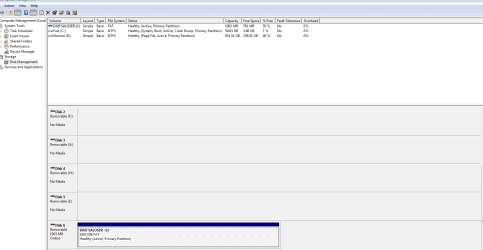
Here it is. This is taken booting from the SSD (C: Fast) that caused all the issues. Note its low on free space but I can free up 10gig once I get it optimised and after I download all the windows updates again.

Actually another question - I think the install backed up the existing windows files, is it possible to run the windows updates from backed up files rather than downloading again?
 

Attachments
  • Capture.PNG
    Capture.PNG
    21 KB · Views: 3

My Computer My Computer

Computer type
PC/Desktop
OS
w7 premium x64
Physically disconnect D:, then test to see that the PC reboots.
 

My Computer My Computer

Computer type
PC/Desktop
Computer Manufacturer/Model Number
Golden Mk. I.4
OS
Windows 10 Pro x64 ; Xubuntu x64
CPU
Intel i7 860 @ 2.80 GHz O/C'ed to 4.0GHz
Motherboard
Gigabyte P55A-UD3R Rev.1. Award BIOS F13
Memory
16GB Corsair Vengance DDR3 @ 661 MHz Dual Channel (9-9-9-24)
Graphics Card(s)
EVGA NVidia GTX 560 1024MB
Sound Card
Realtek Integrated
Monitor(s) Displays
Dual Samsung SyncMaster 2494HS
Screen Resolution
1920*1080 and 1920*1080
Hard Drives
1*Samsung 840 EVO 120GB SSD;
1*OCZ Vertex 2 60GB SSD;
2*Samsung F3 SpinPoint 1TB in RAID0;
1*Samsung F1 SpinPoint 1TB;
2*Western Digital 1TB External USB 3.0
1*Western Digital 500GB External USB 3.0
1*Seagate 500GB External USB 2.0
PSU
Thermaltake ToughPower QFan 750W
Case
Thermaltake Element S VK60001W2Z
Cooling
Corsair H60 Water Cooling, 2*230mm and 2*80mm case fans
Keyboard
Logitech G110
Mouse
Logitech MX518
Yes boots no worries at all and super fast. Plus theres 34 gig of backed up data from previous windows install on the drive which I guess a lot of can eventually be deleted creating a lot more space. Be good if I could aboid having to download all the windows updates again tho :-)
 

My Computer My Computer

Computer type
PC/Desktop
OS
w7 premium x64
Unfortunately, you will have to download them at some point...bite the bullet on that, and get it done.

You can delete the old installation on the HDD.
 

My Computer My Computer

Computer type
PC/Desktop
Computer Manufacturer/Model Number
Golden Mk. I.4
OS
Windows 10 Pro x64 ; Xubuntu x64
CPU
Intel i7 860 @ 2.80 GHz O/C'ed to 4.0GHz
Motherboard
Gigabyte P55A-UD3R Rev.1. Award BIOS F13
Memory
16GB Corsair Vengance DDR3 @ 661 MHz Dual Channel (9-9-9-24)
Graphics Card(s)
EVGA NVidia GTX 560 1024MB
Sound Card
Realtek Integrated
Monitor(s) Displays
Dual Samsung SyncMaster 2494HS
Screen Resolution
1920*1080 and 1920*1080
Hard Drives
1*Samsung 840 EVO 120GB SSD;
1*OCZ Vertex 2 60GB SSD;
2*Samsung F3 SpinPoint 1TB in RAID0;
1*Samsung F1 SpinPoint 1TB;
2*Western Digital 1TB External USB 3.0
1*Western Digital 500GB External USB 3.0
1*Seagate 500GB External USB 2.0
PSU
Thermaltake ToughPower QFan 750W
Case
Thermaltake Element S VK60001W2Z
Cooling
Corsair H60 Water Cooling, 2*230mm and 2*80mm case fans
Keyboard
Logitech G110
Mouse
Logitech MX518
thx again...

So is it not possible to somehow get all the previously installed windows updates from 34 gig of files that the new instal put in a folder called old windows?

Also, how do I seperately uninstall the windows 7 install on the HDD when Im booted from the SSD?

And finally, is it safe to just go ahead and delete the 34 gig "old windows" saved files if I cant use them?
 

My Computer My Computer

Computer type
PC/Desktop
OS
w7 premium x64
I don't know of a way to get the updates off the old install unfortunately.

Just delete the old installation on the HDD, same with Windows.old if it doesn't have any files you need any more.
 

My Computer My Computer

Computer type
PC/Desktop
Computer Manufacturer/Model Number
Golden Mk. I.4
OS
Windows 10 Pro x64 ; Xubuntu x64
CPU
Intel i7 860 @ 2.80 GHz O/C'ed to 4.0GHz
Motherboard
Gigabyte P55A-UD3R Rev.1. Award BIOS F13
Memory
16GB Corsair Vengance DDR3 @ 661 MHz Dual Channel (9-9-9-24)
Graphics Card(s)
EVGA NVidia GTX 560 1024MB
Sound Card
Realtek Integrated
Monitor(s) Displays
Dual Samsung SyncMaster 2494HS
Screen Resolution
1920*1080 and 1920*1080
Hard Drives
1*Samsung 840 EVO 120GB SSD;
1*OCZ Vertex 2 60GB SSD;
2*Samsung F3 SpinPoint 1TB in RAID0;
1*Samsung F1 SpinPoint 1TB;
2*Western Digital 1TB External USB 3.0
1*Western Digital 500GB External USB 3.0
1*Seagate 500GB External USB 2.0
PSU
Thermaltake ToughPower QFan 750W
Case
Thermaltake Element S VK60001W2Z
Cooling
Corsair H60 Water Cooling, 2*230mm and 2*80mm case fans
Keyboard
Logitech G110
Mouse
Logitech MX518
OK thanks. When I try to delete the HDD windows folder it says I need permission from 'trusted installer'?
 

My Computer My Computer

Computer type
PC/Desktop
OS
w7 premium x64
how do I delete all the old windows files? I keep getting "requires permission from 'trusted installer' if I try to delete the files that were saved by the reinstall on both the HDD and SSD? It wont even let me move them? I only have the one user account and it set up as administrator.
 

My Computer My Computer

Computer type
PC/Desktop
OS
w7 premium x64
Hi Golden, thanks again for all your help which helped me get my system up and running.

I did have one more question to help with housekeeping. I want to remove the now unnecessary windows 7 instal on my HDD (I am booting from SSD). But the system wont allow me to do this, indicating that I require 'trusted installer" permission. Is there any easy workaround for this? Its not a biggie though I can just leave it there as long as having the windows installed twice on seperate drives is not likely to ever cause issues in your knowledgeable opinion?

Cheers
 

My Computer My Computer

Computer type
PC/Desktop
OS
w7 premium x64
Trusted installer? It sounds famiilar, but I can't quite remember. Does this pop-up when you attempt to delete Windows.old?

Can you provide a screencapture image that shows the directory structure on the 2nd HDD and the folder/s you are trying to delete?
 

My Computer My Computer

Computer type
PC/Desktop
Computer Manufacturer/Model Number
Golden Mk. I.4
OS
Windows 10 Pro x64 ; Xubuntu x64
CPU
Intel i7 860 @ 2.80 GHz O/C'ed to 4.0GHz
Motherboard
Gigabyte P55A-UD3R Rev.1. Award BIOS F13
Memory
16GB Corsair Vengance DDR3 @ 661 MHz Dual Channel (9-9-9-24)
Graphics Card(s)
EVGA NVidia GTX 560 1024MB
Sound Card
Realtek Integrated
Monitor(s) Displays
Dual Samsung SyncMaster 2494HS
Screen Resolution
1920*1080 and 1920*1080
Hard Drives
1*Samsung 840 EVO 120GB SSD;
1*OCZ Vertex 2 60GB SSD;
2*Samsung F3 SpinPoint 1TB in RAID0;
1*Samsung F1 SpinPoint 1TB;
2*Western Digital 1TB External USB 3.0
1*Western Digital 500GB External USB 3.0
1*Seagate 500GB External USB 2.0
PSU
Thermaltake ToughPower QFan 750W
Case
Thermaltake Element S VK60001W2Z
Cooling
Corsair H60 Water Cooling, 2*230mm and 2*80mm case fans
Keyboard
Logitech G110
Mouse
Logitech MX518
Back
Top