W7 Resource Monitor shows activity on wrong drive

mooreg

New member
Local time
5:27 PM
Messages
8
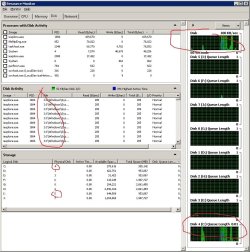
The disk activity graphs in Windows 7 resource monitor show what appears to be an identical amount of activity on my system drive (C:) and also on a drive I use for data storage (I:). In the activty pane where it shows file access, it shows ALL the activity as taking place on the second drive (I:). None of the files exist on that drive, of course.

Any ideas on what may be going on? Or is this just a bug with the display?

Thanks,
Gerald
 

My Computer My Computer

At a glance

Windows 7 x64 Ultimate
Computer type
PC/Desktop
OS
Windows 7 x64 Ultimate
Hi mooreg and welcome to Seven Forums.

Could you please post a screen shot off what you are seeing.

It would be really helpful
 

My Computer My Computer

At a glance

Windows 7 Ultimate 64-bitIntel Core 2 Duo E6550 @2.33GHz4GB DDR"NVIDIA GeForce 8600 GS
Computer type
PC/Desktop
Computer Manufacturer/Model Number
Dell / Lenovo g550
OS
Windows 7 Ultimate 64-bit
CPU
Intel Core 2 Duo E6550 @2.33GHz
Motherboard
foxconn g33m02
Memory
4GB DDR"
Graphics Card(s)
NVIDIA GeForce 8600 GS
Hard Drives
HDD 1 = 150GB
HDD 2 = 1.5TB
PSU
450W
Cooling
Stock fan
Internet Speed
12Mb
Antivirus
AVG Internet Security
I think you are confusing 'drive' and 'partition'. Your C and I are probably two partitions on the same physical drive - and those are always shown together. Resource Monitor cannot distinguish between different partitions on the same physical device.

In my picture I have 3 physical drives and 5 partitions ==> C, M and E,Z,L. The last 3 partitions are on the same physical drive.


My Computer My Computer

At a glance

Vista, Windows7, Mint Mate, Zorin, Windows 8from 1.6GHz Duo to i7
Computer Manufacturer/Model Number
HP, Dell, Gateway, Toshiba - 4 laptops and 2 desktops
OS
Vista, Windows7, Mint Mate, Zorin, Windows 8
CPU
from 1.6GHz Duo to i7
Monitor(s) Displays
2x HP w2207
Hard Drives
5x HDD, 7x SSD, 12x Externals
Keyboard
with trackball - no mices
Mouse
Trackball mice
Internet Speed
DSL 6000
I think you are confusing 'drive' and 'partition'. Your C and I are probably two partitions on the same physical drive - and those are always shown together. Resource Monitor cannot distinguish between different partitions on the same physical device.

In my picture I have 3 physical drives and 5 partitions ==> C, M and E,Z,L. The last 3 partitions are on the same physical drive.


Just what I thought :) that's why I wanted a screen shot :)
 

My Computer My Computer

At a glance

Windows 7 Ultimate 64-bitIntel Core 2 Duo E6550 @2.33GHz4GB DDR"NVIDIA GeForce 8600 GS
Computer type
PC/Desktop
Computer Manufacturer/Model Number
Dell / Lenovo g550
OS
Windows 7 Ultimate 64-bit
CPU
Intel Core 2 Duo E6550 @2.33GHz
Motherboard
foxconn g33m02
Memory
4GB DDR"
Graphics Card(s)
NVIDIA GeForce 8600 GS
Hard Drives
HDD 1 = 150GB
HDD 2 = 1.5TB
PSU
450W
Cooling
Stock fan
Internet Speed
12Mb
Antivirus
AVG Internet Security
Nope. That wasn't from me. The two drives are two physical drives. I'll put up a screen shot later today.

Cheers,
Gerald
 

My Computer My Computer

At a glance

Windows 7 x64 Ultimate
Computer type
PC/Desktop
OS
Windows 7 x64 Ultimate
Yes could you please post a full screen shot of Disk management also.
 

My Computer My Computer

At a glance

Windows 7 Ultimate 64-bitIntel Core 2 Duo E6550 @2.33GHz4GB DDR"NVIDIA GeForce 8600 GS
Computer type
PC/Desktop
Computer Manufacturer/Model Number
Dell / Lenovo g550
OS
Windows 7 Ultimate 64-bit
CPU
Intel Core 2 Duo E6550 @2.33GHz
Motherboard
foxconn g33m02
Memory
4GB DDR"
Graphics Card(s)
NVIDIA GeForce 8600 GS
Hard Drives
HDD 1 = 150GB
HDD 2 = 1.5TB
PSU
450W
Cooling
Stock fan
Internet Speed
12Mb
Antivirus
AVG Internet Security
Here is what I have. I notice the graphic at the top is actually showing all disks, and not disk I as I originally thought. But why is the activity panel showing the path as disk I when the activity is clearly shown on disk C, which is the OS disk?

The storage panel shows essentially what is in disk management. They're all basic disks.
 

Attachments

  • resmon.jpg
    resmon.jpg
    122.3 KB · Views: 18

My Computer My Computer

At a glance

Windows 7 x64 Ultimate
Computer type
PC/Desktop
OS
Windows 7 x64 Ultimate
Partition I: Seems to have a OS on it as you can see the file path "I:\Windows\Sys"

Extend it fully to see the full path
 

My Computer My Computer

At a glance

Windows 7 Ultimate 64-bitIntel Core 2 Duo E6550 @2.33GHz4GB DDR"NVIDIA GeForce 8600 GS
Computer type
PC/Desktop
Computer Manufacturer/Model Number
Dell / Lenovo g550
OS
Windows 7 Ultimate 64-bit
CPU
Intel Core 2 Duo E6550 @2.33GHz
Motherboard
foxconn g33m02
Memory
4GB DDR"
Graphics Card(s)
NVIDIA GeForce 8600 GS
Hard Drives
HDD 1 = 150GB
HDD 2 = 1.5TB
PSU
450W
Cooling
Stock fan
Internet Speed
12Mb
Antivirus
AVG Internet Security
That is why I am so confused. Disk I is a data disk. The OS is on C. All the activity in the graphs is shown on C. There is literally no activity shown on the graphs for disk I. So, either the activity panel is incorrect (which I believe to be true) or else the graphs are incorrect.
 

My Computer My Computer

At a glance

Windows 7 x64 Ultimate
Computer type
PC/Desktop
OS
Windows 7 x64 Ultimate
Yes very strange.

I know this is stupid, but have you tried a restart on the computer.

Also I would run the sfc /scannow command
 

My Computer My Computer

At a glance

Windows 7 Ultimate 64-bitIntel Core 2 Duo E6550 @2.33GHz4GB DDR"NVIDIA GeForce 8600 GS
Computer type
PC/Desktop
Computer Manufacturer/Model Number
Dell / Lenovo g550
OS
Windows 7 Ultimate 64-bit
CPU
Intel Core 2 Duo E6550 @2.33GHz
Motherboard
foxconn g33m02
Memory
4GB DDR"
Graphics Card(s)
NVIDIA GeForce 8600 GS
Hard Drives
HDD 1 = 150GB
HDD 2 = 1.5TB
PSU
450W
Cooling
Stock fan
Internet Speed
12Mb
Antivirus
AVG Internet Security
It's probably been a while since it rebooted. Usually I only do that when Windows update asks for it.

I'll run SFC at some point this weekend and see what happens.
 

My Computer My Computer

At a glance

Windows 7 x64 Ultimate
Computer type
PC/Desktop
OS
Windows 7 x64 Ultimate
Ya maybe you should try a reboot on the system to see if it helps and also run the sfc command if that doesn't fix it
 

My Computer My Computer

At a glance

Windows 7 Ultimate 64-bitIntel Core 2 Duo E6550 @2.33GHz4GB DDR"NVIDIA GeForce 8600 GS
Computer type
PC/Desktop
Computer Manufacturer/Model Number
Dell / Lenovo g550
OS
Windows 7 Ultimate 64-bit
CPU
Intel Core 2 Duo E6550 @2.33GHz
Motherboard
foxconn g33m02
Memory
4GB DDR"
Graphics Card(s)
NVIDIA GeForce 8600 GS
Hard Drives
HDD 1 = 150GB
HDD 2 = 1.5TB
PSU
450W
Cooling
Stock fan
Internet Speed
12Mb
Antivirus
AVG Internet Security
The graphs are not incorrect, Resource Monitor is not incorrect. If they were, the whole system would be incorrect, which it might be. What is this "1" folder on the I: drive? That is what is being accessed. In fact it does not look right at all, something is up with your system. "I:1\Windows" is not what would be expected.
 

My Computer My Computer

At a glance

Windows 10 Pro (x64)Intel Core i7-3930K (3.2GHz - 4.5GHz)4x Samsung 4GB PC3-12800 DDR3 (16GB 1600MHz)Nvidia Geforce GTX 690
Computer type
PC/Desktop
Computer Manufacturer/Model Number
Alienware Aurora ALX R4
OS
Windows 10 Pro (x64)
CPU
Intel Core i7-3930K (3.2GHz - 4.5GHz)
Motherboard
Alienware Aurora-R4 x79
Memory
4x Samsung 4GB PC3-12800 DDR3 (16GB 1600MHz)
Graphics Card(s)
Nvidia Geforce GTX 690
Sound Card
SteelSeries Siberia Elite
Monitor(s) Displays
Dell UltraSharp U3011
Screen Resolution
2560x1600
Hard Drives
Samsung 850 Pro 256 GB, Seagate 1TB Desktop Hybrid HDD, 2x Western Digital 4TB Green HDD
PSU
875W Some Dell PSU <.<
Case
Alienware Aurora ALX
Cooling
Custom Liquid Cooling (EK CPU & GPU blocks) dual EK 480RAD
Keyboard
Logitech G710+ Mechanical
Mouse
Logitech G700s
Internet Speed
Verizon Fios (50 mbps average)
Other Info
Server: Intel NUC D54250WYK: i5-4250U, 16GB, 256 GB mSATA, Windows Server 2012 R2
Rebooted no change. SFC reports no abnormalities. I noticed in disk management that disk I was set as active. I changed it to inactive with diskpart and that still did not change anything in resource monitor.

Baffled, but as the system seems to be running fine, I am just going to let it go for now.
 

My Computer My Computer

At a glance

Windows 7 x64 Ultimate
Computer type
PC/Desktop
OS
Windows 7 x64 Ultimate
I'm baffled to :confused: very strange.

@logicearth: Very strange, you would normally only see this on the OS partition. Could be something corrupt, or virus.
 

My Computer My Computer

At a glance

Windows 7 Ultimate 64-bitIntel Core 2 Duo E6550 @2.33GHz4GB DDR"NVIDIA GeForce 8600 GS
Computer type
PC/Desktop
Computer Manufacturer/Model Number
Dell / Lenovo g550
OS
Windows 7 Ultimate 64-bit
CPU
Intel Core 2 Duo E6550 @2.33GHz
Motherboard
foxconn g33m02
Memory
4GB DDR"
Graphics Card(s)
NVIDIA GeForce 8600 GS
Hard Drives
HDD 1 = 150GB
HDD 2 = 1.5TB
PSU
450W
Cooling
Stock fan
Internet Speed
12Mb
Antivirus
AVG Internet Security
I'm pretty stumped. Tempted to give MS support a shot at it.
 

My Computer My Computer

At a glance

Windows 7 x64 Ultimate
Computer type
PC/Desktop
OS
Windows 7 x64 Ultimate
I could be crazy.
Notice the top graph in the posted picture does not have a drive letter. My understanding is that is a total of disk activity not any particular disk. All the other graphs have drive letters where one can see what each individual disk is doing.
Also notice the different Queue Lengths.
 

My Computer My Computer

At a glance

Windows 10 Pro. 64/ version 1709 Windows 7 Pr...Intel i7-6800K @ 4.3Corsair Platinum 16 gig @2400EVGA GTX 1070 OC
Computer type
PC/Desktop
Computer Manufacturer/Model Number
Home made Desktop
OS
Windows 10 Pro. 64/ version 1709 Windows 7 Pro/64
CPU
Intel i7-6800K @ 4.3
Motherboard
ASUS X-99 Deluxe II
Memory
Corsair Platinum 16 gig @2400
Graphics Card(s)
EVGA GTX 1070 OC
Monitor(s) Displays
Asus 27" LED LCD/VE278Q
Screen Resolution
1920-1080 or 1280-720 HDMI
Hard Drives
INTEL SSD 730-240 Gb Sata 3.0/
PSU
EVGA Platium 1200W
Case
Phanteks Luxe Tempered Glass 8 fans/ one radiator
Cooling
XSPC/ Water Cooled CPU
Keyboard
Das 4 Professional
Mouse
Logitech M705/MX Anywhere 2-S
Internet Speed
100 mbits
Antivirus
Microsoft Security Essentials/ Malwarebytes Premium 3.0/ SAS
Browser
I.E. 11 default/Firefox/ ISP Time Warner Cable/Spectrum
Other Info
LG BluRay Burner/
Sound system-KLipsch-THX/
Icy Dock ssd Hot Swap bays.
Yeah. The top graph shows total activity. The last graph (if I remember right) shows drive C with lots of activity. The activity panel shows all the files as being on a path that does not exist... I:\1\Windows etc). The graph for drive I shows no activity.
 

My Computer My Computer

At a glance

Windows 7 x64 Ultimate
Computer type
PC/Desktop
OS
Windows 7 x64 Ultimate
Back
Top