

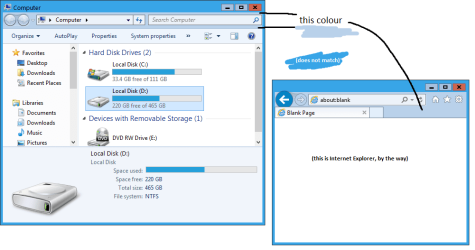
I cannot seem to be able to find the location of the colour of the windows explorer "frame" (below the titlebar and surrounding the address bar and back/forward buttons) when DWM is disabled, as indicated in the attached screenshot. Obviously the reason I want to change this is because the default colour doesn't match with the titlebar colour.
I know it's possible as other themes have managed to change its colour. Any help would be much appreciated. (By the way the same thing applies in IE, if they are separate things in Style Builder please do let me know)
I know it's possible as other themes have managed to change its colour. Any help would be much appreciated. (By the way the same thing applies in IE, if they are separate things in Style Builder please do let me know)
Attachments
My Computer
At a glance
Windows 7 Professional x64Intel Core i5 4690KCorsair Vengeance 16GB DDR3-1600Sapphire Radeon R9 290 Tri-X OC
- Computer type
- PC/Desktop
- OS
- Windows 7 Professional x64
- CPU
- Intel Core i5 4690K
- Motherboard
- Gigabyte Z97X Gaming-3
- Memory
- Corsair Vengeance 16GB DDR3-1600
- Graphics Card(s)
- Sapphire Radeon R9 290 Tri-X OC
- Sound Card
- ONBOARD SOUND :D
- Monitor(s) Displays
- Samsung S24A450BW
- Screen Resolution
- 1920x1200 (16:10 forever)
- Hard Drives
- 250GB Samsung 840 EVO + 2TB Seagate Barracudea
- PSU
- Fractal Design Newton R3 1000W
- Case
- Corsair Graphite 230T
- Cooling
- Cooler Master Hyper 212X
- Keyboard
- Logitech G710+, CM Storm TK
- Mouse
- Steelseries Rival
- Internet Speed
- Australian
- Antivirus
- Avast, because I'm cheap
- Browser
- All the browsers!


