W7 System Imaging

Chipper

Banned
Local time
9:50 PM
Messages
33
Location
Massachusetts
How does W7 System Image compare, say, to Acronis?

What exactly is imaging, as opposed to simply saving something. I've read and re-read about this, and I still don't get it.

I have Acronis and had been constantly updating it's 'imagery'. This was for Vista, when I had it. When I installed W7, other forums told me the Vista Acronis imaging was basically worthless, now, that I did a clean W7 install.

But someone told me to do a certain scan of the empty xtrnl hdd where Acronis resided, to see if I might still be able to recover lost Thunderbird emails. They said I may be able to recover them as long as that xtrnl hdd was still empty.

I got a bunch of file hits from this scan, even ones dealing with email, but haven't been able to open or access them.

I know I may have strayed from my original post, but I had to get this out, because when I bought-into Acronis, I was told that I would be able to recover all emails. I'm aware, too, I screwed-up (on ill advice) by reformatting that xtrnl hdd with Acronis on it, too quickly.

Is imaging really worth the effort?:confused:
 

My Computer

Computer Manufacturer/Model Number
ACER/AM3100-U3201A
OS
Windows7 (Home Premium)
CPU
AMD Athlon Dual Core 4400+ 2.30Ghz
Motherboard
AMD 690 G
Memory
3.0GB (2.75GB usable)
Graphics Card(s)
ATI Radeon X1200 Series
Sound Card
Audigy SE
Monitor(s) Displays
Liquid Video LCD
Hard Drives
C: (system) 298GB [277GB free]
D: (nonsystem) 232GB [213GB free]
J: MyBook 149GB [109GB free] external
K: MyBook 298GB [291GB free] external
PSU
120v AC ?
Case
?
Cooling
3 fans
How does W7 System Image compare, say, to Acronis?

What exactly is imaging, as opposed to simply saving something. I've read and re-read about this, and I still don't get it.

I have Acronis and had been constantly updating it's 'imagery'. This was for Vista, when I had it. When I installed W7, other forums told me the Vista Acronis imaging was basically worthless, now, that I did a clean W7 install.

But someone told me to do a certain scan of the empty xtrnl hdd where Acronis resided, to see if I might still be able to recover lost Thunderbird emails. They said I may be able to recover them as long as that xtrnl hdd was still empty.

I got a bunch of file hits from this scan, even ones dealing with email, but haven't been able to open or access them.

I know I may have strayed from my original post, but I had to get this out, because when I bought-into Acronis, I was told that I would be able to recover all emails. I'm aware, too, I screwed-up (on ill advice) by reformatting that xtrnl hdd with Acronis on it, too quickly.

Is imaging really worth the effort?:confused:

If you have anything important to you on your computer you should image. Lets say you install the Win7 OS, you put your programs on the HD, you have some important mail that you are saving, you may, also, have some pics that can never be replaced. All of a sudden you hear tick tick tick, but before you know what happend your hard drive is toast. If you had an image, all you have to do is buy a new hard drive and put that image on the new drive. You have lost nothing. You saved your pics, mail programs and OS.

Without the image, you lost everything.

Is it worth is yes. Should you have bought Acronis, maybe? There are a lot of free appl that do the same thing, I use Paragon, and I love it.

My advice, learn how to use Acronis, make a copy of your hard drive and store it on an external hard drive. Once a week, once a month or whatever makes you happy, update the image and put it in a safe place. Your hard drive fails, or your computer falls off the desk or is stolen, you lost nothing. Hope I have explained how important an image is.
Richard
 

My Computer

Computer type
PC/Desktop
Computer Manufacturer/Model Number
Dell XPS 420
OS
Windows 10, Home Clean Install
CPU
Intel Core2 processsor Q8200(2.33Ghz 1333FSB) Quad Core Tech
Motherboard
Dell
Memory
6 gb
Graphics Card(s)
ATI Radeon 256MB HD3650
Sound Card
Intergrated 7.1 Channel Audio
Monitor(s) Displays
Dell SP2009W 20"
Hard Drives
640 GB Serial ATA Hard drive
Cooling
Fan
Keyboard
Dell USB Keyboard
Mouse
Dell Premium Optical USB
Internet Speed
DSL 2.85
Chipper:

In my opinion, you should NOT rely on imaging precisely because you can't rely on it. It usually works, damn near always works, etc--that isn't good enough for data backup.

It is still worthwhile--because it usually works. Just don't count on it.

My advice: use it to back up your Windows 7 installation. If you have to reinstall Windows, imaging will save you the trouble of reinstalling all of your programs--assuming it works.

Because imaging is not completely reliable, use other measures to back up your email, videos, mp3 files, and any other personal data you have.

There are free imaging alternatives to Acronis. Windows 7 has imaging built in, but some on this forum have found issues with it.

One that is well-regarded and very easy to use is Macrium Reflect Free Edition.

You can get it here:

Macrium Reflect FREE Edition - Information and download

The only issue with it is that you MUST use a rescue CD disk to restore an image. You can create the rescue disk in a few minutes after installing the program. If you need to restore, you put the rescue disk in your CD drive and boot from it to gain access to your previously created image file.

If you try Macrium, make an image file and a rescue disk. Then boot from the rescue disk to confirm to your own satisfaction that you can actually access the image file. Don't actually do the restoration. It's just good policy to confirm that the rescue disk is usable. Make a new image file periodically--maybe every month or two when your system is working well.

Store the operating system image on some other drive--either internal or external.

Usually, system restore will bail you out. Image files are usually for more serious situations when system restore won't help.
 

My Computer

Computer type
PC/Desktop
Computer Manufacturer/Model Number
Ignatz Special; 4 speed manual gearbox; factory air conditioning; one of one
OS
Windows 7 Home Premium SP1, 64-bit
CPU
Intel Skylake i5-6600K, not overclocked
Motherboard
AsRock Z170M Extreme 4, micro ATX
Memory
8 GB HyperX DDR4-2666 (2 x 4 GB)
Graphics Card(s)
none; graphics are integrated on CPU
Sound Card
onboard: Realtek ALC1150; external: USB Behringer UF0-202
Monitor(s) Displays
Dell S2340M 23 inch IPS
Screen Resolution
1600 x 900
Hard Drives
System: Crucial MX100 series SSD, 128 GB;
Data: Samsung Spinpoint 103SJ, 1 TB;
Backup: WD Caviar Green WD30EZRX-00D8PB0, 3 TB
PSU
Rosewill SilentNight 500 watt fanless, semi-modular
Case
Antec Solo II
Cooling
Noctua NH-U12S; Noctua F12 intake, Noctua S12A exhaust
Keyboard
Microsoft 200 6JH-00001 USB
Mouse
Dell or Microsoft optical wired; USB
Antivirus
Microsoft Security Essentials and Malwarebytes Premium
Browser
Pale Moon
Other Info
All fans PWM; speeds at idle: CPU circa 500 rpm; intake circa 600 rpm; exhaust circa 600 rpm; CPU temps 27 idle and 47 C load in a warm room (27 C/81 F) when running Intel Extreme Tuning Utility stress test.
I agree with ignatzatsonic.
Backup your HD with an image as often as you feel it is needed. This decision depends on how much data you add each day that is critical if lost.

On top of imaging I also copy all my data every few days to my backup drive.
This includes, word, excel, pictures, Outlook.pst files.

This way I actually have two backup. I also keep about 5 to 6 image backups especially if I'm installing new software. I actually have my original image of Win7 after I updated Win7 and all the drivers.

I know too many prople that actually cry when they lose all their data because of virus or HD failure. If your data is not that important to you then don't worry about it.

My 2 cents
 

My Computer

Computer type
PC/Desktop
Computer Manufacturer/Model Number
Self Built
OS
Windows 10 Pro
CPU
Intel i5
Motherboard
I have a fatherboard
Memory
I'm old and lost a few chips
Graphics Card(s)
Yup
Sound Card
Yup
Monitor(s) Displays
Samsung 32" UHD
Screen Resolution
3840 x 2160
Hard Drives
Samsung 860 EVO drives
PSU
450 Watt and some fans that blow
Case
Small tower
Cooling
Yes I am cool. lol
Keyboard
Who needs a keyboard?
Mouse
Logitech Laser G7 wireless
Internet Speed
Zippy fast UP and DOWN
Antivirus
I got a shot
Browser
The new Improved EDGE 2020
On another note, I always create images using a boot CD (Acronis in my case), I'm not comfortable creating them while the OS is running. I've been doing this for years and haven't had errors with creation/restores.
 

My Computer

OS
Windows XP Pro, Windows 7
I do backups with Acronis,on an external HDD, but I have never done an image.....seems like this is something I should look into.
 

My Computer

Computer type
PC/Desktop
Computer Manufacturer/Model Number
Gigabyte Technology Co., Ltd.
OS
Win 7 Ultimate 64-bit SP1 (desktop)
CPU
Intel Core 2 Duo E8400
Motherboard
Gigabyte GA-EP35-DS3R
Memory
2x 2GB OCZ DDR II SDRAM PC2-6400
Graphics Card(s)
NVIDIA GeForce 9400GT
Monitor(s) Displays
HP 2009m(primary), Acer P191W
Screen Resolution
1600x900, 1440x900
Hard Drives
Internal:WD Caviar Black 640GB 32MB cache 7200RPM
External:Samsung Story Station 1TB HDD desktop drive
500GB Toshiba portable drive
PSU
Antec Earthwatts EA500D
Case
Antec Sonata III
Cooling
4 fans
Keyboard
Logitech Wave
Mouse
Logitech M-SBF90
Internet Speed
Slow due to home Wireless-G router
Antivirus
MSE, Hitman Pro, Malwarebytes
Browser
Chrome and Palemoon
Other Info
Laptop....Acer 5750Z-4835
15.6" HD Widescreen CineCrystal™ LED-backlit LCD Display: (1366x768 resolution, 16:9 aspect ratio)
Intel® Pentium® Processor B940 (2.0GHz, 2MB L3 cache)
Windows® 7 Home Premium,500GB Hard Drive,4GB DDR3 RAM, Intel® HD Graphics,8X DVD-Super Multi Double-Layer Drive
Multi-in-1 Digital Media Card Reader,802.11b/g/n Wi-Fi
Chrome and Palemoon, MSE, Hitman Pro
Perhaps Im misunderstanding the OP. If I am, apologies.

Acronis (at least 2010) itself works just fine under 7, as well as many other imaging programs suggested here. Whichever you prefer/most comfortable using.


if you're wanting to recover emails:

Provided you still have the image of Vista you should be able to recover emails.
If you indeed deleted it, then for future reference:


While the Image of the OS itself is not good, (it will restore Vista)
it IS good to recover certain files. Just do NOT restore the entire image, or you'll end back with Vista.

When you open Acronis just choose <<Recover Files and Folders>>.

from here, guide it to the location of the Image, (secure zone, partition where ever you were saving images and the old one resides)

you should now be looking at a complete folder structure to browse of that Vista installation.

Just find your emails and restore those files (you'll likely need to know the exact location Thunderbird stores them)
Make sure only the folder/files you want are checked and nothing else.

Once you find them you should be able to restore ONLY those files.

this should also work for Pictures, Videos, Music

Once you have all the old data you needed, and are happy, you can then delete the old image and prep the secure zone(or partition) for Win7 images as you normally would
 

My Computer

Computer Manufacturer/Model Number
Custom (Self Build)
OS
Windows 7 Home Premium 64bit
CPU
Intel Core i7 2700k
Motherboard
eVGA P67 SLI
Memory
8GB Mushkin Redline Ridgebacks @1866
Graphics Card(s)
EVGA GTX570 SC
Sound Card
XiFi Titanium HD
Monitor(s) Displays
LG W2453V
Screen Resolution
1920x1080
Hard Drives
Intel 320 80GB -- Intel X25-V 40GB --WD Black 1TB x2 -- WD Blue 640GB
PSU
Seasonic x750
Case
Corsair 600T SE White
Cooling
eVGA Superclocked CPU Cooler
Keyboard
Saitek Cyborg
Antivirus
Kaspersky
Browser
IE
Other Info
LG BD/DVD
The OP has deleted/formatted the partition that his Acronis install was on - if I understand correctly - he has lost the app. itself. Presumably he no longer has the installer, the key, etc.

Also, presumably, it was an older version.

There are some excellent free alternatives that work great on 7:

PARAGON:

Paragon Backup & Recovery 10 Free Edition

How to Create an Image with Paragon B&R 10

How to Restore Data with Paragon B&R 10


MACRIUM:

Macrium Reflect FREE Edition - Information and download

How to create a disk image with Macrium Reflect

How to create the Macrium Linux rescue CD

How to recover your PC using the Linux rescue CD
 

My Computers

System One System Two

  • Computer type
    PC/Desktop
    OS
    7 X64
    CPU
    i5 8400
    Motherboard
    gigabyte b365m ds3h
    Memory
    2x8gb 3200mhz
    Hard Drives
    various
    PSU
    pure power 11 400w cm
    Case
    Coolermaster
    Cooling
    cryorig m9i
  • Computer type
    PC/Desktop
    OS
    7x64
    CPU
    g5400
    Motherboard
    ga b365m ds3h
    Memory
    8gb ddr4 2400
    PSU
    xfx pro 450w
I prefer doing clean installs; each one is like doing a puzzle for me.

However, there is a time when having the ability to reimage my HD in 15 minutes, instead of spend 3 hours or 3 days reinstalling, is a great relief - such as maybe a day after I've installed.

So I keep a Win7 backup image in a primary partition on all of my computers, backed up to a folder in an external drive. The Win7 DVD only has to be booted to reimage my HDD's.

Following SIW2's advice on how to get a failsafe image backup, I created a second backup on each machine using another program. Right now it is the very cool Paragon HD manager 2009 backup capsule hidden at the end of the HD which can be activated by tapping the F1 key at bootup.
 
I want to thank everyone for your input. I must say, I messed up and tried to put two topics in one.
First off: I've been doing a complete C:\ image every week for over a year when I had Vista (imaging the entire drive took longer, but those incrmntl/diffrntl alternatives were just too confusing. Acronis itself is a bit confusing - the biggest complaint - is how can you be sure anything is actually being imaged, without actually viewing it? (from time to time)
I also save entire C:\ as well (although not as frequently as imaging).

There's only a handful of things I care to save, anyway. Emails are one (music and photos are the others).

The second deal is: After I did a clean W7 install, folks on another forum, said that the Acronis (Vista) imaging I had been doing all along, will do me no good with W7. With that in mind, I immediately reformatted extrnl hdd K: with Acronis as the only program on it. It's empty now.
When I went to another xtrnl hdd to retrieve [saved] Thunderbird from Program Files (Vista again). I quickly found out that I couldn't retrieve any emails.

So then someone on the other forum said there is a way to do a scan on an empty re-formatted drive and possibly pick up those emails. So I did this scan, and sure enough, many files [including some emails] were pulled up. I saved the results somewhere, but today, I can't seem to locate them. When I couldn't open them up and/or reinstall them in T-Bird, I may have given up and deleted the scan.
I'd like to try it again, but I don't remember what the scan program was, and as luck would have it, the other forum is presently down, so I can't do a search on it now.

BTW - Thanks also for the 'free' image links. I may give those a try. Acronis is v.11, and it's been updated since I put it back on W7.
 
Last edited:

My Computer

Computer Manufacturer/Model Number
ACER/AM3100-U3201A
OS
Windows7 (Home Premium)
CPU
AMD Athlon Dual Core 4400+ 2.30Ghz
Motherboard
AMD 690 G
Memory
3.0GB (2.75GB usable)
Graphics Card(s)
ATI Radeon X1200 Series
Sound Card
Audigy SE
Monitor(s) Displays
Liquid Video LCD
Hard Drives
C: (system) 298GB [277GB free]
D: (nonsystem) 232GB [213GB free]
J: MyBook 149GB [109GB free] external
K: MyBook 298GB [291GB free] external
PSU
120v AC ?
Case
?
Cooling
3 fans
Thank you so much for your kind words. There is no right or wrong, if you are happy it is right for you. The Happiest and Healthiest New Years wish for you and your loved ones.
 

My Computer

Computer type
PC/Desktop
Computer Manufacturer/Model Number
Dell XPS 420
OS
Windows 10, Home Clean Install
CPU
Intel Core2 processsor Q8200(2.33Ghz 1333FSB) Quad Core Tech
Motherboard
Dell
Memory
6 gb
Graphics Card(s)
ATI Radeon 256MB HD3650
Sound Card
Intergrated 7.1 Channel Audio
Monitor(s) Displays
Dell SP2009W 20"
Hard Drives
640 GB Serial ATA Hard drive
Cooling
Fan
Keyboard
Dell USB Keyboard
Mouse
Dell Premium Optical USB
Internet Speed
DSL 2.85
Chipper.....which Acronis do you have, exactly? My computer's builder told me he had to upgrade to Acronis True Image Home 2010 to be compatible with this machine....and he was previously running this machine with Vista Ultimate and the older Acronis.....so it seems the OS was the difference. :geek:
 

My Computer

Computer type
PC/Desktop
Computer Manufacturer/Model Number
Gigabyte Technology Co., Ltd.
OS
Win 7 Ultimate 64-bit SP1 (desktop)
CPU
Intel Core 2 Duo E8400
Motherboard
Gigabyte GA-EP35-DS3R
Memory
2x 2GB OCZ DDR II SDRAM PC2-6400
Graphics Card(s)
NVIDIA GeForce 9400GT
Monitor(s) Displays
HP 2009m(primary), Acer P191W
Screen Resolution
1600x900, 1440x900
Hard Drives
Internal:WD Caviar Black 640GB 32MB cache 7200RPM
External:Samsung Story Station 1TB HDD desktop drive
500GB Toshiba portable drive
PSU
Antec Earthwatts EA500D
Case
Antec Sonata III
Cooling
4 fans
Keyboard
Logitech Wave
Mouse
Logitech M-SBF90
Internet Speed
Slow due to home Wireless-G router
Antivirus
MSE, Hitman Pro, Malwarebytes
Browser
Chrome and Palemoon
Other Info
Laptop....Acer 5750Z-4835
15.6" HD Widescreen CineCrystal™ LED-backlit LCD Display: (1366x768 resolution, 16:9 aspect ratio)
Intel® Pentium® Processor B940 (2.0GHz, 2MB L3 cache)
Windows® 7 Home Premium,500GB Hard Drive,4GB DDR3 RAM, Intel® HD Graphics,8X DVD-Super Multi Double-Layer Drive
Multi-in-1 Digital Media Card Reader,802.11b/g/n Wi-Fi
Chrome and Palemoon, MSE, Hitman Pro
Thunderbird mail is not found in C:\program files.

Thunderbird mail is at C:\Users\Yourusername\appdata\roaming\Thunderbird--actually in a subfolder of this location.

You should back up that Thunderbird folder if you want to back up email.

For most people, making weekly images is excessive unless you are making a lot of significant system changes, lots of program installs and uninstalls, experimentation, etc. For typical users, you would want to make an image when you have most or all of your programs installed and your system is running well--with no signs of viruses, malware, etc. Do a complete check for these bad critters before you make an image--no use making an image of an infected system.

Making weekly images implies that you may be relying on images as your primary data backup. I don't think that is the best policy, but it's your choice.

I'd say you are on the right track by doing only full images rather than incrementals/differentials--they add another layer of complexity and possible confusion.
 

My Computer

Computer type
PC/Desktop
Computer Manufacturer/Model Number
Ignatz Special; 4 speed manual gearbox; factory air conditioning; one of one
OS
Windows 7 Home Premium SP1, 64-bit
CPU
Intel Skylake i5-6600K, not overclocked
Motherboard
AsRock Z170M Extreme 4, micro ATX
Memory
8 GB HyperX DDR4-2666 (2 x 4 GB)
Graphics Card(s)
none; graphics are integrated on CPU
Sound Card
onboard: Realtek ALC1150; external: USB Behringer UF0-202
Monitor(s) Displays
Dell S2340M 23 inch IPS
Screen Resolution
1600 x 900
Hard Drives
System: Crucial MX100 series SSD, 128 GB;
Data: Samsung Spinpoint 103SJ, 1 TB;
Backup: WD Caviar Green WD30EZRX-00D8PB0, 3 TB
PSU
Rosewill SilentNight 500 watt fanless, semi-modular
Case
Antec Solo II
Cooling
Noctua NH-U12S; Noctua F12 intake, Noctua S12A exhaust
Keyboard
Microsoft 200 6JH-00001 USB
Mouse
Dell or Microsoft optical wired; USB
Antivirus
Microsoft Security Essentials and Malwarebytes Premium
Browser
Pale Moon
Other Info
All fans PWM; speeds at idle: CPU circa 500 rpm; intake circa 600 rpm; exhaust circa 600 rpm; CPU temps 27 idle and 47 C load in a warm room (27 C/81 F) when running Intel Extreme Tuning Utility stress test.
Is it OK, or not, to go about business-as-usual when saving and/or imaging?

The same with scanning and running Trend Micro or Secunia, for example?

Or should you just walk away from the PC when these operations are going on?

Sorry, everyone, but I did not get the usual email W7Forum alert, so that's why I posted, and then realized, well, there's been responses. My apologies.
 
Last edited:

My Computer

Computer Manufacturer/Model Number
ACER/AM3100-U3201A
OS
Windows7 (Home Premium)
CPU
AMD Athlon Dual Core 4400+ 2.30Ghz
Motherboard
AMD 690 G
Memory
3.0GB (2.75GB usable)
Graphics Card(s)
ATI Radeon X1200 Series
Sound Card
Audigy SE
Monitor(s) Displays
Liquid Video LCD
Hard Drives
C: (system) 298GB [277GB free]
D: (nonsystem) 232GB [213GB free]
J: MyBook 149GB [109GB free] external
K: MyBook 298GB [291GB free] external
PSU
120v AC ?
Case
?
Cooling
3 fans

My Computers

System One System Two

  • Computer type
    PC/Desktop
    OS
    7 X64
    CPU
    i5 8400
    Motherboard
    gigabyte b365m ds3h
    Memory
    2x8gb 3200mhz
    Hard Drives
    various
    PSU
    pure power 11 400w cm
    Case
    Coolermaster
    Cooling
    cryorig m9i
  • Computer type
    PC/Desktop
    OS
    7x64
    CPU
    g5400
    Motherboard
    ga b365m ds3h
    Memory
    8gb ddr4 2400
    PSU
    xfx pro 450w
Thanks agin' fellas,

I've already downloaded and installed Paragon. I only IMAGED every week as part of protecting the system. I just went on the advice from TOF [the other forum]. At the time [a year or so ago] I had no clue what imaging was all about. I figured you just SAVED stuff, and that was that. Wrong.

I'm now very aware that none of these save/image/anti this/anti that/ programs are 100%. Tuff lesson to learn, but experience and makin' mistakes is the only true teacher.

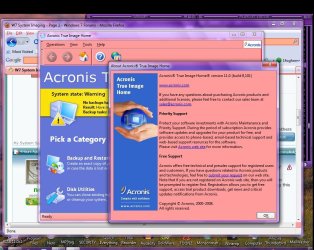
Noob - here is a pic of my present Acronis.
 

Attachments

  • Acronis11.jpg
    Acronis11.jpg
    139.7 KB · Views: 24

My Computer

Computer Manufacturer/Model Number
ACER/AM3100-U3201A
OS
Windows7 (Home Premium)
CPU
AMD Athlon Dual Core 4400+ 2.30Ghz
Motherboard
AMD 690 G
Memory
3.0GB (2.75GB usable)
Graphics Card(s)
ATI Radeon X1200 Series
Sound Card
Audigy SE
Monitor(s) Displays
Liquid Video LCD
Hard Drives
C: (system) 298GB [277GB free]
D: (nonsystem) 232GB [213GB free]
J: MyBook 149GB [109GB free] external
K: MyBook 298GB [291GB free] external
PSU
120v AC ?
Case
?
Cooling
3 fans
Personally, I'm kind of in a rut with Acronis, because I feel that I understand it better, but I also have Paragon and Macrium installed, so to be able to do multiple backups, just in case one program fails. In any case, since my first three attempts to use the built-in backup of W7 froze each time, I have not used it since.
 

My Computer

Computer Manufacturer/Model Number
DIY
OS
W7x64 Pro, SuSe 12.1/** W7 x64 Pro, XP MCE
CPU
Phenom II 1090T w/Noctua NH-D14 /**4400+ X2 w/CM Hyper TX 3
Motherboard
ASRock 890FX Deluxe 4/**A8N-SLI
Memory
2 x 2GB Patriot PGS34g1600LLKA/**4x1GB Corsair VS
Graphics Card(s)
EVGA GTX460 SC/**EVGA 8800GTS
Sound Card
Asus Xonar D2X/**Xonar D1
Monitor(s) Displays
Acer X233H, Dell E152FPc /**LG M237-WD
Screen Resolution
1920x1080 & 1024x768/**1980x1080
Hard Drives
WDC 2TB, 1.5TB, 1TB, 500GB,Seagate 500GB , Maxtor 80GB /**500GB Seagate & WDC 1TB Black
PSU
CM RS600 w/ APC BX1000G/**Antec 500 TP w/ APC BX1000
Case
HAF922/**Antec 1040IIB
Cooling
3x200mm, 1x140 and 1x120mm/**5x80mm fans
Keyboard
Logitech Media USB/**Saitek Eclipse
Mouse
Cordless Trackman Wheel/**Ditto
Internet Speed
3.3Mbps
Other Info
SB 560 5.1 w/ Sennheiser RS140/**Creative T20 speakers, Dvico FusionHDTV7 Gold RT, Cisco E3000, HP 5510V AIO, Linksys E3000, Belkin F5U237 hub and **F5D8055 adapter
(** = 2nd rig)
Thanks agin' fellas,

I've already downloaded and installed Paragon. I only IMAGED every week as part of protecting the system. I just went on the advice from TOF [the other forum]. At the time [a year or so ago] I had no clue what imaging was all about. I figured you just SAVED stuff, and that was that. Wrong.

I'm now very aware that none of these save/image/anti this/anti that/ programs are 100%. Tuff lesson to learn, but experience and makin' mistakes is the only true teacher.

Noob - here is a pic of my present Acronis.

Paragon, wise choice. Im glad that you made that decision.
 

My Computer

Computer type
PC/Desktop
Computer Manufacturer/Model Number
Dell XPS 420
OS
Windows 10, Home Clean Install
CPU
Intel Core2 processsor Q8200(2.33Ghz 1333FSB) Quad Core Tech
Motherboard
Dell
Memory
6 gb
Graphics Card(s)
ATI Radeon 256MB HD3650
Sound Card
Intergrated 7.1 Channel Audio
Monitor(s) Displays
Dell SP2009W 20"
Hard Drives
640 GB Serial ATA Hard drive
Cooling
Fan
Keyboard
Dell USB Keyboard
Mouse
Dell Premium Optical USB
Internet Speed
DSL 2.85
SIW2 - thanks for the T-Bird link. It's now installed.

And, again, to all, I appreciate immensely all of your advice. I feel i have a better handle on this save/image thingy.

And I was not trying to be evasive with "the other forum". I'm a musician and pedal steel player and the forum is: The Steel Guitar Forum

There is a COMPUTER section, and of course this is where I was referrring to. You guys might want to check it out, as well. The SGF is now much more than just a forum for the pedal steel.

One of my good buddies, who I met on the SGF, is Mitch Drumm. He turned me on to W7Forums. I assume he is a member, as well, but I'm not sure.

Anyway...this is just a great place. :)
 

My Computer

Computer Manufacturer/Model Number
ACER/AM3100-U3201A
OS
Windows7 (Home Premium)
CPU
AMD Athlon Dual Core 4400+ 2.30Ghz
Motherboard
AMD 690 G
Memory
3.0GB (2.75GB usable)
Graphics Card(s)
ATI Radeon X1200 Series
Sound Card
Audigy SE
Monitor(s) Displays
Liquid Video LCD
Hard Drives
C: (system) 298GB [277GB free]
D: (nonsystem) 232GB [213GB free]
J: MyBook 149GB [109GB free] external
K: MyBook 298GB [291GB free] external
PSU
120v AC ?
Case
?
Cooling
3 fans
Thanks for the kind words. You will always be welcome here. Have a healthy and happy New Year
 

My Computer

Computer type
PC/Desktop
Computer Manufacturer/Model Number
Dell XPS 420
OS
Windows 10, Home Clean Install
CPU
Intel Core2 processsor Q8200(2.33Ghz 1333FSB) Quad Core Tech
Motherboard
Dell
Memory
6 gb
Graphics Card(s)
ATI Radeon 256MB HD3650
Sound Card
Intergrated 7.1 Channel Audio
Monitor(s) Displays
Dell SP2009W 20"
Hard Drives
640 GB Serial ATA Hard drive
Cooling
Fan
Keyboard
Dell USB Keyboard
Mouse
Dell Premium Optical USB
Internet Speed
DSL 2.85
Back
Top