Solved W7 system: suddenly long boots and periods of ultra slow performance

rhodesengr

New member
Local time
4:38 PM
Messages
24
I have a W7 Professional system running an i7. It was working ok until yesterday. Started by noticing the sound system had stopped working. There was a red X through the speaker icon in the lower right corner. So I rebooted. It went into a chksdk mode (that made me nervous) and then booted but taking much longer than usual. The normal screen eventually came up but the disk access light stayed on for maybe 10 minutes during which I was getting about zero performance. During the boot I got an error message "could not start event service, standard users may not be able to log onEventually the disk access light went off so I tried a few things and the light came back on solid again, stayed on for a numkber of minutes, then went off again. The desktop had changed a little just some changes in the sizes of things and colors. Not sure exactly but the screen just looked a little different.

So something has changed but I don't really know what. I am not sure how to diagnose the problem. While the light is on, I can not bring up task manager.

Things I could try that I know about:
1. I have a disk image from afew weeks ago. I could restore back to that disk image.
2. Try a system restore point. Not sure which ones are in there (PC is at home and I am at worknow).
3. Repair install. I just made a DVD for repaire install.

So i could use some advice on how best to proceed; which order to try things, and maybe there are some things to try not on my list. I ran Hijackthis and don't see anything obvious loading like malware. Just seems like the system is having a problem. Also, I ran Symantec Endpoint Protection, did a full scan last night and it found nothing.

Thanks in advance,
Mark
 

My Computer My Computer

At a glance

W7 pro at home, W7 Enterprise at worki7 at home
Computer Manufacturer/Model Number
QES Computers at home Dell at work
OS
W7 pro at home, W7 Enterprise at work
CPU
i7 at home
Your specs show you are using Enterprise and your post states Professional. Just want to be sure what we are working with.
My first choice would be a restore point. At that point because your system has changed and you didn't do the changing I would be thinking of a possible infection. Two programs I recommend and have used.
http://www.sevenforums.com/tutorials/166445-windows-defender-offline.html
---------------
Free Online Virus Scanner | ESET


Pleas let us know if any infection were found and what they were.
 

My Computer My Computer

At a glance

Windows 10 Pro. 64/ version 1709 Windows 7 Pr...Intel i7-6800K @ 4.3Corsair Platinum 16 gig @2400EVGA GTX 1070 OC
Computer type
PC/Desktop
Computer Manufacturer/Model Number
Home made Desktop
OS
Windows 10 Pro. 64/ version 1709 Windows 7 Pro/64
CPU
Intel i7-6800K @ 4.3
Motherboard
ASUS X-99 Deluxe II
Memory
Corsair Platinum 16 gig @2400
Graphics Card(s)
EVGA GTX 1070 OC
Monitor(s) Displays
Asus 27" LED LCD/VE278Q
Screen Resolution
1920-1080 or 1280-720 HDMI
Hard Drives
INTEL SSD 730-240 Gb Sata 3.0/
PSU
EVGA Platium 1200W
Case
Phanteks Luxe Tempered Glass 8 fans/ one radiator
Cooling
XSPC/ Water Cooled CPU
Keyboard
Das 4 Professional
Mouse
Logitech M705/MX Anywhere 2-S
Internet Speed
100 mbits
Antivirus
Microsoft Security Essentials/ Malwarebytes Premium 3.0/ SAS
Browser
I.E. 11 default/Firefox/ ISP Time Warner Cable/Spectrum
Other Info
LG BluRay Burner/
Sound system-KLipsch-THX/
Icy Dock ssd Hot Swap bays.
Sorry for the confusion. The specs are for my system at work which is in fact W7 Enterprise. When I posted here last year my issue was with my work PC.

Now my problem is with my home PC which is W7 Pro 64 bit.

I was thinking about trying SFC /scannow before trying the restore point.

You think the scan progorams you suggested are worth doing even if SEP (symantec endpoint protection) found nothing? I am happy to do whatever makes sense.
 

My Computer My Computer

At a glance

W7 pro at home, W7 Enterprise at worki7 at home
Computer Manufacturer/Model Number
QES Computers at home Dell at work
OS
W7 pro at home, W7 Enterprise at work
CPU
i7 at home
No one anti virus program is a 100%. That is why I use several at times. Malwarebytes Anti Malware is another great program. Something made changes to your computer without your permission. It might of been a innocent program that made a mistake or a bad program trying to mess your computer up. I would never trust just one program to protect my computers. Please keep in mind that only one anti virus program should be install at one time. The programs I have suggested I run while MSE is in use on my computers with no problems. When done you can just remove the programs you don't want.
At this time I run
MSE active
MAM Pro active
SAS on demand
PSI 3.0 on demand
Filehippo Update Checker on demand
Windows 7 built in firewall
About every 4 to 5 weeks I scan with ESET. If any problems are found I use Defender Off Line. I check Windows Updates 3 to 4 times a day.
------------
This is what you don't want to have to go through and it was caused by a false positive.
http://www.sevenforums.com/system-security/261979-help-zbot-infection.html
 

My Computer My Computer

At a glance

Windows 10 Pro. 64/ version 1709 Windows 7 Pr...Intel i7-6800K @ 4.3Corsair Platinum 16 gig @2400EVGA GTX 1070 OC
Computer type
PC/Desktop
Computer Manufacturer/Model Number
Home made Desktop
OS
Windows 10 Pro. 64/ version 1709 Windows 7 Pro/64
CPU
Intel i7-6800K @ 4.3
Motherboard
ASUS X-99 Deluxe II
Memory
Corsair Platinum 16 gig @2400
Graphics Card(s)
EVGA GTX 1070 OC
Monitor(s) Displays
Asus 27" LED LCD/VE278Q
Screen Resolution
1920-1080 or 1280-720 HDMI
Hard Drives
INTEL SSD 730-240 Gb Sata 3.0/
PSU
EVGA Platium 1200W
Case
Phanteks Luxe Tempered Glass 8 fans/ one radiator
Cooling
XSPC/ Water Cooled CPU
Keyboard
Das 4 Professional
Mouse
Logitech M705/MX Anywhere 2-S
Internet Speed
100 mbits
Antivirus
Microsoft Security Essentials/ Malwarebytes Premium 3.0/ SAS
Browser
I.E. 11 default/Firefox/ ISP Time Warner Cable/Spectrum
Other Info
LG BluRay Burner/
Sound system-KLipsch-THX/
Icy Dock ssd Hot Swap bays.
I ran sfc /scannow and it found two corrupt files. I went through the manual extract and replace process, ran sfc a second time it the same two files are corrputed. I rebooted and ran sfc a third time and the same two files are corrupted. I potsed the most recent lof file section below. How come if i replace them and recan they are still corrupted?


2012-11-20 18:42:14, Info CSI 000002f8 [SR] Cannot repair member file [l:28{14}]"powershell.exe" of Microsoft-Windows-PowerShell-Exe, Version = 6.1.7600.16385, pA = PROCESSOR_ARCHITECTURE_AMD64 (9), Culture neutral, VersionScope = 1 nonSxS, PublicKeyToken = {l:8 b:31bf3856ad364e35}, Type neutral, TypeName neutral, PublicKey neutral in the store, hash mismatch
2012-11-20 18:42:36, Info CSI 000002f9 [SR] Cannot repair member file [l:20{10}]"wscsvc.dll" of Microsoft-Windows-SecurityCenter-Core, Version = 6.1.7601.17514, pA = PROCESSOR_ARCHITECTURE_AMD64 (9), Culture neutral, VersionScope = 1 nonSxS, PublicKeyToken = {l:8 b:31bf3856ad364e35}, Type neutral, TypeName neutral, PublicKey neutral in the store, hash mismatch
2012-11-20 18:42:36, Info CSI 000002fb [SR] Cannot repair member file [l:28{14}]"powershell.exe" of Microsoft-Windows-PowerShell-Exe, Version = 6.1.7600.16385, pA = PROCESSOR_ARCHITECTURE_AMD64 (9), Culture neutral, VersionScope = 1 nonSxS, PublicKeyToken = {l:8 b:31bf3856ad364e35}, Type neutral, TypeName neutral, PublicKey neutral in the store, hash mismatch
2012-11-20 18:42:36, Info CSI 000002fc [SR] This component was referenced by [l:242{121}]"Microsoft-Windows-Client-Features-Package~31bf3856ad364e35~amd64~~6.1.7601.17514.Microsoft-Windows-Client-Features-Update"
2012-11-20 18:42:41, Info CSI 000002fd [SR] Cannot repair member file [l:20{10}]"wscsvc.dll" of Microsoft-Windows-SecurityCenter-Core, Version = 6.1.7601.17514, pA = PROCESSOR_ARCHITECTURE_AMD64 (9), Culture neutral, VersionScope = 1 nonSxS, PublicKeyToken = {l:8 b:31bf3856ad364e35}, Type neutral, TypeName neutral, PublicKey neutral in the store, hash mismatch
2012-11-20 18:42:41, Info CSI 000002fe [SR] This component was referenced by [l:242{121}]"Microsoft-Windows-Client-Features-Package~31bf3856ad364e35~amd64~~6.1.7601.17514.Microsoft-Windows-Client-Features-Update"
2012-11-20 18:42:41, Info CSI 00000300 [SR] Repair complete
2012-11-20 18:42:41, Info CSI 00000301 [SR] Committing transaction
2012-11-20 18:42:41, Info CSI 00000305 [SR] Verify and Repair Transaction completed. All files and registry keys listed in this transaction have been successfully repaired
 

My Computer My Computer

At a glance

W7 pro at home, W7 Enterprise at worki7 at home
Computer Manufacturer/Model Number
QES Computers at home Dell at work
OS
W7 pro at home, W7 Enterprise at work
CPU
i7 at home
Hi rhodesengr,
Just to rule out a defective hard drive as you had very long disk accesses and are getting corrupt files. Download this program Hard Disk Sentinel - HDD health and temperature monitoring
(free trial) and it will report on the health of your drive.
If you have a rapidly failing drive it will cause these symptoms.
Good Luck :D
Tony.
 

My Computer My Computer

At a glance

Windows 7 x64 Ultimate and numerous virtual m...AMD FX-8350 Vishera 32nm Technology @ 4.2 GHz...G Skill 32.0GB Dual-Channel DDR3 @ 1204MHz (1...EVGA GeForce GTX 960 4GB Super SC ACX 2.0+ wi...
Computer type
PC/Desktop
Computer Manufacturer/Model Number
Bluethunder II
OS
Windows 7 x64 Ultimate and numerous virtual machines
CPU
AMD FX-8350 Vishera 32nm Technology @ 4.2 GHz default
Motherboard
ASUSTeK COMPUTER INC. SABERTOOTH 990FX R2.0 (Socket 942)
Memory
G Skill 32.0GB Dual-Channel DDR3 @ 1204MHz (11-13-13-31)
Graphics Card(s)
EVGA GeForce GTX 960 4GB Super SC ACX 2.0+ with Back Plate
Sound Card
Creative X-Fi Titanium HD Audiophile PCIe
Monitor(s) Displays
LG L227WTG x 3
Screen Resolution
1680 x 1050 16:10
Hard Drives
238GB Samsung850 PRO SATA Disk Device (SSD)
1863GB Seagate ST2000DM 001-1CH164 (SATA)
1397GB Seagate ST1500DL 003-9VT16L(SATA)
466GB Western Digital WDC WD50 03AZEX-00K1GA0 (SATA) x 2
932GB Seagate ST310005 28AS SATA Disk Device (SATA)
PSU
Enermax Revolution87+ 1000 Watts Gold Certified Power Supply
Case
Rocketfish Full Tower
Cooling
Cooler Master Hyper 212 EVO Push Pull 120mm Fans
Keyboard
Logitech K740
Mouse
Logitech G100S Laser LED + Logitech Gamepad F310
Internet Speed
500 mbs down and 30mbs up
Antivirus
Malwarebytes Pro & Avast and MSE on certain Virtual Machines
Browser
Firefox (Main) Chrome, Internet Explorer (Back Up)
Other Info
Logitech X 230 2.1 Stereo System and 5.1 Yamaha RX V2090
B&W DM6 Monitor Speakers + Center and Surround Speakers
Using Mouse Without Borders (Google it)
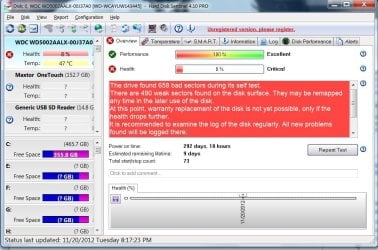
so I ran hard Disk Sentinel. This what i got. So it does look bad for the HD. So the full story is that my HD failed about a month ago and my local shop installed this new one. So this is basically a new drive. There was some other issue with bad sectors so I had run chkdsk /r and I thought that might have fixed it. I ran the WDC utility and it failed that test. I guess I should take it back. What do you think?
The drive found 658 bad sectors during its self test

attachment.php
e are 490 weak sectors found on the disk surface. They may be remapped any time in the later use of the disk.
At this point, warranty replacement of the disk is not yet possible, only if the health drops further.
It is recommended to examine the log of the disk regularly. All new problems found will be logged there.
 

Attachments

  • hard disl test.jpg
    hard disl test.jpg
    108.6 KB · Views: 124

My Computer My Computer

At a glance

W7 pro at home, W7 Enterprise at worki7 at home
Computer Manufacturer/Model Number
QES Computers at home Dell at work
OS
W7 pro at home, W7 Enterprise at work
CPU
i7 at home
Yes, taking it back it is on its way out. I have seen this several times before. Print off a copy of the report for them. 8% is bad. I have never had a false report with that program and I respect the author for a great tool.
That drive cannot be trusted. Make sure you have a back up of all your "stuff" on that drive.
47C is warm too unless you are in a warm part of the world. The warmest one I have runs at 41C having been on all day. Also of note a "NEW DRIVE" with 292 days use on it??
Tony
 
Last edited:

My Computer My Computer

At a glance

Windows 7 x64 Ultimate and numerous virtual m...AMD FX-8350 Vishera 32nm Technology @ 4.2 GHz...G Skill 32.0GB Dual-Channel DDR3 @ 1204MHz (1...EVGA GeForce GTX 960 4GB Super SC ACX 2.0+ wi...
Computer type
PC/Desktop
Computer Manufacturer/Model Number
Bluethunder II
OS
Windows 7 x64 Ultimate and numerous virtual machines
CPU
AMD FX-8350 Vishera 32nm Technology @ 4.2 GHz default
Motherboard
ASUSTeK COMPUTER INC. SABERTOOTH 990FX R2.0 (Socket 942)
Memory
G Skill 32.0GB Dual-Channel DDR3 @ 1204MHz (11-13-13-31)
Graphics Card(s)
EVGA GeForce GTX 960 4GB Super SC ACX 2.0+ with Back Plate
Sound Card
Creative X-Fi Titanium HD Audiophile PCIe
Monitor(s) Displays
LG L227WTG x 3
Screen Resolution
1680 x 1050 16:10
Hard Drives
238GB Samsung850 PRO SATA Disk Device (SSD)
1863GB Seagate ST2000DM 001-1CH164 (SATA)
1397GB Seagate ST1500DL 003-9VT16L(SATA)
466GB Western Digital WDC WD50 03AZEX-00K1GA0 (SATA) x 2
932GB Seagate ST310005 28AS SATA Disk Device (SATA)
PSU
Enermax Revolution87+ 1000 Watts Gold Certified Power Supply
Case
Rocketfish Full Tower
Cooling
Cooler Master Hyper 212 EVO Push Pull 120mm Fans
Keyboard
Logitech K740
Mouse
Logitech G100S Laser LED + Logitech Gamepad F310
Internet Speed
500 mbs down and 30mbs up
Antivirus
Malwarebytes Pro & Avast and MSE on certain Virtual Machines
Browser
Firefox (Main) Chrome, Internet Explorer (Back Up)
Other Info
Logitech X 230 2.1 Stereo System and 5.1 Yamaha RX V2090
B&W DM6 Monitor Speakers + Center and Surround Speakers
Using Mouse Without Borders (Google it)
I am still curious why replacing the bad files did not fix the bad files. Shouldn't replacing them have fixed them?
 

My Computer My Computer

At a glance

W7 pro at home, W7 Enterprise at worki7 at home
Computer Manufacturer/Model Number
QES Computers at home Dell at work
OS
W7 pro at home, W7 Enterprise at work
CPU
i7 at home
I am still curious why replacing the bad files did not fix the bad files. Shouldn't replacing them have fixed them?
There is no answer to that question other than if Windows wrote the files to the exact same location then they would be corrupted as the hard drive must have bad sectors at the write location. Sort of like and MP3 file with a chunk of the music missing or a scratched CD / DVD. How did you 292 days use on it in a month ?:D
 

My Computer My Computer

At a glance

Windows 7 x64 Ultimate and numerous virtual m...AMD FX-8350 Vishera 32nm Technology @ 4.2 GHz...G Skill 32.0GB Dual-Channel DDR3 @ 1204MHz (1...EVGA GeForce GTX 960 4GB Super SC ACX 2.0+ wi...
Computer type
PC/Desktop
Computer Manufacturer/Model Number
Bluethunder II
OS
Windows 7 x64 Ultimate and numerous virtual machines
CPU
AMD FX-8350 Vishera 32nm Technology @ 4.2 GHz default
Motherboard
ASUSTeK COMPUTER INC. SABERTOOTH 990FX R2.0 (Socket 942)
Memory
G Skill 32.0GB Dual-Channel DDR3 @ 1204MHz (11-13-13-31)
Graphics Card(s)
EVGA GeForce GTX 960 4GB Super SC ACX 2.0+ with Back Plate
Sound Card
Creative X-Fi Titanium HD Audiophile PCIe
Monitor(s) Displays
LG L227WTG x 3
Screen Resolution
1680 x 1050 16:10
Hard Drives
238GB Samsung850 PRO SATA Disk Device (SSD)
1863GB Seagate ST2000DM 001-1CH164 (SATA)
1397GB Seagate ST1500DL 003-9VT16L(SATA)
466GB Western Digital WDC WD50 03AZEX-00K1GA0 (SATA) x 2
932GB Seagate ST310005 28AS SATA Disk Device (SATA)
PSU
Enermax Revolution87+ 1000 Watts Gold Certified Power Supply
Case
Rocketfish Full Tower
Cooling
Cooler Master Hyper 212 EVO Push Pull 120mm Fans
Keyboard
Logitech K740
Mouse
Logitech G100S Laser LED + Logitech Gamepad F310
Internet Speed
500 mbs down and 30mbs up
Antivirus
Malwarebytes Pro & Avast and MSE on certain Virtual Machines
Browser
Firefox (Main) Chrome, Internet Explorer (Back Up)
Other Info
Logitech X 230 2.1 Stereo System and 5.1 Yamaha RX V2090
B&W DM6 Monitor Speakers + Center and Surround Speakers
Using Mouse Without Borders (Google it)
Indianatone;2186883 How did you 292 days use on it in a month ?:D[/QUOTE said:
The exact question I asked at my local PC shop when I brought it in this morning. They mumbled something about the manufacturer sometimes does that. This shop has been good over the years but the original HD crashed and now the replacement so I am starting to wonder.

I have two brand new 3TB Seagates i was going to put in an NAS chasis so I though about just using one of them. But the drive was so new I figured i should the shop a chance to make good. I have worked with them for over ten years.

Thanks for all your help.
 

My Computer My Computer

At a glance

W7 pro at home, W7 Enterprise at worki7 at home
Computer Manufacturer/Model Number
QES Computers at home Dell at work
OS
W7 pro at home, W7 Enterprise at work
CPU
i7 at home
Thats why i stopped using WD drives, the quality sucks these days for their non entreprise/black model disks.
 

My Computer My Computer

At a glance

Microsoft Windows 10 Professional / Windows 7...Intel i5-357016GB DDR3AMD Radeon HD 7850 2GB
Computer type
PC/Desktop
OS
Microsoft Windows 10 Professional / Windows 7 Professional
CPU
Intel i5-3570
Motherboard
Lenovo Mahobay
Memory
16GB DDR3
Graphics Card(s)
AMD Radeon HD 7850 2GB
Sound Card
(1) Realtek HD Audio (2) AMD HD Audio
Monitor(s) Displays
LG LS192WS
Screen Resolution
1440 x 900 @ 32bit color
Hard Drives
(1) SUV300S37A/120G (2) ST3500413AS SATA Disk Device AHCI mode enabled.
PSU
Corsair HX620
Case
Thermaltake V4 Black Edition
Cooling
Cooler Master Hyper 212 + Artic Silver 5 on CPU/GPU
Keyboard
Dell SK-8115
Mouse
Razer Copperhead with MAPED mat (awesome!)
Internet Speed
100 Mbps up/down
Browser
Chrome
Thats why i stopped using WD drives, the quality sucks these days for their non entreprise/black model disks.

Which brand/model do you recommend. I could really use some advice. I don't really follow the HD market much.

What do you think about Seagate ST3000DM001? This is what I bought to stick in my Synology DiskStation. I have two of them new and unopened.

I don't need to be cheap about it. I am willing to spend more (within reason) for a reliable drive.
 

My Computer My Computer

At a glance

W7 pro at home, W7 Enterprise at worki7 at home
Computer Manufacturer/Model Number
QES Computers at home Dell at work
OS
W7 pro at home, W7 Enterprise at work
CPU
i7 at home
Well it look like Indianatone has got you going down the right road. If the place you bought the hard drive doesn't give you a very good reason for the time on your new hard drive I would suggest doing business some where else. If the manufacture did pull that hard drive for random quality checks they would not of put that kind of time on it and then package it for sale. I would also be concerned about the two new drives if you got them from the same shop. I too have been using a computer shop for many years and did have a problem. Working with one of the owners we nailed it down to one employee which no longer has a job there. I still use the same shop without any more problems.
 

My Computer My Computer

At a glance

Windows 10 Pro. 64/ version 1709 Windows 7 Pr...Intel i7-6800K @ 4.3Corsair Platinum 16 gig @2400EVGA GTX 1070 OC
Computer type
PC/Desktop
Computer Manufacturer/Model Number
Home made Desktop
OS
Windows 10 Pro. 64/ version 1709 Windows 7 Pro/64
CPU
Intel i7-6800K @ 4.3
Motherboard
ASUS X-99 Deluxe II
Memory
Corsair Platinum 16 gig @2400
Graphics Card(s)
EVGA GTX 1070 OC
Monitor(s) Displays
Asus 27" LED LCD/VE278Q
Screen Resolution
1920-1080 or 1280-720 HDMI
Hard Drives
INTEL SSD 730-240 Gb Sata 3.0/
PSU
EVGA Platium 1200W
Case
Phanteks Luxe Tempered Glass 8 fans/ one radiator
Cooling
XSPC/ Water Cooled CPU
Keyboard
Das 4 Professional
Mouse
Logitech M705/MX Anywhere 2-S
Internet Speed
100 mbits
Antivirus
Microsoft Security Essentials/ Malwarebytes Premium 3.0/ SAS
Browser
I.E. 11 default/Firefox/ ISP Time Warner Cable/Spectrum
Other Info
LG BluRay Burner/
Sound system-KLipsch-THX/
Icy Dock ssd Hot Swap bays.
I would also be concerned about the two new drives if you got them from the same shop.

The 3TB Seagates I ordered from Amazon.

The shop just called and they are putting in an ST500DM002. They gave me a choice of that Seagate or another WD.
 

My Computer My Computer

At a glance

W7 pro at home, W7 Enterprise at worki7 at home
Computer Manufacturer/Model Number
QES Computers at home Dell at work
OS
W7 pro at home, W7 Enterprise at work
CPU
i7 at home
I would also be concerned about the two new drives if you got them from the same shop.

The 3TB Seagates I ordered from Amazon.

The shop just called and they are putting in an ST500DM002. They gave me a choice of that Seagate or another WD.
Glad to help, I have used both WD and Seagate over the years. I go for Seagate at the moment but really hard drives just fail. Sometimes shipping damage sometimes just a bad batch. I think it is best to read reviews and always have several back ups and ask questions on a forum like this. I am sure others will post or you could start another thread asking about hard drives?
Hopefully I can get an SSD when costs come down a little more seeing as I am disabled and no longer working.
 

My Computer My Computer

At a glance

Windows 7 x64 Ultimate and numerous virtual m...AMD FX-8350 Vishera 32nm Technology @ 4.2 GHz...G Skill 32.0GB Dual-Channel DDR3 @ 1204MHz (1...EVGA GeForce GTX 960 4GB Super SC ACX 2.0+ wi...
Computer type
PC/Desktop
Computer Manufacturer/Model Number
Bluethunder II
OS
Windows 7 x64 Ultimate and numerous virtual machines
CPU
AMD FX-8350 Vishera 32nm Technology @ 4.2 GHz default
Motherboard
ASUSTeK COMPUTER INC. SABERTOOTH 990FX R2.0 (Socket 942)
Memory
G Skill 32.0GB Dual-Channel DDR3 @ 1204MHz (11-13-13-31)
Graphics Card(s)
EVGA GeForce GTX 960 4GB Super SC ACX 2.0+ with Back Plate
Sound Card
Creative X-Fi Titanium HD Audiophile PCIe
Monitor(s) Displays
LG L227WTG x 3
Screen Resolution
1680 x 1050 16:10
Hard Drives
238GB Samsung850 PRO SATA Disk Device (SSD)
1863GB Seagate ST2000DM 001-1CH164 (SATA)
1397GB Seagate ST1500DL 003-9VT16L(SATA)
466GB Western Digital WDC WD50 03AZEX-00K1GA0 (SATA) x 2
932GB Seagate ST310005 28AS SATA Disk Device (SATA)
PSU
Enermax Revolution87+ 1000 Watts Gold Certified Power Supply
Case
Rocketfish Full Tower
Cooling
Cooler Master Hyper 212 EVO Push Pull 120mm Fans
Keyboard
Logitech K740
Mouse
Logitech G100S Laser LED + Logitech Gamepad F310
Internet Speed
500 mbs down and 30mbs up
Antivirus
Malwarebytes Pro & Avast and MSE on certain Virtual Machines
Browser
Firefox (Main) Chrome, Internet Explorer (Back Up)
Other Info
Logitech X 230 2.1 Stereo System and 5.1 Yamaha RX V2090
B&W DM6 Monitor Speakers + Center and Surround Speakers
Using Mouse Without Borders (Google it)
Thats why i stopped using WD drives, the quality sucks these days for their non entreprise/black model disks.

Which brand/model do you recommend. I could really use some advice. I don't really follow the HD market much.

What do you think about Seagate ST3000DM001? This is what I bought to stick in my Synology DiskStation. I have two of them new and unopened.

I don't need to be cheap about it. I am willing to spend more (within reason) for a reliable drive.

Seagate all the way brother, i went from WD to full Seagate in all my computers (4x2disks each) and dont regret at all.
 

My Computer My Computer

At a glance

Microsoft Windows 10 Professional / Windows 7...Intel i5-357016GB DDR3AMD Radeon HD 7850 2GB
Computer type
PC/Desktop
OS
Microsoft Windows 10 Professional / Windows 7 Professional
CPU
Intel i5-3570
Motherboard
Lenovo Mahobay
Memory
16GB DDR3
Graphics Card(s)
AMD Radeon HD 7850 2GB
Sound Card
(1) Realtek HD Audio (2) AMD HD Audio
Monitor(s) Displays
LG LS192WS
Screen Resolution
1440 x 900 @ 32bit color
Hard Drives
(1) SUV300S37A/120G (2) ST3500413AS SATA Disk Device AHCI mode enabled.
PSU
Corsair HX620
Case
Thermaltake V4 Black Edition
Cooling
Cooler Master Hyper 212 + Artic Silver 5 on CPU/GPU
Keyboard
Dell SK-8115
Mouse
Razer Copperhead with MAPED mat (awesome!)
Internet Speed
100 Mbps up/down
Browser
Chrome
Isn't WD now the same company as Seagate ? From my experience . I had a 500 GB WD drive that failed and a Seagate drive which burned the Sata cable and blowed a TVS Diode. I attached a fan plate beneath the drive which I think messed it up(EMI). I read on the internet that hard drives actually perform better at higher temperatures and dont need extra cooling so dont bother with them stupid fan plates.

I would recommend Samsung Drives as I have never had a problem with them over many years use. I think thats why Sky put them in all their Sat Video boxes. However, If you get a WD drive you can maybe get Acronis backup WD edition for free which enables you to mount and run backup images.
 
Last edited:

My Computer My Computer

At a glance

7 32bit
OS
7 32bit
Isn't WD now the same company as Seagate ? From my experience . I had a 500 GB WD drive that failed and a Seagate drive which burned the Sata cable and blowed a TVS Diode. I attached a fan plate beneath the drive which I think messed it up(EMI). I read on the internet that hard drives actually perform better at higher temperatures and dont need extra cooling so dont bother with them stupid fan plates.

I would recommend Samsung Drives as I have never had a problem with them over many years use. I think thats why Sky put them in all their Sat Video boxes. However, If you get a WD drive you can maybe get Acronis backup WD edition for free which enables you to mount and run backup images.

No it is Western Digital, Hitachi and Seagate the main platers, I mean players. Seagate makes Samsung drives. The drives in DVR's are different to drives in PC's. The are more error tolerant for video and usually run 24/ 7. They may be more costly but they are designed for video and constant use. This is why you think they are better. I have a couple of WD and Seagate drives from DVR's that are still going strong after 10 years.
 

My Computer My Computer

At a glance

Windows 7 x64 Ultimate and numerous virtual m...AMD FX-8350 Vishera 32nm Technology @ 4.2 GHz...G Skill 32.0GB Dual-Channel DDR3 @ 1204MHz (1...EVGA GeForce GTX 960 4GB Super SC ACX 2.0+ wi...
Computer type
PC/Desktop
Computer Manufacturer/Model Number
Bluethunder II
OS
Windows 7 x64 Ultimate and numerous virtual machines
CPU
AMD FX-8350 Vishera 32nm Technology @ 4.2 GHz default
Motherboard
ASUSTeK COMPUTER INC. SABERTOOTH 990FX R2.0 (Socket 942)
Memory
G Skill 32.0GB Dual-Channel DDR3 @ 1204MHz (11-13-13-31)
Graphics Card(s)
EVGA GeForce GTX 960 4GB Super SC ACX 2.0+ with Back Plate
Sound Card
Creative X-Fi Titanium HD Audiophile PCIe
Monitor(s) Displays
LG L227WTG x 3
Screen Resolution
1680 x 1050 16:10
Hard Drives
238GB Samsung850 PRO SATA Disk Device (SSD)
1863GB Seagate ST2000DM 001-1CH164 (SATA)
1397GB Seagate ST1500DL 003-9VT16L(SATA)
466GB Western Digital WDC WD50 03AZEX-00K1GA0 (SATA) x 2
932GB Seagate ST310005 28AS SATA Disk Device (SATA)
PSU
Enermax Revolution87+ 1000 Watts Gold Certified Power Supply
Case
Rocketfish Full Tower
Cooling
Cooler Master Hyper 212 EVO Push Pull 120mm Fans
Keyboard
Logitech K740
Mouse
Logitech G100S Laser LED + Logitech Gamepad F310
Internet Speed
500 mbs down and 30mbs up
Antivirus
Malwarebytes Pro & Avast and MSE on certain Virtual Machines
Browser
Firefox (Main) Chrome, Internet Explorer (Back Up)
Other Info
Logitech X 230 2.1 Stereo System and 5.1 Yamaha RX V2090
B&W DM6 Monitor Speakers + Center and Surround Speakers
Using Mouse Without Borders (Google it)
Back
Top