W7 x64 - poor sound levels

Blok23

New member
Local time
8:59 PM
Messages
3
Hi people!

When I install latest Realtek drivers I'm getting 50% lowest sound than I had before I've formatted my OS, also the same version of drivers and OS.
I'm running W7 x64 and Asus P5Q - PRO mb.
When I uninstall them and install "default Windows7 Realtek HD drivers" sound is great and high like before.

How can I solve this problem because I tried every to combine with every settings in Realtek HD audio manager but with no success?
 

My Computer

OS
Windows 7
Windows volume panel > Playback devices > Speaker > Properties > Levels > Realtek HD Audio Output
What does your output level look like?
Is it at the maximum?

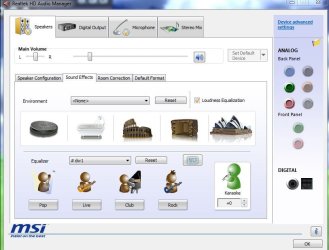
Realtek also has Loudness Equalization which will boost the volume quite a bit.
realtek.JPG
 

My Computer

Computer type
PC/Desktop
Computer Manufacturer/Model Number
Custom Build
OS
Windows 7 Home Premium 64 bit
CPU
Intel Core i7-4790
Motherboard
GA-Z87X-D3H
Memory
G.SKILL 8GB (2 x 4GB) DDR3 F3-10666CL9D-8GBNT
Graphics Card(s)
AMD Radeon R7 250
Sound Card
Realtek ALC892
Monitor(s) Displays
Samsung UN32EH5000, Dell 1703FPT
Screen Resolution
1920 x 1080, 1280 x 1024
Hard Drives
WD5003AZEX
WD10EZEX
Samsung HD103SJ
Samsung 128 GB 840 PRO
PSU
SeaSonic M12II SS-500GM
Case
Fractal Design Define R4
Cooling
Zalman CNPS9900ALED
Keyboard
Logitech K800
Mouse
Logitech M705
Internet Speed
16 Mbps
Antivirus
Avast
Browser
Firefox
Other Info
Bose Companion 2 Multimedia Speakers
Windows volume panel > Playback devices > Speaker > Properties > Levels > Realtek HD Audio Output
What does your output level look like?
Is it at the maximum?

Realtek also has Loudness Equalization which will boost the volume quite a bit.
View attachment 131664

p5bdkw:

I notice that your screen shot shows a "stereo mix" option.

Can you confirm that the "stereo mix" functionality works on your PC with W7 Home Premium 64---that is, can you record whatever you might be listening to on your speakers or headphones at any given moment?

I ask because I am going to be migrating to a motherboard with Realtek audio and Win 7 64-bit shortly.

"Stereo mix" is very hit and miss on Windows 7---many sound drivers simply do not support it. So I'd like some confirmation about your situation.

Do you specifically have Realtek ALC892 onboard sound???
 

My Computer

Computer type
PC/Desktop
Computer Manufacturer/Model Number
Ignatz Special; 4 speed manual gearbox; factory air conditioning; one of one
OS
Windows 7 Home Premium SP1, 64-bit
CPU
Intel Skylake i5-6600K, not overclocked
Motherboard
AsRock Z170M Extreme 4, micro ATX
Memory
8 GB HyperX DDR4-2666 (2 x 4 GB)
Graphics Card(s)
none; graphics are integrated on CPU
Sound Card
onboard: Realtek ALC1150; external: USB Behringer UF0-202
Monitor(s) Displays
Dell S2340M 23 inch IPS
Screen Resolution
1600 x 900
Hard Drives
System: Crucial MX100 series SSD, 128 GB;
Data: Samsung Spinpoint 103SJ, 1 TB;
Backup: WD Caviar Green WD30EZRX-00D8PB0, 3 TB
PSU
Rosewill SilentNight 500 watt fanless, semi-modular
Case
Antec Solo II
Cooling
Noctua NH-U12S; Noctua F12 intake, Noctua S12A exhaust
Keyboard
Microsoft 200 6JH-00001 USB
Mouse
Dell or Microsoft optical wired; USB
Antivirus
Microsoft Security Essentials and Malwarebytes Premium
Browser
Pale Moon
Other Info
All fans PWM; speeds at idle: CPU circa 500 rpm; intake circa 600 rpm; exhaust circa 600 rpm; CPU temps 27 idle and 47 C load in a warm room (27 C/81 F) when running Intel Extreme Tuning Utility stress test.
Ignatzatsonic,

I can confirm that I was able to record Winamp, WMP and SageTV using Audacity.
Now, the stereo mix pages shows 4 sample rates relating to CD, DVD and Studio quality.
16 bits 44100 Hz CD Quality
16 bits 48000 Hz DVD Quality
16 bits 69000 Hz Studio Quality
16 bit 192000 Hz Studio Quality
I can't confirm that if you use any of the higher rates, that they will be recorded at those rates.
I have the Realtek ALC889 chipset.
 

My Computer

Computer type
PC/Desktop
Computer Manufacturer/Model Number
Custom Build
OS
Windows 7 Home Premium 64 bit
CPU
Intel Core i7-4790
Motherboard
GA-Z87X-D3H
Memory
G.SKILL 8GB (2 x 4GB) DDR3 F3-10666CL9D-8GBNT
Graphics Card(s)
AMD Radeon R7 250
Sound Card
Realtek ALC892
Monitor(s) Displays
Samsung UN32EH5000, Dell 1703FPT
Screen Resolution
1920 x 1080, 1280 x 1024
Hard Drives
WD5003AZEX
WD10EZEX
Samsung HD103SJ
Samsung 128 GB 840 PRO
PSU
SeaSonic M12II SS-500GM
Case
Fractal Design Define R4
Cooling
Zalman CNPS9900ALED
Keyboard
Logitech K800
Mouse
Logitech M705
Internet Speed
16 Mbps
Antivirus
Avast
Browser
Firefox
Other Info
Bose Companion 2 Multimedia Speakers
Ignatzatsonic,

I can confirm that I was able to record Winamp, WMP and SageTV using Audacity.
Now, the stereo mix pages shows 4 sample rates relating to CD, DVD and Studio quality.
16 bits 44100 Hz CD Quality
16 bits 48000 Hz DVD Quality
16 bits 69000 Hz Studio Quality
16 bit 192000 Hz Studio Quality
I can't confirm that if you use any of the higher rates, that they will be recorded at those rates.
I have the Realtek ALC889 chipset.

Good info, thanks. My new mobo will have ALC892 which I can only hope has the same capabilities.

I use Audacity as well and use the 44100 setting without any problems, so would stick with that.

Generally speaking--do you have any issues with Realtek overall--glitches, sound quality, functionality, configurability, driver support, Realtek website, etc???
 

My Computer

Computer type
PC/Desktop
Computer Manufacturer/Model Number
Ignatz Special; 4 speed manual gearbox; factory air conditioning; one of one
OS
Windows 7 Home Premium SP1, 64-bit
CPU
Intel Skylake i5-6600K, not overclocked
Motherboard
AsRock Z170M Extreme 4, micro ATX
Memory
8 GB HyperX DDR4-2666 (2 x 4 GB)
Graphics Card(s)
none; graphics are integrated on CPU
Sound Card
onboard: Realtek ALC1150; external: USB Behringer UF0-202
Monitor(s) Displays
Dell S2340M 23 inch IPS
Screen Resolution
1600 x 900
Hard Drives
System: Crucial MX100 series SSD, 128 GB;
Data: Samsung Spinpoint 103SJ, 1 TB;
Backup: WD Caviar Green WD30EZRX-00D8PB0, 3 TB
PSU
Rosewill SilentNight 500 watt fanless, semi-modular
Case
Antec Solo II
Cooling
Noctua NH-U12S; Noctua F12 intake, Noctua S12A exhaust
Keyboard
Microsoft 200 6JH-00001 USB
Mouse
Dell or Microsoft optical wired; USB
Antivirus
Microsoft Security Essentials and Malwarebytes Premium
Browser
Pale Moon
Other Info
All fans PWM; speeds at idle: CPU circa 500 rpm; intake circa 600 rpm; exhaust circa 600 rpm; CPU temps 27 idle and 47 C load in a warm room (27 C/81 F) when running Intel Extreme Tuning Utility stress test.
Generally speaking--do you have any issues with Realtek overall--glitches, sound quality, functionality, configurability, driver support, Realtek website, etc???

No. But, I think that with different hardware setups, you run into different problems. I just installed 4 Windows updates and SageTV went wacky. Two reboots seemed to fix the problem. Realtek releases drivers very frequently, I'm not sure that's a good thing. Hardware, drivers and Windows updates, not always a good mix.
Good luck!!
 

My Computer

Computer type
PC/Desktop
Computer Manufacturer/Model Number
Custom Build
OS
Windows 7 Home Premium 64 bit
CPU
Intel Core i7-4790
Motherboard
GA-Z87X-D3H
Memory
G.SKILL 8GB (2 x 4GB) DDR3 F3-10666CL9D-8GBNT
Graphics Card(s)
AMD Radeon R7 250
Sound Card
Realtek ALC892
Monitor(s) Displays
Samsung UN32EH5000, Dell 1703FPT
Screen Resolution
1920 x 1080, 1280 x 1024
Hard Drives
WD5003AZEX
WD10EZEX
Samsung HD103SJ
Samsung 128 GB 840 PRO
PSU
SeaSonic M12II SS-500GM
Case
Fractal Design Define R4
Cooling
Zalman CNPS9900ALED
Keyboard
Logitech K800
Mouse
Logitech M705
Internet Speed
16 Mbps
Antivirus
Avast
Browser
Firefox
Other Info
Bose Companion 2 Multimedia Speakers
Back
Top