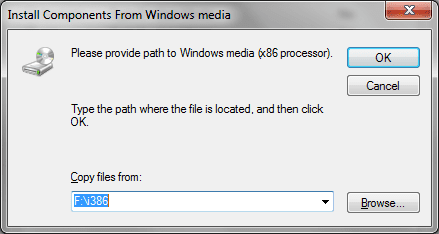
I need to share my HP LaserJet 1200 printer with my other computer running XP Home SP3 x86.
I can get my printer shared, but with x64 drivers, when I click additional drivers for x86, I get asked for x86 Printer Drivers. I got those already, but then it asks for Windows media (x86). Do I need to get the W7 x86 7232 ISO for those files? or the XP Home x86 CD?
EDIT: SOLVED! 6 months later!
This might work for any network shared Printer you cannot get installed on an XP computer (maybe even for 2k/ME/98)
1. Make sure you can browse to the W7 x64 over the network on the XP machine.
- All these instructions assume you are on the XP machine.
2. In Internet Explorer goto: Microsoft Update Catalog - Install the ActiveX thingy if needed
3. Search for your Printer model (eg: LaserJet 1200) and OS (eg: Windows XP)
4. Find a version closest to your W7 share version (like W7 is LaserJet 1200 Series PCL 5, and closest XP version is LaserJet 1200 Series PCL 5e)
5. Check that the version is for x86 and your language (Eng, Rus, Spa, etc..)
6. Add it to the Basket
7. Click the link to View Basket (upper right of page)
8. Click the Download Button
9. Click the Browse Button to where you want to save the driver (eg: C:\ .. it will create a subfolder if the driver automatically)
10. Click Continue Button in the lower right
11. Once download is done, browse to where the driver was downloaded (eg: C:\Hewlett-Packard Company - Printers - HP LaserJet 1200 Series PCL 5e)
12. At this point you might need WinRAR or 7-Zip to extract the files. I've got both CAB and ZIP files from Update Catalog. I am not sure if Explorer can open and extract CAB files, I know it can handle ZIPs.
13. Once you have the files extracted, find and open the INF with Notepad. There is usually one INF file, if there are more then one open them up too.
14. Search for the [Strings] section and edit the name there to exactly what the W7 share name is.
For example I had to edit this:
to this
Yes...the only thing different is the 'e' is missing.
15. Once that is done and saved, attempt to open the W7 shared printer, and it'll ask you to install drivers.
16. Browse to the location of the edited INF file, and it should install!
I can get my printer shared, but with x64 drivers, when I click additional drivers for x86, I get asked for x86 Printer Drivers. I got those already, but then it asks for Windows media (x86). Do I need to get the W7 x86 7232 ISO for those files? or the XP Home x86 CD?
EDIT: SOLVED! 6 months later!
This might work for any network shared Printer you cannot get installed on an XP computer (maybe even for 2k/ME/98)
1. Make sure you can browse to the W7 x64 over the network on the XP machine.
- All these instructions assume you are on the XP machine.
2. In Internet Explorer goto: Microsoft Update Catalog - Install the ActiveX thingy if needed
3. Search for your Printer model (eg: LaserJet 1200) and OS (eg: Windows XP)
4. Find a version closest to your W7 share version (like W7 is LaserJet 1200 Series PCL 5, and closest XP version is LaserJet 1200 Series PCL 5e)
5. Check that the version is for x86 and your language (Eng, Rus, Spa, etc..)
6. Add it to the Basket
7. Click the link to View Basket (upper right of page)
8. Click the Download Button
9. Click the Browse Button to where you want to save the driver (eg: C:\ .. it will create a subfolder if the driver automatically)
10. Click Continue Button in the lower right
11. Once download is done, browse to where the driver was downloaded (eg: C:\Hewlett-Packard Company - Printers - HP LaserJet 1200 Series PCL 5e)
12. At this point you might need WinRAR or 7-Zip to extract the files. I've got both CAB and ZIP files from Update Catalog. I am not sure if Explorer can open and extract CAB files, I know it can handle ZIPs.
13. Once you have the files extracted, find and open the INF with Notepad. There is usually one INF file, if there are more then one open them up too.
14. Search for the [Strings] section and edit the name there to exactly what the W7 share name is.
For example I had to edit this:
Code:
[Strings]
Printer1="HP LaserJet 1200 Series PCL 5e"
Printer2="HP LaserJet 1200 Series PCL 5e"
DiskID1="HP LaserJet 1200 Series Drivers Disk"
Code:
[Strings]
Printer1="HP LaserJet 1200 Series PCL 5"
Printer2="HP LaserJet 1200 Series PCL 5"
DiskID1="HP LaserJet 1200 Series Drivers Disk"15. Once that is done and saved, attempt to open the W7 shared printer, and it'll ask you to install drivers.
16. Browse to the location of the edited INF file, and it should install!
Last edited:
My Computer
- Computer Manufacturer/Model Number
- Asus V2-M3M8200 Barebones
- OS
- Windows 7 Professional x64
- CPU
- AMD Phenom II X4 925
- Motherboard
- V2-M3M8200 (basically a M3N78-VM)
- Memory
- 4x1024mb Kingston HyperX DDR2-1066 KHX8500D2/1G
- Graphics Card(s)
- Asus GTS 450 OC
- Sound Card
- Creative Sound Blaster X-Fi Titanium PCIe
- Monitor(s) Displays
- Asus 24" LCD VH242H
- Screen Resolution
- 1920x1080
- Hard Drives
- WDC WD5000AAKS
WDC WD5002ABYS
Seagate ST325062 USB-to-IDE
Fujitsu 160GB Pocket USB HDD
- PSU
- Antec Earthwatts EA-430D
- Case
- Asus V2-M3M8200
- Cooling
- 120mm side fan & 80mm front & 92mm rear fan
- Keyboard
- Dell USB mini Multimedia
- Mouse
- Logitech MX518
- Internet Speed
- Comcast Xfinity
- Other Info
- Logitech Webcam Pro 9000
Accurian 40-1462 Speakers
little dot MKII Headphone Amp