W7U Pick Me up!

JRockZ

New member
Member
VIP
Local time
9:06 PM
Messages
176
Been running W7U about a year now,, it performs well,, I like to tweak things and i have my system running quite well i think but it still seems to just lack that wow factor. I dont have my system overclocked nor do i have my Geforce overclocked but i know iwth my set up i could probably easily gain some performance but would i see a noticable difference?
I have read the how to overclock tutorials and i guess i have to admit im lazy i wanna just make some small adjustments in the bios to get me up a few more Mhz's so as not to create to much more heat and or instability issues. so my questions are:

#1 am i better off over clocking the processor? Ram? Or my graphics? or should i do a little bump to all 3?
#2 What tweaks have worked the best for you? where you actually noticed a performance gain during normal everyday use?

Mind you i'm not a gamer,,, i mainly surf, email, chat, webcam and do some graphics and website work.
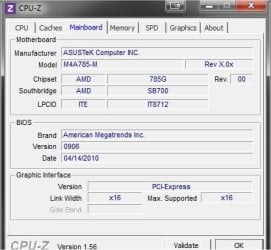
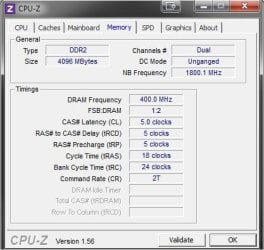
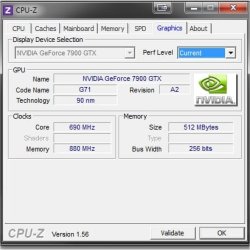
Heres my main system specs
 

Attachments

  • Image2.jpg
    Image2.jpg
    39 KB · Views: 3
  • Image4.jpg
    Image4.jpg
    25.4 KB · Views: 6
  • Image6.jpg
    Image6.jpg
    27.3 KB · Views: 4
  • Image8.jpg
    Image8.jpg
    25.7 KB · Views: 4

My Computer

Computer type
PC/Desktop
Computer Manufacturer/Model Number
JRockZ
OS
Win 7 64 Ultimate
CPU
AMD 8350 Bulldozer 4ghz
Motherboard
Asus M5a97 R2
Memory
6gb
Graphics Card(s)
ATI Radeon HD 5770 X 2
Sound Card
Board
Monitor(s) Displays
Dual Gateway 19" and 32" TV 3 displays at once :D
Screen Resolution
1440X900
Hard Drives
OCZ Agility SSD Patriot Blaze 120
PSU
750 Watt Thermaltake Tough Power
Case
Diablotek EVO Mid Tower Case CPA-6170 - 8X 120mm case fans
Cooling
Corsair Liquid Cooled
Antivirus
NAV
Browser
Always IE
Honestly, with what you stated your main uses are, you'd probably notice the most improvement by switching to an SSD drive (at least for the OS partition). I doubt CPU, RAM, or a graphics overclock are going to give you a huge boost, but switching from a mechanical drive to an SSD will show a huge improvement, especially in day-to-day tasks.
 

My Computer

Computer type
PC/Desktop
Computer Manufacturer/Model Number
Custom
OS
Windows 10 Pro x64
CPU
Intel Core i7 4790K @ 4.5GHz
Motherboard
Asus Maximus Hero VII
Memory
32GB DDR3
Graphics Card(s)
Nvidia GeForce GTX970
Sound Card
Realtek HD Audio
Screen Resolution
1920x1200
Hard Drives
1x Samsung 250GB SSD
4x WD RE 2TB (RAIDZ)
PSU
Corsair AX760i
Case
Fractal Design Define R4
Cooling
Noctua NH-D15
Honestly, with what you stated your main uses are, you'd probably notice the most improvement by switching to an SSD drive (at least for the OS partition). I doubt CPU, RAM, or a graphics overclock are going to give you a huge boost, but switching from a mechanical drive to an SSD will show a huge improvement, especially in day-to-day tasks.

+1. Well said. Go SSD - you won't regret it.
 

My Computer

Computer type
PC/Desktop
Computer Manufacturer/Model Number
Golden Mk. I.4
OS
Windows 10 Pro x64 ; Xubuntu x64
CPU
Intel i7 860 @ 2.80 GHz O/C'ed to 4.0GHz
Motherboard
Gigabyte P55A-UD3R Rev.1. Award BIOS F13
Memory
16GB Corsair Vengance DDR3 @ 661 MHz Dual Channel (9-9-9-24)
Graphics Card(s)
EVGA NVidia GTX 560 1024MB
Sound Card
Realtek Integrated
Monitor(s) Displays
Dual Samsung SyncMaster 2494HS
Screen Resolution
1920*1080 and 1920*1080
Hard Drives
1*Samsung 840 EVO 120GB SSD;
1*OCZ Vertex 2 60GB SSD;
2*Samsung F3 SpinPoint 1TB in RAID0;
1*Samsung F1 SpinPoint 1TB;
2*Western Digital 1TB External USB 3.0
1*Western Digital 500GB External USB 3.0
1*Seagate 500GB External USB 2.0
PSU
Thermaltake ToughPower QFan 750W
Case
Thermaltake Element S VK60001W2Z
Cooling
Corsair H60 Water Cooling, 2*230mm and 2*80mm case fans
Keyboard
Logitech G110
Mouse
Logitech MX518
I did the overclocking thing for a short time, mainly because I just wanted to know how to do it, and to see the results for myself. My conclusion was: For the few seconds that things may have been faster, it wasn't worth the extra heat that my CPU was generating. Sooner or later that is going to shorten the life of the processor and ram, and to what gain?

I kinda have to chuckle to myself when I see posts about someone griping because his Windows takes 15 seconds longer to boot than it used to. There are 86,400 seconds in a day. How big a hurry are we really in?

To my naked eye apps didn't load quicker, games didn't play better, graphics were not better. The cause and efffect wasn't worth it to me, but I do know there are lots of people that want to take it to the limit.

Guess it's no different than fine tuning yesterday's muscle cars to the ultimate. The need for speed.

SSD's no doubt are the way to go. I'm just the type to hang on until they are cheaper with more capacity.
 

My Computer

Computer type
PC/Desktop
Computer Manufacturer/Model Number
Self build
OS
Windows 10 Home
CPU
Intel Core i5 3550
Motherboard
ASUS P8Z77-V LX (LGA1155)
Memory
Corsair Vengeance DDR3 16GB
Graphics Card(s)
Nvidia GEForce GTX 970 SSC
Monitor(s) Displays
Hanns-G 23.6", Acer 17"
Screen Resolution
1920x1080, 1440x900
Hard Drives
Sandisk SSD 256 GB
WD500GB
WD640GB
Seagage Ultra + 1TB ext.
BWD 800GB
WD 1TB ext
PSU
Antec 650w
Case
Cooler Master Centurion 534
Cooling
COOLER MASTER GeminII S524, 3 120 mm case fans.
Keyboard
Logitech MK300
Mouse
Logitech MK300
Internet Speed
Cable
Antivirus
MSSE, Malwarebytes
Browser
IE 10, Chrome
Back
Top