
Wake on Lan problem

stew1411

New member
Local time
7:58 PM
Messages
5
So I have a HP desktop and an Android tablet. I want to remote desktop my tablet to the pc for school purposes, as I am not always home. I can get remote desktop to work fine. It WoL that won't work. I enabled it in the bios, set up a new rule for port 9 in the firewall, under ethernet settings, enabled all the power management options, and also enabled WoL under the ethernet settings. Router is port fowarded to port 9. All the required info is set up on my tablet, but I cannot get the pc to power, or even wake from sleep. using same IP and everything as I do when I use VNC on the tablet, with the exception of the different port. What could be causing me to fail at this?
 

My Computer

Computer type
PC/Desktop
Computer Manufacturer/Model Number
Custom build
OS
Win 7 Ultimate (x64)
CPU
AMD Phenom II X4 850 3.3 GHz
Memory
4 GB
Graphics Card(s)
GeForce GTX 650 Ti
Hard Drives
1- 128 GB SSD (OS Partition)
1- 750 GB HDD (Media)
1- 500 GB HDD (external)
you can not wake it through internet. WOL will send a packet through your lan when both device using the same network router.
you can make some schedule to make your home pc wake up and then using remote desktop tools to control it via internet.
 

My Computer

OS
Windows 7 Ultimate x64
CPU
core i7.
Even on same network it wouldn't wake. I tried main IP and then also the static IP.
 

My Computer

Computer type
PC/Desktop
Computer Manufacturer/Model Number
Custom build
OS
Win 7 Ultimate (x64)
CPU
AMD Phenom II X4 850 3.3 GHz
Memory
4 GB
Graphics Card(s)
GeForce GTX 650 Ti
Hard Drives
1- 128 GB SSD (OS Partition)
1- 750 GB HDD (Media)
1- 500 GB HDD (external)
you need your MAC address to make a computer wake on
here is what you need
 

Attachments

My Computer

OS
Windows 7 Ultimate x64
CPU
core i7.
So my BIOS is set on wake from S5 state. That is the only option. I have it enabled. I have maximum power saving in S5 state disabled. If its enabled in BIOS, enabled in Windows, and also enabled through my router, is that all I need to have done?
 

My Computer

Computer type
PC/Desktop
Computer Manufacturer/Model Number
Custom build
OS
Win 7 Ultimate (x64)
CPU
AMD Phenom II X4 850 3.3 GHz
Memory
4 GB
Graphics Card(s)
GeForce GTX 650 Ti
Hard Drives
1- 128 GB SSD (OS Partition)
1- 750 GB HDD (Media)
1- 500 GB HDD (external)
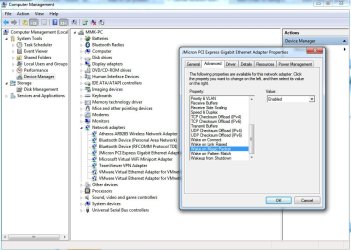
go to device manager and find your lan in the list. then go to advance option and find the wake on magic packet, turn it on. then go to your bios setup. it must have the wake on lan option to do so. if had, enable it and thats over.

run the wol i sent you and your computer would turn on by a magic packet.
 

Attachments

  • 1-11-2013 9-02-35 PM.jpg
    1-11-2013 9-02-35 PM.jpg
    245.9 KB · Views: 3

My Computer

OS
Windows 7 Ultimate x64
CPU
core i7.
Back
Top