wallpaper unwanted resizing

karkalec

New member
Local time
11:04 AM
Messages
21
I've been running 32 bit Windows 7 Home Premium since it came out retail. I generally put photos on the desktop as background. Files are often 2816X2112 or those types of dimensions. For as long as I can remember my computer (including older OS and even Windows 7 until recently) would automatically resize the background picture to make it meet the dimensions of the monitor (1680X1050). Now all of a sudden it isn't resizing pictures so the pictures are stretched out to full size and only portions of the pictures are visible on the desktop. I can't figure out what changed it or how to get it back. Any ideas?

THX

Justin
 

My Computer

OS
Windows 7 Home Premium
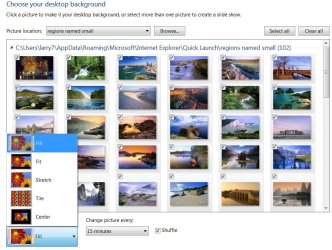
Right click on desktop > personalize > click on the blue under "Desktop background" (bottom left) > then try different "picture positions" (bottom left again).
 

My Computer

Computer Manufacturer/Model Number
HP, Dell, Gateway, Toshiba - 4 laptops and 2 desktops
OS
Vista, Windows7, Mint Mate, Zorin, Windows 8
CPU
from 1.6GHz Duo to i7
Monitor(s) Displays
2x HP w2207
Hard Drives
5x HDD, 7x SSD, 12x Externals
Keyboard
with trackball - no mices
Mouse
Trackball mice
Internet Speed
DSL 6000
Welcome to SevenForums Karkalec,
Which do you have selected here in desktop backgrounds? Fill, fit or?
fill.JPG
 

My Computer

Computer Manufacturer/Model Number
Gateway GT5692
OS
Windows 7 Ulti. x64
CPU
AMD Phenom 8450 triple-core 2.10 ghz
Memory
4GB
Graphics Card(s)
ATI Radion HD 3200
Monitor(s) Displays
Gateway FPD1775W
Screen Resolution
1280x720
Hard Drives
465.6613 Gibibytes
It was set to "Fill" and I set it to "Fit" and the problem appears to be solved. Not sure how it got changed in the first place, but thanks so much for solving it for me!!
 

My Computer

OS
Windows 7 Home Premium
These things happen. Glad you got it solved.
 

My Computer

Computer Manufacturer/Model Number
HP, Dell, Gateway, Toshiba - 4 laptops and 2 desktops
OS
Vista, Windows7, Mint Mate, Zorin, Windows 8
CPU
from 1.6GHz Duo to i7
Monitor(s) Displays
2x HP w2207
Hard Drives
5x HDD, 7x SSD, 12x Externals
Keyboard
with trackball - no mices
Mouse
Trackball mice
Internet Speed
DSL 6000
wallpaper aspect locked to "Stretch"

I'm using Win 7 Home Premium on a HP Pavilion dv6.

My problem is that when i try to change the wallpaper aspect it always resets to 'Stretch' after I click the "save changes" button.
 

My Computer

OS
Windows 7
Back
Top