
Solved Wandering cursor in win 7 live mail and word 10

stony41

New member
Member
Local time
5:14 PM
Messages
58
This problem has been posted plenty of times before, here and elsewhere online, but generally in relation to laptops (where one solution is to turn off the touchpad). I have a 23-inch Sony VAIO all-in-one, running Win 7 Home Premium.

Chaos reigns when I enter text into any text box, such as this one, or into Windows Live Mail 2012 or Word 10. When I am answering an email the cursor frequently jumps elsewhere in my reply and even jumps into the email text I am replying to.

Googling suggests that I try changing a mouse setting, turning off 'Hide mouse pointer when typing'. No go for me.

I should point out that I also have two Toshiba AIOs but they don't have this wandering cursor problem. The Toshiba mouses are inferior to the Bluetooth Sony mouse, which is the best I have ever used. I have tried a USB Logitech mouse on the Sony, but the wandering still occurs.

I am firmly in the group of users who can't seem to find a solution.

Has anyone a non-laptop solution to this infuriating problem?
 
Last edited:

My Computer My Computer

At a glance

windows 7 home premium 64, windows 8.1 home p...
Computer type
PC/Desktop
Computer Manufacturer/Model Number
Sony and Toshiba all-in-ones, Medion and Lenovo laptops
OS
windows 7 home premium 64, windows 8.1 home premium 64
This suggestion might not cure the problem, but it might help relieve the issue:

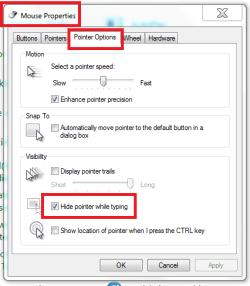
In the Mouse Properties, select the Printer Options tab and check the box near the bottom 'Hide pointer while typing'.
Mouse pointer options.PNG
 

My Computer My Computer

At a glance

Windows 7 Home Premium 64bitIntel(R) Core(TM) i3-2120 CPU @ 3.30GHz3.00 GB(1) Intel(R) HD Graphics (2) VNC Mirror Driver
Computer type
PC/Desktop
Computer Manufacturer/Model Number
Packard Bell
OS
Windows 7 Home Premium 64bit
CPU
Intel(R) Core(TM) i3-2120 CPU @ 3.30GHz
Motherboard
Packard Bell IPISB-AG
Memory
3.00 GB
Graphics Card(s)
(1) Intel(R) HD Graphics (2) VNC Mirror Driver
Sound Card
Realtek High Definition Audio
Monitor(s) Displays
AIO LCD
Screen Resolution
1920 x 1080
Hard Drives
WDC WD10EADX-22TDHB0 ATA Device
Fixed hard disk media
4 partitions
931.51 GB
Keyboard
Wireless
Mouse
Wireless
Antivirus
Microsoft Security Essentials
Browser
IE; Firefox
Other Info
Also:
Samsung N220 Plus Netbook - Windows 7 Home
HP laptop
iPad 5
Thanks for your reply, Irene. However, I mentioned that changing 'Mouse Properties/Pointer Options/Hide pointer while typing' hasn't helped. The cursor jumps irrespective of whether the setting is on or off.
 

My Computer My Computer

At a glance

windows 7 home premium 64, windows 8.1 home p...
Computer type
PC/Desktop
Computer Manufacturer/Model Number
Sony and Toshiba all-in-ones, Medion and Lenovo laptops
OS
windows 7 home premium 64, windows 8.1 home premium 64
Sorry stony41, I missed that in your post.

What about the other settings in the Mouse Properties? Also, in the Pointers tab, have you tried changing the Scheme?
 

My Computer My Computer

At a glance

Windows 7 Home Premium 64bitIntel(R) Core(TM) i3-2120 CPU @ 3.30GHz3.00 GB(1) Intel(R) HD Graphics (2) VNC Mirror Driver
Computer type
PC/Desktop
Computer Manufacturer/Model Number
Packard Bell
OS
Windows 7 Home Premium 64bit
CPU
Intel(R) Core(TM) i3-2120 CPU @ 3.30GHz
Motherboard
Packard Bell IPISB-AG
Memory
3.00 GB
Graphics Card(s)
(1) Intel(R) HD Graphics (2) VNC Mirror Driver
Sound Card
Realtek High Definition Audio
Monitor(s) Displays
AIO LCD
Screen Resolution
1920 x 1080
Hard Drives
WDC WD10EADX-22TDHB0 ATA Device
Fixed hard disk media
4 partitions
931.51 GB
Keyboard
Wireless
Mouse
Wireless
Antivirus
Microsoft Security Essentials
Browser
IE; Firefox
Other Info
Also:
Samsung N220 Plus Netbook - Windows 7 Home
HP laptop
iPad 5
I have tried other schemes in Control Panel/Mouse without any success. Also I have also been reminded that I also have a disappearing cursor. I tend to look at the keyboard when I type and often I look up to see that the cursor has disappeared and some of what I have been entering isn't there. On top of this is the fact that I also suffer from windows minimising randomly, including this one.

I can obviously manage to key into text boxes, but it is a bit of a chore getting there.

Perhaps I should try another, non-Sony keyboard? Possibly there is no need for a non-Sony mouse as the erratic behaviour also occurred when a Logitech one was on board.

Sony appeared to be the culprit when I recently seemed to finally remove other erratic behaviour by turning off ‘Edge access’ in VAIO Control Panel. This is a Sony ‘feature’ that provides extra facilities when the user presses in the black edge around the touchscreen. I was getting random beeping, strange boxes popping up and then immediately disappearing, sound waves popping out from the edges, and possibly other bizarre stuff. The computer no longer shows this behaviour, so perhaps a clean break by introducing a Logitech or similar keyboard is in order.
 

My Computer My Computer

At a glance

windows 7 home premium 64, windows 8.1 home p...
Computer type
PC/Desktop
Computer Manufacturer/Model Number
Sony and Toshiba all-in-ones, Medion and Lenovo laptops
OS
windows 7 home premium 64, windows 8.1 home premium 64

My Computer My Computer

At a glance

Windows 7 Home Premium 64bitIntel(R) Core(TM) i3-2120 CPU @ 3.30GHz3.00 GB(1) Intel(R) HD Graphics (2) VNC Mirror Driver
Computer type
PC/Desktop
Computer Manufacturer/Model Number
Packard Bell
OS
Windows 7 Home Premium 64bit
CPU
Intel(R) Core(TM) i3-2120 CPU @ 3.30GHz
Motherboard
Packard Bell IPISB-AG
Memory
3.00 GB
Graphics Card(s)
(1) Intel(R) HD Graphics (2) VNC Mirror Driver
Sound Card
Realtek High Definition Audio
Monitor(s) Displays
AIO LCD
Screen Resolution
1920 x 1080
Hard Drives
WDC WD10EADX-22TDHB0 ATA Device
Fixed hard disk media
4 partitions
931.51 GB
Keyboard
Wireless
Mouse
Wireless
Antivirus
Microsoft Security Essentials
Browser
IE; Firefox
Other Info
Also:
Samsung N220 Plus Netbook - Windows 7 Home
HP laptop
iPad 5
Yes. Norton IS runs all the time and I regularly run Mbytes and ASC. Mbytes has just found nothing but one PUP.

The only malware I am getting at the moment seems to be coming from Microsoft and/or Sony.
 

My Computer My Computer

At a glance

windows 7 home premium 64, windows 8.1 home p...
Computer type
PC/Desktop
Computer Manufacturer/Model Number
Sony and Toshiba all-in-ones, Medion and Lenovo laptops
OS
windows 7 home premium 64, windows 8.1 home premium 64
I have just bought a heavily discounted Logitech keyboard and mouse set and have tried it out with a longish email I needed to send. Cursor wandering and disappearing while keying still occurred. Looks as if this behaviour is software associated and not hardware associated. Keying into a text box leads to (a) the cursor moving from where it should be, (b) the cursor disappearing, (c) the active window minimising. So the Sony keyboard and mouse are not at fault.

These behaviours are reported widely online. None of the fixes suggested have worked for me.
 

My Computer My Computer

At a glance

windows 7 home premium 64, windows 8.1 home p...
Computer type
PC/Desktop
Computer Manufacturer/Model Number
Sony and Toshiba all-in-ones, Medion and Lenovo laptops
OS
windows 7 home premium 64, windows 8.1 home premium 64
May not have anything to do with it, but could it actually be the keyboard? e.g. Are the batteries ok?

....and yes, I am clutching at straws! :confused:
 

My Computer My Computer

At a glance

Windows 7 Home Premium 64bitIntel(R) Core(TM) i3-2120 CPU @ 3.30GHz3.00 GB(1) Intel(R) HD Graphics (2) VNC Mirror Driver
Computer type
PC/Desktop
Computer Manufacturer/Model Number
Packard Bell
OS
Windows 7 Home Premium 64bit
CPU
Intel(R) Core(TM) i3-2120 CPU @ 3.30GHz
Motherboard
Packard Bell IPISB-AG
Memory
3.00 GB
Graphics Card(s)
(1) Intel(R) HD Graphics (2) VNC Mirror Driver
Sound Card
Realtek High Definition Audio
Monitor(s) Displays
AIO LCD
Screen Resolution
1920 x 1080
Hard Drives
WDC WD10EADX-22TDHB0 ATA Device
Fixed hard disk media
4 partitions
931.51 GB
Keyboard
Wireless
Mouse
Wireless
Antivirus
Microsoft Security Essentials
Browser
IE; Firefox
Other Info
Also:
Samsung N220 Plus Netbook - Windows 7 Home
HP laptop
iPad 5
The Sony keyboard's sole battery is OK. As I said in my last post, I tried a cheap Logitech keyboard-mouse combo and got the same misbehaviour with two brand-new batteries.
 

My Computer My Computer

At a glance

windows 7 home premium 64, windows 8.1 home p...
Computer type
PC/Desktop
Computer Manufacturer/Model Number
Sony and Toshiba all-in-ones, Medion and Lenovo laptops
OS
windows 7 home premium 64, windows 8.1 home premium 64
Thanks for the suggestions, gregrocker. However, as frequently happens, I can't follow the instructions as my version of Win 7 64 doesn't have the heading Troubleshoot under Devices and Printers. Microsoft never should have allowed manufacturers to play around with its OS. Furthermore, the Sony N50 Bluetooth mouse doesn't even need the Windows Bluetooth Service to be turned on. I tried a MS Bluetooth mouse some time ago and I had to turn on the service to use it. Sony obviously has something else going on with its mouse. I think I need to contact Sony to see how I should refresh its mysterious mouse.
 

My Computer My Computer

At a glance

windows 7 home premium 64, windows 8.1 home p...
Computer type
PC/Desktop
Computer Manufacturer/Model Number
Sony and Toshiba all-in-ones, Medion and Lenovo laptops
OS
windows 7 home premium 64, windows 8.1 home premium 64
Did you install Logitech software? If so I would uninstall it in Control Panel and DEvice manager then reboot to let Windows 7 install the drivers and any software it wants.

First enable Automatically deliver drivers via Windows Update (Step 3).

Check for Updates to install all Important and Optional as there are often performance Updates that make hardware run correctly. I would accept any Updates except Bingware.

I asked if you still have the Factory Install which no tech enthusiast would run to begin with. Look over the steps to get and keep a perfect Clean Reinstall Windows 7.
 

My Computer My Computer

At a glance

Multi-Boot W7_Pro_x64 W8.1_Pro_x64 W10_Pro_x6...AMD Athlon II x4 6206GB GSkill DDR2 800AMD 4670 GPU + AMD 4200 IGP
Computer type
PC/Desktop
Computer Manufacturer/Model Number
home built
OS
Multi-Boot W7_Pro_x64 W8.1_Pro_x64 W10_Pro_x64 +Linux_VMs +Chromium_VM
CPU
AMD Athlon II x4 620
Motherboard
Gigabyte GA-MA785G-UD3H
Memory
6GB GSkill DDR2 800
Graphics Card(s)
AMD 4670 GPU + AMD 4200 IGP
Sound Card
on board Realtek ALC889A
Monitor(s) Displays
RCA 40" LCD TV, Insignia 32" LCD TV, HP 15" LCD monitor
Screen Resolution
1680 x 1050
Hard Drives
OCZ Vertex 3 120GB,
Samsung F3 1TB (3),
Several others - WD, Seagate, Hitachi, ...
PSU
Corsair 500 W
Case
Rosewill mid tower
Cooling
CM 90mm rifle
Keyboard
Gyration wireless, Logitech wireless, Dell USB wired
Mouse
Gyration wireless, Logitech wireless, V7 USB wired
Internet Speed
Spectrum - 100Mbps D / 10Mbps U
Antivirus
Avast, MBAM3, EMET, WinPatrol
Browser
Pale Moon, Firefox, IE
Other Info
2 multi-boot PC's
Mainly HTPC/Office/Gen purpose (no gaming).
Trendnet USB KVM.
LG DVD burner/Blue Ray Player.
Tray system for removable SATA backup drives.

Not currently OCd, under-volted.
I use Hybrid sleep, rarely re-boot or shutdown.

Hauppauge HD-PVR, Avermedia PCIe TV Tuner, Hauppauge PCI TV Tuner.
I didn't install anything for the Logitech mouse. It was just plug and play.

I already have the settings for automatically delivering updates.

There are no updates to be installed.

I am not keen to go back to factory. Sony has been nagging me to go back to their factory for years. I have oodles of programs and utilities and it would take ages to reinstall them. The computer works well generally and the wandering cursor is the only real annoyance. (I have just removed lots of mysterious beeps and fleeting popups and waves by turning off Sony's 'Edge access' that supposedly gave helpful additional abilities when the user pressed in the black edge of the touchscreen. If I could just turn off something else from Sony and get a stable cursor.) I am unsure whether I can go back to a general setup, as I suspect that some vital drivers are Sony's and things may not work with Microsoft's drivers. Proprietary all-in-ones have advantages and disadvantages.
 

My Computer My Computer

At a glance

windows 7 home premium 64, windows 8.1 home p...
Computer type
PC/Desktop
Computer Manufacturer/Model Number
Sony and Toshiba all-in-ones, Medion and Lenovo laptops
OS
windows 7 home premium 64, windows 8.1 home premium 64
Why would anyone go back to the worst possible install of Win7 one can have? I thought I had already suggested that you need to do what most tech enthusiasts do and experience Win7 for the first time on that PC in its native perfect state, by doing a Clean Reinstall Windows 7.

It explains in the tutorial how to determine which Sony software is needed to make your PC run best.
 
Gregrocker, I see a clean install as a last resort. I wouldn't describe myself as a tech enthusiast but have used PCs for 30 years. I don't wish to start from scratch just to remove an annoyance that I can work around. I still think there may be a simple fix for this cursor problem on the Sony. There are two Toshiba aios in the house that don't have cursor problems.

DavidE, I still had cursor problems under Safe Mode.
 

My Computer My Computer

At a glance

windows 7 home premium 64, windows 8.1 home p...
Computer type
PC/Desktop
Computer Manufacturer/Model Number
Sony and Toshiba all-in-ones, Medion and Lenovo laptops
OS
windows 7 home premium 64, windows 8.1 home premium 64
As I am a Clean Reinstall specialist I will always lean toward that, knowing that over a million consumers have followed Clean Reinstall Windows 7 and enjoy the best install of Win7 anyone can have. Most of them had crappy factory installs previously which isn't even really Win7 but a crippled version of it with annoyances like yours.

Have you tried a normal wired or wireless mouse?

The problem could relate to the touchscreen as it does in laptops, although obviously it isn't an issue of palm drag across touchpad as it laptops. Do you have the latest touch software from the maker?
 
Did you run a System File Check ?

In post #7 you stated
Yes. Norton IS runs all the time and I regularly run Mbytes and ASC. Mbytes has just found nothing but one PUP.

The only malware I am getting at the moment seems to be coming from Microsoft and/or Sony.
What is ASC, is it IObit Advanced System Care ?
What malware do you get from Microsoft ?

If you want to try something less aggressive than a clean install and keep your current installed programs:
- Create a System Backup Image
- Do a Repair Install, read more in tutorial by Brink: http://www.sevenforums.com/tutorials/3413-repair-install.html
- If the Repair Install doesn't work out, restore the Backup Image.

If you use Advanced System Care, that may be causing your problems.

Greg is the top installation expert, if I had issues/questions I'd follow his advice in a NY city minute ;)
 

My Computer My Computer

At a glance

Multi-Boot W7_Pro_x64 W8.1_Pro_x64 W10_Pro_x6...AMD Athlon II x4 6206GB GSkill DDR2 800AMD 4670 GPU + AMD 4200 IGP
Computer type
PC/Desktop
Computer Manufacturer/Model Number
home built
OS
Multi-Boot W7_Pro_x64 W8.1_Pro_x64 W10_Pro_x64 +Linux_VMs +Chromium_VM
CPU
AMD Athlon II x4 620
Motherboard
Gigabyte GA-MA785G-UD3H
Memory
6GB GSkill DDR2 800
Graphics Card(s)
AMD 4670 GPU + AMD 4200 IGP
Sound Card
on board Realtek ALC889A
Monitor(s) Displays
RCA 40" LCD TV, Insignia 32" LCD TV, HP 15" LCD monitor
Screen Resolution
1680 x 1050
Hard Drives
OCZ Vertex 3 120GB,
Samsung F3 1TB (3),
Several others - WD, Seagate, Hitachi, ...
PSU
Corsair 500 W
Case
Rosewill mid tower
Cooling
CM 90mm rifle
Keyboard
Gyration wireless, Logitech wireless, Dell USB wired
Mouse
Gyration wireless, Logitech wireless, V7 USB wired
Internet Speed
Spectrum - 100Mbps D / 10Mbps U
Antivirus
Avast, MBAM3, EMET, WinPatrol
Browser
Pale Moon, Firefox, IE
Other Info
2 multi-boot PC's
Mainly HTPC/Office/Gen purpose (no gaming).
Trendnet USB KVM.
LG DVD burner/Blue Ray Player.
Tray system for removable SATA backup drives.

Not currently OCd, under-volted.
I use Hybrid sleep, rarely re-boot or shutdown.

Hauppauge HD-PVR, Avermedia PCIe TV Tuner, Hauppauge PCI TV Tuner.
Greg and David

Having had immediate success with turning off Sony's 'Edge access' and immediately stopping annoying beeps and popups, I thought why not turn off the rest of the touchscreen. After all, I never use it. I expected this would be difficult, but not so: Pen and Touch/Touch/Use your finger as an input device/Uncheck. As a result, I have just keyed this without one disappearance or jumping of the cursor. I think I may have done it, so fingers crossed.

Greg, I belong to a computer discussion group where Microsoft and Apple frequently get flippant serves. I was just being facetious about malware from them. In this case, the serve should have been aimed at Sony, who clearly had erred in their touchscreen technology, at least in my case.

Thanks for all your suggestions, I, G and D.
 

My Computer My Computer

At a glance

windows 7 home premium 64, windows 8.1 home p...
Computer type
PC/Desktop
Computer Manufacturer/Model Number
Sony and Toshiba all-in-ones, Medion and Lenovo laptops
OS
windows 7 home premium 64, windows 8.1 home premium 64
Back
Top