
Want desktop icons to stay put after reboot.

AaLF

New member
Member
VIP
Local time
3:20 AM
Messages
488
Plenty of desktop icons & shortcuts lay on the desktop.

Want to assign them into groups rather than A-Z.

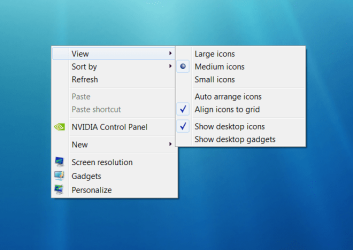
But on reboot the disobedient gremlins scurry back to their old columns. Neat & tidy, but I want them to remain where I assigned them. Here is the setting I'm using -
 

Attachments
  • desktop.png
    desktop.png
    57.1 KB · Views: 19

My Computer My Computer

At a glance

Microsoft Windows 7 HomePremium 64-bit 7601 M...Intel(R) Core(TM)2 Duo CPU E4500 @ 2.20GHz8GbNVIDIA GeForce GT 710
Computer type
PC/Desktop
Computer Manufacturer/Model Number
Generic - custom build
OS
Microsoft Windows 7 HomePremium 64-bit 7601 Multiprocessor Free Service Pack 1
CPU
Intel(R) Core(TM)2 Duo CPU E4500 @ 2.20GHz
Motherboard
Gigabyte Technology Co., Ltd. EP35-DS3P
Memory
8Gb
Graphics Card(s)
NVIDIA GeForce GT 710
Sound Card
(1) USB Audio Device (2) USB Audio Device (3) NVIDIA Hig
Monitor(s) Displays
older 21" thinkvision brand?
Screen Resolution
1680 x 1050
Hard Drives
WDC WD5000AAKS-22A7B0 ATA Device
ST3500418AS ATA Device
ST3320813AS ATA Device
PSU
ANTEC NEO ECO 520W
Case
generic tower
Cooling
couple of 4" fans
Keyboard
logitech k220
Mouse
logitech 305
Antivirus
malwarebytes premium
Browser
FireFox + opera
Strange, they should be staying right where you put them.
 

My Computer My Computer

At a glance

Windows 10 Pro x64Intel Core i7 6700KGSkill TridentZ RGB 16GB 3600 16-16-16-36EVGA GTX 980 Ti SC x2
Computer type
PC/Desktop
Computer Manufacturer/Model Number
Skylake Special #666
OS
Windows 10 Pro x64
CPU
Intel Core i7 6700K
Motherboard
Asus Sabertooth Z170 Mark 1
Memory
GSkill TridentZ RGB 16GB 3600 16-16-16-36
Graphics Card(s)
EVGA GTX 980 Ti SC x2
Sound Card
Realtek High Definition
Monitor(s) Displays
AOC G2460PG
Screen Resolution
1920 x 1080 144Hz
Hard Drives
Samsung 860 Pro 256GB, Seagate Barracuda 4TB x2
PSU
EVGA 1000 P2, EVGA White Custom Braided Cables
Case
Corsair Vengeance C70 Gunmetal Black
Cooling
Corsair H100i v2, Corsair ML120 x2, Thermal Grizzly Kryonaut
Keyboard
Logitech G910 Orion Spectrum
Mouse
Logitech G700s
Internet Speed
Verizon Fios Quantum Gateway 75/75
Antivirus
Windows Defender, Malwarebytes Free 3.8.3
Browser
Chrome
Other Info
Corsair SP120 x4, LG Blu-ray Drive, Durabrand HT-395 100 Watt Dolby Digital Amp, Corsair H2100 Wireless 7.1 Headset
This issue may happen if there are some themes which are installed on the computer, that interferes with the working of Desktop icons.

Perform the steps mentioned below and see if it helps.
a: Right Click on an empty space on the desktop, and then click Personalize.
b: Then Click Change Desktop Icons option present at the Top left corner.
c: Uncheck the option Allow Themes to change desktop icons.
d: Click Apply and then Ok.

Source: Desktop Icons change the order after restart - Microsoft Community
 

My Computer My Computer

At a glance

Windows 7 Pro 32bitDual Core
Computer type
PC/Desktop
Computer Manufacturer/Model Number
HP
OS
Windows 7 Pro 32bit
CPU
Dual Core
Antivirus
Trend Micro
Plenty of desktop icons & shortcuts lay on the desktop.

Want to assign them into groups rather than A-Z.

But on reboot the disobedient gremlins scurry back to their old columns. Neat & tidy, but I want them to remain where I assigned them. Here is the setting I'm using -

Remove the check mark from "Align Icons to Grid".
 

My Computer My Computer

At a glance

Windows 7 Ultimate x86 w/SP13GB
Computer type
PC/Desktop
Computer Manufacturer/Model Number
Dell Dimension E521
OS
Windows 7 Ultimate x86 w/SP1
Memory
3GB
Back
Top