Want to make Win 7 System Partition DualBoot

Well, I did it, but I had to do a repair install.

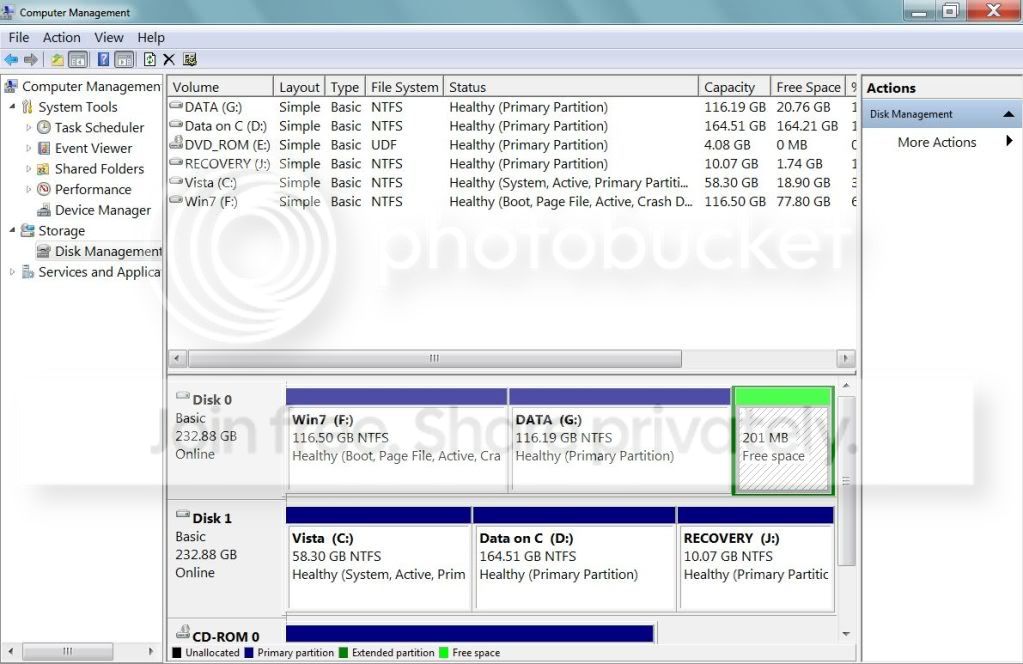
The next stupid question is about deleting the 200 mg partition. I had it deleted once, I thought. It shows up now as unallocated space or some such (I am writing this elsewhere so can't check.) When I try to delete it again it says that "This is an Extended Partition. Are You Sure You Want To Delete?" And I'm not sure since I have no idea how on earth it became an extended partition and whether deleting it will mess up the other, desired primary partitions holding Windows 7 and my data. I think I can, actually, but want to be cast iron sure, so am coming here to check.

The last thing is, anybody have any idea why Macrium Free's rescue disk that used to work for me and then I thew it out and made the new one with the newer program now will not work under any circumstance whatsoever?
 

My Computer My Computer

At a glance

Vista Windows 7 each 64 bit Home Premium
Computer Manufacturer/Model Number
HP HDX18, HP DV7 Quad Edition to arrive soon
OS
Vista Windows 7 each 64 bit Home Premium
Monitor(s) Displays
Acer H233H External Monitor
Hard Drives
2 Hard Drives on both computers
Better post back another screenshot of your full Disk Management drive map.

If it is warning you that is an extended partition and you previously deleted within it, it should read Free Space (Logical), which can be deleted to become (Primary) Unallocated Space. Then you can extend the adjacent partition into it..

http://www.sevenforums.com/tutorials/2670-partition-volume-extend.html

If this is not clear then let us see the screenshot.
 
Since the 7 installer didn't place it there to begin with there won't be anything on it. If that was created at the front of the drive once gone you would then need to move the 7 primary forward to fill that empty space in. But like gregrocker suggested a good look at the DM would be a big help at this time before going any further.
 

My Computers My Computers

  • At a glance

    W7 Ultimate x64/W10 Pro x64/W11 Pro Triple Bo...AMD Phenom II X4 975 Deneb 3.6ghz - 965 2nd r...Kingston Hyper X DDR3 1600 1.5v 16gb - Hyper ...MSI HD Radeon 5750 1gb - MSI HD Radeon 6450 o...
    Computer type
    PC/Desktop
    Computer Manufacturer/Model Number
    Custom builds = 2
    OS
    W7 Ultimate x64/W10 Pro x64/W11 Pro Triple Boot - Main PC W7 Remote PC Micro ATX W7 Pro x64/W11 Pro
    CPU
    AMD Phenom II X4 975 Deneb 3.6ghz - 965 2nd remote pc
    Motherboard
    Gigabyte GA-790XTA-UD4-Gigabyte GA-880GM-D2H remote pc
    Memory
    Kingston Hyper X DDR3 1600 1.5v 16gb - Hyper X Fury 8gb 2nd
    Graphics Card(s)
    MSI HD Radeon 5750 1gb - MSI HD Radeon 6450 on mini tower
    Sound Card
    Creative Labs X-Fi Xtreme Audio P - Realtek onooard 2nd case
    Monitor(s) Displays
    ASUS VW199T-P 19" HP 2082a Main-HP 2082a 20" remote pc
    Screen Resolution
    Asus 1440x900 - HP 1600x900
    Hard Drives
    WD Black 1TB HD per OS W7, W10, and pending W11 presently on 500gb OS Drive - Pending Triple 1TB HDs for Spanned Storage/backup volume
    Single 2TB external USB enclosure, single 1TB System 7 Host/Boot drive, Pending 8TB external HD for system image b
    PSU
    Corsair 750TX - primary / Corsair CX600 - second
    Case
    Antec 900-2 - SSD compatible / NZXT Vulcan mini tower
    Cooling
    Zalman CNPS9900A
    Keyboard
    AZIO L70 Backlit Letters Gaming - ONN Cordless/USB
    Mouse
    MSI DS200 Programmable, Logitech Cordless
    Internet Speed
    30mbps upgrade - primary hard wired - mini tower usb WiFi
    Antivirus
    GFI VIPRE Internet Security 2014 on W7 2016 beta on W10,
    Browser
    Cyberfox, WaterFox 64bit FF variants, FireFox x64, Pale Moon
    Other Info
    Accomdata fan cooled usb 2.0 PIDE/Sata II, III external enclosure.
    Sambient usb/eSata PATA/Sata II, III external enclosure.
  • At a glance

    W7 Pro x64/W11 ProAMD Deneb 3.6ghz - 965Kingston Hyper X Fury 8gbMSI HD Radeon 6450 DVI Output
    Computer type
    PC/Desktop
    System Manufacturer/Model Number
    CUSTOM ASSEMBLY
    OS
    W7 Pro x64/W11 Pro
    CPU
    AMD Deneb 3.6ghz - 965
    Motherboard
    Gigabyte GA-880GM-D2H remote pc
    Memory
    Kingston Hyper X Fury 8gb
    Graphics Card(s)
    MSI HD Radeon 6450 DVI Output
    Sound Card
    Realtek onooard Creative or Other separate PENDING
    Monitor(s) Displays
    VIZIO 32" LCD TV Separate LCD Pending
    Screen Resolution
    1600x1080
    Hard Drives
    WD 500GB OS Host/Boot WD Green 1TB Storage/Backup
    PSU
    Corsair 600W - THERMALTAKE 600W spare case
    Case
    NZXT Vulcan mini tower
    Cooling
    Twin 120mm Top Fans - 240mm Side Cover
    Keyboard
    ONN Cordless/USB Logitech Cordless
    Mouse
    ONN USB/Cordless - Logitech Cordless
    Internet Speed
    DSL 5G
    Browser
    MS Edge, FireFox, WaterFox x64, FireFox Nightly
    Other Info
    OS Testing-Remote Access to Main TeamViewer
Not used to this, see if this works

Posting an image using the paperclip didn't work, because after the file uploaded, when I clicked "Close this window", nothing happened. Below is using Photobucket, and it's taken a while for me to get a code there that worked. If this is too big, I'm sorry, it was all I could find that worked.

">
 

My Computer My Computer

At a glance

Vista Windows 7 each 64 bit Home Premium
Computer Manufacturer/Model Number
HP HDX18, HP DV7 Quad Edition to arrive soon
OS
Vista Windows 7 each 64 bit Home Premium
Monitor(s) Displays
Acer H233H External Monitor
Hard Drives
2 Hard Drives on both computers
Nothing happens until you finish the post and click on the Quick Reply button. That's any images attached with the second browse window appear. You'll get used to it! :D

As far as the 200mb partition you may as well simply deleted that entirely and expand the second data partition into the empty space left behind. With the W7 installer's own drive tools that creates a 100mb system reserved partition at the front not rear of the drive which holds the repair tools mainly.

When using a 3rd party paritioning program the 7 installer then tucks them into the new C primary since the partition is already present. You won't see the F8 boot menu option however unless a problem comes up where you are then aske if you want to use the startup repair tool. The other tools are unavailable.
 

My Computers My Computers

  • At a glance

    W7 Ultimate x64/W10 Pro x64/W11 Pro Triple Bo...AMD Phenom II X4 975 Deneb 3.6ghz - 965 2nd r...Kingston Hyper X DDR3 1600 1.5v 16gb - Hyper ...MSI HD Radeon 5750 1gb - MSI HD Radeon 6450 o...
    Computer type
    PC/Desktop
    Computer Manufacturer/Model Number
    Custom builds = 2
    OS
    W7 Ultimate x64/W10 Pro x64/W11 Pro Triple Boot - Main PC W7 Remote PC Micro ATX W7 Pro x64/W11 Pro
    CPU
    AMD Phenom II X4 975 Deneb 3.6ghz - 965 2nd remote pc
    Motherboard
    Gigabyte GA-790XTA-UD4-Gigabyte GA-880GM-D2H remote pc
    Memory
    Kingston Hyper X DDR3 1600 1.5v 16gb - Hyper X Fury 8gb 2nd
    Graphics Card(s)
    MSI HD Radeon 5750 1gb - MSI HD Radeon 6450 on mini tower
    Sound Card
    Creative Labs X-Fi Xtreme Audio P - Realtek onooard 2nd case
    Monitor(s) Displays
    ASUS VW199T-P 19" HP 2082a Main-HP 2082a 20" remote pc
    Screen Resolution
    Asus 1440x900 - HP 1600x900
    Hard Drives
    WD Black 1TB HD per OS W7, W10, and pending W11 presently on 500gb OS Drive - Pending Triple 1TB HDs for Spanned Storage/backup volume
    Single 2TB external USB enclosure, single 1TB System 7 Host/Boot drive, Pending 8TB external HD for system image b
    PSU
    Corsair 750TX - primary / Corsair CX600 - second
    Case
    Antec 900-2 - SSD compatible / NZXT Vulcan mini tower
    Cooling
    Zalman CNPS9900A
    Keyboard
    AZIO L70 Backlit Letters Gaming - ONN Cordless/USB
    Mouse
    MSI DS200 Programmable, Logitech Cordless
    Internet Speed
    30mbps upgrade - primary hard wired - mini tower usb WiFi
    Antivirus
    GFI VIPRE Internet Security 2014 on W7 2016 beta on W10,
    Browser
    Cyberfox, WaterFox 64bit FF variants, FireFox x64, Pale Moon
    Other Info
    Accomdata fan cooled usb 2.0 PIDE/Sata II, III external enclosure.
    Sambient usb/eSata PATA/Sata II, III external enclosure.
  • At a glance

    W7 Pro x64/W11 ProAMD Deneb 3.6ghz - 965Kingston Hyper X Fury 8gbMSI HD Radeon 6450 DVI Output
    Computer type
    PC/Desktop
    System Manufacturer/Model Number
    CUSTOM ASSEMBLY
    OS
    W7 Pro x64/W11 Pro
    CPU
    AMD Deneb 3.6ghz - 965
    Motherboard
    Gigabyte GA-880GM-D2H remote pc
    Memory
    Kingston Hyper X Fury 8gb
    Graphics Card(s)
    MSI HD Radeon 6450 DVI Output
    Sound Card
    Realtek onooard Creative or Other separate PENDING
    Monitor(s) Displays
    VIZIO 32" LCD TV Separate LCD Pending
    Screen Resolution
    1600x1080
    Hard Drives
    WD 500GB OS Host/Boot WD Green 1TB Storage/Backup
    PSU
    Corsair 600W - THERMALTAKE 600W spare case
    Case
    NZXT Vulcan mini tower
    Cooling
    Twin 120mm Top Fans - 240mm Side Cover
    Keyboard
    ONN Cordless/USB Logitech Cordless
    Mouse
    ONN USB/Cordless - Logitech Cordless
    Internet Speed
    DSL 5G
    Browser
    MS Edge, FireFox, WaterFox x64, FireFox Nightly
    Other Info
    OS Testing-Remote Access to Main TeamViewer
Try deleting the Free Space to get rid of the extended partition and make Unallocated Space. Then extend the adjacent partition into the space using tutorial I linked above.
 
Night Hawk, I couldn't get to the Quick Reply button. I was stuck in the area where you upload images. After mine uploaded, I clicked the "close window" button, neither of them would work.

Since you say it is safe, will delete the partition and expand the data area.

When I have a migraine that keeps me awake in the wee hours I will do a very slow Macrum Rescue disk again.

Thank you so very much, don't know what I'd do without you all.
 

My Computer My Computer

At a glance

Vista Windows 7 each 64 bit Home Premium
Computer Manufacturer/Model Number
HP HDX18, HP DV7 Quad Edition to arrive soon
OS
Vista Windows 7 each 64 bit Home Premium
Monitor(s) Displays
Acer H233H External Monitor
Hard Drives
2 Hard Drives on both computers
I've have the attach files page slow at times here as well since SF is a busy place to start with! :D That's a common problem however and generally easy to use in the few seconds it takes there.

The 200mb partition you added at the end of the drive won't do you any good there for a start since the actual system reserved partition is half that size and prepared by the Windows installer itself. Your best option is to simply delete that and look at the reference gregrocker pointed to if you are new at drive partitioning in general to avoid any goofs! :(

Once in a DM that will only take a matter of a minute if that to take care of. That will simply see the 200mb of drive space made available to the G data partition rather then having the extra part taking up space and not being used for anything.
 

My Computers My Computers

  • At a glance

    W7 Ultimate x64/W10 Pro x64/W11 Pro Triple Bo...AMD Phenom II X4 975 Deneb 3.6ghz - 965 2nd r...Kingston Hyper X DDR3 1600 1.5v 16gb - Hyper ...MSI HD Radeon 5750 1gb - MSI HD Radeon 6450 o...
    Computer type
    PC/Desktop
    Computer Manufacturer/Model Number
    Custom builds = 2
    OS
    W7 Ultimate x64/W10 Pro x64/W11 Pro Triple Boot - Main PC W7 Remote PC Micro ATX W7 Pro x64/W11 Pro
    CPU
    AMD Phenom II X4 975 Deneb 3.6ghz - 965 2nd remote pc
    Motherboard
    Gigabyte GA-790XTA-UD4-Gigabyte GA-880GM-D2H remote pc
    Memory
    Kingston Hyper X DDR3 1600 1.5v 16gb - Hyper X Fury 8gb 2nd
    Graphics Card(s)
    MSI HD Radeon 5750 1gb - MSI HD Radeon 6450 on mini tower
    Sound Card
    Creative Labs X-Fi Xtreme Audio P - Realtek onooard 2nd case
    Monitor(s) Displays
    ASUS VW199T-P 19" HP 2082a Main-HP 2082a 20" remote pc
    Screen Resolution
    Asus 1440x900 - HP 1600x900
    Hard Drives
    WD Black 1TB HD per OS W7, W10, and pending W11 presently on 500gb OS Drive - Pending Triple 1TB HDs for Spanned Storage/backup volume
    Single 2TB external USB enclosure, single 1TB System 7 Host/Boot drive, Pending 8TB external HD for system image b
    PSU
    Corsair 750TX - primary / Corsair CX600 - second
    Case
    Antec 900-2 - SSD compatible / NZXT Vulcan mini tower
    Cooling
    Zalman CNPS9900A
    Keyboard
    AZIO L70 Backlit Letters Gaming - ONN Cordless/USB
    Mouse
    MSI DS200 Programmable, Logitech Cordless
    Internet Speed
    30mbps upgrade - primary hard wired - mini tower usb WiFi
    Antivirus
    GFI VIPRE Internet Security 2014 on W7 2016 beta on W10,
    Browser
    Cyberfox, WaterFox 64bit FF variants, FireFox x64, Pale Moon
    Other Info
    Accomdata fan cooled usb 2.0 PIDE/Sata II, III external enclosure.
    Sambient usb/eSata PATA/Sata II, III external enclosure.
  • At a glance

    W7 Pro x64/W11 ProAMD Deneb 3.6ghz - 965Kingston Hyper X Fury 8gbMSI HD Radeon 6450 DVI Output
    Computer type
    PC/Desktop
    System Manufacturer/Model Number
    CUSTOM ASSEMBLY
    OS
    W7 Pro x64/W11 Pro
    CPU
    AMD Deneb 3.6ghz - 965
    Motherboard
    Gigabyte GA-880GM-D2H remote pc
    Memory
    Kingston Hyper X Fury 8gb
    Graphics Card(s)
    MSI HD Radeon 6450 DVI Output
    Sound Card
    Realtek onooard Creative or Other separate PENDING
    Monitor(s) Displays
    VIZIO 32" LCD TV Separate LCD Pending
    Screen Resolution
    1600x1080
    Hard Drives
    WD 500GB OS Host/Boot WD Green 1TB Storage/Backup
    PSU
    Corsair 600W - THERMALTAKE 600W spare case
    Case
    NZXT Vulcan mini tower
    Cooling
    Twin 120mm Top Fans - 240mm Side Cover
    Keyboard
    ONN Cordless/USB Logitech Cordless
    Mouse
    ONN USB/Cordless - Logitech Cordless
    Internet Speed
    DSL 5G
    Browser
    MS Edge, FireFox, WaterFox x64, FireFox Nightly
    Other Info
    OS Testing-Remote Access to Main TeamViewer
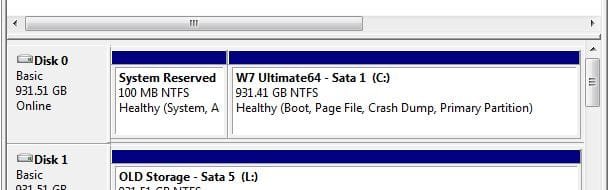
Where is my Win 7 100 mg partition? I don't see it.
 

My Computer My Computer

At a glance

Vista Windows 7 each 64 bit Home Premium
Computer Manufacturer/Model Number
HP HDX18, HP DV7 Quad Edition to arrive soon
OS
Vista Windows 7 each 64 bit Home Premium
Monitor(s) Displays
Acer H233H External Monitor
Hard Drives
2 Hard Drives on both computers
It doesn't look like you have one.

The 7 installer will create one under certain conditions - don't worry, you don't need it.
 

My Computers My Computers

  • At a glance

    7 X64i5 84002x8gb 3200mhz
    Computer type
    PC/Desktop
    OS
    7 X64
    CPU
    i5 8400
    Motherboard
    gigabyte b365m ds3h
    Memory
    2x8gb 3200mhz
    Hard Drives
    various
    PSU
    pure power 11 400w cm
    Case
    Coolermaster
    Cooling
    cryorig m9i
  • At a glance

    7x64g54008gb ddr4 2400
    Computer type
    PC/Desktop
    OS
    7x64
    CPU
    g5400
    Motherboard
    ga b365m ds3h
    Memory
    8gb ddr4 2400
    PSU
    xfx pro 450w
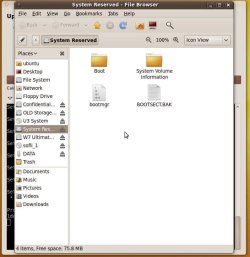
When using a 3rd party tool to partition the hard drive ahead of installing 7 the 100mb system partition isn't created. You only see that when allowing the Windows installer to prepare the drive when it then creates the first 100 system and boot partition.

The two images here show how that looks when seen in the Disk Management tool and a look at what is seen on it.
 

Attachments

  • System 100mb.jpg
    System 100mb.jpg
    24.4 KB · Views: 2
  • System 100mb2.jpg
    System 100mb2.jpg
    55.2 KB · Views: 2

My Computers My Computers

  • At a glance

    W7 Ultimate x64/W10 Pro x64/W11 Pro Triple Bo...AMD Phenom II X4 975 Deneb 3.6ghz - 965 2nd r...Kingston Hyper X DDR3 1600 1.5v 16gb - Hyper ...MSI HD Radeon 5750 1gb - MSI HD Radeon 6450 o...
    Computer type
    PC/Desktop
    Computer Manufacturer/Model Number
    Custom builds = 2
    OS
    W7 Ultimate x64/W10 Pro x64/W11 Pro Triple Boot - Main PC W7 Remote PC Micro ATX W7 Pro x64/W11 Pro
    CPU
    AMD Phenom II X4 975 Deneb 3.6ghz - 965 2nd remote pc
    Motherboard
    Gigabyte GA-790XTA-UD4-Gigabyte GA-880GM-D2H remote pc
    Memory
    Kingston Hyper X DDR3 1600 1.5v 16gb - Hyper X Fury 8gb 2nd
    Graphics Card(s)
    MSI HD Radeon 5750 1gb - MSI HD Radeon 6450 on mini tower
    Sound Card
    Creative Labs X-Fi Xtreme Audio P - Realtek onooard 2nd case
    Monitor(s) Displays
    ASUS VW199T-P 19" HP 2082a Main-HP 2082a 20" remote pc
    Screen Resolution
    Asus 1440x900 - HP 1600x900
    Hard Drives
    WD Black 1TB HD per OS W7, W10, and pending W11 presently on 500gb OS Drive - Pending Triple 1TB HDs for Spanned Storage/backup volume
    Single 2TB external USB enclosure, single 1TB System 7 Host/Boot drive, Pending 8TB external HD for system image b
    PSU
    Corsair 750TX - primary / Corsair CX600 - second
    Case
    Antec 900-2 - SSD compatible / NZXT Vulcan mini tower
    Cooling
    Zalman CNPS9900A
    Keyboard
    AZIO L70 Backlit Letters Gaming - ONN Cordless/USB
    Mouse
    MSI DS200 Programmable, Logitech Cordless
    Internet Speed
    30mbps upgrade - primary hard wired - mini tower usb WiFi
    Antivirus
    GFI VIPRE Internet Security 2014 on W7 2016 beta on W10,
    Browser
    Cyberfox, WaterFox 64bit FF variants, FireFox x64, Pale Moon
    Other Info
    Accomdata fan cooled usb 2.0 PIDE/Sata II, III external enclosure.
    Sambient usb/eSata PATA/Sata II, III external enclosure.
  • At a glance

    W7 Pro x64/W11 ProAMD Deneb 3.6ghz - 965Kingston Hyper X Fury 8gbMSI HD Radeon 6450 DVI Output
    Computer type
    PC/Desktop
    System Manufacturer/Model Number
    CUSTOM ASSEMBLY
    OS
    W7 Pro x64/W11 Pro
    CPU
    AMD Deneb 3.6ghz - 965
    Motherboard
    Gigabyte GA-880GM-D2H remote pc
    Memory
    Kingston Hyper X Fury 8gb
    Graphics Card(s)
    MSI HD Radeon 6450 DVI Output
    Sound Card
    Realtek onooard Creative or Other separate PENDING
    Monitor(s) Displays
    VIZIO 32" LCD TV Separate LCD Pending
    Screen Resolution
    1600x1080
    Hard Drives
    WD 500GB OS Host/Boot WD Green 1TB Storage/Backup
    PSU
    Corsair 600W - THERMALTAKE 600W spare case
    Case
    NZXT Vulcan mini tower
    Cooling
    Twin 120mm Top Fans - 240mm Side Cover
    Keyboard
    ONN Cordless/USB Logitech Cordless
    Mouse
    ONN USB/Cordless - Logitech Cordless
    Internet Speed
    DSL 5G
    Browser
    MS Edge, FireFox, WaterFox x64, FireFox Nightly
    Other Info
    OS Testing-Remote Access to Main TeamViewer
It still won't let me make an image of Win 7alone, I'll need to add roughly 33 gb to image both it says.

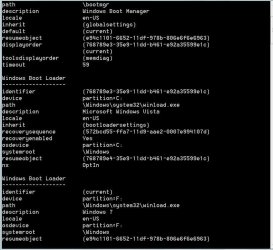
Clicking on the paper clip does not work. It has been over five minutes I'd say, and I was stuck in that window, so came back here, uploaded to Photobucket a bcdedit image so you can figure out what the ****!
is%20and%20that
 

Attachments

  • bcdedit.JPG
    bcdedit.JPG
    72.2 KB · Views: 2

My Computer My Computer

At a glance

Vista Windows 7 each 64 bit Home Premium
Computer Manufacturer/Model Number
HP HDX18, HP DV7 Quad Edition to arrive soon
OS
Vista Windows 7 each 64 bit Home Premium
Monitor(s) Displays
Acer H233H External Monitor
Hard Drives
2 Hard Drives on both computers
As I explained in my first post, Win7 backup imaging wants to include Vista in the image because it holds the boot-critical files. The best way to overcome this is to abandon a Windows-managed Dual Boot to boot instead via the BIOS. This way the HD's become independent for imaging, and can come and go as you please.

Under a BIOS managed Dual boot, you would set the preferred HD to boot first in BIOS setup, then if you want to boot the other HD you tap the key given on first boot screen for one-time Boot Menu, which is normally ESC on HP's.

To set it up this way, you need to recover the MBR into Win7 so it boots independently. To do this, mark Win7 Active in Vista Disk Management, power down to unplug Vista, then either plug its cable into Win7 HD or set Win7 HD first to boot in BIOS, after DVD.

Now boot the Win7 DVD Repair console or Repair CD, click through to Recovery Tools list to run Startup Repair up to 3 separate times with reboots until Win7 Starts up. Now you can plug Vista HD back in and boot it via one-time Boot Menu ESC key.

The attempt to create a System Reserved partition to hold your boot files is not an option - that must be done during Win7 install or reinstall to a blank HD while Vista HD is unplugged.
 
Well, I admit I didn't go to Vista to check that Win 7 was marked as active.
I took the hard drive for Vista out of my laptop and ran setup repair more than 3 times but still no go, so I did a repair install.

Now, when it boots it presents a choice of Vista or Windows 7, with Windows 7 (listed second) highlighted and the one that starts if I don't press enter. If I want Vista I have to arrow up to selected it and hit enter, o it seemed they were separate to me, especially since the repair install was done and it would start up without the Vista hard drive in and would have Vista independent.

I posted the bcdedit screen because I wondered if it was possible to fix it that way, with instruct. I also have Easybcd.

Sorry I skipped the going to Vista to mark Win 7 Active, saw that it was while in Win 7, didn't realize there would be a difference. My apologies. Please bear with me, I am a 67 year old lady with a brain lesion, frequent migraines and fibromyalgia, so I'm in several kinds of pain and very tired most of the time.
 

My Computer My Computer

At a glance

Vista Windows 7 each 64 bit Home Premium
Computer Manufacturer/Model Number
HP HDX18, HP DV7 Quad Edition to arrive soon
OS
Vista Windows 7 each 64 bit Home Premium
Monitor(s) Displays
Acer H233H External Monitor
Hard Drives
2 Hard Drives on both computers
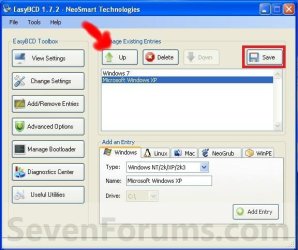
You can change the boot order in EasyBCD.

W7-XP-8.jpg
 

My Computer My Computer

At a glance

ME/XP/Vista/Win7
OS
ME/XP/Vista/Win7
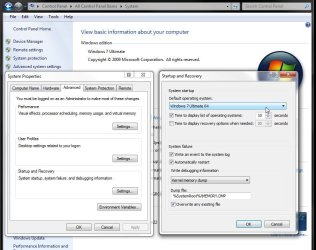
If you don't have EasyBCD downloaded and installed you can also change the default OS in the "Control Panel>System>Advanced Settings>Startup & Recovery" section. Note the screen attached here.
 

Attachments

  • Change Defautl OS.jpg
    Change Defautl OS.jpg
    87.8 KB · Views: 1

My Computers My Computers

  • At a glance

    W7 Ultimate x64/W10 Pro x64/W11 Pro Triple Bo...AMD Phenom II X4 975 Deneb 3.6ghz - 965 2nd r...Kingston Hyper X DDR3 1600 1.5v 16gb - Hyper ...MSI HD Radeon 5750 1gb - MSI HD Radeon 6450 o...
    Computer type
    PC/Desktop
    Computer Manufacturer/Model Number
    Custom builds = 2
    OS
    W7 Ultimate x64/W10 Pro x64/W11 Pro Triple Boot - Main PC W7 Remote PC Micro ATX W7 Pro x64/W11 Pro
    CPU
    AMD Phenom II X4 975 Deneb 3.6ghz - 965 2nd remote pc
    Motherboard
    Gigabyte GA-790XTA-UD4-Gigabyte GA-880GM-D2H remote pc
    Memory
    Kingston Hyper X DDR3 1600 1.5v 16gb - Hyper X Fury 8gb 2nd
    Graphics Card(s)
    MSI HD Radeon 5750 1gb - MSI HD Radeon 6450 on mini tower
    Sound Card
    Creative Labs X-Fi Xtreme Audio P - Realtek onooard 2nd case
    Monitor(s) Displays
    ASUS VW199T-P 19" HP 2082a Main-HP 2082a 20" remote pc
    Screen Resolution
    Asus 1440x900 - HP 1600x900
    Hard Drives
    WD Black 1TB HD per OS W7, W10, and pending W11 presently on 500gb OS Drive - Pending Triple 1TB HDs for Spanned Storage/backup volume
    Single 2TB external USB enclosure, single 1TB System 7 Host/Boot drive, Pending 8TB external HD for system image b
    PSU
    Corsair 750TX - primary / Corsair CX600 - second
    Case
    Antec 900-2 - SSD compatible / NZXT Vulcan mini tower
    Cooling
    Zalman CNPS9900A
    Keyboard
    AZIO L70 Backlit Letters Gaming - ONN Cordless/USB
    Mouse
    MSI DS200 Programmable, Logitech Cordless
    Internet Speed
    30mbps upgrade - primary hard wired - mini tower usb WiFi
    Antivirus
    GFI VIPRE Internet Security 2014 on W7 2016 beta on W10,
    Browser
    Cyberfox, WaterFox 64bit FF variants, FireFox x64, Pale Moon
    Other Info
    Accomdata fan cooled usb 2.0 PIDE/Sata II, III external enclosure.
    Sambient usb/eSata PATA/Sata II, III external enclosure.
  • At a glance

    W7 Pro x64/W11 ProAMD Deneb 3.6ghz - 965Kingston Hyper X Fury 8gbMSI HD Radeon 6450 DVI Output
    Computer type
    PC/Desktop
    System Manufacturer/Model Number
    CUSTOM ASSEMBLY
    OS
    W7 Pro x64/W11 Pro
    CPU
    AMD Deneb 3.6ghz - 965
    Motherboard
    Gigabyte GA-880GM-D2H remote pc
    Memory
    Kingston Hyper X Fury 8gb
    Graphics Card(s)
    MSI HD Radeon 6450 DVI Output
    Sound Card
    Realtek onooard Creative or Other separate PENDING
    Monitor(s) Displays
    VIZIO 32" LCD TV Separate LCD Pending
    Screen Resolution
    1600x1080
    Hard Drives
    WD 500GB OS Host/Boot WD Green 1TB Storage/Backup
    PSU
    Corsair 600W - THERMALTAKE 600W spare case
    Case
    NZXT Vulcan mini tower
    Cooling
    Twin 120mm Top Fans - 240mm Side Cover
    Keyboard
    ONN Cordless/USB Logitech Cordless
    Mouse
    ONN USB/Cordless - Logitech Cordless
    Internet Speed
    DSL 5G
    Browser
    MS Edge, FireFox, WaterFox x64, FireFox Nightly
    Other Info
    OS Testing-Remote Access to Main TeamViewer
You are doing fine, better than many half your age and with no disability. We are always happy to help you.

So can you image your Win7 HD separately now? If I remember correctly that's what we were trying to help you with.
 
Thank you so much for those kind words Greg. HP's techs keep saying that and the repair manager. Now that is scary, when you know as much as they do. I STILL have not figured out why "allow this device to wake the computer" is greyed out on all the USB ports, on both HDX18s, and so I can't wake the computer with my mouse, or at least I think that is the reason there is no power management tab at all. I can wake it from the touchpad. They all agree that I ought to be able to. I'm down to going into the registry, where there is a d word I can find little about on Google. Well, that's off topic, but you guys are smarter than I, so I'm giving you something to think about while I try what I'm describing below.

I have kind words for you, too, but they wouldn't let me until I gave them to some one else. Night Hawk is due, I've just been too tired to give rep.

Everything looks exactly alike in both the System-Advanced and EasyBCD pictures except that in EasyBCD type is empty, which my inclination is to leave alone, AND C IS NOT DIM. It clearly says C. Win 7 is on F for me. So I think I should change that and it might help. Now in details I see that it says there are two entries for the Vista bootloader and it gives Vista in C and Windows 7 in F. So that bootloader knows it is F. That may be confusing it.

Right now I cannot image Win 7 only, yes, Greg, that is the current problem.

Alright, my backup computer is working, so I will try changing it to F and rebooting and trying to image and report back.
 

My Computer My Computer

At a glance

Vista Windows 7 each 64 bit Home Premium
Computer Manufacturer/Model Number
HP HDX18, HP DV7 Quad Edition to arrive soon
OS
Vista Windows 7 each 64 bit Home Premium
Monitor(s) Displays
Acer H233H External Monitor
Hard Drives
2 Hard Drives on both computers
As for the wakeup on most desktops at least the setting is found in the power management section of the bios to enable that as well as power on by keyboard, any key, and mouse. With the newer models that would also include usb keyboards along with mice for that.

As for any imaging of one particular drive you first would want it to be bootable as a stand alone drive even if you have the main boot loader for another OS or version which is Vista for you in use on another drive. The system image creator or other software will simply backup files and boot info from the selected drive/partitions on the one or more selected.

As for setting the default OS to 7 on the external drive there is one thing to know however. If you decide to take the laptop with you without the F drive plugged in you might want to reset Vista as the default OS ahead of time to insure you will still boot into Windows depending on how much time you leave for the boot options to be displayed.

This is in case of any unforeseen booting problems that could come up and how fragile dual booting with external drives involved can be at times. If you regularly unplug the external drive this is a good practice to prevent any mishaps when bringing the laptop with you without the other drive.
 

My Computers My Computers

  • At a glance

    W7 Ultimate x64/W10 Pro x64/W11 Pro Triple Bo...AMD Phenom II X4 975 Deneb 3.6ghz - 965 2nd r...Kingston Hyper X DDR3 1600 1.5v 16gb - Hyper ...MSI HD Radeon 5750 1gb - MSI HD Radeon 6450 o...
    Computer type
    PC/Desktop
    Computer Manufacturer/Model Number
    Custom builds = 2
    OS
    W7 Ultimate x64/W10 Pro x64/W11 Pro Triple Boot - Main PC W7 Remote PC Micro ATX W7 Pro x64/W11 Pro
    CPU
    AMD Phenom II X4 975 Deneb 3.6ghz - 965 2nd remote pc
    Motherboard
    Gigabyte GA-790XTA-UD4-Gigabyte GA-880GM-D2H remote pc
    Memory
    Kingston Hyper X DDR3 1600 1.5v 16gb - Hyper X Fury 8gb 2nd
    Graphics Card(s)
    MSI HD Radeon 5750 1gb - MSI HD Radeon 6450 on mini tower
    Sound Card
    Creative Labs X-Fi Xtreme Audio P - Realtek onooard 2nd case
    Monitor(s) Displays
    ASUS VW199T-P 19" HP 2082a Main-HP 2082a 20" remote pc
    Screen Resolution
    Asus 1440x900 - HP 1600x900
    Hard Drives
    WD Black 1TB HD per OS W7, W10, and pending W11 presently on 500gb OS Drive - Pending Triple 1TB HDs for Spanned Storage/backup volume
    Single 2TB external USB enclosure, single 1TB System 7 Host/Boot drive, Pending 8TB external HD for system image b
    PSU
    Corsair 750TX - primary / Corsair CX600 - second
    Case
    Antec 900-2 - SSD compatible / NZXT Vulcan mini tower
    Cooling
    Zalman CNPS9900A
    Keyboard
    AZIO L70 Backlit Letters Gaming - ONN Cordless/USB
    Mouse
    MSI DS200 Programmable, Logitech Cordless
    Internet Speed
    30mbps upgrade - primary hard wired - mini tower usb WiFi
    Antivirus
    GFI VIPRE Internet Security 2014 on W7 2016 beta on W10,
    Browser
    Cyberfox, WaterFox 64bit FF variants, FireFox x64, Pale Moon
    Other Info
    Accomdata fan cooled usb 2.0 PIDE/Sata II, III external enclosure.
    Sambient usb/eSata PATA/Sata II, III external enclosure.
  • At a glance

    W7 Pro x64/W11 ProAMD Deneb 3.6ghz - 965Kingston Hyper X Fury 8gbMSI HD Radeon 6450 DVI Output
    Computer type
    PC/Desktop
    System Manufacturer/Model Number
    CUSTOM ASSEMBLY
    OS
    W7 Pro x64/W11 Pro
    CPU
    AMD Deneb 3.6ghz - 965
    Motherboard
    Gigabyte GA-880GM-D2H remote pc
    Memory
    Kingston Hyper X Fury 8gb
    Graphics Card(s)
    MSI HD Radeon 6450 DVI Output
    Sound Card
    Realtek onooard Creative or Other separate PENDING
    Monitor(s) Displays
    VIZIO 32" LCD TV Separate LCD Pending
    Screen Resolution
    1600x1080
    Hard Drives
    WD 500GB OS Host/Boot WD Green 1TB Storage/Backup
    PSU
    Corsair 600W - THERMALTAKE 600W spare case
    Case
    NZXT Vulcan mini tower
    Cooling
    Twin 120mm Top Fans - 240mm Side Cover
    Keyboard
    ONN Cordless/USB Logitech Cordless
    Mouse
    ONN USB/Cordless - Logitech Cordless
    Internet Speed
    DSL 5G
    Browser
    MS Edge, FireFox, WaterFox x64, FireFox Nightly
    Other Info
    OS Testing-Remote Access to Main TeamViewer
Back
Top