Want to make Win 7 System Partition DualBoot

Still cannot do. Get a message that "this drive is on the same physical disk as your system drive."

Was looking at Bootrec , but none seemed exactly right. Maybe you know better or have thought of something. I fell asleep in the middle of typing this and think I'd better quit for now.

Night Hawk, you are so quick, you posted while I was asleep.

Nothing in the BIOS, in fact it is very, very simple. Can enable virtualization is about it.

This is a second internal hard drive, not an external drive. So good of you to think of all the contengencies, but it doesn't even travel much around my living room. Mostly sits by my recliner while I use fabulous Firefly corded keyboard which shows a light through the character of each key so I can easily type this at night. It can't wake the computer either.

Hope answers helped, migraine is coming on rapidly. Good night for now.

Oops, forgot: Win 7 was booting fine all by itself with the C Vista drive removed after I did the repair install.
 
Last edited:

My Computer My Computer

At a glance

Vista Windows 7 each 64 bit Home Premium
Computer Manufacturer/Model Number
HP HDX18, HP DV7 Quad Edition to arrive soon
OS
Vista Windows 7 each 64 bit Home Premium
Monitor(s) Displays
Acer H233H External Monitor
Hard Drives
2 Hard Drives on both computers
Your present boot loader and mbr entries are on the internal C Vista drive there. In order to see the external drive made bootable on it's own you may have to perform an upgrade repair install with the internal unplugged. Once made bootable as a stand alone drive you can install EasyBCD on both Vista and 7 while keeping one as default preferrably Vista being on the internal drive.

Being too late and falling asleep is nothing to rush into here! Get that first and then take a fresh look at things so far on the thread here. That will be the best option for you since that can help in avoiding mistakes along the way.
 

My Computers My Computers

  • At a glance

    W7 Ultimate x64/W10 Pro x64/W11 Pro Triple Bo...AMD Phenom II X4 975 Deneb 3.6ghz - 965 2nd r...Kingston Hyper X DDR3 1600 1.5v 16gb - Hyper ...MSI HD Radeon 5750 1gb - MSI HD Radeon 6450 o...
    Computer type
    PC/Desktop
    Computer Manufacturer/Model Number
    Custom builds = 2
    OS
    W7 Ultimate x64/W10 Pro x64/W11 Pro Triple Boot - Main PC W7 Remote PC Micro ATX W7 Pro x64/W11 Pro
    CPU
    AMD Phenom II X4 975 Deneb 3.6ghz - 965 2nd remote pc
    Motherboard
    Gigabyte GA-790XTA-UD4-Gigabyte GA-880GM-D2H remote pc
    Memory
    Kingston Hyper X DDR3 1600 1.5v 16gb - Hyper X Fury 8gb 2nd
    Graphics Card(s)
    MSI HD Radeon 5750 1gb - MSI HD Radeon 6450 on mini tower
    Sound Card
    Creative Labs X-Fi Xtreme Audio P - Realtek onooard 2nd case
    Monitor(s) Displays
    ASUS VW199T-P 19" HP 2082a Main-HP 2082a 20" remote pc
    Screen Resolution
    Asus 1440x900 - HP 1600x900
    Hard Drives
    WD Black 1TB HD per OS W7, W10, and pending W11 presently on 500gb OS Drive - Pending Triple 1TB HDs for Spanned Storage/backup volume
    Single 2TB external USB enclosure, single 1TB System 7 Host/Boot drive, Pending 8TB external HD for system image b
    PSU
    Corsair 750TX - primary / Corsair CX600 - second
    Case
    Antec 900-2 - SSD compatible / NZXT Vulcan mini tower
    Cooling
    Zalman CNPS9900A
    Keyboard
    AZIO L70 Backlit Letters Gaming - ONN Cordless/USB
    Mouse
    MSI DS200 Programmable, Logitech Cordless
    Internet Speed
    30mbps upgrade - primary hard wired - mini tower usb WiFi
    Antivirus
    GFI VIPRE Internet Security 2014 on W7 2016 beta on W10,
    Browser
    Cyberfox, WaterFox 64bit FF variants, FireFox x64, Pale Moon
    Other Info
    Accomdata fan cooled usb 2.0 PIDE/Sata II, III external enclosure.
    Sambient usb/eSata PATA/Sata II, III external enclosure.
  • At a glance

    W7 Pro x64/W11 ProAMD Deneb 3.6ghz - 965Kingston Hyper X Fury 8gbMSI HD Radeon 6450 DVI Output
    Computer type
    PC/Desktop
    System Manufacturer/Model Number
    CUSTOM ASSEMBLY
    OS
    W7 Pro x64/W11 Pro
    CPU
    AMD Deneb 3.6ghz - 965
    Motherboard
    Gigabyte GA-880GM-D2H remote pc
    Memory
    Kingston Hyper X Fury 8gb
    Graphics Card(s)
    MSI HD Radeon 6450 DVI Output
    Sound Card
    Realtek onooard Creative or Other separate PENDING
    Monitor(s) Displays
    VIZIO 32" LCD TV Separate LCD Pending
    Screen Resolution
    1600x1080
    Hard Drives
    WD 500GB OS Host/Boot WD Green 1TB Storage/Backup
    PSU
    Corsair 600W - THERMALTAKE 600W spare case
    Case
    NZXT Vulcan mini tower
    Cooling
    Twin 120mm Top Fans - 240mm Side Cover
    Keyboard
    ONN Cordless/USB Logitech Cordless
    Mouse
    ONN USB/Cordless - Logitech Cordless
    Internet Speed
    DSL 5G
    Browser
    MS Edge, FireFox, WaterFox x64, FireFox Nightly
    Other Info
    OS Testing-Remote Access to Main TeamViewer
But, these are two internal hard drives, and I have already taken out the Visa hard drive and done the repair install on the Windows 7 installation as a stand alone. And it booted all by itself just fine. I do have EasyBCD on each.
 

My Computer My Computer

At a glance

Vista Windows 7 each 64 bit Home Premium
Computer Manufacturer/Model Number
HP HDX18, HP DV7 Quad Edition to arrive soon
OS
Vista Windows 7 each 64 bit Home Premium
Monitor(s) Displays
Acer H233H External Monitor
Hard Drives
2 Hard Drives on both computers
With the Vista drive added back in with the 7 drive set as default you can now add Vista into the new 7 bcd there for a dual boot while still seeing the 7 drive as a stand alone. The EasyBCD entry will simply point to the Vista boot loader on the other drive.

One thing to note is the drive association option seen in EassyBCD itself. When swapping drives around and drive letters subsequently are changed you can go in and reassign the new drive letter for any OS added into the bcd store in the advanced Settings.

Note the screen presently showing C for the 7 install here. You can see how if a second OS like Vista for example may be on F, G, H, etc where you would simply select the correct drive letter for that installation as set in the 7 Disk Management tool and click the "Save Settings" button to see that set.

(latest build 100 beta in use here)
 

Attachments

  • Designate Drive Letter in EasyBCD.jpg
    Designate Drive Letter in EasyBCD.jpg
    45.1 KB · Views: 1

My Computers My Computers

  • At a glance

    W7 Ultimate x64/W10 Pro x64/W11 Pro Triple Bo...AMD Phenom II X4 975 Deneb 3.6ghz - 965 2nd r...Kingston Hyper X DDR3 1600 1.5v 16gb - Hyper ...MSI HD Radeon 5750 1gb - MSI HD Radeon 6450 o...
    Computer type
    PC/Desktop
    Computer Manufacturer/Model Number
    Custom builds = 2
    OS
    W7 Ultimate x64/W10 Pro x64/W11 Pro Triple Boot - Main PC W7 Remote PC Micro ATX W7 Pro x64/W11 Pro
    CPU
    AMD Phenom II X4 975 Deneb 3.6ghz - 965 2nd remote pc
    Motherboard
    Gigabyte GA-790XTA-UD4-Gigabyte GA-880GM-D2H remote pc
    Memory
    Kingston Hyper X DDR3 1600 1.5v 16gb - Hyper X Fury 8gb 2nd
    Graphics Card(s)
    MSI HD Radeon 5750 1gb - MSI HD Radeon 6450 on mini tower
    Sound Card
    Creative Labs X-Fi Xtreme Audio P - Realtek onooard 2nd case
    Monitor(s) Displays
    ASUS VW199T-P 19" HP 2082a Main-HP 2082a 20" remote pc
    Screen Resolution
    Asus 1440x900 - HP 1600x900
    Hard Drives
    WD Black 1TB HD per OS W7, W10, and pending W11 presently on 500gb OS Drive - Pending Triple 1TB HDs for Spanned Storage/backup volume
    Single 2TB external USB enclosure, single 1TB System 7 Host/Boot drive, Pending 8TB external HD for system image b
    PSU
    Corsair 750TX - primary / Corsair CX600 - second
    Case
    Antec 900-2 - SSD compatible / NZXT Vulcan mini tower
    Cooling
    Zalman CNPS9900A
    Keyboard
    AZIO L70 Backlit Letters Gaming - ONN Cordless/USB
    Mouse
    MSI DS200 Programmable, Logitech Cordless
    Internet Speed
    30mbps upgrade - primary hard wired - mini tower usb WiFi
    Antivirus
    GFI VIPRE Internet Security 2014 on W7 2016 beta on W10,
    Browser
    Cyberfox, WaterFox 64bit FF variants, FireFox x64, Pale Moon
    Other Info
    Accomdata fan cooled usb 2.0 PIDE/Sata II, III external enclosure.
    Sambient usb/eSata PATA/Sata II, III external enclosure.
  • At a glance

    W7 Pro x64/W11 ProAMD Deneb 3.6ghz - 965Kingston Hyper X Fury 8gbMSI HD Radeon 6450 DVI Output
    Computer type
    PC/Desktop
    System Manufacturer/Model Number
    CUSTOM ASSEMBLY
    OS
    W7 Pro x64/W11 Pro
    CPU
    AMD Deneb 3.6ghz - 965
    Motherboard
    Gigabyte GA-880GM-D2H remote pc
    Memory
    Kingston Hyper X Fury 8gb
    Graphics Card(s)
    MSI HD Radeon 6450 DVI Output
    Sound Card
    Realtek onooard Creative or Other separate PENDING
    Monitor(s) Displays
    VIZIO 32" LCD TV Separate LCD Pending
    Screen Resolution
    1600x1080
    Hard Drives
    WD 500GB OS Host/Boot WD Green 1TB Storage/Backup
    PSU
    Corsair 600W - THERMALTAKE 600W spare case
    Case
    NZXT Vulcan mini tower
    Cooling
    Twin 120mm Top Fans - 240mm Side Cover
    Keyboard
    ONN Cordless/USB Logitech Cordless
    Mouse
    ONN USB/Cordless - Logitech Cordless
    Internet Speed
    DSL 5G
    Browser
    MS Edge, FireFox, WaterFox x64, FireFox Nightly
    Other Info
    OS Testing-Remote Access to Main TeamViewer
The WIndows 7 drive is still not marked System, so the Win7 imaging app will always want to include Vista in the image since it still contains the System MBR.

The solutions to this are to:

1)Follow my initial suggestion which is to adopt a BIOS-managed Dual boot, where both HD's/OS's have their own MBR, EasyBCD entries are removed (using Add/Remove tab) and the booting is done via the BIOS boot order and BIOS Boot Menu shortcut key.

You would set Win7 HD to boot first in BIOS setup, recover the MBR into it while Vista HD is unplugged, then when you plug Vista HD back in it would be booted by tapping the key given on first boot screen for one-time Boot Menu, which is ESC for HP's.

2) You can continue with a Windows-managed Dual Boot, but the MBR must be on the Win7 HD, not the Vista one. To achieve this, you mark Vista Inactive using DISKPART or free Partition Wizard bootable CD, make sure Win7 is marked Active and first to boot in BIOS boot order (after DVD), then boot Win7 DVD Repair console, click thru to Recovery Tools list to run Startup Repair up to 3 separate times with reboots until it starts up, then add Vista using EasyBCD 2.0 on Add/Remove tab - you may need to remove it first to add it correctly.

Once again, you currently have the MBR on Vista. To image only Win7 with Win7 imaging, you must either move the MBR to Win7 using Step 2 above, or adopt a BIOS-managed Dual Boot where both HD's have MBR's and are booted via BIOS boot order or ESC Boot Menu key, with no Dual Boot menu given.

If you decide which you want to do, feel free to ask any further questions or for more detailed steps.
 
I've unplugged and replugged the Vista drive back in when running the betas and RCs without ever needing to mark any partitions. EasyBCD was actually installed on both while both drives had seen stand alone installations already from the existing XP/Vista dual boot at the time.

All you needed to do was set the 7 drive as default in the bios once again after replugging the Vista drive then seen as HD0 back in and add a new entry into the then 7 bcd store. If I were to install Vista now on this case on another drive while the 7 was still plugged in Vista would become D as seen by 7.

Once the 7 host drive was unplugged and Vista saw a repair or full install to make that other drive a stand alone and the 7 host was plugged back in Vista would still load when selected. When EasyBCD was installed on Vista and 7 was added in there then seeing the Vista drive set as default 7 would still load as well when selected. Despite both being separate editions they share the same boot loader.
 

My Computers My Computers

  • At a glance

    W7 Ultimate x64/W10 Pro x64/W11 Pro Triple Bo...AMD Phenom II X4 975 Deneb 3.6ghz - 965 2nd r...Kingston Hyper X DDR3 1600 1.5v 16gb - Hyper ...MSI HD Radeon 5750 1gb - MSI HD Radeon 6450 o...
    Computer type
    PC/Desktop
    Computer Manufacturer/Model Number
    Custom builds = 2
    OS
    W7 Ultimate x64/W10 Pro x64/W11 Pro Triple Boot - Main PC W7 Remote PC Micro ATX W7 Pro x64/W11 Pro
    CPU
    AMD Phenom II X4 975 Deneb 3.6ghz - 965 2nd remote pc
    Motherboard
    Gigabyte GA-790XTA-UD4-Gigabyte GA-880GM-D2H remote pc
    Memory
    Kingston Hyper X DDR3 1600 1.5v 16gb - Hyper X Fury 8gb 2nd
    Graphics Card(s)
    MSI HD Radeon 5750 1gb - MSI HD Radeon 6450 on mini tower
    Sound Card
    Creative Labs X-Fi Xtreme Audio P - Realtek onooard 2nd case
    Monitor(s) Displays
    ASUS VW199T-P 19" HP 2082a Main-HP 2082a 20" remote pc
    Screen Resolution
    Asus 1440x900 - HP 1600x900
    Hard Drives
    WD Black 1TB HD per OS W7, W10, and pending W11 presently on 500gb OS Drive - Pending Triple 1TB HDs for Spanned Storage/backup volume
    Single 2TB external USB enclosure, single 1TB System 7 Host/Boot drive, Pending 8TB external HD for system image b
    PSU
    Corsair 750TX - primary / Corsair CX600 - second
    Case
    Antec 900-2 - SSD compatible / NZXT Vulcan mini tower
    Cooling
    Zalman CNPS9900A
    Keyboard
    AZIO L70 Backlit Letters Gaming - ONN Cordless/USB
    Mouse
    MSI DS200 Programmable, Logitech Cordless
    Internet Speed
    30mbps upgrade - primary hard wired - mini tower usb WiFi
    Antivirus
    GFI VIPRE Internet Security 2014 on W7 2016 beta on W10,
    Browser
    Cyberfox, WaterFox 64bit FF variants, FireFox x64, Pale Moon
    Other Info
    Accomdata fan cooled usb 2.0 PIDE/Sata II, III external enclosure.
    Sambient usb/eSata PATA/Sata II, III external enclosure.
  • At a glance

    W7 Pro x64/W11 ProAMD Deneb 3.6ghz - 965Kingston Hyper X Fury 8gbMSI HD Radeon 6450 DVI Output
    Computer type
    PC/Desktop
    System Manufacturer/Model Number
    CUSTOM ASSEMBLY
    OS
    W7 Pro x64/W11 Pro
    CPU
    AMD Deneb 3.6ghz - 965
    Motherboard
    Gigabyte GA-880GM-D2H remote pc
    Memory
    Kingston Hyper X Fury 8gb
    Graphics Card(s)
    MSI HD Radeon 6450 DVI Output
    Sound Card
    Realtek onooard Creative or Other separate PENDING
    Monitor(s) Displays
    VIZIO 32" LCD TV Separate LCD Pending
    Screen Resolution
    1600x1080
    Hard Drives
    WD 500GB OS Host/Boot WD Green 1TB Storage/Backup
    PSU
    Corsair 600W - THERMALTAKE 600W spare case
    Case
    NZXT Vulcan mini tower
    Cooling
    Twin 120mm Top Fans - 240mm Side Cover
    Keyboard
    ONN Cordless/USB Logitech Cordless
    Mouse
    ONN USB/Cordless - Logitech Cordless
    Internet Speed
    DSL 5G
    Browser
    MS Edge, FireFox, WaterFox x64, FireFox Nightly
    Other Info
    OS Testing-Remote Access to Main TeamViewer
That is the problem: both share the same bootloader and it is on Vista.

It needs to be moved to Win7 to stop the imaging app from wanting to include Vista in Win7 image. The imaging app wants the MBR included and it is on Vista.

Or: To make both independent, stand-alone drives booted via BIOS means recovering the MBR back into both (while the other is unplugged) until both are marked System and boot via BIOS. Any EasyBCD listings need to be removed or Windows Dual Boot manager will intrude.
 
When adding Vista into the 7 bcd while having each on separate drives both were stand alone OS where the loading of Vista when selected would then see the choice at the time to boot into XP or Vista having been the previous dual boot seen in the Vista bcd. The 7 RC was also added into the Vista bcd as another option while each drive remained indepently bootable if run by themselves.

Once the 7 drive is made bootable as a stand alone there the addition of the Vista entry is basic once plugged back keeping the 7 drive set as the default. The second trip into the bios however will be needed since the Vista will still be HD0 and automatically be set as the first default drive once replugged unless data cables are reversed for seeing the 7 drive plugged into port #1 on the board.

The image taken of any drive is strictly what is on the drive itself. For a backup of the 7 drive the added entry for Vista would be preserved while nothing on the Vista drive is included in the drive image unless the drive is also checked off to be included.
 

My Computers My Computers

  • At a glance

    W7 Ultimate x64/W10 Pro x64/W11 Pro Triple Bo...AMD Phenom II X4 975 Deneb 3.6ghz - 965 2nd r...Kingston Hyper X DDR3 1600 1.5v 16gb - Hyper ...MSI HD Radeon 5750 1gb - MSI HD Radeon 6450 o...
    Computer type
    PC/Desktop
    Computer Manufacturer/Model Number
    Custom builds = 2
    OS
    W7 Ultimate x64/W10 Pro x64/W11 Pro Triple Boot - Main PC W7 Remote PC Micro ATX W7 Pro x64/W11 Pro
    CPU
    AMD Phenom II X4 975 Deneb 3.6ghz - 965 2nd remote pc
    Motherboard
    Gigabyte GA-790XTA-UD4-Gigabyte GA-880GM-D2H remote pc
    Memory
    Kingston Hyper X DDR3 1600 1.5v 16gb - Hyper X Fury 8gb 2nd
    Graphics Card(s)
    MSI HD Radeon 5750 1gb - MSI HD Radeon 6450 on mini tower
    Sound Card
    Creative Labs X-Fi Xtreme Audio P - Realtek onooard 2nd case
    Monitor(s) Displays
    ASUS VW199T-P 19" HP 2082a Main-HP 2082a 20" remote pc
    Screen Resolution
    Asus 1440x900 - HP 1600x900
    Hard Drives
    WD Black 1TB HD per OS W7, W10, and pending W11 presently on 500gb OS Drive - Pending Triple 1TB HDs for Spanned Storage/backup volume
    Single 2TB external USB enclosure, single 1TB System 7 Host/Boot drive, Pending 8TB external HD for system image b
    PSU
    Corsair 750TX - primary / Corsair CX600 - second
    Case
    Antec 900-2 - SSD compatible / NZXT Vulcan mini tower
    Cooling
    Zalman CNPS9900A
    Keyboard
    AZIO L70 Backlit Letters Gaming - ONN Cordless/USB
    Mouse
    MSI DS200 Programmable, Logitech Cordless
    Internet Speed
    30mbps upgrade - primary hard wired - mini tower usb WiFi
    Antivirus
    GFI VIPRE Internet Security 2014 on W7 2016 beta on W10,
    Browser
    Cyberfox, WaterFox 64bit FF variants, FireFox x64, Pale Moon
    Other Info
    Accomdata fan cooled usb 2.0 PIDE/Sata II, III external enclosure.
    Sambient usb/eSata PATA/Sata II, III external enclosure.
  • At a glance

    W7 Pro x64/W11 ProAMD Deneb 3.6ghz - 965Kingston Hyper X Fury 8gbMSI HD Radeon 6450 DVI Output
    Computer type
    PC/Desktop
    System Manufacturer/Model Number
    CUSTOM ASSEMBLY
    OS
    W7 Pro x64/W11 Pro
    CPU
    AMD Deneb 3.6ghz - 965
    Motherboard
    Gigabyte GA-880GM-D2H remote pc
    Memory
    Kingston Hyper X Fury 8gb
    Graphics Card(s)
    MSI HD Radeon 6450 DVI Output
    Sound Card
    Realtek onooard Creative or Other separate PENDING
    Monitor(s) Displays
    VIZIO 32" LCD TV Separate LCD Pending
    Screen Resolution
    1600x1080
    Hard Drives
    WD 500GB OS Host/Boot WD Green 1TB Storage/Backup
    PSU
    Corsair 600W - THERMALTAKE 600W spare case
    Case
    NZXT Vulcan mini tower
    Cooling
    Twin 120mm Top Fans - 240mm Side Cover
    Keyboard
    ONN Cordless/USB Logitech Cordless
    Mouse
    ONN USB/Cordless - Logitech Cordless
    Internet Speed
    DSL 5G
    Browser
    MS Edge, FireFox, WaterFox x64, FireFox Nightly
    Other Info
    OS Testing-Remote Access to Main TeamViewer
I have read this last night and tonight and am still confused. However, that is probably due to the distractions going on in my life now. Just letting you two know I am paying attention, not ignoring you.

Maybe if you explained what I did wrong when I removed the drive and did the repair install of Win 7. I would have thought that would have put a stand alone MBR and bootloader (is this correct terms, anyhow whatever was needed) on the Win 7 drive then.
 

My Computer My Computer

At a glance

Vista Windows 7 each 64 bit Home Premium
Computer Manufacturer/Model Number
HP HDX18, HP DV7 Quad Edition to arrive soon
OS
Vista Windows 7 each 64 bit Home Premium
Monitor(s) Displays
Acer H233H External Monitor
Hard Drives
2 Hard Drives on both computers
With the repair install the 7 should be booting up normally as you would expect it to. When going to add the Vista drive back in especially if that was plugged into the first sata port on the board it will then become the default boot drive in the bios.

To insure the 7 drive is the first default drive and later add an entry in for Vista you can opt to switch the data cables between the drives seeing the 7 drive then plugged into port #1 which makes any further repairs easy being the first drive or simply go into the bios, integrated peripherals, hard drives clicking enter to bring up the list of hard drives installed and move that to the top of the list. Then simply exit and save the new bios setting made.

Once booting by default into 7 you can add the new entry for Vista into 7's own bcd store on that drive using the EasyBCD tool. You will need to sign up at the neosmart forums however to download the latest beta build 100 now seen until the new 2.0 version is final and made public. The old 1.72 was written for Vista and would see the Vista boot screen replace the newer animated 7 boot logo if that is used.

Once the Vista entry is added and you can even name that what you want to be showin in the boot options screen you simply select it to see Vista load rather then 7. You can leave 7 as the default OS or change it to Vista. The amount of time for the boot options screen to be display can be reduced from 30 down even under 5 seconds to speed things up as well.
 

My Computers My Computers

  • At a glance

    W7 Ultimate x64/W10 Pro x64/W11 Pro Triple Bo...AMD Phenom II X4 975 Deneb 3.6ghz - 965 2nd r...Kingston Hyper X DDR3 1600 1.5v 16gb - Hyper ...MSI HD Radeon 5750 1gb - MSI HD Radeon 6450 o...
    Computer type
    PC/Desktop
    Computer Manufacturer/Model Number
    Custom builds = 2
    OS
    W7 Ultimate x64/W10 Pro x64/W11 Pro Triple Boot - Main PC W7 Remote PC Micro ATX W7 Pro x64/W11 Pro
    CPU
    AMD Phenom II X4 975 Deneb 3.6ghz - 965 2nd remote pc
    Motherboard
    Gigabyte GA-790XTA-UD4-Gigabyte GA-880GM-D2H remote pc
    Memory
    Kingston Hyper X DDR3 1600 1.5v 16gb - Hyper X Fury 8gb 2nd
    Graphics Card(s)
    MSI HD Radeon 5750 1gb - MSI HD Radeon 6450 on mini tower
    Sound Card
    Creative Labs X-Fi Xtreme Audio P - Realtek onooard 2nd case
    Monitor(s) Displays
    ASUS VW199T-P 19" HP 2082a Main-HP 2082a 20" remote pc
    Screen Resolution
    Asus 1440x900 - HP 1600x900
    Hard Drives
    WD Black 1TB HD per OS W7, W10, and pending W11 presently on 500gb OS Drive - Pending Triple 1TB HDs for Spanned Storage/backup volume
    Single 2TB external USB enclosure, single 1TB System 7 Host/Boot drive, Pending 8TB external HD for system image b
    PSU
    Corsair 750TX - primary / Corsair CX600 - second
    Case
    Antec 900-2 - SSD compatible / NZXT Vulcan mini tower
    Cooling
    Zalman CNPS9900A
    Keyboard
    AZIO L70 Backlit Letters Gaming - ONN Cordless/USB
    Mouse
    MSI DS200 Programmable, Logitech Cordless
    Internet Speed
    30mbps upgrade - primary hard wired - mini tower usb WiFi
    Antivirus
    GFI VIPRE Internet Security 2014 on W7 2016 beta on W10,
    Browser
    Cyberfox, WaterFox 64bit FF variants, FireFox x64, Pale Moon
    Other Info
    Accomdata fan cooled usb 2.0 PIDE/Sata II, III external enclosure.
    Sambient usb/eSata PATA/Sata II, III external enclosure.
  • At a glance

    W7 Pro x64/W11 ProAMD Deneb 3.6ghz - 965Kingston Hyper X Fury 8gbMSI HD Radeon 6450 DVI Output
    Computer type
    PC/Desktop
    System Manufacturer/Model Number
    CUSTOM ASSEMBLY
    OS
    W7 Pro x64/W11 Pro
    CPU
    AMD Deneb 3.6ghz - 965
    Motherboard
    Gigabyte GA-880GM-D2H remote pc
    Memory
    Kingston Hyper X Fury 8gb
    Graphics Card(s)
    MSI HD Radeon 6450 DVI Output
    Sound Card
    Realtek onooard Creative or Other separate PENDING
    Monitor(s) Displays
    VIZIO 32" LCD TV Separate LCD Pending
    Screen Resolution
    1600x1080
    Hard Drives
    WD 500GB OS Host/Boot WD Green 1TB Storage/Backup
    PSU
    Corsair 600W - THERMALTAKE 600W spare case
    Case
    NZXT Vulcan mini tower
    Cooling
    Twin 120mm Top Fans - 240mm Side Cover
    Keyboard
    ONN Cordless/USB Logitech Cordless
    Mouse
    ONN USB/Cordless - Logitech Cordless
    Internet Speed
    DSL 5G
    Browser
    MS Edge, FireFox, WaterFox x64, FireFox Nightly
    Other Info
    OS Testing-Remote Access to Main TeamViewer
I don't believe he is trying to delete the Vista drive.

Mark Win7 active, set it as first HD to boot in BIOS, then recover the System MBR into Win7 by running Startup Repair repeatedly from DVD while Vista HD is unplugged.

Once Win7 Starts up, plug back in the Vista HD but keep Win7 HD as first HD to boot in BIOS. Now test to see if Vista will boot on its own by tapping the key given at bootup to get the one-time BIOS Boot Menu, select Vista HD to boot instead of the default Win7 HD.

If this BIOS Dual Boot works, then you don't need to use EasyBCD since you have a much better Dual Boot config: via the BIOS boot order OR one-time Boot Menu ESC key. The HD's don't become interlinked and can come and go as you please.

If you use EasyBCD 2.0 to construct a windows-managed Dual Boot menu, then the drives become interlocked and are harder to extricate later.
 
Last edited:
The “Press <F9> to change boot order” message that is displayed in the lower-left corner of the screen
each time the computer is started or restarted in Windows is the prompt to change the boot order.


That was seen in one manual for that model series at http://h10032.www1.hp.com/ctg/Manual/c01215575.pdf

As far as EasyBCD that goes on easy, edits the Vista or 7 BCD store with ease, and works well on both versions. The boot device menu is used here for things like booting from either the optical drive or a usb flash drive when plugged in for things like loading GParted live for cd or running even installing a live distro on one.

Up until 7 was released I ran Vista on drive with the RCs on two others the 32bit RC replacing the old XP. I even had a second 64bit install on the old XP drive later all stand alone and added into each other's BCD where you could set one as default but simply one of the others all on one of the startup boot options screens. The EasyBCD tool also allows you to change the default OS without even going into the bios which is one other thing to consider.

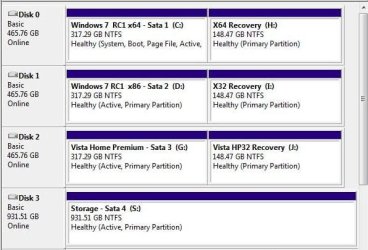
A slight update here to show how things looked last year while the 7 RCs were along with Vista. For each drive's installation of the 7 RCs already having Vista then seen as the 3rd HD from simply swapping data cables the other two had been unplugged during the install to see the two 7 drives made stand alones.

Upon replugging them back in when finished the screen here shows how they were all seen as active primaries. Notice the word "healthy" seen on each there. The one with the 32bit RC later became a second 64bit install as well due to the first being on a drive removed from a WD MyBook Essentials external casing also being a Green Power lower end drive.
 

Attachments

  • OLD PARTITION LAYOUT.jpg
    OLD PARTITION LAYOUT.jpg
    47.5 KB · Views: 0
Last edited:

My Computers My Computers

  • At a glance

    W7 Ultimate x64/W10 Pro x64/W11 Pro Triple Bo...AMD Phenom II X4 975 Deneb 3.6ghz - 965 2nd r...Kingston Hyper X DDR3 1600 1.5v 16gb - Hyper ...MSI HD Radeon 5750 1gb - MSI HD Radeon 6450 o...
    Computer type
    PC/Desktop
    Computer Manufacturer/Model Number
    Custom builds = 2
    OS
    W7 Ultimate x64/W10 Pro x64/W11 Pro Triple Boot - Main PC W7 Remote PC Micro ATX W7 Pro x64/W11 Pro
    CPU
    AMD Phenom II X4 975 Deneb 3.6ghz - 965 2nd remote pc
    Motherboard
    Gigabyte GA-790XTA-UD4-Gigabyte GA-880GM-D2H remote pc
    Memory
    Kingston Hyper X DDR3 1600 1.5v 16gb - Hyper X Fury 8gb 2nd
    Graphics Card(s)
    MSI HD Radeon 5750 1gb - MSI HD Radeon 6450 on mini tower
    Sound Card
    Creative Labs X-Fi Xtreme Audio P - Realtek onooard 2nd case
    Monitor(s) Displays
    ASUS VW199T-P 19" HP 2082a Main-HP 2082a 20" remote pc
    Screen Resolution
    Asus 1440x900 - HP 1600x900
    Hard Drives
    WD Black 1TB HD per OS W7, W10, and pending W11 presently on 500gb OS Drive - Pending Triple 1TB HDs for Spanned Storage/backup volume
    Single 2TB external USB enclosure, single 1TB System 7 Host/Boot drive, Pending 8TB external HD for system image b
    PSU
    Corsair 750TX - primary / Corsair CX600 - second
    Case
    Antec 900-2 - SSD compatible / NZXT Vulcan mini tower
    Cooling
    Zalman CNPS9900A
    Keyboard
    AZIO L70 Backlit Letters Gaming - ONN Cordless/USB
    Mouse
    MSI DS200 Programmable, Logitech Cordless
    Internet Speed
    30mbps upgrade - primary hard wired - mini tower usb WiFi
    Antivirus
    GFI VIPRE Internet Security 2014 on W7 2016 beta on W10,
    Browser
    Cyberfox, WaterFox 64bit FF variants, FireFox x64, Pale Moon
    Other Info
    Accomdata fan cooled usb 2.0 PIDE/Sata II, III external enclosure.
    Sambient usb/eSata PATA/Sata II, III external enclosure.
  • At a glance

    W7 Pro x64/W11 ProAMD Deneb 3.6ghz - 965Kingston Hyper X Fury 8gbMSI HD Radeon 6450 DVI Output
    Computer type
    PC/Desktop
    System Manufacturer/Model Number
    CUSTOM ASSEMBLY
    OS
    W7 Pro x64/W11 Pro
    CPU
    AMD Deneb 3.6ghz - 965
    Motherboard
    Gigabyte GA-880GM-D2H remote pc
    Memory
    Kingston Hyper X Fury 8gb
    Graphics Card(s)
    MSI HD Radeon 6450 DVI Output
    Sound Card
    Realtek onooard Creative or Other separate PENDING
    Monitor(s) Displays
    VIZIO 32" LCD TV Separate LCD Pending
    Screen Resolution
    1600x1080
    Hard Drives
    WD 500GB OS Host/Boot WD Green 1TB Storage/Backup
    PSU
    Corsair 600W - THERMALTAKE 600W spare case
    Case
    NZXT Vulcan mini tower
    Cooling
    Twin 120mm Top Fans - 240mm Side Cover
    Keyboard
    ONN Cordless/USB Logitech Cordless
    Mouse
    ONN USB/Cordless - Logitech Cordless
    Internet Speed
    DSL 5G
    Browser
    MS Edge, FireFox, WaterFox x64, FireFox Nightly
    Other Info
    OS Testing-Remote Access to Main TeamViewer
Let's see if I can remember everything.

I don't want to delete Vista. I would like each separate so if one hard drive went the other drive would still boot. I want to be able to image Win 7 only.

Both Vista and Win 7 are marked as Active but only Vista has System. If this is because I put the Vista drive back into the first slot, that is because I read here that changing things will mess up Macrium images. I could reimage the Vista drive if all went well.

I said this had a simple BIOS. I just looked and it only says hard drive, there is nothing in the BIOS about which hard drive boots first under setting boot order.

I registered, downloaded the beta version of Easy BCD and installed it on Windows 7. It isn't on Vista yet.
 

My Computer My Computer

At a glance

Vista Windows 7 each 64 bit Home Premium
Computer Manufacturer/Model Number
HP HDX18, HP DV7 Quad Edition to arrive soon
OS
Vista Windows 7 each 64 bit Home Premium
Monitor(s) Displays
Acer H233H External Monitor
Hard Drives
2 Hard Drives on both computers
When seeing the hard drive item in the bios you have to highlight that by moving with the up or down arrow. Once highlighted you press the enter key to see the list of drives installed on the new screen that comes up. This is how most bioses work.

Once in that screen you highlight the intended drive and often use the NumPad plus or minus key to bring that drive to the top of the list making it default upon the exit and save of the bios changes made. The F10 key is often the assigned key as the alternate exit and save.

As far as imaging any drive what is that drive alone is what is compiled into the image itself. With a 3rd party program like Macrium keeping the same drive letters and drive configuration is important for seeing any image restored later. In 7 even the Home Premium edition features it's own system image creation option as well.
"Yes - Not to network location" is seen in the edition comparison chart. http://www.sevenforums.com/tutorials/14422-compare-windows-7-editions.html

Drive manufacturers like Western Digital and Seagate also offer their own free version of programs like the Acronis True Image which can mount a backup image create in order to add further to it incrementally if you know which make of drive was used by HP for that model.

Meanwhile the working Vista install will still load either by pressing the assigned boot device menu key to bring which type of drive to boot with for a one time session or by having the entry for both versions seen on the boot options screen added in by EasyBCD where you can set which will be default.

With the 7 drive set as default and Vista added into the bcd store you could still set Vista as the default OS. Vice versa for the 7 entry added into the Vista bcd. If you elect to change the second OS drive letter once both drives are plugged and one is booted into you will need to reassociate the second OS with the new drive letter however in order to still see the second version load when selected.

It sounds complicated but is quite simple once you have worked with it a few times.
 

My Computers My Computers

  • At a glance

    W7 Ultimate x64/W10 Pro x64/W11 Pro Triple Bo...AMD Phenom II X4 975 Deneb 3.6ghz - 965 2nd r...Kingston Hyper X DDR3 1600 1.5v 16gb - Hyper ...MSI HD Radeon 5750 1gb - MSI HD Radeon 6450 o...
    Computer type
    PC/Desktop
    Computer Manufacturer/Model Number
    Custom builds = 2
    OS
    W7 Ultimate x64/W10 Pro x64/W11 Pro Triple Boot - Main PC W7 Remote PC Micro ATX W7 Pro x64/W11 Pro
    CPU
    AMD Phenom II X4 975 Deneb 3.6ghz - 965 2nd remote pc
    Motherboard
    Gigabyte GA-790XTA-UD4-Gigabyte GA-880GM-D2H remote pc
    Memory
    Kingston Hyper X DDR3 1600 1.5v 16gb - Hyper X Fury 8gb 2nd
    Graphics Card(s)
    MSI HD Radeon 5750 1gb - MSI HD Radeon 6450 on mini tower
    Sound Card
    Creative Labs X-Fi Xtreme Audio P - Realtek onooard 2nd case
    Monitor(s) Displays
    ASUS VW199T-P 19" HP 2082a Main-HP 2082a 20" remote pc
    Screen Resolution
    Asus 1440x900 - HP 1600x900
    Hard Drives
    WD Black 1TB HD per OS W7, W10, and pending W11 presently on 500gb OS Drive - Pending Triple 1TB HDs for Spanned Storage/backup volume
    Single 2TB external USB enclosure, single 1TB System 7 Host/Boot drive, Pending 8TB external HD for system image b
    PSU
    Corsair 750TX - primary / Corsair CX600 - second
    Case
    Antec 900-2 - SSD compatible / NZXT Vulcan mini tower
    Cooling
    Zalman CNPS9900A
    Keyboard
    AZIO L70 Backlit Letters Gaming - ONN Cordless/USB
    Mouse
    MSI DS200 Programmable, Logitech Cordless
    Internet Speed
    30mbps upgrade - primary hard wired - mini tower usb WiFi
    Antivirus
    GFI VIPRE Internet Security 2014 on W7 2016 beta on W10,
    Browser
    Cyberfox, WaterFox 64bit FF variants, FireFox x64, Pale Moon
    Other Info
    Accomdata fan cooled usb 2.0 PIDE/Sata II, III external enclosure.
    Sambient usb/eSata PATA/Sata II, III external enclosure.
  • At a glance

    W7 Pro x64/W11 ProAMD Deneb 3.6ghz - 965Kingston Hyper X Fury 8gbMSI HD Radeon 6450 DVI Output
    Computer type
    PC/Desktop
    System Manufacturer/Model Number
    CUSTOM ASSEMBLY
    OS
    W7 Pro x64/W11 Pro
    CPU
    AMD Deneb 3.6ghz - 965
    Motherboard
    Gigabyte GA-880GM-D2H remote pc
    Memory
    Kingston Hyper X Fury 8gb
    Graphics Card(s)
    MSI HD Radeon 6450 DVI Output
    Sound Card
    Realtek onooard Creative or Other separate PENDING
    Monitor(s) Displays
    VIZIO 32" LCD TV Separate LCD Pending
    Screen Resolution
    1600x1080
    Hard Drives
    WD 500GB OS Host/Boot WD Green 1TB Storage/Backup
    PSU
    Corsair 600W - THERMALTAKE 600W spare case
    Case
    NZXT Vulcan mini tower
    Cooling
    Twin 120mm Top Fans - 240mm Side Cover
    Keyboard
    ONN Cordless/USB Logitech Cordless
    Mouse
    ONN USB/Cordless - Logitech Cordless
    Internet Speed
    DSL 5G
    Browser
    MS Edge, FireFox, WaterFox x64, FireFox Nightly
    Other Info
    OS Testing-Remote Access to Main TeamViewer
or use acronis true image home 2010, you can isolate the system partitions and copy and restore what you want. Other disk or down a network. Win7 backup is OK for the average pc user who is not a technocrat and wants to do things like dual booting. :)
 

My Computer My Computer

At a glance

Windows 7 32bit, Windows XP Pro., Ubunto.
Computer Manufacturer/Model Number
Various desktops, laptops and network storage devices.
OS
Windows 7 32bit, Windows XP Pro., Ubunto.
Other Info
Also main desktop set up as dual boot with XP Pro and Win7 Pro 32bit.
Hi,

You can put 7 HD first in bios boot order and use Easybcd to add an entry for Vista to the 7 boot menu.

You won't have a problem with macrium images.

With macrium, paragon, acronis, any 3rd party imaging tool - you select which partition you want to back up - and where to store the backup image.

You then select which partition image to restore - then select where to restore it to.

They all work fine.


Let's see if I can remember everything.

I don't want to delete Vista. I would like each separate so if one hard drive went the other drive would still boot. I want to be able to image Win 7 only.

Both Vista and Win 7 are marked as Active but only Vista has System. If this is because I put the Vista drive back into the first slot, that is because I read here that changing things will mess up Macrium images. I could reimage the Vista drive if all went well.

I said this had a simple BIOS. I just looked and it only says hard drive, there is nothing in the BIOS about which hard drive boots first under setting boot order.

I registered, downloaded the beta version of Easy BCD and installed it on Windows 7. It isn't on Vista yet.
 

My Computers My Computers

  • At a glance

    7 X64i5 84002x8gb 3200mhz
    Computer type
    PC/Desktop
    OS
    7 X64
    CPU
    i5 8400
    Motherboard
    gigabyte b365m ds3h
    Memory
    2x8gb 3200mhz
    Hard Drives
    various
    PSU
    pure power 11 400w cm
    Case
    Coolermaster
    Cooling
    cryorig m9i
  • At a glance

    7x64g54008gb ddr4 2400
    Computer type
    PC/Desktop
    OS
    7x64
    CPU
    g5400
    Motherboard
    ga b365m ds3h
    Memory
    8gb ddr4 2400
    PSU
    xfx pro 450w
Look for boot order (not HD listings) in BIOS setup. Expand the HD listed as Nighthawk suggests, if necessary. Which HD is set to boot first? Change it to Win7 HD.

Now what happens? If Win7 boots, then restart and tap the key given on first boot screen for one-time Boot Menu (which should be ESC for HP's, but others say here might be F9 or F10) to see if you can interrupt Win7 boot and boot the Vista HD instead.

If this will work and is satisfactory, then you don't need to install EasyBCD but can boot into Win7 by default via the BIOS boot order, or instead trigger Vista on the one-time Boot Menu key.

If you can't get Vista to boot this way, then install EasyBCD 2.0 to Win7 and Add Vista on the Add/Remove menu.
 
When I go into BIOS setup and move across until I get Boot Order and then go down I get choices of do I want to enable a floppy drive and so on, then boot order, which I can move up or down by pressing F52 or F6 I think. When I land on Hard Drive and hit Enter, nothing happens. No choice of which hard drive comes up. I told you it was very simplistic. When I exit and save and I get a black and white screen with Vista at the top, Windows 7 below, with Windows 7 highlighted as the default and so many minutes ticking away giving me the choice to change from the default Win 7 to Vista. It says Windows Boot Manager at the Top.

I have no idea what you mean when you say Hit one time Boot Menu Esc key or when you say tapping the key given at bootup to get the one-time BIOS Boot Menu, select Vista HD to boot instead.

When starting, if I hit Esc I have choices: F8, BIOS, and Boot Order. If I pick Boot Order, it is CD or Hard Drive if I remember correctly, I will have to go have another look at it. Whichever I pick is immediately started, it doesn't give you this first or last like it sounds like you would.

I use Macronis, I want to image from Windows 7, a Win 7 only to save space and have it so I can use it for the F8 choice in case of emergency and it is a "belt and suspenders" backup to Macrons.

Also, as I said I want either drive to start in case the other fails and that means System on both of them I gather.

This is Windows Home Premium on a laptop with two internal hard drives. Both are healthy, active partitions. System is shown on the Vista partition but not the Win 7 partition. I want Win 7 as the default.

If I am correct in assuming that the only thing I did wrong before was putting Win 7 back in its old slot, and if Macrium doesn't care, then I just have to take Vista out again, put the Win7 DVD in and boot repeatedly from it and if that doesn't work do a system restore and when that works and it is starting all by itself, shut it down and put it in the first position. Then put the Vista hard drive in and see if it will boot. It should still have System on it and Wind 7 should have had System added to it and not been removed by my putting it in the second slot. I can change drive letters in Easy BCDEDIT. Is this correct.
 

My Computer My Computer

At a glance

Vista Windows 7 each 64 bit Home Premium
Computer Manufacturer/Model Number
HP HDX18, HP DV7 Quad Edition to arrive soon
OS
Vista Windows 7 each 64 bit Home Premium
Monitor(s) Displays
Acer H233H External Monitor
Hard Drives
2 Hard Drives on both computers
Yes, the Boot menu you accessed when pressing ESC at startup is the one-time Boot Menu, which should give you a choice of HD's if both are registering in BIOS and System.

To make Win7 a System HD you need to write the MBR to it: Make sure it is still marked Active in Vista DIsk Mgmt, power down, Unplug Vista HD, set Win7 as first HD to boot in BIOS setup under Boot Order.

Now boot the Win7 DVD Repair console or Repair CD, click through to Recovery Tools list to run Startup Repair (not System Restore) up to 3 separate times with reboots until Win7 starts on its own.

Now plug Vista HD back in, boot computer, press ESC and see if you are given the choice to boot the Vista HD separately under HD's. Next, restart and confirm that Win7 starts up on its own,. Report back.
 
Last edited:
Back
Top