Solved want to reinstall my win7 on a diffrent SDD

yuval153

New member
Local time
11:50 PM
Messages
14
hello !
my pc is getting kind of slow, so i want to upgrade it little bit, so i went and bought EVO 850 120gb SSD.
my question is, i got an OEM win 7 that installed by the company that i bought this pc from.
i want to delete the win 7 from that HDD, and reinstall with the same CD-KEY on my new SSD.

i got the disk from the company, that i dont know if i can install windows with it.
i know the product key only from my "my computer > settings" - is it a problem?

and for last, how can i do it?
 

My Computer My Computer

At a glance

windows 7 64bitIntel i7 382016gb corsair2x gtx 670 3gb
Computer type
PC/Desktop
Computer Manufacturer/Model Number
Asus
OS
windows 7 64bit
CPU
Intel i7 3820
Motherboard
p9x79 LE
Memory
16gb corsair
Graphics Card(s)
2x gtx 670 3gb
Monitor(s) Displays
BenQ XL2420T
Screen Resolution
1920x1080
Hard Drives
2x W.D black 1TB
1x w.d Green 2TB
PSU
GS700 700w
Case
ThermalTake Chaiser MK-I
Cooling
H100i
Keyboard
Razer BlackWidow Chroma
Mouse
Razer DeathAdder 2014
Internet Speed
100mb
Antivirus
microsoft
Browser
chrome
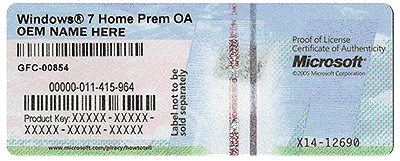
Do you have the COA sticker on the machine? If so that is the key you need to use. You can use Gregrocker's Tutorial to do a Clean Install of Windows 7. You will be using the SSD in the original machine, so an OEM License will work for you.
The big thing to remember is that you cannot have the original HDD connected while you do this project. The SSD will become the primary drive. Also, you need to do a full backup of your personal information/files. Make sure you have all of the program discs as well.
You can download your version of Windows 7 from Digital River and burn it to a DVD. This is also explained in the Tutorials available here at Seven Forums.
Shalom and good luck
 

My Computer My Computer

At a glance

Windows 7 Enterprise 64bit Desktops; Windows ...AMD Athlon 2 X3; I5-6200 6th gen (Dell)8 Gig Desktop, 8Gig Laptop, 16Gig LaptopRadeon R5450 1Gig
Computer type
PC/Desktop
Computer Manufacturer/Model Number
Custom Desktop (2 alike) Dell inspiron 13" W10 Laptop Dell Inspiron 17 5759
OS
Windows 7 Enterprise 64bit Desktops; Windows 7 Professional 64Bit 17"Laptop
CPU
AMD Athlon 2 X3; I5-6200 6th gen (Dell)
Motherboard
Gigabyte GA 78LMT-USB3 (2 Desktops)
Memory
8 Gig Desktop, 8Gig Laptop, 16Gig Laptop
Graphics Card(s)
Radeon R5450 1Gig
Sound Card
Creative SB X-Fi Titanium Extreme Audio Desktop 1
Monitor(s) Displays
Dell 2419
Screen Resolution
1920x1080
Hard Drives
Crucial M500 500GB SSD Desktop 1 and Laptops
Samsung 850EVO 250GB - Desktop 2
PSU
Thermaltake 600watt
Case
Rosewill
Cooling
Scythe Typhoon 120mm
Keyboard
Kensington
Mouse
Logitech M310
Internet Speed
50/50
Antivirus
Avast
Browser
Firefox 68
and if i dont have the sticker on my pc?
how can i find my cd-key ?
 

My Computer My Computer

At a glance

windows 7 64bitIntel i7 382016gb corsair2x gtx 670 3gb
Computer type
PC/Desktop
Computer Manufacturer/Model Number
Asus
OS
windows 7 64bit
CPU
Intel i7 3820
Motherboard
p9x79 LE
Memory
16gb corsair
Graphics Card(s)
2x gtx 670 3gb
Monitor(s) Displays
BenQ XL2420T
Screen Resolution
1920x1080
Hard Drives
2x W.D black 1TB
1x w.d Green 2TB
PSU
GS700 700w
Case
ThermalTake Chaiser MK-I
Cooling
H100i
Keyboard
Razer BlackWidow Chroma
Mouse
Razer DeathAdder 2014
Internet Speed
100mb
Antivirus
microsoft
Browser
chrome
Did your disc come with a sticker or key printed on it? If not, was this a custom built machine? It is also possible that your motherboard is UEFI and has the Key stored in the BIOS. You can contact the dealer and see if they have a record of the Key or Microsoft may be able to retrieve it for you. The only other possibility I can offer is to buy a copy of Windows 7 Pro from a reputable dealer such as Amazon.
 

My Computer My Computer

At a glance

Windows 7 Enterprise 64bit Desktops; Windows ...AMD Athlon 2 X3; I5-6200 6th gen (Dell)8 Gig Desktop, 8Gig Laptop, 16Gig LaptopRadeon R5450 1Gig
Computer type
PC/Desktop
Computer Manufacturer/Model Number
Custom Desktop (2 alike) Dell inspiron 13" W10 Laptop Dell Inspiron 17 5759
OS
Windows 7 Enterprise 64bit Desktops; Windows 7 Professional 64Bit 17"Laptop
CPU
AMD Athlon 2 X3; I5-6200 6th gen (Dell)
Motherboard
Gigabyte GA 78LMT-USB3 (2 Desktops)
Memory
8 Gig Desktop, 8Gig Laptop, 16Gig Laptop
Graphics Card(s)
Radeon R5450 1Gig
Sound Card
Creative SB X-Fi Titanium Extreme Audio Desktop 1
Monitor(s) Displays
Dell 2419
Screen Resolution
1920x1080
Hard Drives
Crucial M500 500GB SSD Desktop 1 and Laptops
Samsung 850EVO 250GB - Desktop 2
PSU
Thermaltake 600watt
Case
Rosewill
Cooling
Scythe Typhoon 120mm
Keyboard
Kensington
Mouse
Logitech M310
Internet Speed
50/50
Antivirus
Avast
Browser
Firefox 68
Your specs show a motherboard Asus p9x79 LE.
Did you buy this computer from Asus with that motherboard or did you replace the motherboard.

Who did you buy the computer from?

It should have a Windows 7 COA sticker somewhere on the computer.
 

My Computer My Computer

At a glance

Windows 10 Pro. 64/ version 1709 Windows 7 Pr...Intel i7-6800K @ 4.3Corsair Platinum 16 gig @2400EVGA GTX 1070 OC
Computer type
PC/Desktop
Computer Manufacturer/Model Number
Home made Desktop
OS
Windows 10 Pro. 64/ version 1709 Windows 7 Pro/64
CPU
Intel i7-6800K @ 4.3
Motherboard
ASUS X-99 Deluxe II
Memory
Corsair Platinum 16 gig @2400
Graphics Card(s)
EVGA GTX 1070 OC
Monitor(s) Displays
Asus 27" LED LCD/VE278Q
Screen Resolution
1920-1080 or 1280-720 HDMI
Hard Drives
INTEL SSD 730-240 Gb Sata 3.0/
PSU
EVGA Platium 1200W
Case
Phanteks Luxe Tempered Glass 8 fans/ one radiator
Cooling
XSPC/ Water Cooled CPU
Keyboard
Das 4 Professional
Mouse
Logitech M705/MX Anywhere 2-S
Internet Speed
100 mbits
Antivirus
Microsoft Security Essentials/ Malwarebytes Premium 3.0/ SAS
Browser
I.E. 11 default/Firefox/ ISP Time Warner Cable/Spectrum
Other Info
LG BluRay Burner/
Sound system-KLipsch-THX/
Icy Dock ssd Hot Swap bays.
this is a custom pc.
the parts are from a store, and i do have a disc, but not a sticker. and im not sure if with the that disc i can re-install WIN7.
how can i be sure?

i will try to open it up and search inside, maybe the builder miss-place the sticker.
but if i wont find it, is it possible for some software to find it for me / talk online with helper from microsoft for him
to find it for me?


what is the "identify product" that i see in "my computer > settings" down bellow?
 

My Computer My Computer

At a glance

windows 7 64bitIntel i7 382016gb corsair2x gtx 670 3gb
Computer type
PC/Desktop
Computer Manufacturer/Model Number
Asus
OS
windows 7 64bit
CPU
Intel i7 3820
Motherboard
p9x79 LE
Memory
16gb corsair
Graphics Card(s)
2x gtx 670 3gb
Monitor(s) Displays
BenQ XL2420T
Screen Resolution
1920x1080
Hard Drives
2x W.D black 1TB
1x w.d Green 2TB
PSU
GS700 700w
Case
ThermalTake Chaiser MK-I
Cooling
H100i
Keyboard
Razer BlackWidow Chroma
Mouse
Razer DeathAdder 2014
Internet Speed
100mb
Antivirus
microsoft
Browser
chrome
if you got windows installed by company there may be chance of getting oem slp key which you cant used to reinstall windows. oem slp are generic keys used to activate windows at high volumes.if it is custom there may be chance of using oem key which can be used to reinstall. so use the software "magicall jelly bean " or "product key finder".it will show your product key and its type.
oem slp: you cant reinstall
oem:you can reinstall
retail:you can reinstall on any pc at one time. first make sure the type of key you have then take action.make system image before you mess with pc.
 

My Computer My Computer

At a glance

windows 7 pro 32bit
Computer type
Laptop
OS
windows 7 pro 32bit

My Computer My Computer

At a glance

windows 7 pro 32bit
Computer type
Laptop
OS
windows 7 pro 32bit

My Computer My Computer

At a glance

Windows 10 Pro. 64/ version 1709 Windows 7 Pr...Intel i7-6800K @ 4.3Corsair Platinum 16 gig @2400EVGA GTX 1070 OC
Computer type
PC/Desktop
Computer Manufacturer/Model Number
Home made Desktop
OS
Windows 10 Pro. 64/ version 1709 Windows 7 Pro/64
CPU
Intel i7-6800K @ 4.3
Motherboard
ASUS X-99 Deluxe II
Memory
Corsair Platinum 16 gig @2400
Graphics Card(s)
EVGA GTX 1070 OC
Monitor(s) Displays
Asus 27" LED LCD/VE278Q
Screen Resolution
1920-1080 or 1280-720 HDMI
Hard Drives
INTEL SSD 730-240 Gb Sata 3.0/
PSU
EVGA Platium 1200W
Case
Phanteks Luxe Tempered Glass 8 fans/ one radiator
Cooling
XSPC/ Water Cooled CPU
Keyboard
Das 4 Professional
Mouse
Logitech M705/MX Anywhere 2-S
Internet Speed
100 mbits
Antivirus
Microsoft Security Essentials/ Malwarebytes Premium 3.0/ SAS
Browser
I.E. 11 default/Firefox/ ISP Time Warner Cable/Spectrum
Other Info
LG BluRay Burner/
Sound system-KLipsch-THX/
Icy Dock ssd Hot Swap bays.
on "product key finder" i found my win7 H-P cd key.
am i right, and it is the cd-key that i need for my WIN7?

and now, how can i install it, because i am not sure my disc is ok for that..
the code of my win 7 - it does not specify if it OEM / OEM SLP.
but on my disc it written - "product recovery DVD-ROM"
"FOR DISTRIBUTION ONLY WITH A NEW ***** PC"


is it possible for me too download some unleagal WIN7, and than just put in inside the "activate" section the real key, and update ?
 
Last edited:

My Computer My Computer

At a glance

windows 7 64bitIntel i7 382016gb corsair2x gtx 670 3gb
Computer type
PC/Desktop
Computer Manufacturer/Model Number
Asus
OS
windows 7 64bit
CPU
Intel i7 3820
Motherboard
p9x79 LE
Memory
16gb corsair
Graphics Card(s)
2x gtx 670 3gb
Monitor(s) Displays
BenQ XL2420T
Screen Resolution
1920x1080
Hard Drives
2x W.D black 1TB
1x w.d Green 2TB
PSU
GS700 700w
Case
ThermalTake Chaiser MK-I
Cooling
H100i
Keyboard
Razer BlackWidow Chroma
Mouse
Razer DeathAdder 2014
Internet Speed
100mb
Antivirus
microsoft
Browser
chrome

My Computer My Computer

At a glance

Windows 10 Pro. 64/ version 1709 Windows 7 Pr...Intel i7-6800K @ 4.3Corsair Platinum 16 gig @2400EVGA GTX 1070 OC
Computer type
PC/Desktop
Computer Manufacturer/Model Number
Home made Desktop
OS
Windows 10 Pro. 64/ version 1709 Windows 7 Pro/64
CPU
Intel i7-6800K @ 4.3
Motherboard
ASUS X-99 Deluxe II
Memory
Corsair Platinum 16 gig @2400
Graphics Card(s)
EVGA GTX 1070 OC
Monitor(s) Displays
Asus 27" LED LCD/VE278Q
Screen Resolution
1920-1080 or 1280-720 HDMI
Hard Drives
INTEL SSD 730-240 Gb Sata 3.0/
PSU
EVGA Platium 1200W
Case
Phanteks Luxe Tempered Glass 8 fans/ one radiator
Cooling
XSPC/ Water Cooled CPU
Keyboard
Das 4 Professional
Mouse
Logitech M705/MX Anywhere 2-S
Internet Speed
100 mbits
Antivirus
Microsoft Security Essentials/ Malwarebytes Premium 3.0/ SAS
Browser
I.E. 11 default/Firefox/ ISP Time Warner Cable/Spectrum
Other Info
LG BluRay Burner/
Sound system-KLipsch-THX/
Icy Dock ssd Hot Swap bays.
if you cant able to find the type of license key you have to follow the link provided by layback bear there you will find MGAdiag tool. download the tool and run. post your results here he will tell you the type of license key you have.you can download the legal virus free windows 7 iso from digital river.once you sorted the type of key if it is not oem slp key then you can follow the clean install tutorial by gregrocker here.if you got oem slp then use AOMEI partition assistant for os migration.
 

My Computer My Computer

At a glance

windows 7 pro 32bit
Computer type
Laptop
OS
windows 7 pro 32bit
If you post the log as per the tutorial I posted before we can tell you exactly what you have. (OEM/SLP, OEM, or Retail)


Windows Genuine and Activation Issue Posting Instructions
Code:
Diagnostic Report (1.9.0027.0):
-----------------------------------------
Windows Validation Data-->

Validation Code: 0
Cached Online Validation Code: 0x0
Windows Product Key: *****-*****-7KHKC-4VY6H-XM38H
Windows Product Key Hash: Crkg6bo1TnhBGvmyQRBgY++rROs=
Windows Product ID: 00359-OEM-8802172-29638
Windows Product ID Type: 3
Windows License Type: OEM System Builder
Windows OS version: 6.1.7601.2.00010300.1.0.003
ID: {F0539725-8433-4CD1-A137-09D7902AC99B}(1)
Is Admin: Yes
TestCab: 0x0
LegitcheckControl ActiveX: N/A, hr = 0x80070002
Signed By: N/A, hr = 0x80070002
Product Name: Windows 7 Home Premium
Architecture: 0x00000009
Build lab: 7601.win7sp1_gdr.141211-1742
TTS Error: 
Validation Diagnostic: 
Resolution Status: N/A

Vista WgaER Data-->
ThreatID(s): N/A, hr = 0x80070002
Version: N/A, hr = 0x80070002

Windows XP Notifications Data-->
Cached Result: N/A, hr = 0x80070002
File Exists: No
Version: N/A, hr = 0x80070002
WgaTray.exe Signed By: N/A, hr = 0x80070002
WgaLogon.dll Signed By: N/A, hr = 0x80070002

OGA Notifications Data-->
Cached Result: N/A, hr = 0x80070002
Version: N/A, hr = 0x80070002
OGAExec.exe Signed By: N/A, hr = 0x80070002
OGAAddin.dll Signed By: N/A, hr = 0x80070002

OGA Data-->
Office Status: 109 N/A
OGA Version: N/A, 0x80070002
Signed By: N/A, hr = 0x80070002
Office Diagnostics: 025D1FF3-364-80041010_025D1FF3-229-80041010_025D1FF3-230-1_025D1FF3-517-80040154_025D1FF3-237-80040154_025D1FF3-238-2_025D1FF3-244-80070002_025D1FF3-258-3

Browser Data-->
Proxy settings: N/A
User Agent: Mozilla/4.0 (compatible; MSIE 8.0; Win32)
Default Browser: C:\Program Files (x86)\Google\Chrome\Application\chrome.exe
Download signed ActiveX controls: Prompt
Download unsigned ActiveX controls: Disabled
Run ActiveX controls and plug-ins: Allowed
Initialize and script ActiveX controls not marked as safe: Disabled
Allow scripting of Internet Explorer Webbrowser control: Disabled
Active scripting: Allowed
Script ActiveX controls marked as safe for scripting: Allowed

File Scan Data-->

Other data-->
Office Details: <GenuineResults><MachineData><UGUID>{F0539725-8433-4CD1-A137-09D7902AC99B}</UGUID><Version>1.9.0027.0</Version><OS>6.1.7601.2.00010300.1.0.003</OS><Architecture>x64</Architecture><PKey>*****-*****-*****-*****-XM38H</PKey><PID>00359-OEM-8802172-29638</PID><PIDType>3</PIDType><SID>S-1-5-21-3244369198-2583359702-144688144</SID><SYSTEM><Manufacturer>System manufacturer</Manufacturer><Model>System Product Name</Model></SYSTEM><BIOS><Manufacturer>American Megatrends Inc.</Manufacturer><Version>3009</Version><SMBIOSVersion major="2" minor="7"/><Date>20121005000000.000000+000</Date></BIOS><HWID>51873907018400F2</HWID><UserLCID>040D</UserLCID><SystemLCID>040D</SystemLCID><TimeZone>שעון רגיל ירושלים(GMT+02:00)</TimeZone><iJoin>0</iJoin><SBID><stat>3</stat><msppid></msppid><name></name><model></model></SBID><OEM/><GANotification/></MachineData><Software><Office><Result>109</Result><Products/><Applications/></Office></Software></GenuineResults>  

Spsys.log Content: 0x80070002

Licensing Data-->
Software licensing service version: 6.1.7601.17514

Name: Windows(R) 7, HomePremium edition
Description: Windows Operating System - Windows(R) 7, OEM_COA_NSLP channel
Activation ID: 9f83d90f-a151-4665-ae69-30b3f63ec659
Application ID: 55c92734-d682-4d71-983e-d6ec3f16059f
Extended PID: 00359-00176-021-729638-02-1037-7600.0000-0042013
Installation ID: 013283910993131756303444634221992424192711355865215516
Processor Certificate URL: [url=http://go.microsoft.com/fwlink/?LinkID=88338]SpcService Web Service[/url]
Machine Certificate URL: [url=http://go.microsoft.com/fwlink/?LinkID=88339]RacService Web Service[/url]
Use License URL: [url=http://go.microsoft.com/fwlink/?LinkID=88341]UseLicenseService Web Service[/url]
Product Key Certificate URL: [url=http://go.microsoft.com/fwlink/?LinkID=88340]PkcService Web Service[/url]
Partial Product Key: XM38H
License Status: Licensed
Remaining Windows rearm count: 4
Trusted time: 26/01/2015 13:30:31

Windows Activation Technologies-->
HrOffline: 0x00000000
HrOnline: 0x00000000
HealthStatus: 0x0000000000000000
Event Time Stamp: 12:30:2014 14:36
ActiveX: Registered, Version: 7.1.7600.16395
Admin Service: Registered, Version: 7.1.7600.16395
HealthStatus Bitmask Output:


HWID Data-->
HWID Hash Current: OAAAAAIAAgABAAEAAQADAAAAAwABAAEAHKJoEfQCdxZ0xGTHNg+QcXg01ujKxEuHpCoy7gt3NCE=

OEM Activation 1.0 Data-->
N/A

OEM Activation 2.0 Data-->
BIOS valid for OA 2.0: yes, but no SLIC table
Windows marker version: N/A
OEMID and OEMTableID Consistent: N/A
BIOS Information: 
  ACPI Table Name	OEMID Value	OEMTableID Value
  APIC			ALASKA		A M I
  FACP			ALASKA		A M I
  HPET			ALASKA		A M I
  MCFG			ALASKA		OEMMCFG.
  FPDT			ALASKA		A M I
  SSDT			AMICPU		PROC

 

My Computer My Computer

At a glance

windows 7 64bitIntel i7 382016gb corsair2x gtx 670 3gb
Computer type
PC/Desktop
Computer Manufacturer/Model Number
Asus
OS
windows 7 64bit
CPU
Intel i7 3820
Motherboard
p9x79 LE
Memory
16gb corsair
Graphics Card(s)
2x gtx 670 3gb
Monitor(s) Displays
BenQ XL2420T
Screen Resolution
1920x1080
Hard Drives
2x W.D black 1TB
1x w.d Green 2TB
PSU
GS700 700w
Case
ThermalTake Chaiser MK-I
Cooling
H100i
Keyboard
Razer BlackWidow Chroma
Mouse
Razer DeathAdder 2014
Internet Speed
100mb
Antivirus
microsoft
Browser
chrome
it seems you have oem license you are good to go with clean install of windows tutorial by gregrocker.But wait for confirmation from layback bear.
 

My Computer My Computer

At a glance

windows 7 pro 32bit
Computer type
Laptop
OS
windows 7 pro 32bit
how do i remove windows on the current HDD, and than reinstall it on the SSD?
the cd-key just "open" up again and i can re-use it?
 

My Computer My Computer

At a glance

windows 7 64bitIntel i7 382016gb corsair2x gtx 670 3gb
Computer type
PC/Desktop
Computer Manufacturer/Model Number
Asus
OS
windows 7 64bit
CPU
Intel i7 3820
Motherboard
p9x79 LE
Memory
16gb corsair
Graphics Card(s)
2x gtx 670 3gb
Monitor(s) Displays
BenQ XL2420T
Screen Resolution
1920x1080
Hard Drives
2x W.D black 1TB
1x w.d Green 2TB
PSU
GS700 700w
Case
ThermalTake Chaiser MK-I
Cooling
H100i
Keyboard
Razer BlackWidow Chroma
Mouse
Razer DeathAdder 2014
Internet Speed
100mb
Antivirus
microsoft
Browser
chrome
if it is oem key you can use many times in a pc as long as you have same mobo because the oem key is tied to mobo on which you install os first.wait for layback bear replay for confirmation .you can easily install ssd.
1.plug ssd to sata 3 sort(for better speed)
2.unplug remaining hdd
3.set bios setting sata port to ACHI.
4.change booting order to your installation media dvd or pendrive
5.install in usual way 6.after installing windows restart and shutdown power off
7.plug in other hdd
8.set your ssd as first booting device and hdd as second in bios.
9.remove the os from hdd.there as many methods follow the methods that suits you.
 
Last edited:

My Computer My Computer

At a glance

windows 7 pro 32bit
Computer type
Laptop
OS
windows 7 pro 32bit
take a look at the thread here titled "installing W7 on an ssd without deleting previous install ".note down the product key obtained from product key finder you said it matches cd key so no problem anyhow note it down safely. wait for confirmation from layback bear before doing anything.
 
Last edited:

My Computer My Computer

At a glance

windows 7 pro 32bit
Computer type
Laptop
OS
windows 7 pro 32bit
You have a
OEM System Builder for
Windows 7 Home Premium

If you use Speccy and tick Operating System you should get your COA key.
You can use that COA key to Clean Install or Repair Install Home Premium as long as you are using the same motherboard it was installed on the first time and the COA key is not being used on another computer.

Do not display that key on the net. Write it down.

https://www.piriform.com/speccy
 

My Computer My Computer

At a glance

Windows 10 Pro. 64/ version 1709 Windows 7 Pr...Intel i7-6800K @ 4.3Corsair Platinum 16 gig @2400EVGA GTX 1070 OC
Computer type
PC/Desktop
Computer Manufacturer/Model Number
Home made Desktop
OS
Windows 10 Pro. 64/ version 1709 Windows 7 Pro/64
CPU
Intel i7-6800K @ 4.3
Motherboard
ASUS X-99 Deluxe II
Memory
Corsair Platinum 16 gig @2400
Graphics Card(s)
EVGA GTX 1070 OC
Monitor(s) Displays
Asus 27" LED LCD/VE278Q
Screen Resolution
1920-1080 or 1280-720 HDMI
Hard Drives
INTEL SSD 730-240 Gb Sata 3.0/
PSU
EVGA Platium 1200W
Case
Phanteks Luxe Tempered Glass 8 fans/ one radiator
Cooling
XSPC/ Water Cooled CPU
Keyboard
Das 4 Professional
Mouse
Logitech M705/MX Anywhere 2-S
Internet Speed
100 mbits
Antivirus
Microsoft Security Essentials/ Malwarebytes Premium 3.0/ SAS
Browser
I.E. 11 default/Firefox/ ISP Time Warner Cable/Spectrum
Other Info
LG BluRay Burner/
Sound system-KLipsch-THX/
Icy Dock ssd Hot Swap bays.
go on install windows on ssd. enjoy
 

My Computer My Computer

At a glance

windows 7 pro 32bit
Computer type
Laptop
OS
windows 7 pro 32bit
i have no idea what COA key means, so if u can explain to me how to find it and what can i do with it?
cause i dont really understand how to reinstall win7 without a real disc..
 

My Computer My Computer

At a glance

windows 7 64bitIntel i7 382016gb corsair2x gtx 670 3gb
Computer type
PC/Desktop
Computer Manufacturer/Model Number
Asus
OS
windows 7 64bit
CPU
Intel i7 3820
Motherboard
p9x79 LE
Memory
16gb corsair
Graphics Card(s)
2x gtx 670 3gb
Monitor(s) Displays
BenQ XL2420T
Screen Resolution
1920x1080
Hard Drives
2x W.D black 1TB
1x w.d Green 2TB
PSU
GS700 700w
Case
ThermalTake Chaiser MK-I
Cooling
H100i
Keyboard
Razer BlackWidow Chroma
Mouse
Razer DeathAdder 2014
Internet Speed
100mb
Antivirus
microsoft
Browser
chrome
Back
Top