
Warning when formatting unallocated space

hiqbal

New member
Local time
5:10 AM
Messages
5
Got a new notebook HP dv6 with Windows 7 Home Basic (64-bit) and 320 GB hard disk.

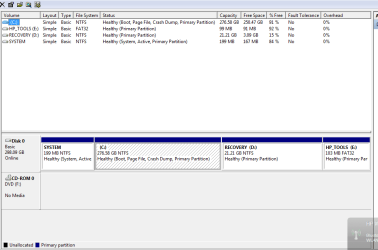
I shrinked C Drive to half in order to use additional partition for storage. When I get the unallocated space to format and make a new volume. I get the following warning

"The operation you selected will convert the selected basic disk(s) to dynamic disk(s). If you convert the disk(s) to dynamic, you will not be able to start installed operating systems from any volume on the disk(s) (except the current boot volume). Are you sure want to continue?"

I pressed Yes and nothing happened. When restarted Windows was unable to boot and had to do a complete system recovery. Would like to know what went wrong!

Thanks. H
 

Attachments
  • Disk Partition.png
    Disk Partition.png
    14.9 KB · Views: 135
Last edited:

My Computer

Computer Manufacturer/Model Number
HP Pavilion dv6-3016
OS
Windows 7 Home Basic 64-bit
CPU
Intel Core i3-350M 2.26GHz
Memory
2GB
Graphics Card(s)
Intel
Hard Drives
320 GB SATA
If I am wrong someone will correct me, but it appears that HP has placed 4 primary partitions on the disk. You are only allowed 4 primary partitions per disk.
 

My Computers

System One System Two

  • Computer type
    PC/Desktop
    Computer Manufacturer/Model Number
    ALWAYS UNDER CONSTRUCTION
    OS
    Windows 11 Pro
    CPU
    Ryzen 9 5900X
    Motherboard
    Asus X570 Crosshair Viii Hero
    Memory
    32GB G Skill DDR4-3600
    Graphics Card(s)
    EVGA RTX 3080 FTW 3 Ultra
    Sound Card
    On Board/Sennheiser PC37X Headset
    Monitor(s) Displays
    3 X Asus 27"
    Screen Resolution
    2560x1440
    Hard Drives
    2 X 1 TB NVME drives
    PSU
    EVGA 850
    Case
    Phanteks Eclipse P400A
    Cooling
    EVGA 280 AIO
    Keyboard
    Logitech G510s/ Logitech G13
    Mouse
    Logitech G502
    Internet Speed
    24/1
    Antivirus
    ESET/MBAM Pro/SAS Pro
    Browser
    Chrome/ Firefox/ Edge
  • Computer type
    Laptop
    System Manufacturer/Model Number
    Dell 16 Plus
    OS
    Windows 11 Pro
    CPU
    Intel Ultra 9 288V
    Memory
    32 GB LPDDR5X 8533
    Monitor(s) Displays
    16" Mini-LED HDR600 Touch 90 Hz
    Screen Resolution
    2560X1600
    Hard Drives
    1 TB NVME
Correct I forced 5 on a HDD once... Im glad Segate has a good warranty...
 

My Computer

Computer Manufacturer/Model Number
SMN-Productions
OS
Windows 7 x86/x64, Server 2008r2, Web Server 2008
CPU
i7 v2 3930K Steping stone 2
Motherboard
ASUS Rampage IV Extreme
Memory
G.SKILL Ripjaws Z Series 32GB
Graphics Card(s)
AMD HD 5770
Monitor(s) Displays
Acer 21" and Samsung 20"
Hard Drives
Patriot Pyro 80GB
PSU
1000 Watt
Case
HAF-X
Cooling
4 Fans
Keyboard
Black Widow Ultimate
There is a limit of 4 partitions per hard drive. You tried to make a 5'TH partition so it probably defaulted to a dynamic disk. I'm not sure if you can get around that limit very easily, it might end up being more trouble than its worth.
 
Last edited:

My Computer

Computer type
PC/Desktop
Computer Manufacturer/Model Number
Home Built
OS
Windows 10 Education 64 bit
CPU
AMD Phenom II X4 980 Black Edition Deneb 3.7GHz
Motherboard
Asus M4N68T-M V2 µATX Motherboard
Memory
8GB 4GBx2 Kingston PC10600 DDR3 1333 Memory
Graphics Card(s)
Zotac NVIDIA Geforce GT640 2 Gig DDR3 PCIe
Sound Card
VIA VT1708s High Definition Audio 8-channel Onboard
Monitor(s) Displays
22" LG E2242 1080p and 2 19" I-INC AG191D
Screen Resolution
1280x1024 - 1920x1080 - 1280x1024
Hard Drives
Crucial M100 256 GB SSD and 500 GB WD Blue SATA
PSU
Thermaltake TR 620
Case
Power Up Black ATX Mid-Tower Case
Cooling
Stock heatsink and fan
Keyboard
Logitech Wireless K350 Wave
Mouse
Logitech Wireless M570 Trackman Wheel
Internet Speed
80 Mbps Down 30 Mbps Up
Antivirus
Windows Defender
Browser
Internet Explorer 11
Other Info
HP DVD1040e Lightscribe - External USB2
You are right. there are four partitions already. (System, C, HP Tools and Recovery). So i should leave them like they are. Is it a problem if i keep using C for storing data. I have gone through recovery once.. Dont want to repeat it
 

My Computer

Computer Manufacturer/Model Number
HP Pavilion dv6-3016
OS
Windows 7 Home Basic 64-bit
CPU
Intel Core i3-350M 2.26GHz
Memory
2GB
Graphics Card(s)
Intel
Hard Drives
320 GB SATA
It won't be a problem using C for data, it just means you have to backup your documents, pictures, etc to external media if you ever decide to do a reinstall. How computer savvy are you? I believe there is a tutorial on how to remove that "System Reserved" partition. If you mess it up though, you'll be looking at another restore.
 

My Computer

Computer type
PC/Desktop
Computer Manufacturer/Model Number
Home Built
OS
Windows 10 Education 64 bit
CPU
AMD Phenom II X4 980 Black Edition Deneb 3.7GHz
Motherboard
Asus M4N68T-M V2 µATX Motherboard
Memory
8GB 4GBx2 Kingston PC10600 DDR3 1333 Memory
Graphics Card(s)
Zotac NVIDIA Geforce GT640 2 Gig DDR3 PCIe
Sound Card
VIA VT1708s High Definition Audio 8-channel Onboard
Monitor(s) Displays
22" LG E2242 1080p and 2 19" I-INC AG191D
Screen Resolution
1280x1024 - 1920x1080 - 1280x1024
Hard Drives
Crucial M100 256 GB SSD and 500 GB WD Blue SATA
PSU
Thermaltake TR 620
Case
Power Up Black ATX Mid-Tower Case
Cooling
Stock heatsink and fan
Keyboard
Logitech Wireless K350 Wave
Mouse
Logitech Wireless M570 Trackman Wheel
Internet Speed
80 Mbps Down 30 Mbps Up
Antivirus
Windows Defender
Browser
Internet Explorer 11
Other Info
HP DVD1040e Lightscribe - External USB2
I would very much like to have a different volume for data. Can you share with me the tutorial?
 

My Computer

Computer Manufacturer/Model Number
HP Pavilion dv6-3016
OS
Windows 7 Home Basic 64-bit
CPU
Intel Core i3-350M 2.26GHz
Memory
2GB
Graphics Card(s)
Intel
Hard Drives
320 GB SATA
Another option is to move the user files to an external. Use the external for user files and storage. I works pretty well. I am doing that right now. I had to RMA my MB, so am on my wife's computer. You don't mess up my wife's computer so I did it this way and am having no problems.
 

My Computers

System One System Two

  • Computer type
    PC/Desktop
    Computer Manufacturer/Model Number
    ALWAYS UNDER CONSTRUCTION
    OS
    Windows 11 Pro
    CPU
    Ryzen 9 5900X
    Motherboard
    Asus X570 Crosshair Viii Hero
    Memory
    32GB G Skill DDR4-3600
    Graphics Card(s)
    EVGA RTX 3080 FTW 3 Ultra
    Sound Card
    On Board/Sennheiser PC37X Headset
    Monitor(s) Displays
    3 X Asus 27"
    Screen Resolution
    2560x1440
    Hard Drives
    2 X 1 TB NVME drives
    PSU
    EVGA 850
    Case
    Phanteks Eclipse P400A
    Cooling
    EVGA 280 AIO
    Keyboard
    Logitech G510s/ Logitech G13
    Mouse
    Logitech G502
    Internet Speed
    24/1
    Antivirus
    ESET/MBAM Pro/SAS Pro
    Browser
    Chrome/ Firefox/ Edge
  • Computer type
    Laptop
    System Manufacturer/Model Number
    Dell 16 Plus
    OS
    Windows 11 Pro
    CPU
    Intel Ultra 9 288V
    Memory
    32 GB LPDDR5X 8533
    Monitor(s) Displays
    16" Mini-LED HDR600 Touch 90 Hz
    Screen Resolution
    2560X1600
    Hard Drives
    1 TB NVME
Its not wise of HP keeping these partitions. It slows down if you keep storing data on C: Should I remove reserved system partition and shrink C for another data partition or will it cause problems to windows in some way
 

My Computer

Computer Manufacturer/Model Number
HP Pavilion dv6-3016
OS
Windows 7 Home Basic 64-bit
CPU
Intel Core i3-350M 2.26GHz
Memory
2GB
Graphics Card(s)
Intel
Hard Drives
320 GB SATA
I would very much like to have a different volume for data. Can you share with me the tutorial?

I took a quick look and all I could find were tutorials for creating it and modifying it for dual boot. It could be that you can't remove it, not easily anyway.
 

My Computer

Computer type
PC/Desktop
Computer Manufacturer/Model Number
Home Built
OS
Windows 10 Education 64 bit
CPU
AMD Phenom II X4 980 Black Edition Deneb 3.7GHz
Motherboard
Asus M4N68T-M V2 µATX Motherboard
Memory
8GB 4GBx2 Kingston PC10600 DDR3 1333 Memory
Graphics Card(s)
Zotac NVIDIA Geforce GT640 2 Gig DDR3 PCIe
Sound Card
VIA VT1708s High Definition Audio 8-channel Onboard
Monitor(s) Displays
22" LG E2242 1080p and 2 19" I-INC AG191D
Screen Resolution
1280x1024 - 1920x1080 - 1280x1024
Hard Drives
Crucial M100 256 GB SSD and 500 GB WD Blue SATA
PSU
Thermaltake TR 620
Case
Power Up Black ATX Mid-Tower Case
Cooling
Stock heatsink and fan
Keyboard
Logitech Wireless K350 Wave
Mouse
Logitech Wireless M570 Trackman Wheel
Internet Speed
80 Mbps Down 30 Mbps Up
Antivirus
Windows Defender
Browser
Internet Explorer 11
Other Info
HP DVD1040e Lightscribe - External USB2
Its not wise of HP keeping these partitions. It slows down if you keep storing data on C: Should I remove reserved system partition and shrink C for another data partition or will it cause problems to windows in some way

I don't think the extra partitions are slowing anything down as far as Windows goes. Storing your data on another partition on the same drive won't speed things up any either. The only way you would get a boost would be to store your data on a second hard drive.
If you still want to make a separate data partition you could consider removing the HP recovery partition. Make a recovery disk set before you do it though. Then shrink your C if you want to and create a new D drive with whats left.
 

My Computer

Computer type
PC/Desktop
Computer Manufacturer/Model Number
Home Built
OS
Windows 10 Education 64 bit
CPU
AMD Phenom II X4 980 Black Edition Deneb 3.7GHz
Motherboard
Asus M4N68T-M V2 µATX Motherboard
Memory
8GB 4GBx2 Kingston PC10600 DDR3 1333 Memory
Graphics Card(s)
Zotac NVIDIA Geforce GT640 2 Gig DDR3 PCIe
Sound Card
VIA VT1708s High Definition Audio 8-channel Onboard
Monitor(s) Displays
22" LG E2242 1080p and 2 19" I-INC AG191D
Screen Resolution
1280x1024 - 1920x1080 - 1280x1024
Hard Drives
Crucial M100 256 GB SSD and 500 GB WD Blue SATA
PSU
Thermaltake TR 620
Case
Power Up Black ATX Mid-Tower Case
Cooling
Stock heatsink and fan
Keyboard
Logitech Wireless K350 Wave
Mouse
Logitech Wireless M570 Trackman Wheel
Internet Speed
80 Mbps Down 30 Mbps Up
Antivirus
Windows Defender
Browser
Internet Explorer 11
Other Info
HP DVD1040e Lightscribe - External USB2
That is what i plan to do now, as i dont want to invest in an external drive now. Thanks
 

My Computer

Computer Manufacturer/Model Number
HP Pavilion dv6-3016
OS
Windows 7 Home Basic 64-bit
CPU
Intel Core i3-350M 2.26GHz
Memory
2GB
Graphics Card(s)
Intel
Hard Drives
320 GB SATA
My first thought was why not remove the HP Tools partition. I'm unaware of what it contains, did a search, and it seems like it is not a critical component. Maybe someone with experience with it has an opinion.

delete hp tools partition - Bing=

Also, here is on older thread where they removed it.
http://www.sevenforums.com/general-discussion/41178-too-many-primary-partitions.html
"So after two days of emailing back and forth with multiple HP techs there was little consensus between them as to whether or not I should delete either the recovery or the hp_tools partition, I made my recovery cds and deleted both of the partitions"

Or perhaps the Tools can be copied and placed on your data storage partition??
 

My Computer

OS
Windows 7 Professional x64
The only glitch to doing that is if you run into problems latter on and have to call HP tech support, they may want you to run some of those diagnostics before giving you any more help. I'm not sure if they would hassle you over it or not. The other glitch is that the recovery partition is between your C partition and that HP tools partition. I don't think you will be able to take space from C and add it to E. Not without creating a dynamic disk. If it was me and I had a full Microsoft install DVD (not recovery media), I'd nuke the whole drive and start over. It would definitely be on my to do list once the warranty was over.
 

My Computer

Computer type
PC/Desktop
Computer Manufacturer/Model Number
Home Built
OS
Windows 10 Education 64 bit
CPU
AMD Phenom II X4 980 Black Edition Deneb 3.7GHz
Motherboard
Asus M4N68T-M V2 µATX Motherboard
Memory
8GB 4GBx2 Kingston PC10600 DDR3 1333 Memory
Graphics Card(s)
Zotac NVIDIA Geforce GT640 2 Gig DDR3 PCIe
Sound Card
VIA VT1708s High Definition Audio 8-channel Onboard
Monitor(s) Displays
22" LG E2242 1080p and 2 19" I-INC AG191D
Screen Resolution
1280x1024 - 1920x1080 - 1280x1024
Hard Drives
Crucial M100 256 GB SSD and 500 GB WD Blue SATA
PSU
Thermaltake TR 620
Case
Power Up Black ATX Mid-Tower Case
Cooling
Stock heatsink and fan
Keyboard
Logitech Wireless K350 Wave
Mouse
Logitech Wireless M570 Trackman Wheel
Internet Speed
80 Mbps Down 30 Mbps Up
Antivirus
Windows Defender
Browser
Internet Explorer 11
Other Info
HP DVD1040e Lightscribe - External USB2
First you need to delete the partition you created and convert from Dynamic back to Basic. In order to do this you'll need to find Version 4.2 of free Partition Wizard bootable CD as it has been moved to the paid version since then. This is the only known method to convert without data destruction. Back up your files anyway.

Then I would simply use PW to create a Logical partition in the shrink space to use for your data - you can even add as many additional Logical partitions as there are letters remaining. Removing the SysReserved partition might mess with Factory Recovery and will remove the Repair console from F8 Advanced Boot Tools menu.

If you decide you want to make your Recovery Disks then wipe the HD to clean reinstall and reclaim all the disk space without the factory bloatware and useless utilities which have better versions built into Win7, here are some tips for how to get a purrfect clean install: http://www.sevenforums.com/installation-setup/125874-re-install-windows-7-a.html#post1086729
 
Back
Top