Solved Washed Out Screens and Taskbar, etc...

in2tech

New member
Local time
7:44 AM
Messages
21
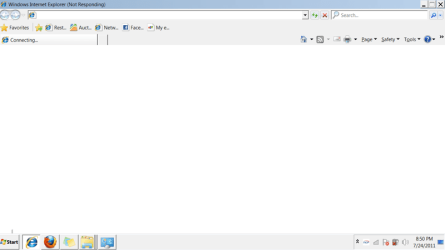
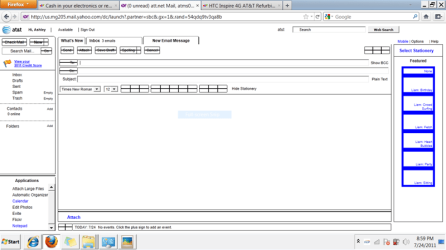
My niece has a laptop that started giving her washed out areas of the browsers, desktop, taskbar, etc... I had her go back and restore as far back as she could incase she got a virus or something weird happened with drivers etc... but it didn't fix anything. She has checked the settings in the control panel for screen settings, themes, etc... and nothing fixes it.

Please see attached images to see what I am talking about!

Any ideas? Would a complete restore help? Has someone clicked on the wrong settings somehow? She does have a 3 year old :)

Thanks for your help!
 

Attachments

  • Capture.PNG
    Capture.PNG
    14.9 KB · Views: 548
  • Capture_2.png
    Capture_2.png
    30.7 KB · Views: 473

My Computer My Computer

At a glance

Windows 7 Ultiimate x64 bitAMD Turion(tm) X2 Dual-Core RM-75 2.20 GHZ4 GB
Computer Manufacturer/Model Number
HP dv7-1444us laptop
OS
Windows 7 Ultiimate x64 bit
CPU
AMD Turion(tm) X2 Dual-Core RM-75 2.20 GHZ
Memory
4 GB
Monitor(s) Displays
17.3"
Hard Drives
320 GB internal
500 GB external Seagate
This can be caused by a display that's worn out. I'm not saying it is. Let's try some other things.


WIN + X key combo | drag the slider in the Brightness section to the left

WIN is the key with the Microsoft flag on top.

=========================
CONTROL PANEL | make sure that Small Icons is selected | DISPLAY
You check the Calibrate Display to see if that will help.

======================================
CONTROL PANEL | TROUBLESHOOTING | APPEARANCE AND PERSONALIZATION | Display Quality

=========================================
General


Fix it Center Online
FixIt Solution Center
Open the Hardware and Devices Troubleshooter
Win 7 Problems Solutions Troubleshooting
Windows 7_ top solutions - Help & How-to - Microsoft Windows
 
Last edited:

My Computer My Computer

At a glance

MS Windows 7 Ultimate SP1 64-bitAMD A10-4600M6.00 GB Dual-Channel DDR3 @ 798MHz (11-11-12-28)AMD Radeon HD 7660G
Computer Manufacturer/Model Number
Toshiba Satellite S875D-S7239 laptop
OS
MS Windows 7 Ultimate SP1 64-bit
CPU
AMD A10-4600M
Motherboard
AMD Pumori (Socket FT1)
Memory
6.00 GB Dual-Channel DDR3 @ 798MHz (11-11-12-28)
Graphics Card(s)
AMD Radeon HD 7660G
Sound Card
High Definition Audio Device
Monitor(s) Displays
Generic PnP Monitor (1600x900@60Hz)
Screen Resolution
1600x900@60Hz
Hard Drives
SSD 119GB Corsair CSSD-V128GB2 ATA Device
Keyboard
Standard PS/2 Keyboard
Mouse
HP Wireless Optical Mobile Mouse Model FHA-3410
Internet Speed
What the local pub, local coffee shop offers.
Other Info
Optical Drive:MATSHITA BD-CMB UJ160B ATA Device


Also have an Asus ha1002xp netbook with Win 7 Ultimate installed.
Well none of those options appear to be helping. Will a complete restore back to factory default help at all, or is this possibly a hardware problem with the display?

Thanks for your help everyone!
 

My Computer My Computer

At a glance

Windows 7 Ultiimate x64 bitAMD Turion(tm) X2 Dual-Core RM-75 2.20 GHZ4 GB
Computer Manufacturer/Model Number
HP dv7-1444us laptop
OS
Windows 7 Ultiimate x64 bit
CPU
AMD Turion(tm) X2 Dual-Core RM-75 2.20 GHZ
Memory
4 GB
Monitor(s) Displays
17.3"
Hard Drives
320 GB internal
500 GB external Seagate
As a last restort, you can try the factory restore.

My money is on you having a hardware problem since all of the troubleshooters and fixits came up empty.

Let's hope that I'm wrong.
 

My Computer My Computer

At a glance

MS Windows 7 Ultimate SP1 64-bitAMD A10-4600M6.00 GB Dual-Channel DDR3 @ 798MHz (11-11-12-28)AMD Radeon HD 7660G
Computer Manufacturer/Model Number
Toshiba Satellite S875D-S7239 laptop
OS
MS Windows 7 Ultimate SP1 64-bit
CPU
AMD A10-4600M
Motherboard
AMD Pumori (Socket FT1)
Memory
6.00 GB Dual-Channel DDR3 @ 798MHz (11-11-12-28)
Graphics Card(s)
AMD Radeon HD 7660G
Sound Card
High Definition Audio Device
Monitor(s) Displays
Generic PnP Monitor (1600x900@60Hz)
Screen Resolution
1600x900@60Hz
Hard Drives
SSD 119GB Corsair CSSD-V128GB2 ATA Device
Keyboard
Standard PS/2 Keyboard
Mouse
HP Wireless Optical Mobile Mouse Model FHA-3410
Internet Speed
What the local pub, local coffee shop offers.
Other Info
Optical Drive:MATSHITA BD-CMB UJ160B ATA Device


Also have an Asus ha1002xp netbook with Win 7 Ultimate installed.
Well there are several possibilities there that are not hardware related.

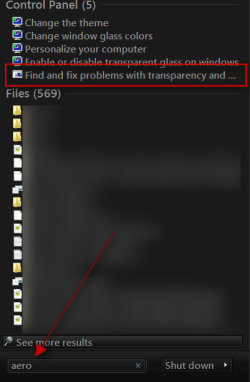
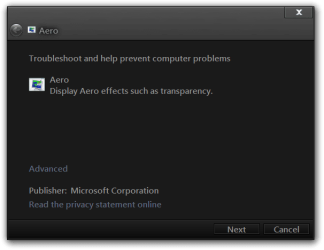
1) Your running in a "Basic" theme which looks "washed out" by itself. No trnasparency and plain UI. To get the Aero look back, try right clicking the desktop and selecting Personalize and select an Aero theme. I know you mentioned themes but specifically try that.

2) Your IE sample there has the browser "not responding". Any time a program locks up on windows it fades out a bit. If this is the problem, and you say it happens to the task bar, does that mean the task bar does not accept mouse clicks any more? Same with firefox or other programs? (Most programs will say "Not responding" at the top but some without title bars won't).

3) That AT&T page sample is just odd in several ways. Like a browser problem. Or a virus causing browser problems.

It's possible that a virus would be causing all of this unfortunately. Or something else causing programs to crash. A bit more investigation is needed. Doubt it's a display problem but could be Virus or memory or driver issue.
 

My Computer My Computer

At a glance

Windows 7 x64 Ultimatei7 96012 Gig Corsair DominatorNvidia 480
Computer Manufacturer/Model Number
Scratch built
OS
Windows 7 x64 Ultimate
CPU
i7 960
Motherboard
Asus P6X58D
Memory
12 Gig Corsair Dominator
Graphics Card(s)
Nvidia 480
Sound Card
Maudio Delta 44 + breakout box
Monitor(s) Displays
Dell UltraSharp U2410 24in and Samsung 21 dual monitors
Screen Resolution
1920x1200 and 1280x1024
Hard Drives
Primary: Intel X-25M G2 160G SSD
Secondary: Segate baracuda 1.0 TB
HDs in AHCI mode.
PSU
Corasair TX850
Case
Cooler Master HAF
Cooling
Corsair H50
Keyboard
Logitech G15 + N52 game pad
Mouse
Logitech MX518
Internet Speed
15kbs down 4.5kbps up
Other Info
WEI 7.6
CPU & RAM 7.6
Graphics 7.9
Hard disk 7.7

My Computer My Computer

At a glance

Win 7 Pro x64 / Win 10 ProIntel(R) Core(TM) i7-3630QM CPU @ 2.40GHz12 GB(1) Intel(R) HD Graphics 4000 (2) NVIDIA GeFo...
Computer type
Laptop
Computer Manufacturer/Model Number
Sager NP9170
OS
Win 7 Pro x64 / Win 10 Pro
CPU
Intel(R) Core(TM) i7-3630QM CPU @ 2.40GHz
Motherboard
CLEVO P170EM
Memory
12 GB
Graphics Card(s)
(1) Intel(R) HD Graphics 4000 (2) NVIDIA GeForce GTX 675M
Sound Card
(1) Realtek High Definition Audio (2) Intel(R) Display Aud
Monitor(s) Displays
17.3
Screen Resolution
1920x1080
Hard Drives
(1) Samsung 860 EVO 500GB(OS) (1) Samsung 860 EVO 500GB(Data)
Keyboard
Backlite
Antivirus
MSE, Malwarebytes Pro
Browser
Firefox
Other Info
DESKTOP: Custom-built.
OS: Win 10 Pro x64.
CASE: Rosewill R5.
CPU: Intel I5 4670K CPU @ 3.40GHz.
CPU COOLER: Cool Master Hyper 212 EVO.
MOTHERBOARD: Asus Z87-A.
MEMORY: Kingston HyperX 2x4 GB.
GPU: Nvidia Geforce 650 TI.
PSU: Corsair TX750.
DRIVES: (1) Samsung 840 120 GB SSD (2) Western Digital blue 500 GB 7200 RPM.
Well none of those options appear to be helping. Will a complete restore back to factory default help at all, or is this possibly a hardware problem with the display?

Thanks for your help everyone!

One of those troubleshooters:

control panel | Traoubleshooting | Appearance and Personalization | Display Quality


You indicated that you had processed the links. Did you run that troubleshooter?
 

My Computer My Computer

At a glance

MS Windows 7 Ultimate SP1 64-bitAMD A10-4600M6.00 GB Dual-Channel DDR3 @ 798MHz (11-11-12-28)AMD Radeon HD 7660G
Computer Manufacturer/Model Number
Toshiba Satellite S875D-S7239 laptop
OS
MS Windows 7 Ultimate SP1 64-bit
CPU
AMD A10-4600M
Motherboard
AMD Pumori (Socket FT1)
Memory
6.00 GB Dual-Channel DDR3 @ 798MHz (11-11-12-28)
Graphics Card(s)
AMD Radeon HD 7660G
Sound Card
High Definition Audio Device
Monitor(s) Displays
Generic PnP Monitor (1600x900@60Hz)
Screen Resolution
1600x900@60Hz
Hard Drives
SSD 119GB Corsair CSSD-V128GB2 ATA Device
Keyboard
Standard PS/2 Keyboard
Mouse
HP Wireless Optical Mobile Mouse Model FHA-3410
Internet Speed
What the local pub, local coffee shop offers.
Other Info
Optical Drive:MATSHITA BD-CMB UJ160B ATA Device


Also have an Asus ha1002xp netbook with Win 7 Ultimate installed.
Well there are several possibilities there that are not hardware related.

1) Your running in a "Basic" theme which looks "washed out" by itself. No trnasparency and plain UI. To get the Aero look back, try right clicking the desktop and selecting Personalize and select an Aero theme. I know you mentioned themes but specifically try that.

Your the bomb fseal it was your number one suggestion. Such a simple thing causing such headaches to people. She was about to take it to Best Buy and I was begging her not too that most likely this great community would figure it out!

Here is a virtual $50.00 bill, that Best Buy would have charged if not more. :)

Thanks again everyone!
 

My Computer My Computer

At a glance

Windows 7 Ultiimate x64 bitAMD Turion(tm) X2 Dual-Core RM-75 2.20 GHZ4 GB
Computer Manufacturer/Model Number
HP dv7-1444us laptop
OS
Windows 7 Ultiimate x64 bit
CPU
AMD Turion(tm) X2 Dual-Core RM-75 2.20 GHZ
Memory
4 GB
Monitor(s) Displays
17.3"
Hard Drives
320 GB internal
500 GB external Seagate
Woot!

Hopefully those other browser issues are not too serious :D
 

My Computer My Computer

At a glance

Windows 7 x64 Ultimatei7 96012 Gig Corsair DominatorNvidia 480
Computer Manufacturer/Model Number
Scratch built
OS
Windows 7 x64 Ultimate
CPU
i7 960
Motherboard
Asus P6X58D
Memory
12 Gig Corsair Dominator
Graphics Card(s)
Nvidia 480
Sound Card
Maudio Delta 44 + breakout box
Monitor(s) Displays
Dell UltraSharp U2410 24in and Samsung 21 dual monitors
Screen Resolution
1920x1200 and 1280x1024
Hard Drives
Primary: Intel X-25M G2 160G SSD
Secondary: Segate baracuda 1.0 TB
HDs in AHCI mode.
PSU
Corasair TX850
Case
Cooler Master HAF
Cooling
Corsair H50
Keyboard
Logitech G15 + N52 game pad
Mouse
Logitech MX518
Internet Speed
15kbs down 4.5kbps up
Other Info
WEI 7.6
CPU & RAM 7.6
Graphics 7.9
Hard disk 7.7
Woot!

Hopefully those other browser issues are not too serious :D

She does still have the problem with IE 8 or 9 locking up but she is using FireFox right now with no issues at all. If I remember correctly it's a pain to remove IE 8 and reinstall it, but I will at sometime do this for her! For the time being we are at different households and I might try to remote connect in to her and remove and reinstall IE for her! I just can't remember off the top of my head how to remove it. I do know it's not in the Uninstall area of the Control Panel :) Which really kind of makes me slightly angry. It should be really easy to uninstall any browser, including Internet Explorer!

Thanks so much for the help everyone!
 

My Computer My Computer

At a glance

Windows 7 Ultiimate x64 bitAMD Turion(tm) X2 Dual-Core RM-75 2.20 GHZ4 GB
Computer Manufacturer/Model Number
HP dv7-1444us laptop
OS
Windows 7 Ultiimate x64 bit
CPU
AMD Turion(tm) X2 Dual-Core RM-75 2.20 GHZ
Memory
4 GB
Monitor(s) Displays
17.3"
Hard Drives
320 GB internal
500 GB external Seagate
IE is considered a "Windows Feature" :) You can get rid of the IE client by going to Control Panel->Programs->Turn windows features on or off and uncheck the IE entry. The HTML engine will remain as it is used by the help and several UI components but the IE UI should be gone.
 

My Computer My Computer

At a glance

Windows 7 x64 Ultimatei7 96012 Gig Corsair DominatorNvidia 480
Computer Manufacturer/Model Number
Scratch built
OS
Windows 7 x64 Ultimate
CPU
i7 960
Motherboard
Asus P6X58D
Memory
12 Gig Corsair Dominator
Graphics Card(s)
Nvidia 480
Sound Card
Maudio Delta 44 + breakout box
Monitor(s) Displays
Dell UltraSharp U2410 24in and Samsung 21 dual monitors
Screen Resolution
1920x1200 and 1280x1024
Hard Drives
Primary: Intel X-25M G2 160G SSD
Secondary: Segate baracuda 1.0 TB
HDs in AHCI mode.
PSU
Corasair TX850
Case
Cooler Master HAF
Cooling
Corsair H50
Keyboard
Logitech G15 + N52 game pad
Mouse
Logitech MX518
Internet Speed
15kbs down 4.5kbps up
Other Info
WEI 7.6
CPU & RAM 7.6
Graphics 7.9
Hard disk 7.7
FYI: The fix that solved it for one person is not the full fix. I have done the same thing but the problem keeps returning. Sometimes a week later, sometimes after coming out of sleep mode.
 

My Computer My Computer

At a glance

Windows 7 Pro and Enterprise x86 and x64Multiple 1.2 to 3.0Multiple 2gb to 8gbMultiple
Computer Manufacturer/Model Number
Multiple Dell and HP
OS
Windows 7 Pro and Enterprise x86 and x64
CPU
Multiple 1.2 to 3.0
Motherboard
Multiple
Memory
Multiple 2gb to 8gb
Graphics Card(s)
Multiple
Sound Card
Multiple
Monitor(s) Displays
Multiple
Hard Drives
Multiple 80gb to 1 tb
PSU
Multiple
Case
Tower
Cooling
Multiple fans
Fixed for me IE 11 / WINDOWS 7 64 bit

I was able to go to Control Panel / Appearance and Personalization / Change window glass colors / then select a darker color such as the dark blue. Now I can read the icons on the taskbar.
 

My Computer My Computer

At a glance

Windows 7 64 bit
Computer type
PC/Desktop
Computer Manufacturer/Model Number
Dell
OS
Windows 7 64 bit
Browser
IE 11
Just fixed this on my own pc thanks to fseal :)

One thing i noticed whilst looking at my themes is that if you are using an aero theme when your ac adapter is plugged in, it will change it to the basic theme once you unplug the cable, hence the washed out colours and taskbar. If you change your theme when you battery is unplugged and set it from basic to an aero theme, and do the same when it is plugged into a charger, then your problem will be solved.

Ty for all the help guys :)
 

My Computer My Computer

At a glance

Windows 7 Ultimate 64 bit
Computer type
PC/Desktop
OS
Windows 7 Ultimate 64 bit
Back
Top