Solved WaterCooling Plan (No AIO)

NoN

New member
Guru
Gold Member
VIP
Local time
7:42 PM
Messages
4,101
Location
LostInSpace, Vol15 - Cool It
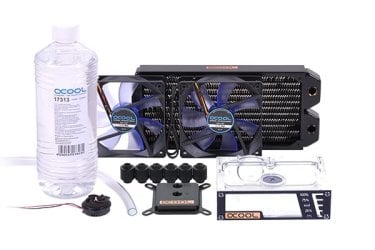
I started since few days my water cooling project based on the existing configuration of the AlphaCool NexXxoS Cool Answer 240 DDC/XT45 kit you can find on link. :geek:

I picking up parts of this kit and changed some to others to suit better my needs, but will be close to that setup in scheme.

The main difference is that i will grab a 240 Rad 30mm thick sized instead of the 45mm thick mentioned in that roll-up water cooling kits review, mainly because my PC case will not provide the sufficient space once the 120mm fans (Swiftech Helix PWM) installed and i will be cooling only the CPU.

The 240 radiator will be a 16 to 20 Fins Per Inch (FPI) for medium speed airflow fans.

I can make a fake Push/Pull with that 30mm thick Radiator mounted as my PC case allows me to put two others fans extracting on top of the Rad without mounting them on it. That might help the lost of thickness of it!

Also the tubing will be transparent black.

Either, is strange they do not mention the optional backplate to fit the CPU waterblock...i might have to grab one. I know EK Waterblocks line do provide it, but not sure i'll go this brand.

The only thing i'm not sure about, is the Res Tank. I do not know yet if i'll grab a Bay Res 5,25" one or Tower one.

I've the place to put a mid-sized Res Tank Tower + Pump (which pump will be more powerful than the one seeing in the attachment pic for both Res Tanks) or make a free place for Bay Res 5,25". Let's say will grab something like a 10W pump.

As i've already ordered some of the parts...the full setup might start by the end of July/early August 2014 as i have to wait for some of the parts availability, hope that hot summer will last!! :D

Not in a hurry, its my first water cooling experience!! :zip:
 

Attachments

  • 1155_0.jpg
    1155_0.jpg
    28.5 KB · Views: 83
Last edited:

My Computer

Computer type
PC/Desktop
Computer Manufacturer/Model Number
Custom Build
OS
Windows 7 Professional SP1 - x64 [Non-UEFI Boot]
CPU
Ivy Bridge Core i5 3570K (Delidded)
Motherboard
Asus P8Z77-V LE PLUS
Memory
G.Skill "Ares" DDR3 PC3-12800 - 1600MHz (16Gb)
Graphics Card(s)
Asus Dual-RX480-O4G
Sound Card
Creative Sound Blaster Z w/5.1 sound system
Monitor(s) Displays
Asus IPS 23"
Screen Resolution
16/9
Hard Drives
Internal:
500Go Sata 6Gb/s (x2)
500Go Sata 3Gb/s (x2)
SSD 60Go Sata 6Gb/s
PSU
In Win C 900W Series 80+ Platinum
Case
Thermaltake Chaser A71
Cooling
Custom Water Cooling Loop
Keyboard
Cooler Master QuickFire XTi
Mouse
Razer Imperator 2012 (4G)
Antivirus
MSE
Browser
IE 11.0.xxx Rtm
Other Info
"Raid0" with Intel Smart Response Technology (HDD/SSD)
I dunno; Ive personally never been a huge fan of water cooling; as it can take up a lot of space and you do have to have the right size tubing, etc for it and yes it can get a bit costly i would imagine; but thats not to say i wouldnt totally rule it out if i had the extra cash on hand. It is a interesting concept though in the way water cooling for a computer works with all the tubing, fans, etc. I wonder though realistically; which actually cools better in the long run; say like 4-6 case-supplied fans like what i have in my current case; or a cooling setup like that with radiator, etc.
 

My Computer

Computer type
PC/Desktop
Computer Manufacturer/Model Number
custom built
OS
Windows 7 ultimate 64-bit
CPU
Intel I7 2600K 3.4ghz
Motherboard
Asus Evo P8P67
Memory
Corsair 16gb ddr3 1600mhz
Graphics Card(s)
Nvidia Geforce gt 430
Sound Card
Sound Blaster Titanium x-fi pci express
Monitor(s) Displays
Dell E198WFP
Hard Drives
1 western digital 2TB drive.
PSU
Antec 1200 watt
Case
Inwin Dragon Rider
Cooling
6 case supplied cooling fans
Keyboard
logitech mk700
Mouse
logitech m705
Internet Speed
25-50mbps download; 10mbps upload(i think)
Antivirus
avg free 2014
Browser
mozilla firefox
Other Info
Also have a pretty bad speaker setup which is a klipsch promedia 5.1 surround speaker setup with huge subwoofer and lg blu ray player/writer. Also a hp officejet pro 8600 plus wireless all in one and a logitech s7500 webcam.
Well, i've studying this setup deeply before buying the first parts. I can only tell by reviews and benchmarks actually, the parts that will be good for my actual desktop configuration. The way i decide to build my own is that what i do expect for a mid-range Water cooling system. I've got good result with my Air cooler but i'm also keen of that kind of method for cooling a CPU.

I've bought more than i need as for tubing and will surely not be caught on length!

Might the Pump being more powerful than the 10w i plan, but i'm still on expectation with that as i do not plan to Watercool the all motherboard, nor the GPU yet!! Got plenty of Fans already in my Rig. :D

I think it will cool better than an AIO and also better than Air Cooler, but this will depends of how powerful the fans will be and the outflow the Pump could provide. I'm on it!!

True is does involve some costly parts and the overall setup might end-up a bit priced compare to AIO, but it is made for lasting some years. Haswell Lga 1150 compatibility is taking as an account when choosing parts, so i do expect keeping this for a future upgrade.

I went also for a silver Nickel plated/Acetal Water Block for preventing oxidation and Corrosion inhibitor as for coolant.

Still haven't make up my mind for the Res Tank, though!
 
Last edited:

My Computer

Computer type
PC/Desktop
Computer Manufacturer/Model Number
Custom Build
OS
Windows 7 Professional SP1 - x64 [Non-UEFI Boot]
CPU
Ivy Bridge Core i5 3570K (Delidded)
Motherboard
Asus P8Z77-V LE PLUS
Memory
G.Skill "Ares" DDR3 PC3-12800 - 1600MHz (16Gb)
Graphics Card(s)
Asus Dual-RX480-O4G
Sound Card
Creative Sound Blaster Z w/5.1 sound system
Monitor(s) Displays
Asus IPS 23"
Screen Resolution
16/9
Hard Drives
Internal:
500Go Sata 6Gb/s (x2)
500Go Sata 3Gb/s (x2)
SSD 60Go Sata 6Gb/s
PSU
In Win C 900W Series 80+ Platinum
Case
Thermaltake Chaser A71
Cooling
Custom Water Cooling Loop
Keyboard
Cooler Master QuickFire XTi
Mouse
Razer Imperator 2012 (4G)
Antivirus
MSE
Browser
IE 11.0.xxx Rtm
Other Info
"Raid0" with Intel Smart Response Technology (HDD/SSD)
Im to scared to watercool :banghead:
 

My Computer

Computer type
PC/Desktop
Computer Manufacturer/Model Number
Custom Build
OS
Windows 7 Ultimate 64-bit
CPU
Intel G3420 3.2GHZ Dual Core
Motherboard
Gigabyte H87-HD3
Memory
Kingson 8GB 1600mhz
Graphics Card(s)
MSI R7970 TF 3GD5/OC BE
Monitor(s) Displays
21" LG & "19 Vertical Samsung
Hard Drives
120GB SSD - Boot
1TB WD
350GB External
2TB External (Wireless)
PSU
Corsair CX 500 modular
Case
Zalman Z11 Plus (modified)
Cooling
Corsair H55, 2x 120mm SP Corsair, 1x 140 Coolermaster
Keyboard
Corsair K50
Mouse
CSL Gaming
Internet Speed
164Mbps
Antivirus
Avast, Malwarebytes
Browser
Google Chrome, IE, Firefox
Im to scared to watercool :banghead:


You do not need it...seeing your place "Rainy UK" :what:
Remember that it is my first attemp!!;)
 

My Computer

Computer type
PC/Desktop
Computer Manufacturer/Model Number
Custom Build
OS
Windows 7 Professional SP1 - x64 [Non-UEFI Boot]
CPU
Ivy Bridge Core i5 3570K (Delidded)
Motherboard
Asus P8Z77-V LE PLUS
Memory
G.Skill "Ares" DDR3 PC3-12800 - 1600MHz (16Gb)
Graphics Card(s)
Asus Dual-RX480-O4G
Sound Card
Creative Sound Blaster Z w/5.1 sound system
Monitor(s) Displays
Asus IPS 23"
Screen Resolution
16/9
Hard Drives
Internal:
500Go Sata 6Gb/s (x2)
500Go Sata 3Gb/s (x2)
SSD 60Go Sata 6Gb/s
PSU
In Win C 900W Series 80+ Platinum
Case
Thermaltake Chaser A71
Cooling
Custom Water Cooling Loop
Keyboard
Cooler Master QuickFire XTi
Mouse
Razer Imperator 2012 (4G)
Antivirus
MSE
Browser
IE 11.0.xxx Rtm
Other Info
"Raid0" with Intel Smart Response Technology (HDD/SSD)

My Computer

Computer type
PC/Desktop
Computer Manufacturer/Model Number
Custom Build
OS
Windows 7 Ultimate 64-bit
CPU
Intel G3420 3.2GHZ Dual Core
Motherboard
Gigabyte H87-HD3
Memory
Kingson 8GB 1600mhz
Graphics Card(s)
MSI R7970 TF 3GD5/OC BE
Monitor(s) Displays
21" LG & "19 Vertical Samsung
Hard Drives
120GB SSD - Boot
1TB WD
350GB External
2TB External (Wireless)
PSU
Corsair CX 500 modular
Case
Zalman Z11 Plus (modified)
Cooling
Corsair H55, 2x 120mm SP Corsair, 1x 140 Coolermaster
Keyboard
Corsair K50
Mouse
CSL Gaming
Internet Speed
164Mbps
Antivirus
Avast, Malwarebytes
Browser
Google Chrome, IE, Firefox
Im to scared to watercool :banghead:


You do not need it...seeing your place "Rainy UK" :what:
Remember that it is my first attemp!!;)

You have much bigger balls keys then me.

:devil2:Damn caught on my backup card....!

Water cooling can be an easy and simple solution, it is just when your build your own one, things get more complicated as for choosing parts. That's why manies went for All in One (which i nearly decided to take) and made some enthusiastic about those. It is not sorcery! :)
 

My Computer

Computer type
PC/Desktop
Computer Manufacturer/Model Number
Custom Build
OS
Windows 7 Professional SP1 - x64 [Non-UEFI Boot]
CPU
Ivy Bridge Core i5 3570K (Delidded)
Motherboard
Asus P8Z77-V LE PLUS
Memory
G.Skill "Ares" DDR3 PC3-12800 - 1600MHz (16Gb)
Graphics Card(s)
Asus Dual-RX480-O4G
Sound Card
Creative Sound Blaster Z w/5.1 sound system
Monitor(s) Displays
Asus IPS 23"
Screen Resolution
16/9
Hard Drives
Internal:
500Go Sata 6Gb/s (x2)
500Go Sata 3Gb/s (x2)
SSD 60Go Sata 6Gb/s
PSU
In Win C 900W Series 80+ Platinum
Case
Thermaltake Chaser A71
Cooling
Custom Water Cooling Loop
Keyboard
Cooler Master QuickFire XTi
Mouse
Razer Imperator 2012 (4G)
Antivirus
MSE
Browser
IE 11.0.xxx Rtm
Other Info
"Raid0" with Intel Smart Response Technology (HDD/SSD)
This is going to be short, currently on my phone. I'll come back to this thread later tonight, once I am home. I just wanted to share my experience, I myself just recently put together my first custom water cooling loop. It was by far the best upgrade I could do for my computer. Even more so now that Summer is upon us here in Southern California.

Anyways, I put a larger loop together, then what you are planning, cooling both the CPU and the GPU (GTX 690) using two quad radiators. (480mm length, 64mm thick) Under load the CPU went from average ~80°c - ~90°c to average ~40°c - ~50°c. It has a real hard time cracking past 50°. While the GPU sits ~10° cooler then the CPU on average.

I'll share more on my setup little later. Good luck with your project!
 

My Computer

Computer type
PC/Desktop
Computer Manufacturer/Model Number
Alienware Aurora ALX R4
OS
Windows 10 Pro (x64)
CPU
Intel Core i7-3930K (3.2GHz - 4.5GHz)
Motherboard
Alienware Aurora-R4 x79
Memory
4x Samsung 4GB PC3-12800 DDR3 (16GB 1600MHz)
Graphics Card(s)
Nvidia Geforce GTX 690
Sound Card
SteelSeries Siberia Elite
Monitor(s) Displays
Dell UltraSharp U3011
Screen Resolution
2560x1600
Hard Drives
Samsung 850 Pro 256 GB, Seagate 1TB Desktop Hybrid HDD, 2x Western Digital 4TB Green HDD
PSU
875W Some Dell PSU <.<
Case
Alienware Aurora ALX
Cooling
Custom Liquid Cooling (EK CPU & GPU blocks) dual EK 480RAD
Keyboard
Logitech G710+ Mechanical
Mouse
Logitech G700s
Internet Speed
Verizon Fios (50 mbps average)
Other Info
Server: Intel NUC D54250WYK: i5-4250U, 16GB, 256 GB mSATA, Windows Server 2012 R2
Most of your time will be homework when making a water cooled system.
Checking reviews, watching youtube videos, researching different water cooling systems hardware.
Learning the proper way to fill a system, ect.

The next thing I recommend is making a drawing or two or three of the way you want to install the cooling system.
What will go where and how the tubing will be routed.
It's really not that hard to do. Take your time to install the cooling system. Little mistakes can turn into big mistakes.
I think you already new that. Common sense, good planning and taking your time to install the system and things will work just fine. Of course you will want everything to look neat and tidy.
The system in My System Specs was my first built water cooling system and I'm well pleased. I don't think I would ever go back to air cooling the cpu again on any new build.

Wish you well with your new water cooled system.
 

My Computer

Computer type
PC/Desktop
Computer Manufacturer/Model Number
Home made Desktop
OS
Windows 10 Pro. 64/ version 1709 Windows 7 Pro/64
CPU
Intel i7-6800K @ 4.3
Motherboard
ASUS X-99 Deluxe II
Memory
Corsair Platinum 16 gig @2400
Graphics Card(s)
EVGA GTX 1070 OC
Monitor(s) Displays
Asus 27" LED LCD/VE278Q
Screen Resolution
1920-1080 or 1280-720 HDMI
Hard Drives
INTEL SSD 730-240 Gb Sata 3.0/
PSU
EVGA Platium 1200W
Case
Phanteks Luxe Tempered Glass 8 fans/ one radiator
Cooling
XSPC/ Water Cooled CPU
Keyboard
Das 4 Professional
Mouse
Logitech M705/MX Anywhere 2-S
Internet Speed
100 mbits
Antivirus
Microsoft Security Essentials/ Malwarebytes Premium 3.0/ SAS
Browser
I.E. 11 default/Firefox/ ISP Time Warner Cable/Spectrum
Other Info
LG BluRay Burner/
Sound system-KLipsch-THX/
Icy Dock ssd Hot Swap bays.
Thanks both for sharing experience and encouragement.

Yes, my loop is a simple loop customized for chilling the Cpu only. I made that choice on purpose because i perfectly know how tubings can be an hassle and not very nice looking if not done properly and as for a 1st mounting Exp, i do not want to overkill myself on something i'm not controlling yet. :zip:

I'm expecting good Temp results for this custom loop, also i was thinking if i ever want one day to chill the GPU , i have the sufficient place to put a dedicated custom 120mm radiator. That's what i try to figure with a Res Tank that can provide an entry more.

Some restrictions applies to me as I'm not in intend to change my PC Case for a while.
 

My Computer

Computer type
PC/Desktop
Computer Manufacturer/Model Number
Custom Build
OS
Windows 7 Professional SP1 - x64 [Non-UEFI Boot]
CPU
Ivy Bridge Core i5 3570K (Delidded)
Motherboard
Asus P8Z77-V LE PLUS
Memory
G.Skill "Ares" DDR3 PC3-12800 - 1600MHz (16Gb)
Graphics Card(s)
Asus Dual-RX480-O4G
Sound Card
Creative Sound Blaster Z w/5.1 sound system
Monitor(s) Displays
Asus IPS 23"
Screen Resolution
16/9
Hard Drives
Internal:
500Go Sata 6Gb/s (x2)
500Go Sata 3Gb/s (x2)
SSD 60Go Sata 6Gb/s
PSU
In Win C 900W Series 80+ Platinum
Case
Thermaltake Chaser A71
Cooling
Custom Water Cooling Loop
Keyboard
Cooler Master QuickFire XTi
Mouse
Razer Imperator 2012 (4G)
Antivirus
MSE
Browser
IE 11.0.xxx Rtm
Other Info
"Raid0" with Intel Smart Response Technology (HDD/SSD)
Do you have room for a dual bay res? A dual bay res with 1 or 2 D5 pumps provides great flow and is quiet. A single pump can handle a 2-3 block loop, if you plan on adding more items like flow meters, MB block, multiple rads, 2 pumps adds to the flow rate and offers redundancy.

A good loop is very quiet and keeps temps very low.
 

My Computer

Computer type
PC/Desktop
Computer Manufacturer/Model Number
Custom, Dell and Lenono LT's
OS
Win8/8.1,Win7-U64, Vista U64, uncounted Linux distor's
CPU
AMD and Intell, 9590, 8350, i5 3570k
Motherboard
CFVFZ, GA990FXA, Z77e-itx
Memory
Corsair G Skill
Graphics Card(s)
Crossfired Sapphire HD 7950 Vapor-X, ASUS R9 280X TOP
Sound Card
Realtek ALC889
Monitor(s) Displays
ViewSonic VX2770SMH 27" / ViewSonic VX2433 LCD 24"
Screen Resolution
1080i HD
Hard Drives
Samsung SSD 840 Pro
OCZ Agility 3's
OCZ Vector's
WD's Blue, red, green, Velociraptors
Seagate USB3 & Hybrid's
ASUS Blu-Ray
ASUS DVD
PSU
Corsair AX1200i, Seasonice 850 Gold
Case
Cooler Master HAF 922 & HAF 932, Lian Li Train case.
Cooling
Air, Glacer 240L expanded, custom EK loop with duel D5's
Keyboard
Microsoft SideWinder X4 USB Keyboard / Logitech 250 PS2
Mouse
Logitech G500 / MS wireless 5000
Internet Speed
Best of 5ms / 75+ dn / 12+ up More or less.
Antivirus
MS esentials-MalwareBytes
Browser
Firefox Chromebook
Do you have room for a dual bay res? A dual bay res with 1 or 2 D5 pumps provides great flow and is quiet. A single pump can handle a 2-3 block loop, if you plan on adding more items like flow meters, MB block, multiple rads, 2 pumps adds to the flow rate and offers redundancy.

A good loop is very quiet and keeps temps very low.

Unfortunately no, i do not have the dual bay free (needed). Only one Bay 5,25".

I know D5 Pumps series are quite powerful one but are mainly for High-Flow and multiple loop.

XSPC does make some Towers including D5 pump: D5 Photon 170 Reservoir/Pump Combo, interesting concept!

I saw also that those DDC pumps (laing, swiftech) had been improved quite well since a year and now are with options like PWM and can handle up to 1000L/hour for a Power consumption of 18W. The PWM is helped by another 4pin Molex to provide enough current on 12V.

Also Some single Res Bay system do provide ability installing two DDC pumps.

Might go something between 800L/h to 1000L/h, it will be far enough to provide a least a second 120mm radiator and even a flow meter with pin sensor!!

Thanks for the input!:)
 

My Computer

Computer type
PC/Desktop
Computer Manufacturer/Model Number
Custom Build
OS
Windows 7 Professional SP1 - x64 [Non-UEFI Boot]
CPU
Ivy Bridge Core i5 3570K (Delidded)
Motherboard
Asus P8Z77-V LE PLUS
Memory
G.Skill "Ares" DDR3 PC3-12800 - 1600MHz (16Gb)
Graphics Card(s)
Asus Dual-RX480-O4G
Sound Card
Creative Sound Blaster Z w/5.1 sound system
Monitor(s) Displays
Asus IPS 23"
Screen Resolution
16/9
Hard Drives
Internal:
500Go Sata 6Gb/s (x2)
500Go Sata 3Gb/s (x2)
SSD 60Go Sata 6Gb/s
PSU
In Win C 900W Series 80+ Platinum
Case
Thermaltake Chaser A71
Cooling
Custom Water Cooling Loop
Keyboard
Cooler Master QuickFire XTi
Mouse
Razer Imperator 2012 (4G)
Antivirus
MSE
Browser
IE 11.0.xxx Rtm
Other Info
"Raid0" with Intel Smart Response Technology (HDD/SSD)
Last edited:

My Computer

Computer type
PC/Desktop
Computer Manufacturer/Model Number
Skylake Special #666
OS
Windows 10 Pro x64
CPU
Intel Core i7 6700K
Motherboard
Asus Sabertooth Z170 Mark 1
Memory
GSkill TridentZ RGB 16GB 3600 16-16-16-36
Graphics Card(s)
EVGA GTX 980 Ti SC x2
Sound Card
Realtek High Definition
Monitor(s) Displays
AOC G2460PG
Screen Resolution
1920 x 1080 144Hz
Hard Drives
Samsung 860 Pro 256GB, Seagate Barracuda 4TB x2
PSU
EVGA 1000 P2, EVGA White Custom Braided Cables
Case
Corsair Vengeance C70 Gunmetal Black
Cooling
Corsair H100i v2, Corsair ML120 x2, Thermal Grizzly Kryonaut
Keyboard
Logitech G910 Orion Spectrum
Mouse
Logitech G700s
Internet Speed
Verizon Fios Quantum Gateway 75/75
Antivirus
Windows Defender, Malwarebytes Free 3.8.3
Browser
Chrome
Other Info
Corsair SP120 x4, LG Blu-ray Drive, Durabrand HT-395 100 Watt Dolby Digital Amp, Corsair H2100 Wireless 7.1 Headset
Yeah i was looking at the H80i ?
 

My Computer

Computer type
PC/Desktop
Computer Manufacturer/Model Number
Custom Build
OS
Windows 7 Ultimate 64-bit
CPU
Intel G3420 3.2GHZ Dual Core
Motherboard
Gigabyte H87-HD3
Memory
Kingson 8GB 1600mhz
Graphics Card(s)
MSI R7970 TF 3GD5/OC BE
Monitor(s) Displays
21" LG & "19 Vertical Samsung
Hard Drives
120GB SSD - Boot
1TB WD
350GB External
2TB External (Wireless)
PSU
Corsair CX 500 modular
Case
Zalman Z11 Plus (modified)
Cooling
Corsair H55, 2x 120mm SP Corsair, 1x 140 Coolermaster
Keyboard
Corsair K50
Mouse
CSL Gaming
Internet Speed
164Mbps
Antivirus
Avast, Malwarebytes
Browser
Google Chrome, IE, Firefox
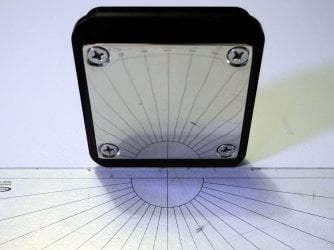
Received today the Water Block Silver Nickel Plated/Acetal...Quite heavy stuff, well protected in box and the bundle is completed with Tim & all the necessary mounting screws. No backplate inside provided. I Got it also today and is heavy duty. Nice Black & Chromium look!

The Nickel plated is thick and have very very slight tendency to be embossed on the out sides most because the inner surface machined have dig the copper underneath in a square design, so the Nickel Plated have to fill the gap on CPU side. You can see the lines slightly broken, all at the same place, both vertical & horizontal. Shouldn't let an air bubbles (i think) at that place, the tim might fill it.

I talk about way more than a half of half one millimeter to fill, so its very thin but still visible to eyes!!! :)

Doesn't looks too bad to me...:rolleyes:
 

Attachments

  • DSCN1570.JPG
    DSCN1570.JPG
    97 KB · Views: 2
  • DSCN1569.JPG
    DSCN1569.JPG
    105.5 KB · Views: 2
Last edited:

My Computer

Computer type
PC/Desktop
Computer Manufacturer/Model Number
Custom Build
OS
Windows 7 Professional SP1 - x64 [Non-UEFI Boot]
CPU
Ivy Bridge Core i5 3570K (Delidded)
Motherboard
Asus P8Z77-V LE PLUS
Memory
G.Skill "Ares" DDR3 PC3-12800 - 1600MHz (16Gb)
Graphics Card(s)
Asus Dual-RX480-O4G
Sound Card
Creative Sound Blaster Z w/5.1 sound system
Monitor(s) Displays
Asus IPS 23"
Screen Resolution
16/9
Hard Drives
Internal:
500Go Sata 6Gb/s (x2)
500Go Sata 3Gb/s (x2)
SSD 60Go Sata 6Gb/s
PSU
In Win C 900W Series 80+ Platinum
Case
Thermaltake Chaser A71
Cooling
Custom Water Cooling Loop
Keyboard
Cooler Master QuickFire XTi
Mouse
Razer Imperator 2012 (4G)
Antivirus
MSE
Browser
IE 11.0.xxx Rtm
Other Info
"Raid0" with Intel Smart Response Technology (HDD/SSD)
Is it really required? I work with IBM Power servers where each CPU has TDP of about 250W and are they are not liquid cooled. They are in rooms with AC but that is all.

EDIT - yours looks better though - I was just curious if heat really mattered....
 
Last edited:

My Computer

Computer type
Laptop
Computer Manufacturer/Model Number
Macbook pro
OS
8.1 Pro x64
CPU
core2duo
Memory
3GB
Graphics Card(s)
ATI X1600
Antivirus
Defender
Browser
IE11
Is it really required? I work with IBM Power servers where each CPU has TDP of about 250W and are they are not liquid cooled. They are in rooms with AC but that is all.

Why not?

Its a solution and a way of cooling, as good as others might prefer Air cooler! :geek:

Do not have AC here and enjoy time to time over clocking my chip. I'm not in a corporate environment, nor have a server, that's for me joy and i'm working actually to pay it!!

Its like me asking the same to the person i'm working to...

Look around those guys having Rigs...half of them do have Watercooling solutions and enjoy their results.
 

My Computer

Computer type
PC/Desktop
Computer Manufacturer/Model Number
Custom Build
OS
Windows 7 Professional SP1 - x64 [Non-UEFI Boot]
CPU
Ivy Bridge Core i5 3570K (Delidded)
Motherboard
Asus P8Z77-V LE PLUS
Memory
G.Skill "Ares" DDR3 PC3-12800 - 1600MHz (16Gb)
Graphics Card(s)
Asus Dual-RX480-O4G
Sound Card
Creative Sound Blaster Z w/5.1 sound system
Monitor(s) Displays
Asus IPS 23"
Screen Resolution
16/9
Hard Drives
Internal:
500Go Sata 6Gb/s (x2)
500Go Sata 3Gb/s (x2)
SSD 60Go Sata 6Gb/s
PSU
In Win C 900W Series 80+ Platinum
Case
Thermaltake Chaser A71
Cooling
Custom Water Cooling Loop
Keyboard
Cooler Master QuickFire XTi
Mouse
Razer Imperator 2012 (4G)
Antivirus
MSE
Browser
IE 11.0.xxx Rtm
Other Info
"Raid0" with Intel Smart Response Technology (HDD/SSD)
No reason at all - only curious really. Looks better certainly.
 

My Computer

Computer type
Laptop
Computer Manufacturer/Model Number
Macbook pro
OS
8.1 Pro x64
CPU
core2duo
Memory
3GB
Graphics Card(s)
ATI X1600
Antivirus
Defender
Browser
IE11
No reason at all - only curious really. Looks better certainly.

No worries, on the point of view of a professional corporation i can understand its no investment, a waste of money against profits.

I've swear many years ago not making any misplaced remarks to my girlfriend that could end-up a total war! :zip:;)
 

My Computer

Computer type
PC/Desktop
Computer Manufacturer/Model Number
Custom Build
OS
Windows 7 Professional SP1 - x64 [Non-UEFI Boot]
CPU
Ivy Bridge Core i5 3570K (Delidded)
Motherboard
Asus P8Z77-V LE PLUS
Memory
G.Skill "Ares" DDR3 PC3-12800 - 1600MHz (16Gb)
Graphics Card(s)
Asus Dual-RX480-O4G
Sound Card
Creative Sound Blaster Z w/5.1 sound system
Monitor(s) Displays
Asus IPS 23"
Screen Resolution
16/9
Hard Drives
Internal:
500Go Sata 6Gb/s (x2)
500Go Sata 3Gb/s (x2)
SSD 60Go Sata 6Gb/s
PSU
In Win C 900W Series 80+ Platinum
Case
Thermaltake Chaser A71
Cooling
Custom Water Cooling Loop
Keyboard
Cooler Master QuickFire XTi
Mouse
Razer Imperator 2012 (4G)
Antivirus
MSE
Browser
IE 11.0.xxx Rtm
Other Info
"Raid0" with Intel Smart Response Technology (HDD/SSD)
I've swear many years ago not making any misplaced remarks to my girlfriend that could end-up a total war! :zip:;)
Best not to say anything really - something I could learn :)

My laptop runs hot (thus the question) but isn't relevant to your thread so I'll not go on about it. Please excuse me.
 

My Computer

Computer type
Laptop
Computer Manufacturer/Model Number
Macbook pro
OS
8.1 Pro x64
CPU
core2duo
Memory
3GB
Graphics Card(s)
ATI X1600
Antivirus
Defender
Browser
IE11
Back
Top