Solved WaterCooling Plan (No AIO)

My Computer My Computer

Computer type
PC/Desktop
Computer Manufacturer/Model Number
Custom Build
OS
Windows 7 Professional SP1 - x64 [Non-UEFI Boot]
CPU
Ivy Bridge Core i5 3570K (Delidded)
Motherboard
Asus P8Z77-V LE PLUS
Memory
G.Skill "Ares" DDR3 PC3-12800 - 1600MHz (16Gb)
Graphics Card(s)
Asus Dual-RX480-O4G
Sound Card
Creative Sound Blaster Z w/5.1 sound system
Monitor(s) Displays
Asus IPS 23"
Screen Resolution
16/9
Hard Drives
Internal:
500Go Sata 6Gb/s (x2)
500Go Sata 3Gb/s (x2)
SSD 60Go Sata 6Gb/s
PSU
In Win C 900W Series 80+ Platinum
Case
Thermaltake Chaser A71
Cooling
Custom Water Cooling Loop
Keyboard
Cooler Master QuickFire XTi
Mouse
Razer Imperator 2012 (4G)
Antivirus
MSE
Browser
IE 11.0.xxx Rtm
Other Info
"Raid0" with Intel Smart Response Technology (HDD/SSD)
Yeah I did. Some of the comments made me laugh out loud. I better call it a day.
 

My Computer My Computer

Computer type
Laptop
Computer Manufacturer/Model Number
Macbook pro
OS
8.1 Pro x64
CPU
core2duo
Memory
3GB
Graphics Card(s)
ATI X1600
Antivirus
Defender
Browser
IE11
So, finally got the Reservoir Tank!

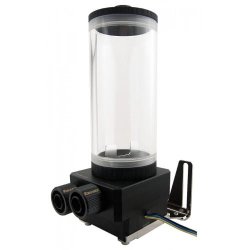
I deciced to go for a Koolance modular Reservoir body 60mm*80mm (shorter than the one on attached pic) and Koolance Pump Fitting & Reservoir Base.

The Res Base comes with a bracket which fit 120mm fan width , which is quite handy to make myself two holes that fit 120mm.

I choosed a modular ResTank because Koolance is the one who made a "Reservoir Coupler with Fitting Sockets x2 G1,4" (handy for a new loop) in case you want to expand the reservoir higher & fill it bigger, they've got Res Body from 30mm, 50mm to 80mm, shorts one.

I liked a lot this way of mounting yourself your own. Didn't went to a reservoir coupler yet, though!

Nor did take the Pump as i want to know before which DDC outflow ones i'll go.

Still some parts to grab...might have to sweat a little before! :)
 

Attachments

  • cov-rp400_rev2.1.jpg
    cov-rp400_rev2.1.jpg
    11.9 KB · Views: 43

My Computer My Computer

Computer type
PC/Desktop
Computer Manufacturer/Model Number
Custom Build
OS
Windows 7 Professional SP1 - x64 [Non-UEFI Boot]
CPU
Ivy Bridge Core i5 3570K (Delidded)
Motherboard
Asus P8Z77-V LE PLUS
Memory
G.Skill "Ares" DDR3 PC3-12800 - 1600MHz (16Gb)
Graphics Card(s)
Asus Dual-RX480-O4G
Sound Card
Creative Sound Blaster Z w/5.1 sound system
Monitor(s) Displays
Asus IPS 23"
Screen Resolution
16/9
Hard Drives
Internal:
500Go Sata 6Gb/s (x2)
500Go Sata 3Gb/s (x2)
SSD 60Go Sata 6Gb/s
PSU
In Win C 900W Series 80+ Platinum
Case
Thermaltake Chaser A71
Cooling
Custom Water Cooling Loop
Keyboard
Cooler Master QuickFire XTi
Mouse
Razer Imperator 2012 (4G)
Antivirus
MSE
Browser
IE 11.0.xxx Rtm
Other Info
"Raid0" with Intel Smart Response Technology (HDD/SSD)
Its going to look beautiful! :)
 

My Computer My Computer

Computer type
PC/Desktop
Computer Manufacturer/Model Number
Custom Build
OS
Windows 7 Ultimate 64-bit
CPU
Intel G3420 3.2GHZ Dual Core
Motherboard
Gigabyte H87-HD3
Memory
Kingson 8GB 1600mhz
Graphics Card(s)
MSI R7970 TF 3GD5/OC BE
Monitor(s) Displays
21" LG & "19 Vertical Samsung
Hard Drives
120GB SSD - Boot
1TB WD
350GB External
2TB External (Wireless)
PSU
Corsair CX 500 modular
Case
Zalman Z11 Plus (modified)
Cooling
Corsair H55, 2x 120mm SP Corsair, 1x 140 Coolermaster
Keyboard
Corsair K50
Mouse
CSL Gaming
Internet Speed
164Mbps
Antivirus
Avast, Malwarebytes
Browser
Google Chrome, IE, Firefox

Attachments

  • user9509.jpg
    user9509.jpg
    38.8 KB · Views: 41
Last edited:

My Computer My Computer

Computer type
PC/Desktop
Computer Manufacturer/Model Number
Custom Build
OS
Windows 7 Professional SP1 - x64 [Non-UEFI Boot]
CPU
Ivy Bridge Core i5 3570K (Delidded)
Motherboard
Asus P8Z77-V LE PLUS
Memory
G.Skill "Ares" DDR3 PC3-12800 - 1600MHz (16Gb)
Graphics Card(s)
Asus Dual-RX480-O4G
Sound Card
Creative Sound Blaster Z w/5.1 sound system
Monitor(s) Displays
Asus IPS 23"
Screen Resolution
16/9
Hard Drives
Internal:
500Go Sata 6Gb/s (x2)
500Go Sata 3Gb/s (x2)
SSD 60Go Sata 6Gb/s
PSU
In Win C 900W Series 80+ Platinum
Case
Thermaltake Chaser A71
Cooling
Custom Water Cooling Loop
Keyboard
Cooler Master QuickFire XTi
Mouse
Razer Imperator 2012 (4G)
Antivirus
MSE
Browser
IE 11.0.xxx Rtm
Other Info
"Raid0" with Intel Smart Response Technology (HDD/SSD)
I was a bit worry about that Alphacool xp3 Light Nickel/Acetal water block, then i made a Tim (zm-stg2) quick test over a hard surface.

Designed a "+" in center of the water block then pressed it by the four corners, on a thick plexiglas surface (15mm).

Here the result (attached pic)...Looks ok and spreading well rounded!?! what you guys think?
 

Attachments

  • RSCN1574.JPG
    RSCN1574.JPG
    95.9 KB · Views: 1

My Computer My Computer

Computer type
PC/Desktop
Computer Manufacturer/Model Number
Custom Build
OS
Windows 7 Professional SP1 - x64 [Non-UEFI Boot]
CPU
Ivy Bridge Core i5 3570K (Delidded)
Motherboard
Asus P8Z77-V LE PLUS
Memory
G.Skill "Ares" DDR3 PC3-12800 - 1600MHz (16Gb)
Graphics Card(s)
Asus Dual-RX480-O4G
Sound Card
Creative Sound Blaster Z w/5.1 sound system
Monitor(s) Displays
Asus IPS 23"
Screen Resolution
16/9
Hard Drives
Internal:
500Go Sata 6Gb/s (x2)
500Go Sata 3Gb/s (x2)
SSD 60Go Sata 6Gb/s
PSU
In Win C 900W Series 80+ Platinum
Case
Thermaltake Chaser A71
Cooling
Custom Water Cooling Loop
Keyboard
Cooler Master QuickFire XTi
Mouse
Razer Imperator 2012 (4G)
Antivirus
MSE
Browser
IE 11.0.xxx Rtm
Other Info
"Raid0" with Intel Smart Response Technology (HDD/SSD)
Good Idea!
 

My Computer My Computer

Computer type
PC/Desktop
Computer Manufacturer/Model Number
Custom Build
OS
Windows 7 Ultimate 64-bit
CPU
Intel G3420 3.2GHZ Dual Core
Motherboard
Gigabyte H87-HD3
Memory
Kingson 8GB 1600mhz
Graphics Card(s)
MSI R7970 TF 3GD5/OC BE
Monitor(s) Displays
21" LG & "19 Vertical Samsung
Hard Drives
120GB SSD - Boot
1TB WD
350GB External
2TB External (Wireless)
PSU
Corsair CX 500 modular
Case
Zalman Z11 Plus (modified)
Cooling
Corsair H55, 2x 120mm SP Corsair, 1x 140 Coolermaster
Keyboard
Corsair K50
Mouse
CSL Gaming
Internet Speed
164Mbps
Antivirus
Avast, Malwarebytes
Browser
Google Chrome, IE, Firefox
So back on that setup...

Finished with buying parts and now waiting for the compression fittings i last ordered to arrive next week.

Pretty happy of myself having step forward to watercool my rig. :)

One question...i saw some but not manies are washing/rinse their radiators with hot tap water in case residues remain inside, aswell wash all parts before mounting.

Also, are you using a little of tap water to wet the O-rings before tighten them onto their place?

Humm, looks some basic groundwork to do....:rolleyes:
 
Last edited:

My Computer My Computer

Computer type
PC/Desktop
Computer Manufacturer/Model Number
Custom Build
OS
Windows 7 Professional SP1 - x64 [Non-UEFI Boot]
CPU
Ivy Bridge Core i5 3570K (Delidded)
Motherboard
Asus P8Z77-V LE PLUS
Memory
G.Skill "Ares" DDR3 PC3-12800 - 1600MHz (16Gb)
Graphics Card(s)
Asus Dual-RX480-O4G
Sound Card
Creative Sound Blaster Z w/5.1 sound system
Monitor(s) Displays
Asus IPS 23"
Screen Resolution
16/9
Hard Drives
Internal:
500Go Sata 6Gb/s (x2)
500Go Sata 3Gb/s (x2)
SSD 60Go Sata 6Gb/s
PSU
In Win C 900W Series 80+ Platinum
Case
Thermaltake Chaser A71
Cooling
Custom Water Cooling Loop
Keyboard
Cooler Master QuickFire XTi
Mouse
Razer Imperator 2012 (4G)
Antivirus
MSE
Browser
IE 11.0.xxx Rtm
Other Info
"Raid0" with Intel Smart Response Technology (HDD/SSD)
You can use what ever coolant you plan to use in the system to pre -dampen your " O " rings.
That way their won't be a cross contamination of fluids.
Washing your components before installing is always a good idea. You never know what was left from manufacturing process. I did this using a small amount of liquid dish soap and then rinse a lot. All done in the kitchen sink.
I use distilled water and a silver coil only in my system.
Because I'm paranoid I also ran my system 48 hours and then replace the distilled water again.
Probably not needed but distilled water is cheap. Now I know the system is as clean as I can get it.
 

My Computer My Computer

Computer type
PC/Desktop
Computer Manufacturer/Model Number
Home made Desktop
OS
Windows 10 Pro. 64/ version 1709 Windows 7 Pro/64
CPU
Intel i7-6800K @ 4.3
Motherboard
ASUS X-99 Deluxe II
Memory
Corsair Platinum 16 gig @2400
Graphics Card(s)
EVGA GTX 1070 OC
Monitor(s) Displays
Asus 27" LED LCD/VE278Q
Screen Resolution
1920-1080 or 1280-720 HDMI
Hard Drives
INTEL SSD 730-240 Gb Sata 3.0/
PSU
EVGA Platium 1200W
Case
Phanteks Luxe Tempered Glass 8 fans/ one radiator
Cooling
XSPC/ Water Cooled CPU
Keyboard
Das 4 Professional
Mouse
Logitech M705/MX Anywhere 2-S
Internet Speed
100 mbits
Antivirus
Microsoft Security Essentials/ Malwarebytes Premium 3.0/ SAS
Browser
I.E. 11 default/Firefox/ ISP Time Warner Cable/Spectrum
Other Info
LG BluRay Burner/
Sound system-KLipsch-THX/
Icy Dock ssd Hot Swap bays.
You can use what ever coolant you plan to use in the system to pre -dampen your " O " rings.
That way their won't be a cross contamination of fluids.
Washing your components before installing is always a good idea. You never know what was left from manufacturing process. I did this using a small amount of liquid dish soap and then rinse a lot. All done in the kitchen sink.
I use distilled water and a silver coil only in my system.
Because I'm paranoid I also ran my system 48 hours and then replace the distilled water again.
Probably not needed but distilled water is cheap. Now I know the system is as clean as I can get it.

Thanks for respond & suggestions...:)

I'll be using a "ready to use" coolant with an additive for the DDC pump mechanism and Corrosion inhibitor inside which i might be using only for tighten the O-rings.

As for washing parts, looks distilled water is the way to go.
 

My Computer My Computer

Computer type
PC/Desktop
Computer Manufacturer/Model Number
Custom Build
OS
Windows 7 Professional SP1 - x64 [Non-UEFI Boot]
CPU
Ivy Bridge Core i5 3570K (Delidded)
Motherboard
Asus P8Z77-V LE PLUS
Memory
G.Skill "Ares" DDR3 PC3-12800 - 1600MHz (16Gb)
Graphics Card(s)
Asus Dual-RX480-O4G
Sound Card
Creative Sound Blaster Z w/5.1 sound system
Monitor(s) Displays
Asus IPS 23"
Screen Resolution
16/9
Hard Drives
Internal:
500Go Sata 6Gb/s (x2)
500Go Sata 3Gb/s (x2)
SSD 60Go Sata 6Gb/s
PSU
In Win C 900W Series 80+ Platinum
Case
Thermaltake Chaser A71
Cooling
Custom Water Cooling Loop
Keyboard
Cooler Master QuickFire XTi
Mouse
Razer Imperator 2012 (4G)
Antivirus
MSE
Browser
IE 11.0.xxx Rtm
Other Info
"Raid0" with Intel Smart Response Technology (HDD/SSD)
So...

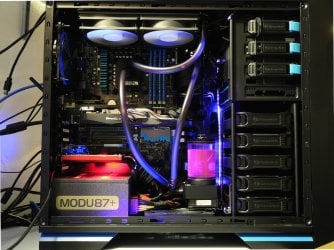
Installed today my custom water cooling loop! :)

So far no probs and everything is working fine, no leaks were found.

I've use 7mm "Shroud & Decoupling" for the 120mm Fans onto the 30mm Radiator to have more of Airflow, and two others 140mm fans on Top of the case, hidden, are on extraction.

DDC Pump is PWM and plug onto CPU_FAN and have to be tuned a little with the Asus Fan XPert+

Its getting late and i'm working tomorrow all day, so i will keep you in touch soon with Temps.

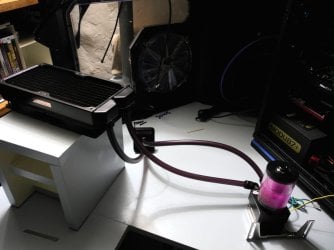
Attached two pics, one when i was filling the Res Tank and the other when installed.

I haven't yet fix the Res Tank onto the Hard Drives cage and it will be about two centimeters higher than on pic.

Also the tubing (10/13mm) will be tighten a little closer to each over , those are brand new so might need time to bend at their places.

I'll post a new pic and share Temps soon.

Cheers!
 

Attachments

  • DSCN1605.JPG
    DSCN1605.JPG
    101 KB · Views: 1
  • DSCN1610.JPG
    DSCN1610.JPG
    181.5 KB · Views: 1
Last edited:

My Computer My Computer

Computer type
PC/Desktop
Computer Manufacturer/Model Number
Custom Build
OS
Windows 7 Professional SP1 - x64 [Non-UEFI Boot]
CPU
Ivy Bridge Core i5 3570K (Delidded)
Motherboard
Asus P8Z77-V LE PLUS
Memory
G.Skill "Ares" DDR3 PC3-12800 - 1600MHz (16Gb)
Graphics Card(s)
Asus Dual-RX480-O4G
Sound Card
Creative Sound Blaster Z w/5.1 sound system
Monitor(s) Displays
Asus IPS 23"
Screen Resolution
16/9
Hard Drives
Internal:
500Go Sata 6Gb/s (x2)
500Go Sata 3Gb/s (x2)
SSD 60Go Sata 6Gb/s
PSU
In Win C 900W Series 80+ Platinum
Case
Thermaltake Chaser A71
Cooling
Custom Water Cooling Loop
Keyboard
Cooler Master QuickFire XTi
Mouse
Razer Imperator 2012 (4G)
Antivirus
MSE
Browser
IE 11.0.xxx Rtm
Other Info
"Raid0" with Intel Smart Response Technology (HDD/SSD)
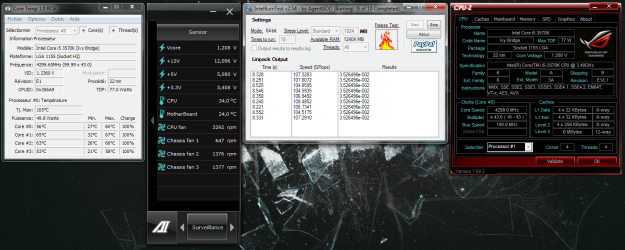
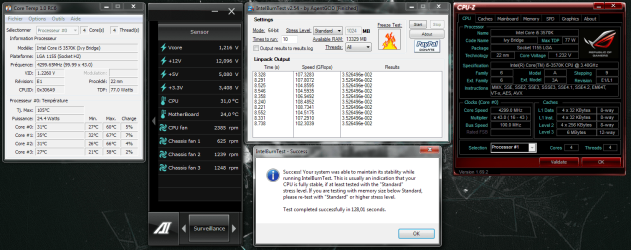
I've done IntelBurn Test V2 and my CPU set to @4,3GHz - 1,224V

The results showed on pics are the second run test (used first to pre-heat). I don't know really what to think, its running cool, not above 70°C. I haven't kept some similar results with my previous Aircooler. Thermal compound is only two days fresh install.

The Water Pump on Mobo CPU_Fan header is quite silent and didn't past 4000Rpm during load. Radiator fans x2 were running 1300Rpm to 1400Rpm

Temps on idle are between 27°C-29°C (Room Delta 19°C) with the pump running an average of 2300Rpm which make it barely audible, fans running Pwm approx 1200Rpm.
 

Attachments

  • Capture.PNG
    Capture.PNG
    249.9 KB · Views: 8
  • Capture2.PNG
    Capture2.PNG
    177.9 KB · Views: 6

My Computer My Computer

Computer type
PC/Desktop
Computer Manufacturer/Model Number
Custom Build
OS
Windows 7 Professional SP1 - x64 [Non-UEFI Boot]
CPU
Ivy Bridge Core i5 3570K (Delidded)
Motherboard
Asus P8Z77-V LE PLUS
Memory
G.Skill "Ares" DDR3 PC3-12800 - 1600MHz (16Gb)
Graphics Card(s)
Asus Dual-RX480-O4G
Sound Card
Creative Sound Blaster Z w/5.1 sound system
Monitor(s) Displays
Asus IPS 23"
Screen Resolution
16/9
Hard Drives
Internal:
500Go Sata 6Gb/s (x2)
500Go Sata 3Gb/s (x2)
SSD 60Go Sata 6Gb/s
PSU
In Win C 900W Series 80+ Platinum
Case
Thermaltake Chaser A71
Cooling
Custom Water Cooling Loop
Keyboard
Cooler Master QuickFire XTi
Mouse
Razer Imperator 2012 (4G)
Antivirus
MSE
Browser
IE 11.0.xxx Rtm
Other Info
"Raid0" with Intel Smart Response Technology (HDD/SSD)
Use hot water with a little vinrgar in it. Then be sure to wash it thoroughly with plain distilled water. Jack's (Layback Bear) advice is very good. If you have any questions, please feel free to ask either one of us.
 

My Computers My Computers

System One System Two

  • Computer type
    PC/Desktop
    Computer Manufacturer/Model Number
    ALWAYS UNDER CONSTRUCTION
    OS
    Windows 11 Pro
    CPU
    Ryzen 9 5900X
    Motherboard
    Asus X570 Crosshair Viii Hero
    Memory
    32GB G Skill DDR4-3600
    Graphics Card(s)
    EVGA RTX 3080 FTW 3 Ultra
    Sound Card
    On Board/Sennheiser PC37X Headset
    Monitor(s) Displays
    3 X Asus 27"
    Screen Resolution
    2560x1440
    Hard Drives
    2 X 1 TB NVME drives
    PSU
    EVGA 850
    Case
    Phanteks Eclipse P400A
    Cooling
    EVGA 280 AIO
    Keyboard
    Logitech G510s/ Logitech G13
    Mouse
    Logitech G502
    Internet Speed
    24/1
    Antivirus
    ESET/MBAM Pro/SAS Pro
    Browser
    Chrome/ Firefox/ Edge
  • Computer type
    Laptop
    System Manufacturer/Model Number
    Dell 16 Plus
    OS
    Windows 11 Pro
    CPU
    Intel Ultra 9 288V
    Memory
    32 GB LPDDR5X 8533
    Monitor(s) Displays
    16" Mini-LED HDR600 Touch 90 Hz
    Screen Resolution
    2560X1600
    Hard Drives
    1 TB NVME
Use hot water with a little vinrgar in it. Then be sure to wash it thoroughly with plain distilled water. Jack's (Layback Bear) advice is very good. If you have any questions, please feel free to ask either one of us.

If you talk about washing radiator & parts i've already done it! :) Residues in radiator were most of the black paint chips the others parts was dust from stock place.

I was sharing Temps!

Otherwise...
My loop is quite classical, nothing fancy or complicated!!

I've let on purpose some tubing length in case i'll be adding another 120mm radiator on rear case from the "out" pump to "in" Radiator. I've just 55mm to place it (include 120mm fan) and might have to grab a 15mm slim Fan line, in case. Will do something like a 60mm Radiator surface to cool...

The main thing is that i do not want to use smartcoil to stiff the tubing as i do not like it too much as for look...the shorter ones i could find are 10cm black mate.

It will have been overkill to take with a Pwm DDC Pump some 13/16mm tubing and harder to bend too. Could have go 10/16mm but found it too big for my rig.

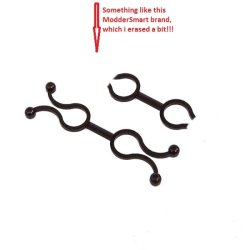
I need a spacer to place between the two tubing of the waterblock to make them go straight before going to their other side input/output. But can't find one or they're do are too thin to hold strong (attached pic)!!!
 

Attachments

  • fixation-twist-13mm-mod-smart-noir.jpg
    fixation-twist-13mm-mod-smart-noir.jpg
    14.8 KB · Views: 27

My Computer My Computer

Computer type
PC/Desktop
Computer Manufacturer/Model Number
Custom Build
OS
Windows 7 Professional SP1 - x64 [Non-UEFI Boot]
CPU
Ivy Bridge Core i5 3570K (Delidded)
Motherboard
Asus P8Z77-V LE PLUS
Memory
G.Skill "Ares" DDR3 PC3-12800 - 1600MHz (16Gb)
Graphics Card(s)
Asus Dual-RX480-O4G
Sound Card
Creative Sound Blaster Z w/5.1 sound system
Monitor(s) Displays
Asus IPS 23"
Screen Resolution
16/9
Hard Drives
Internal:
500Go Sata 6Gb/s (x2)
500Go Sata 3Gb/s (x2)
SSD 60Go Sata 6Gb/s
PSU
In Win C 900W Series 80+ Platinum
Case
Thermaltake Chaser A71
Cooling
Custom Water Cooling Loop
Keyboard
Cooler Master QuickFire XTi
Mouse
Razer Imperator 2012 (4G)
Antivirus
MSE
Browser
IE 11.0.xxx Rtm
Other Info
"Raid0" with Intel Smart Response Technology (HDD/SSD)
Non, I'm sorry, but I really don't know what you are asking. But, try to stay awat from 90 degree fittings as much as possible. @ 45 degree fittings can help make turns much better and will help line up the tubing. For example, to make my tubing run straighter, I used a 45 on my CPU block and a 45 on my radiator which enabled me to not have to make a long bend so the tubing wouldn't kink, which is a strict no-no. With the 2 45 degree free center compression fittings the tubing run was almost perfectly straight and I have little to no flow restriction.

Your temps look good to me. Water cooling will not really give you lower idle temps. Where you will see the difference is with high overclocks that an air cooler or AIO cannot handle. You should find that a custom loop will handle it just fine. For example. On my rig I can run Prime 95 at 5 GHz all day long, and the temps will get high, but not too high. I have used a Noctua NH-D14 air cooler and a Corsair H100. Neither one of those could even come close to handling that. However, at moderate overclocks and idle, there will be little difference, some in prime, but not a whole lot. I can game for hours at 4.6 and never get over 50-55. Also, remember I live in Florida which is very hot and I am upstairs.
 

My Computers My Computers

System One System Two

  • Computer type
    PC/Desktop
    Computer Manufacturer/Model Number
    ALWAYS UNDER CONSTRUCTION
    OS
    Windows 11 Pro
    CPU
    Ryzen 9 5900X
    Motherboard
    Asus X570 Crosshair Viii Hero
    Memory
    32GB G Skill DDR4-3600
    Graphics Card(s)
    EVGA RTX 3080 FTW 3 Ultra
    Sound Card
    On Board/Sennheiser PC37X Headset
    Monitor(s) Displays
    3 X Asus 27"
    Screen Resolution
    2560x1440
    Hard Drives
    2 X 1 TB NVME drives
    PSU
    EVGA 850
    Case
    Phanteks Eclipse P400A
    Cooling
    EVGA 280 AIO
    Keyboard
    Logitech G510s/ Logitech G13
    Mouse
    Logitech G502
    Internet Speed
    24/1
    Antivirus
    ESET/MBAM Pro/SAS Pro
    Browser
    Chrome/ Firefox/ Edge
  • Computer type
    Laptop
    System Manufacturer/Model Number
    Dell 16 Plus
    OS
    Windows 11 Pro
    CPU
    Intel Ultra 9 288V
    Memory
    32 GB LPDDR5X 8533
    Monitor(s) Displays
    16" Mini-LED HDR600 Touch 90 Hz
    Screen Resolution
    2560X1600
    Hard Drives
    1 TB NVME
Non, I'm sorry, but I really don't know what you are asking. But, try to stay awat from 90 degree fittings as much as possible. @ 45 degree fittings can help make turns much better and will help line up the tubing. For example, to make my tubing run straighter, I used a 45 on my CPU block and a 45 on my radiator which enabled me to not have to make a long bend so the tubing wouldn't kink, which is a strict no-no. With the 2 45 degree free center compression fittings the tubing run was almost perfectly straight and I have little to no flow restriction.

Your temps look good to me. Water cooling will not really give you lower idle temps. Where you will see the difference is with high overclocks that an air cooler or AIO cannot handle. You should find that a custom loop will handle it just fine. For example. On my rig I can run Prime 95 at 5 GHz all day long, and the temps will get high, but not too high. I have used a Noctua NH-D14 air cooler and a Corsair H100. Neither one of those could even come close to handling that. However, at moderate overclocks and idle, there will be little difference, some in prime, but not a whole lot. I can game for hours at 4.6 and never get over 50-55. Also, remember I live in Florida which is very hot and I am upstairs.

Thanks for respond and infos essenbe,

I was asking about a spacer between two tubing but that's a bit of quick-fix!!:)

I'm aware about 90° compression fitting and restricted flow...I got only one from the "In" pump and a 45° from the "Out" Pump.

I might need one or two more from the "Out" Water Block and "In" Radiator (as you described) but i would have like it more directly plug on the waterblock, that's why i was searching alternate, plus a 45° wouldn't fit onto the Radiator without a 1/4 adapter because of the 7mm "shroud & decoupling" i'm using...or an extended 45° one but at cost!

I'll see all that!

As for the Temps thanks to have let me know your setting.
I thought that will be the case for normal use...I'm at @4,3GHz everyday and i will see when my thermal compound will be ready of its fresh install if overclocking higher could help me to see what's really going on with a custom Water Cooling solution.
 

My Computer My Computer

Computer type
PC/Desktop
Computer Manufacturer/Model Number
Custom Build
OS
Windows 7 Professional SP1 - x64 [Non-UEFI Boot]
CPU
Ivy Bridge Core i5 3570K (Delidded)
Motherboard
Asus P8Z77-V LE PLUS
Memory
G.Skill "Ares" DDR3 PC3-12800 - 1600MHz (16Gb)
Graphics Card(s)
Asus Dual-RX480-O4G
Sound Card
Creative Sound Blaster Z w/5.1 sound system
Monitor(s) Displays
Asus IPS 23"
Screen Resolution
16/9
Hard Drives
Internal:
500Go Sata 6Gb/s (x2)
500Go Sata 3Gb/s (x2)
SSD 60Go Sata 6Gb/s
PSU
In Win C 900W Series 80+ Platinum
Case
Thermaltake Chaser A71
Cooling
Custom Water Cooling Loop
Keyboard
Cooler Master QuickFire XTi
Mouse
Razer Imperator 2012 (4G)
Antivirus
MSE
Browser
IE 11.0.xxx Rtm
Other Info
"Raid0" with Intel Smart Response Technology (HDD/SSD)
So...

Installed today my custom water cooling loop! :)

So far no probs and everything is working fine, no leaks were found.

I've use 7mm "Shroud & Decoupling" for the 120mm Fans onto the 30mm Radiator to have more of Airflow, and two others 140mm fans on Top of the case, hidden, are on extraction.

DDC Pump is PWM and plug onto CPU_FAN and have to be tuned a little with the Asus Fan XPert+

Its getting late and i'm working tomorrow all day, so i will keep you in touch soon with Temps.

Attached two pics, one when i was filling the Res Tank and the other when installed.

I haven't yet fix the Res Tank onto the Hard Drives cage and it will be about two centimeters higher than on pic.

Also the tubing (10/13mm) will be tighten a little closer to each over , those are brand new so might need time to bend at their places.

I'll post a new pic and share Temps soon.

Cheers!

Looks awesome NoN, very nice mate!
 

My Computer My Computer

OS
Windows 7 Professional 64 bit
So...

Installed today my custom water cooling loop! :)

So far no probs and everything is working fine, no leaks were found.

I've use 7mm "Shroud & Decoupling" for the 120mm Fans onto the 30mm Radiator to have more of Airflow, and two others 140mm fans on Top of the case, hidden, are on extraction.

DDC Pump is PWM and plug onto CPU_FAN and have to be tuned a little with the Asus Fan XPert+

Its getting late and i'm working tomorrow all day, so i will keep you in touch soon with Temps.

Attached two pics, one when i was filling the Res Tank and the other when installed.

I haven't yet fix the Res Tank onto the Hard Drives cage and it will be about two centimeters higher than on pic.

Also the tubing (10/13mm) will be tighten a little closer to each over , those are brand new so might need time to bend at their places.

I'll post a new pic and share Temps soon.

Cheers!

Looks awesome NoN, very nice mate!

Thanks Paul...that's pretty basic but its first one custom!!
 

My Computer My Computer

Computer type
PC/Desktop
Computer Manufacturer/Model Number
Custom Build
OS
Windows 7 Professional SP1 - x64 [Non-UEFI Boot]
CPU
Ivy Bridge Core i5 3570K (Delidded)
Motherboard
Asus P8Z77-V LE PLUS
Memory
G.Skill "Ares" DDR3 PC3-12800 - 1600MHz (16Gb)
Graphics Card(s)
Asus Dual-RX480-O4G
Sound Card
Creative Sound Blaster Z w/5.1 sound system
Monitor(s) Displays
Asus IPS 23"
Screen Resolution
16/9
Hard Drives
Internal:
500Go Sata 6Gb/s (x2)
500Go Sata 3Gb/s (x2)
SSD 60Go Sata 6Gb/s
PSU
In Win C 900W Series 80+ Platinum
Case
Thermaltake Chaser A71
Cooling
Custom Water Cooling Loop
Keyboard
Cooler Master QuickFire XTi
Mouse
Razer Imperator 2012 (4G)
Antivirus
MSE
Browser
IE 11.0.xxx Rtm
Other Info
"Raid0" with Intel Smart Response Technology (HDD/SSD)
Non, the only other recommendation I would suggest, and you may have already done it, is to build in a means to drain the loop at any time, easily.
 

My Computers My Computers

System One System Two

  • Computer type
    PC/Desktop
    Computer Manufacturer/Model Number
    ALWAYS UNDER CONSTRUCTION
    OS
    Windows 11 Pro
    CPU
    Ryzen 9 5900X
    Motherboard
    Asus X570 Crosshair Viii Hero
    Memory
    32GB G Skill DDR4-3600
    Graphics Card(s)
    EVGA RTX 3080 FTW 3 Ultra
    Sound Card
    On Board/Sennheiser PC37X Headset
    Monitor(s) Displays
    3 X Asus 27"
    Screen Resolution
    2560x1440
    Hard Drives
    2 X 1 TB NVME drives
    PSU
    EVGA 850
    Case
    Phanteks Eclipse P400A
    Cooling
    EVGA 280 AIO
    Keyboard
    Logitech G510s/ Logitech G13
    Mouse
    Logitech G502
    Internet Speed
    24/1
    Antivirus
    ESET/MBAM Pro/SAS Pro
    Browser
    Chrome/ Firefox/ Edge
  • Computer type
    Laptop
    System Manufacturer/Model Number
    Dell 16 Plus
    OS
    Windows 11 Pro
    CPU
    Intel Ultra 9 288V
    Memory
    32 GB LPDDR5X 8533
    Monitor(s) Displays
    16" Mini-LED HDR600 Touch 90 Hz
    Screen Resolution
    2560X1600
    Hard Drives
    1 TB NVME
Non, the only other recommendation I would suggest, and you may have already done it, is to build in a means to drain the loop at any time, easily.

You mean a Drain Valve at bottom of the tubing loop for easily drain the system...

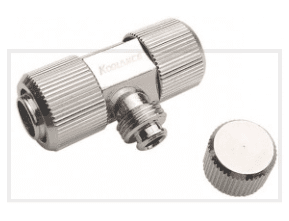
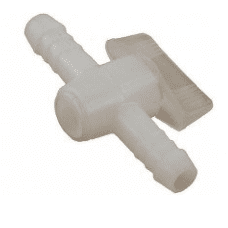
Yeah, i though about it and saw they're huge "T" sized metal x2 G1/4 and those plastic ones (not plugin ones) were so looking cheap...:(
 

Attachments

  • Capture2.PNG
    Capture2.PNG
    13.3 KB · Views: 23
  • Capture.PNG
    Capture.PNG
    7.1 KB · Views: 23

My Computer My Computer

Computer type
PC/Desktop
Computer Manufacturer/Model Number
Custom Build
OS
Windows 7 Professional SP1 - x64 [Non-UEFI Boot]
CPU
Ivy Bridge Core i5 3570K (Delidded)
Motherboard
Asus P8Z77-V LE PLUS
Memory
G.Skill "Ares" DDR3 PC3-12800 - 1600MHz (16Gb)
Graphics Card(s)
Asus Dual-RX480-O4G
Sound Card
Creative Sound Blaster Z w/5.1 sound system
Monitor(s) Displays
Asus IPS 23"
Screen Resolution
16/9
Hard Drives
Internal:
500Go Sata 6Gb/s (x2)
500Go Sata 3Gb/s (x2)
SSD 60Go Sata 6Gb/s
PSU
In Win C 900W Series 80+ Platinum
Case
Thermaltake Chaser A71
Cooling
Custom Water Cooling Loop
Keyboard
Cooler Master QuickFire XTi
Mouse
Razer Imperator 2012 (4G)
Antivirus
MSE
Browser
IE 11.0.xxx Rtm
Other Info
"Raid0" with Intel Smart Response Technology (HDD/SSD)
Back
Top