WD 2 TB 3.0 Is not detected - Again !!

arghya139

New member
Local time
12:03 AM
Messages
2
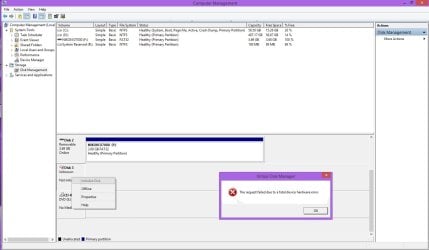
I am using windows 8.1 Pro and WD 2 TB MyBook Essential 3.0
Problem is most of the time its not recognized
Tried using other cables, other pc, formatting but all the same
Any suggestions ?
 

Attachments

  • Untitled-1.jpg
    Untitled-1.jpg
    103.2 KB · Views: 8

My Computer My Computer

At a glance

Windows 8.1
Computer type
PC/Desktop
OS
Windows 8.1
If its hardware failure, why it happens sometimes ?
not all of the time ? Say like weekly 3 days its detected and 4 days it aint
 

My Computer My Computer

At a glance

Windows 8.1
Computer type
PC/Desktop
OS
Windows 8.1
I'd also say it's looking like a hardware issue.
For the WD MyBook essentials external you have 4 areas for failure
1) the micro USB connector (intermittent reliability)
2) the internal USB to Sata interface
3) the HDD Sata interface on the drive itself
4) the physical HDD

Unfortunately I purchased a number of these before I realised failure (1) is a problem more often than you think. If a replacement cable doesn't fix it then it may be the female (attached to the HDD) end of the connector. The other significant problem is that your data is hardware encrypted whether you like it or not so simply pulling out the sata drive won't let you rescue the data.

So if your data is valuable back it up when your drive appears to be behaving. I'll never buy another My Book and will stick with either my own external enclosure or a docking station.
 
Last edited:

My Computer My Computer

At a glance

Windows 7x64 Home Premium SP1Intel i7 2600kG.Skill Ripjaws (DDR3-1600) 2x4GBNvidia GeForce GTS 450; Intel HD Graphics 300...
Computer type
PC/Desktop
Computer Manufacturer/Model Number
Own build
OS
Windows 7x64 Home Premium SP1
CPU
Intel i7 2600k
Motherboard
ASUS P8Z68 Deluxe
Memory
G.Skill Ripjaws (DDR3-1600) 2x4GB
Graphics Card(s)
Nvidia GeForce GTS 450; Intel HD Graphics 3000(GT2+)
Monitor(s) Displays
Dell Ultrasharp IPS panel U2311H, Samsung SyncMaster P2350
Screen Resolution
1920x1080
Hard Drives
Samsung 850 Pro SSD 256GB, Samsung SSD 840 120GB, Seagates 1TB Barracuda ST31000528AS x2
PSU
Seasonic M12II 520W
Case
Lian Li Lancool PC-K60
Cooling
Case: 1x120mm, 3x140mm CPU: Hyper 212+
Keyboard
Logitech MK520 (wireless)
Mouse
Logitech MK520
Internet Speed
6-7 Mbps
Antivirus
Norton Security Premium, Malwarebytes on 2 (MSE on 3rd PC)
Browser
FireFox
Other Info
Audio: Logitech Z523 2.1
If it's not hardware, then it may be software: the operating system and the way it manages the data and structures.

I don't know if 8.1 fixed it, but very long file names can cause problems. Additionally, too many files per folder can compound that problem.

I also encountered problems with a WD 1 tb usb 3.0, more often than not losing recognition (a lot of clicking sounds). (I also assigned the drive letter Q to it. Click-to-run surfaced as the drive label. My security program thought it was a new drive now and then and runs a background scan.)

During a working period, I 'moved' some of the data to another drive parcel by parcel. Just one of those parcels included a too-long file name conflict. (I'm not sure why the conflict didn't appear the first time it arrived at this drive.) By parceling, I trimmed the number of files per folder to less than 100, from nearly 1000. The drive began working consistently and continuously once the moves were made.

I moved the reorganized data back to the drive and the drive continues to work without a problem.
 

My Computer My Computer

At a glance

Windows 7 Home Premium x64
OS
Windows 7 Home Premium x64
If it's not hardware, then it may be software: the operating system and the way it manages the data and structures.


The OP already tried the disk on another PC but the result is same so you can rule out anything related to software.

If its hardware failure, why it happens sometimes ?
not all of the time ? Say like weekly 3 days its detected and 4 days it aint


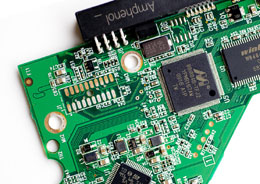
It could be happen if there is internal contact issues between the logic board and HDA connector or dry soldering issues on the logic board. Like "mjf" said, make sure to backup any important when the HDD detected again and submit it for warranty . If warranty is over, carefully disassemble the unit and unscrew the PCB from the HDD. Then use a white pencil rubber to gently rub and clean the contacts.

wd10eavs-pcb-back.jpg


If you are lucky, oxidation might be the only issue and the unit may start to work normally again.
 

My Computer My Computer

At a glance

Windows 7 Ultimate x64
Computer type
PC/Desktop
OS
Windows 7 Ultimate x64
Hi there

If this is not the BOOT disk try re-formatting it as GPT with PRIMARY partition(s). Large HDD's also don't seem to like FAT32 either very much. I've found with these larger HDD's (especially 2TB and more) GPT to be much more reliable.

Also if you run any large EXTERNAL HDD's via USB ports you'll usually find you need a POWERED USB port -- you can do this with a powered hub -- they are quite cheap.

(If it's the BOOT HDD then you will need a UEFI system if you want to use this as the boot device).

Cheers
jimbo
 

My Computer My Computer

At a glance

Linux CENTOS 7 / various Windows OS'es and se...Intel i7 Intel i58GB, 16GBOn Motherboard
Computer type
PC/Desktop
Computer Manufacturer/Model Number
Custom built, several laptops HP/ASUS
OS
Linux CENTOS 7 / various Windows OS'es and servers
CPU
Intel i7 Intel i5
Memory
8GB, 16GB
Graphics Card(s)
On Motherboard
Sound Card
Realtek HD audio
Monitor(s) Displays
Apple Cinema display, Samsung LCD
Screen Resolution
1920 X 1080
Hard Drives
4 X 1TB SATA
Mouse
Toshiba wireless laser
Internet Speed
> 20MB up
The OP already tried the disk on another PC but the result is same so you can rule out anything related to software.
I don't follow that logic. If both systems use Windows, that the HD experiences the same problem in each suggests that commonality.

I don't know what troubleshooting permutations arghya139 tried, but if the hd was formatted and left empty, AND still encountered the problem in BOTH machines, THEN I would say it is a hardware issue. Until then, I would look into the data in the drive and how Windows manages that data.
 

My Computer My Computer

At a glance

Windows 7 Home Premium x64
OS
Windows 7 Home Premium x64
Hi there,
I've seen several users recently reporting similar symptoms, caused by the USB controller driver on Windows 8.1. However I have never seen a case where this occurs intermittently. It really looks like it could be something hardware related here. But still we cannot be certain without further testing. I wonder if the second PC you tested with was running the same OS?

Don't forget to keep us posted on the progress :)
 

My Computer My Computer

At a glance

Windows
Computer type
PC/Desktop
OS
Windows
Back
Top
