
nsingla
New member
It is my brother's hard drive & it has very important data related to his working. It is a 2tb WD my passport ultra external hard disk which was used as NTFS with only one partition.
My brother told me that he deleted some data from the drive by mistake and was recovering the data from the drive but all the windows recovery programs he used just hanged after few minutes (which is also a sign of bad sectors). Then he done the blundered mistake by formatting the drive, the formatting also not completed due to hang situation.
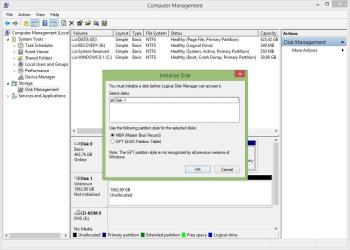
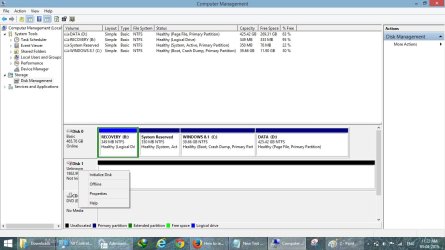
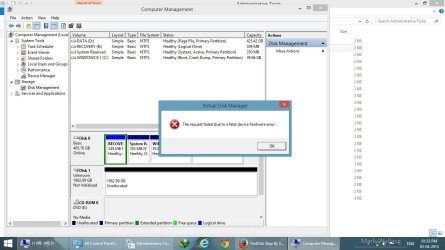
Now the current situation is that the drive is not showing in the windows explorer and when I open the disk management ,the popup came up for initializing the disk either as MBR or GPT. When I try to initialize the disk, it gives me this error:- "The request failed due to a fatal device hardware error". I have attached a few screenshots below.
I have tried cloning the drive with clonezilla, tried booting the drive with parted magic, Hire n boot and system rescue CD but neither of them recognized the drive and some also rejected to boot with the drive attached.
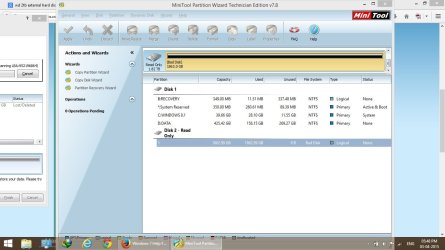
Now currently i am scanning this disc for recovering the lost partition in the 'Partition Recovery Wizard' software according to the advice on some old thread here, but this software has detected my disk as 'bad Disk' in the file System column as you can see in the fifth image, so i don't have much hope with this software.
Please tell me if there is any hope left for drive like trying any other partition recovery software or cloning the drive via some tools.
Thanks in advance
My brother told me that he deleted some data from the drive by mistake and was recovering the data from the drive but all the windows recovery programs he used just hanged after few minutes (which is also a sign of bad sectors). Then he done the blundered
mistake by formatting the drive, the formatting also not completed due to hang situation.Now the current situation is that the drive is not showing in the windows explorer and when I open the disk management ,the popup came up for initializing the disk either as MBR or GPT. When I try to initialize the disk, it gives me this error:- "The request failed due to a fatal device hardware error". I have attached a few screenshots below.
I have tried cloning the drive with clonezilla, tried booting the drive with parted magic, Hire n boot and system rescue CD but neither of them recognized the drive and some also rejected to boot with the drive attached.
Now currently i am scanning this disc for recovering the lost partition in the 'Partition Recovery Wizard' software according to the advice on some old thread here, but this software has detected my disk as 'bad Disk' in the file System column as you can see in the fifth image, so i don't have much hope with this software.
Please tell me if there is any
hope left for drive like trying any other partition recovery software or cloning the drive via some tools.Thanks in advance
Attachments

Last edited by a moderator:
My Computer
- Computer type
- Laptop
- Computer Manufacturer/Model Number
- DELL INSPIRON 3521
- OS
- Windows 8.1 64 bit


