The driver detected a controller error on \Device\Ide\IdePort7.

ahmedilyas

New member
Member
Local time
3:13 AM
Messages
50
Hi.
does anyone know which possible HDD this could be or how I would find out which drive is connected to IdePort7?

Everything is SATA and I have:

1xSSD
2x2TB HDD as RAID0
1x3TB HDD
1x500GB HDD

The driver detected a controller error on \Device\Ide\IdePort7.
 

My Computer My Computer

Computer type
PC/Desktop
OS
Microsoft Windows 7 Ultimate 64-bit 7601 Multiprocessor Free Service Pack 1
CPU
Intel(R) Core(TM) i7 CPU X 990 @ 3.47GHz
Motherboard
ASUSTeK Computer INC. P6X58D-E
Memory
24.00 GB
Graphics Card(s)
NVIDIA GeForce GTX 550 Ti
Sound Card
(1) NVIDIA High Definition Audio (2) NVIDIA High Definitio
Screen Resolution
1920 x 1200 x 32 bits (4294967296 colors) @ 59 Hz
Hard Drives
(1) OCZ-AGILITY3 ATA Device (2) WDC WD2002FAEX-007BA0 ATA Device (3) WDC WD2002FAEX-007BA0 ATA Device (4) WDC WD30EZRX-00DC0B0 ATA Device (5) WDC WD30EZRX-00MMMB0 ATA Device (6) WDC WD5000AAKS-00A7B0 ATA Device
Typically, you have Sata ports 0, 1, 2, 3, then IDE ports 4 and 5. If you have 6 SATA ports then the IDE ports would be 6 and 7. See if you can find the manual for your computer or better yet system board, it should have a layout of the hard drive ports.
 

My Computer My Computer

Computer type
PC/Desktop
Computer Manufacturer/Model Number
Lenovo IdeaCenter 450
OS
Windows 10 Pro X64
CPU
Intel Quad Core i7-4770 @ 3.4Ghz
Memory
16.0GB PC3-12800 DDR3 SDRAM 1600 MHz
Graphics Card(s)
Intel Integrated HD Graphics
Sound Card
Realtek HD Audio
Monitor(s) Displays
HP 22" LCD
Screen Resolution
1680 x 1050
Hard Drives
250GB Samsung EVO SATA-3 SSD
2TB Seagate ST2000DM001 SATA-2
1.5TB Seagate ST3150041AS SATA
Keyboard
Dell USB
Mouse
Lenovo USB
Internet Speed
Cable via Road Runner 3MB Upload, 30MB Download
Antivirus
Windows Defender, MBAM Pro, MBAE
Browser
Seamonkey
Other Info
UEFI/GPT
PLDS DVD-RW DH16AERSH
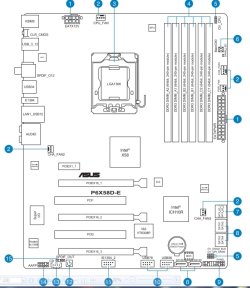
good point on the SATA # however, not able to find it correctly on the motherboard manual :(

ASUS P6X58D-E
 

My Computer My Computer

Computer type
PC/Desktop
OS
Microsoft Windows 7 Ultimate 64-bit 7601 Multiprocessor Free Service Pack 1
CPU
Intel(R) Core(TM) i7 CPU X 990 @ 3.47GHz
Motherboard
ASUSTeK Computer INC. P6X58D-E
Memory
24.00 GB
Graphics Card(s)
NVIDIA GeForce GTX 550 Ti
Sound Card
(1) NVIDIA High Definition Audio (2) NVIDIA High Definitio
Screen Resolution
1920 x 1200 x 32 bits (4294967296 colors) @ 59 Hz
Hard Drives
(1) OCZ-AGILITY3 ATA Device (2) WDC WD2002FAEX-007BA0 ATA Device (3) WDC WD2002FAEX-007BA0 ATA Device (4) WDC WD30EZRX-00DC0B0 ATA Device (5) WDC WD30EZRX-00MMMB0 ATA Device (6) WDC WD5000AAKS-00A7B0 ATA Device
According to the manual, there are no IDE connectors on that board:

ASUS.jpg
ASUS2.jpg

Google has lots of hits for this problem but I did not find any fixes other than replace the board, reseat the SATA cable, etc.: The driver detected a controller error on \Device\Ide\IdePort7

Read through some of the Google hits and see if anything applies to you.
 

My Computer My Computer

Computer type
PC/Desktop
Computer Manufacturer/Model Number
Lenovo IdeaCenter 450
OS
Windows 10 Pro X64
CPU
Intel Quad Core i7-4770 @ 3.4Ghz
Memory
16.0GB PC3-12800 DDR3 SDRAM 1600 MHz
Graphics Card(s)
Intel Integrated HD Graphics
Sound Card
Realtek HD Audio
Monitor(s) Displays
HP 22" LCD
Screen Resolution
1680 x 1050
Hard Drives
250GB Samsung EVO SATA-3 SSD
2TB Seagate ST2000DM001 SATA-2
1.5TB Seagate ST3150041AS SATA
Keyboard
Dell USB
Mouse
Lenovo USB
Internet Speed
Cable via Road Runner 3MB Upload, 30MB Download
Antivirus
Windows Defender, MBAM Pro, MBAE
Browser
Seamonkey
Other Info
UEFI/GPT
PLDS DVD-RW DH16AERSH
Go to the Device manager.

1) Expand Disk Drives Section.
Right click each hard Drive, choose Properties. Click the Details tab. In the Property Drop down Box, select Physical Device Object Name.

Repeat the Process for DVD/CD ROM drives untill you find device 7.

Once you locate which device is throwing the error, the solution could be one of a couple things.
1) The Device itself
2) The cable
3) The cable Connections or the acual plug on the device or motherboard.
4) A Chipset Error *

* My old mother board would throw those erros all the time from device 5. It was my storage drive. Thecables, connectioons, and HD were fine.
For whatever reason, using the Intel Rapid Storage manager/Driver resolved the issue.
 

My Computer My Computer

Computer Manufacturer/Model Number
Custom (Self Build)
OS
Windows 7 Home Premium 64bit
CPU
Intel Core i7 2700k
Motherboard
eVGA P67 SLI
Memory
8GB Mushkin Redline Ridgebacks @1866
Graphics Card(s)
EVGA GTX570 SC
Sound Card
XiFi Titanium HD
Monitor(s) Displays
LG W2453V
Screen Resolution
1920x1080
Hard Drives
Intel 320 80GB -- Intel X25-V 40GB --WD Black 1TB x2 -- WD Blue 640GB
PSU
Seasonic x750
Case
Corsair 600T SE White
Cooling
eVGA Superclocked CPU Cooler
Keyboard
Saitek Cyborg
Antivirus
Kaspersky
Browser
IE
Other Info
LG BD/DVD
Back
Top