
WD External HDD USB 3.0 connectivity issues

atr1

New member
Local time
7:44 PM
Messages
8
Hi Guys,

I've recently been having an issue with connecting my external HDD(EHDD) to my PC via a USB 3.0 port. The device does get detected (i could tell from the familiar usb device connection sound that plays), but it doesn't show up in my computer. After like 10 seconds or so i keep hearing the USB disconnection sound repeatedly. The EHDD is fine; the power led turns on when connected to the PC, and data can actually be transferred to it at USB 3.0 speeds(tried it on my laptop). The only way i could get this EHDD to work with this PC was to connect it to a USB 2.0 port. I updated my USB drivers namely this driver ''USB 3.0 Driver: Intel® USB 3.0 eXtensible Host Controller Driver'', and even disabled the selective suspension setting in power options, only to no avail.

I've attached an image file that might be useful, do let me know if ya'll need anything else.
 

Attachments
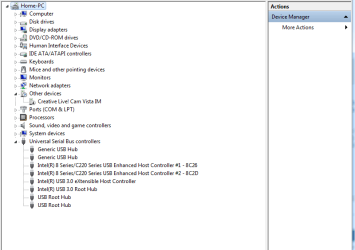
  • USB issue.png
    USB issue.png
    13.6 KB · Views: 1
Last edited:

My Computer My Computer

Computer type
PC/Desktop
Computer Manufacturer/Model Number
Custom
OS
Windows 7 64-bit with SP1
CPU
i5-4670
Motherboard
ASUS B-85 Plus
Memory
Gskill 4GB 2x
Graphics Card(s)
Palit GTX680 2GB
Monitor(s) Displays
Samsung SyncMaster 931bw
Screen Resolution
1440x900
Hard Drives
Seagate 1TB HDD
Seagate 500GB HDD
PSU
Corsair CS750
Case
Corsair carbide 200r
Cooling
Stock casing and CPU fans
Keyboard
Dell
Mouse
HP
Antivirus
Norton 360
Browser
Chrome
A model number for the drive, and its history would be great. You said it works on different computers [like your laptop] but not on the desktop you are trying to connect it to? Have you had any success plugging in other USB devices to the "trouble" computer? Have you checked for any loose connections/cables? Does it show up in the BIOS? Have you already done some diagnostics that you could share the results with us? Any additional information you could provide will speed up the repair process. Like your PC make & model, chipset info.....anything? The more information you can provide, the better. ;)
 

My Computer My Computer

Computer type
PC/Desktop
Computer Manufacturer/Model Number
HP Pavillion
OS
Windows 7 Enterprise SP1 x64
CPU
AMD Athlon 64x2 4200+ Dual Core Windsor 2.2GHz
Motherboard
Socket AM2: ECS MCP61PM-HM
Memory
4Gb: PNY PC2-6400 Dual Channel 2x2Gb
Graphics Card(s)
PNY NVIDIA GeForce 9800 GT
Sound Card
Creative Sound Blaster Audigy 24Bit @96000Hz
Monitor(s) Displays
HP w1907 Wide LCD 19"
Screen Resolution
1440x900
Hard Drives
1.) OS Drive: 500Gb Seagate Barracuda ST35004-18AS


2.) Storage: 1Tb Seagate Barracuda ST310005-28AS
PSU
OCZ StealthXStream OCZ500SXS 500W
Case
Hp Pavillion
Cooling
Thermaltake
Keyboard
HP
Mouse
Microsoft Wireless
Internet Speed
300Mb
Antivirus
Norton Internet Security 2014
Browser
Internet Explorer 11
Other Info
Custom Build
Info for the device.
Port_#0016.Hub_#0001 USB
Mass Storage Device
S/N:575847314138313932313639
Vendor ID:1058
Product ID:0740
Firmware rev.:10.07
USB Class:08 USB Sub-Class:06 USB Protocol:50


Intel® USB 3.0 eXtensible Host Controller Driver Ver. 2.5.3.34
Intel(R) 8 Series/C220 Series USB EHCI Driver Ver. 9.4.0.1011

Not too sure what you meant by "'model number for the drive, and its history", this is all that i could come up with.

You said it works on different computers [like your laptop] but not on the desktop you are trying to connect it to?

Yes, that is what i meant.

Yes I've had success connecting many USB peripherals(keyboard, mouse, flash drives, EHDDs( only usb 2.0 port)) to my ''trouble'' computer; both USB 3.0 and USB 2.0 ports, but not USB 3.0 devices. My EHDD is the only USB 3.0 device i have so i am a bit limited when it comes to testing the port with other USB 3.0 devices. I'm pretty sure all the cables are well connected, the USB 3.0 ports on the back panel don't work for the EHDD as well (if you are worried that my front panel I/O is not connected properly to my mother board). All USB ports show up in the BIOS (confirms that the connections are proper). I'm not sure what sort of diagnostics i can give you, help me out here? As per your request for PC info go ahead and check my profile i filled it up so that it'll be easy for all to check; B-85 intel chipset.

Thank You
 

My Computer My Computer

Computer type
PC/Desktop
Computer Manufacturer/Model Number
Custom
OS
Windows 7 64-bit with SP1
CPU
i5-4670
Motherboard
ASUS B-85 Plus
Memory
Gskill 4GB 2x
Graphics Card(s)
Palit GTX680 2GB
Monitor(s) Displays
Samsung SyncMaster 931bw
Screen Resolution
1440x900
Hard Drives
Seagate 1TB HDD
Seagate 500GB HDD
PSU
Corsair CS750
Case
Corsair carbide 200r
Cooling
Stock casing and CPU fans
Keyboard
Dell
Mouse
HP
Antivirus
Norton 360
Browser
Chrome
Not too sure what you meant by "'model number for the drive, and its history", this is all that i could come up with.
The model number for Western Digital drives should begin with "WD" followed by some numbers [some of which indicates the drive capacity] which you have not yet provided. What I meant by history is things like whether or not the drive is brand new, or if you have had previous trouble with this drive...etc.

Keeping in mind the information that you have already provided, try these things first, and we will go from there.

1.) Go to Device Manager and check the driver version, and date for your USB 3.0 device. Is it the USB 3.0 driver that you just installed that is listed?

2.) Go into the BIOS and check all your settings to make sure the USB 3.0 port you are trying to use is enabled.

3.) Check to see that you have the latest BIOS software installed. I'm assuming that you already know whether or not your motherboard supports USB 3.0?


From what your saying, this is most likely going to come down to a driver, or hardware setting. Nothing major. ;)
 

My Computer My Computer

Computer type
PC/Desktop
Computer Manufacturer/Model Number
HP Pavillion
OS
Windows 7 Enterprise SP1 x64
CPU
AMD Athlon 64x2 4200+ Dual Core Windsor 2.2GHz
Motherboard
Socket AM2: ECS MCP61PM-HM
Memory
4Gb: PNY PC2-6400 Dual Channel 2x2Gb
Graphics Card(s)
PNY NVIDIA GeForce 9800 GT
Sound Card
Creative Sound Blaster Audigy 24Bit @96000Hz
Monitor(s) Displays
HP w1907 Wide LCD 19"
Screen Resolution
1440x900
Hard Drives
1.) OS Drive: 500Gb Seagate Barracuda ST35004-18AS


2.) Storage: 1Tb Seagate Barracuda ST310005-28AS
PSU
OCZ StealthXStream OCZ500SXS 500W
Case
Hp Pavillion
Cooling
Thermaltake
Keyboard
HP
Mouse
Microsoft Wireless
Internet Speed
300Mb
Antivirus
Norton Internet Security 2014
Browser
Internet Explorer 11
Other Info
Custom Build
S/N:WDBACY5000ABK-01

I've had this EHDD for 2 years+, and never had any trouble with it.

The driver version matches the earliest installed driver. The ports(USB 3.0s) are enabled on the BIOS, and the BIOS is up to date. Yes my motherboard supports USB 3.0.

I believe its a driver issue as well, i managed to get the EHDD running on the USB 3.0 port with the 3.0 driver uninstalled, so it operated at 2.0 speeds, but the port works. I'm not exactly sure what is wrong with the latest driver.

I'll try to get a hold of another USB 3.0 device to test on the port, just to make sure its a driver issue.
 

My Computer My Computer

Computer type
PC/Desktop
Computer Manufacturer/Model Number
Custom
OS
Windows 7 64-bit with SP1
CPU
i5-4670
Motherboard
ASUS B-85 Plus
Memory
Gskill 4GB 2x
Graphics Card(s)
Palit GTX680 2GB
Monitor(s) Displays
Samsung SyncMaster 931bw
Screen Resolution
1440x900
Hard Drives
Seagate 1TB HDD
Seagate 500GB HDD
PSU
Corsair CS750
Case
Corsair carbide 200r
Cooling
Stock casing and CPU fans
Keyboard
Dell
Mouse
HP
Antivirus
Norton 360
Browser
Chrome
S/N:WDBACY5000ABK-01
Yep, that is the model number [not serial number] I was looking for. I bet the drive capacity is 500GB isn't it? If you look at the model number closely you'll see how I was able to determine the drive capacity. Just something to keep in mind for future reference.

The driver version matches the earliest installed driver.
I don't understand what you mean by "earliest installed driver." Care to elaborate please?

I believe its a driver issue as well, i managed to get the EHDD running on the USB 3.0 port with the 3.0 driver uninstalled, so it operated at 2.0 speeds, but the port works.
That's good news! I'm about 90% sure you have a corrupted driver installed for USB 3.0. Would you like me to hunt up drivers for your USB 3.0 controllers, or do you want to do it yourself? Either way is fine with me.

I'll try to get a hold of another USB 3.0 device to test on the port, just to make sure its a driver issue.
Smart move. Let me know how that turns out, Bro.
 

My Computer My Computer

Computer type
PC/Desktop
Computer Manufacturer/Model Number
HP Pavillion
OS
Windows 7 Enterprise SP1 x64
CPU
AMD Athlon 64x2 4200+ Dual Core Windsor 2.2GHz
Motherboard
Socket AM2: ECS MCP61PM-HM
Memory
4Gb: PNY PC2-6400 Dual Channel 2x2Gb
Graphics Card(s)
PNY NVIDIA GeForce 9800 GT
Sound Card
Creative Sound Blaster Audigy 24Bit @96000Hz
Monitor(s) Displays
HP w1907 Wide LCD 19"
Screen Resolution
1440x900
Hard Drives
1.) OS Drive: 500Gb Seagate Barracuda ST35004-18AS


2.) Storage: 1Tb Seagate Barracuda ST310005-28AS
PSU
OCZ StealthXStream OCZ500SXS 500W
Case
Hp Pavillion
Cooling
Thermaltake
Keyboard
HP
Mouse
Microsoft Wireless
Internet Speed
300Mb
Antivirus
Norton Internet Security 2014
Browser
Internet Explorer 11
Other Info
Custom Build
Back
Top