
WD extrnl drve not initialized in disk mgmt not shown in my comp

msuper

New member
Local time
4:52 AM
Messages
1
WD MyPassport 07a8 nt initialized in disk mgmt & nt shown in my comp.500GB Extrnl hrd dsk drive. its 90% used. Recommend a quick solution please.
Tried Ease US but its not detecting my hdd.
Tried updating driver uninstalling driver then replugging but no luck.
I am quite afraid about getting back my data.
I need to recover my data.
Please help me out
 

Attachments
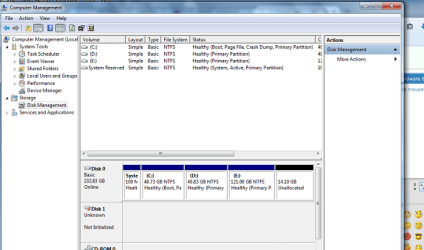
  • my screenshot.png
    my screenshot.png
    32.6 KB · Views: 14
Last edited:

My Computer My Computer

At a glance

Windows 7 Ultimate 32 bit OS
Computer type
PC/Desktop
Computer Manufacturer/Model Number
Dell
OS
Windows 7 Ultimate 32 bit OS
Hi there, this drive is power fed trough the USB cable. So if the cable is damaged or too long it could cause the drive to malfunction. Otherwise it could be a damaged partition or a failed drive. I hope it will be a power issue, as it will be easier to resolve.
Have you tried:
- using a different USB cable (the shorter the better),
- connect it to a different usb port on the PC and make sure all other usb fed devices are unplugged at the time;
- if it's a desktop make sure to use a usb port that is on the back of the PC.
- connecting it to a different PC with a different OS

It will be useful if you give a bit more information. Can you hear any unusual noises from the drive? Have you dropped it recently? Do you remember making any changes before it stopped working ?
You can also check this topic: FAQ: External hard drive no longer shows up in My ... - WD Community

Hope that helps and don't forget to share how it goes
 

My Computer My Computer

At a glance

Windows
Computer type
PC/Desktop
OS
Windows
Back
Top