
WD HDD not found

DarwinGarcia

New member
Local time
7:12 AM
Messages
1
Hi... I'm facing the same problem with my external USB HDD... WD 2TB... Not visible in Windows Exploror - Not initialised in Disk Manager, blank allocation column... MiniTools can't see it either... I tried reconnecting all cables, different ports, reinstall drivers... I just can't access it and it has too much data... it was my only backup... Please advise... tia
 

Attachments
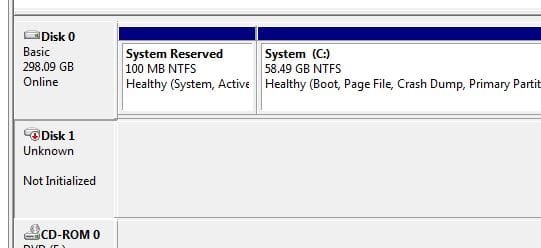
  • Disk 1 not initialised.jpg
    Disk 1 not initialised.jpg
    20.5 KB · Views: 17

My Computer My Computer

Computer type
PC/Desktop
Computer Manufacturer/Model Number
Custom
OS
Windows 7 Ultimate x32
CPU
Intel i5
Motherboard
Zebronics
Hard Drives
Seagate 350GB
Browser
Chrome

My Computers My Computers

System One System Two

  • Computer type
    PC/Desktop
    Computer Manufacturer/Model Number
    custom build
    OS
    Windows 7 HP 64
    CPU
    i5 6600K - 800MHz to 4200MHz
    Motherboard
    GA-Z170-HD3P
    Memory
    4+4G GSkill DDR4 3000
    Graphics Card(s)
    IG - Intel 530
    Monitor(s) Displays
    Samsung 226BW
    Screen Resolution
    1680x1050
    Hard Drives
    (1) -1 SM951 – 128GB M.2 AHCI PCIe SSD drive for Windows 7 and Lubuntu
    (2) -1 WD SATA 3 - 1T for Data
    (3) -1 WD SATA 3 - 1T for backup
    PSU
    Thermaltake 450W TR2 gold
    Keyboard
    Old and good Chicony mechanical keyboard
    Mouse
    Logitech mX performance - 9 buttons (had to disable some)
    Internet Speed
    500Mb/s
    Browser
    Firefox 64
    Other Info
    TinyWall firewall
  • Computer type
    Laptop
    System Manufacturer/Model Number
    Asus Q550LF
    OS
    Windows 7 Pro
    CPU
    i7-4500U 800MHz to 3.0GHz
    Motherboard
    Asus Q550LF
    Memory
    (4+4)G DDR3 1600
    Graphics Card(s)
    IG intel 4400 + NVIDIA GeForce GT 745M
    Sound Card
    Realtek
    Monitor(s) Displays
    LG Display LP156WF4-SPH1
    Screen Resolution
    1920 x 1080
    Hard Drives
    BX500 120G SSD for Windows and programs +
    1T HDD for data
    Internet Speed
    500 Mb/s
    Browser
    Firefox
    Other Info
    TinyWall firewall
Welcome to Seven Forums.

WD 2TB ok. Model? Elements? My Book, Passport?, Passport ultra? Desktop unit with a power adapter? Portable?

For all practical purposes I would think your external drive is a goner. It does not even show the capacity in Windows Disk Management. Probable failure of the SATA to USB bridge electronics inside the enclosure.

If it is a Desktop Elements model using a 3.5" HDD, you can take the HDD out from the enclosure, make a direct connection to the SATA port on a desktop and try to recover the data. Any other model, the data is encrypted by the enclosure electronics and even if the HDD is OK you will get only the encrypted data wich is absolutely useless.

In the portable models also except the elements, Passport and Passport Ultra are encrypted. Even assuming that it is an Element, in the portables, the enclosure electronics is integrated into the HDD and therefore cannot be separated to try it out as an internal drive.(The HDD has no SATA connector)

NetResult: If it is a Desktop Elements you can take the HDD out and Try. Any other model you can't. You have to give it to WD Data Recovery partners to recover the data.
 
Last edited:

My Computer My Computer

OS
Windows 7 Home Premium 32 bit
Back
Top