Solved WD My Passport External HDD not showing in my computer

blueyedsamurai

New member
Member
Local time
9:14 AM
Messages
84
A friend gave me his external to transfer some files onto it but I cant seem to get it to show in my computer.

It shows in device manager and disk management and it also shows up in devices and printers.

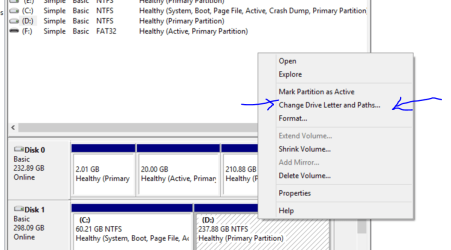
I've tried assigning its own drive letter but those options are greyed out.

disk_management.jpg


Device_manager.jpg
 

My Computer My Computer

At a glance

Windows 7 Ultimate x64Intel i7 4790k16GB DDR3Nvidia Geforce GTX 970
Computer type
PC/Desktop
OS
Windows 7 Ultimate x64
CPU
Intel i7 4790k
Motherboard
MSI Z87-G45
Memory
16GB DDR3
Graphics Card(s)
Nvidia Geforce GTX 970
Monitor(s) Displays
LG 24 inch
Case
Corsair Obsidian 450D
Hi there
Easy

Right mouse click (on the partition - not the system partition) and assign it a letter - then it will show up. In your example right click on the 465.42 GB partition with the blue strip at the top.

Cheers

jimbo
 

Attachments

  • partition.png
    partition.png
    58.6 KB · Views: 1

My Computer My Computer

At a glance

Linux CENTOS 7 / various Windows OS'es and se...Intel i7 Intel i58GB, 16GBOn Motherboard
Computer type
PC/Desktop
Computer Manufacturer/Model Number
Custom built, several laptops HP/ASUS
OS
Linux CENTOS 7 / various Windows OS'es and servers
CPU
Intel i7 Intel i5
Memory
8GB, 16GB
Graphics Card(s)
On Motherboard
Sound Card
Realtek HD audio
Monitor(s) Displays
Apple Cinema display, Samsung LCD
Screen Resolution
1920 X 1080
Hard Drives
4 X 1TB SATA
Mouse
Toshiba wireless laser
Internet Speed
> 20MB up
Those options are greyed out, I tried to do that before but had no luck.
 

My Computer My Computer

At a glance

Windows 7 Ultimate x64Intel i7 4790k16GB DDR3Nvidia Geforce GTX 970
Computer type
PC/Desktop
OS
Windows 7 Ultimate x64
CPU
Intel i7 4790k
Motherboard
MSI Z87-G45
Memory
16GB DDR3
Graphics Card(s)
Nvidia Geforce GTX 970
Monitor(s) Displays
LG 24 inch
Case
Corsair Obsidian 450D
Hi there
Are you sure you moved your mouse well into the rectangle for the 465.42GB partition. Normally this works 100% of the time unless the disk is OFF line. which in this case it isn't.

Try unplugging the HDD , re-plugging it in and having another go.

Cheers
jimbo
 

My Computer My Computer

At a glance

Linux CENTOS 7 / various Windows OS'es and se...Intel i7 Intel i58GB, 16GBOn Motherboard
Computer type
PC/Desktop
Computer Manufacturer/Model Number
Custom built, several laptops HP/ASUS
OS
Linux CENTOS 7 / various Windows OS'es and servers
CPU
Intel i7 Intel i5
Memory
8GB, 16GB
Graphics Card(s)
On Motherboard
Sound Card
Realtek HD audio
Monitor(s) Displays
Apple Cinema display, Samsung LCD
Screen Resolution
1920 X 1080
Hard Drives
4 X 1TB SATA
Mouse
Toshiba wireless laser
Internet Speed
> 20MB up
Hi blueeyedSamurai,

It looks like that external drive was formatted by your friend on a Mac. At the moment it is a guess. Ask your friend.

If you want to format it now in Windows 7, I can tell you something to try but again ask your friend if you can do that and then copy all the files he wanted.

So, Ask your friend, ask your friend and then come back.:)
 

My Computer My Computer

At a glance

Windows 7 Home Premium 32 bit
OS
Windows 7 Home Premium 32 bit
The disk seems to be in GPT style. Is this disk is formatted on a Mac system ? ( Windows doesn't seems to recognize the file system ). Your friend uses a Mac ?.


OOps, parallel posting.
 

My Computer My Computer

At a glance

Windows 7 Ultimate x64
Computer type
PC/Desktop
OS
Windows 7 Ultimate x64
Never mind Anshad. Same wine, different bottles.:)
 

My Computer My Computer

At a glance

Windows 7 Home Premium 32 bit
OS
Windows 7 Home Premium 32 bit
yeh he does have a mac, I guess that might be the issue. Could I use HFSE explorer?
 

My Computer My Computer

At a glance

Windows 7 Ultimate x64Intel i7 4790k16GB DDR3Nvidia Geforce GTX 970
Computer type
PC/Desktop
OS
Windows 7 Ultimate x64
CPU
Intel i7 4790k
Motherboard
MSI Z87-G45
Memory
16GB DDR3
Graphics Card(s)
Nvidia Geforce GTX 970
Monitor(s) Displays
LG 24 inch
Case
Corsair Obsidian 450D
A friend gave me his external to transfer some files onto it but I cant seem to get it to show in my computer.

If i am not mistaken, you need to copy some file in to the HDD. If that is the case, "HFS Explorer" won't help - it only help you to read HFS volumes and copy files from it. For that purpose, there is also another tool available - "Disk Internal's Linux Reader".

Access to Ext 2/3/4, HFS and ReiserFS from Windows


If you need to write to the disk, you need a commercial app - "HFS for Windows" by "Paragon".

HFS for Windows - file system driver | PARAGON Software Group
 

My Computer My Computer

At a glance

Windows 7 Ultimate x64
Computer type
PC/Desktop
OS
Windows 7 Ultimate x64
There is also another tool available - "MacDrive".

MacDrive

It offers 5 day full functional trial so if you only need a temporary write access to copy some files, the trail version will do the trick.
 

My Computer My Computer

At a glance

Windows 7 Ultimate x64
Computer type
PC/Desktop
OS
Windows 7 Ultimate x64
That is a good suggestion by Anshad Edavana.
 

My Computer My Computer

At a glance

Windows 7 Home Premium 32 bit
OS
Windows 7 Home Premium 32 bit
Some additional information:

Mac OS X 10.3 and onwards can read NTFS and so you may copy the data into an NTFS drive and give it to your friend.
 

My Computer My Computer

At a glance

Windows 7 Home Premium 32 bit
OS
Windows 7 Home Premium 32 bit
I got macdrive and that worked perfect, recognized it straight away.

Thanks for the help, I was a bit confused because I just assumed the external was a windows file system
 

My Computer My Computer

At a glance

Windows 7 Ultimate x64Intel i7 4790k16GB DDR3Nvidia Geforce GTX 970
Computer type
PC/Desktop
OS
Windows 7 Ultimate x64
CPU
Intel i7 4790k
Motherboard
MSI Z87-G45
Memory
16GB DDR3
Graphics Card(s)
Nvidia Geforce GTX 970
Monitor(s) Displays
LG 24 inch
Case
Corsair Obsidian 450D
Back
Top