
WD Passport 1 TB , Error - Unaccessible & Not Working ,Not Initialized
Hi. I was looking for some solutions for my hard disk and i ended up here looking for something. Please help on the issue.
1. I was using my my Hard Disk , it was connected and i an restarted my laptop. After it was on the laptop did not recognised the hard disk and i was unable to see it annwhere.
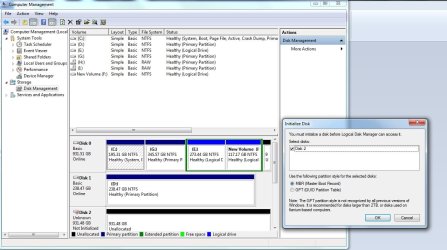
2. I troubleshooted it and saw a a yellow color triangle on WD SES Device . In Disk Management tab also it was not recognised. I uninstalled the SES Driver and and did a lot of things Finally the Hard disk was Recognised in Disk Management Tab as " DISK 2 - Unknown , and it wanted me to initialize the Hard " Disk. (Screenshot Added)
3. I also used various Software to recover my Data ( Data Rescue , EaseUS , iCare , Ontrack ) most of them showed Bad LBA (Sector 1) and so on, some even stopped after clicking on the Hard disk. Current i am running EaseUS and iCare, It will take 3-4 hrs to complete.
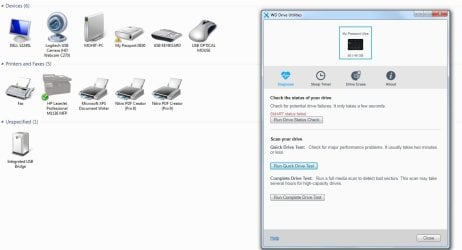
4. I Also used WD Drice Utility Software and it Showed me a " SMART Status Failed" and on Run Quick/Complete Drive test its not responsive. (Screenshot Added).
Please Help me on this Issue as i think the HD is not dead as of now and something can be done.
Hi. I was looking for some solutions for my hard disk and i ended up here looking for something. Please help on the issue.
1. I was using my my Hard Disk , it was connected and i an restarted my laptop. After it was on the laptop did not recognised the hard disk and i was unable to see it annwhere.
2. I troubleshooted it and saw a a yellow color triangle on WD SES Device . In Disk Management tab also it was not recognised. I uninstalled the SES Driver and and did a lot of things Finally the Hard disk was Recognised in Disk Management Tab as " DISK 2 - Unknown , and it wanted me to initialize the Hard " Disk. (Screenshot Added)
3. I also used various Software to recover my Data ( Data Rescue , EaseUS , iCare , Ontrack ) most of them showed Bad LBA (Sector 1) and so on, some even stopped after clicking on the Hard disk. Current i am running EaseUS and iCare, It will take 3-4 hrs to complete.
4. I Also used WD Drice Utility Software and it Showed me a " SMART Status Failed" and on Run Quick/Complete Drive test its not responsive. (Screenshot Added).
Please Help me on this Issue as i think the HD is not dead as of now and something can be done.
Attachments
My Computer
At a glance
Windows 7 (64 bit)
- Computer type
- PC/Desktop
- OS
- Windows 7 (64 bit)
