
WD MY PASSPORT 1 TB stopped working after Win 10 pro

hiamreshg

New member
Local time
4:31 AM
Messages
3
Hello all,

While searching for help on my data lost-coincidentally after upgrading to Win 10 pro I came to know about this forum.
My problem is killing me since last two days... Actually i had a WD 1 TB my passport, I was using it on my television as an input device and keeping all my important data. All of a sudden three days back the TV was showing error and all the folders(every folder was visible) from WD my passport was showing empty. I thought there may be some driver problem so connected with my newly upgraded Laptop with Win 10 Pro. It tool long time to update drivers and the drive was showing without any details on my computer. Nothing helped so I visited WD website and downloaded WDDriveUtilitiesSetup_for_web_1.3.0.17. It also took long time to update last night i slept keeping it on update. In the morning it was showing updated... still it is not opening on laptop i tried on multiple laptops. Now when Connecting to TV it is showing some random files and not all the folders:(:mad:
Where is my data now ? What is the best way to recover my important data from WD my passport.
Any help will be appreciated and I thank you all for the reply to resolve problem.

I have attached screenshots to help in understanding the problem details.
 

Attachments
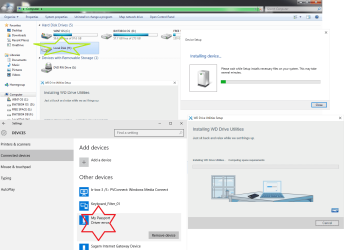
  • WD MY PASSPORT.png
    WD MY PASSPORT.png
    57.9 KB · Views: 5

My Computer My Computer

At a glance

Windows 10 Pro 64 Bit X64 based processori5 2410M CPU
Computer type
Laptop
Computer Manufacturer/Model Number
Sony
OS
Windows 10 Pro 64 Bit X64 based processor
CPU
i5 2410M CPU
What USB cable are you using? Try using a different cable, perhaps of a different generation (USB 2.0/3.0) and certainly of a very short length (1.5 ft or less) and see if the problem repeats itself.

Failing that:

I'm not familiar with this particular brand and generation of external drives, but why do you need a driver to use it? External USB drives should plug and play with most computers equipped with USB. Perhaps you should try it with a regular USB 2.0 computer running Windows XP or GParted (via UBCD).
 

My Computer My Computer

At a glance

Windows 7 Pro 64 bit
Computer type
PC/Desktop
OS
Windows 7 Pro 64 bit
Many thank vassok, I am using the same cable- came with the product. It is less than 0.5 meter. My device is from western Digital( http://www.wdc.com)
Now coming to the problem status yesterday I have tried on multiple Laptops. surprisingly i was able to see some of the folders (2/90). and after some time even these folders became non accessible. Finally I thought of data recovery and searched online for the recovery tools. I found one tool which claims to be free and with that tool i was able to find most of the data... now at the time of recovering the data, it was asking for registration and the cost associated with it was much higher than the device cost.
Now I worried about the data since the device came with 3 years warranty and it is very much under warranty. So my primary concern is data recovery software which comes at a reasonable price.

Thank you
 

My Computer My Computer

At a glance

Windows 10 Pro 64 Bit X64 based processori5 2410M CPU
Computer type
Laptop
Computer Manufacturer/Model Number
Sony
OS
Windows 10 Pro 64 Bit X64 based processor
CPU
i5 2410M CPU

My Computer My Computer

At a glance

Win-7-Pro64bit 7-H-Prem-64biti7-5930K 2nd i9-9940x both water blocked VRM'...Trident-z 3200C14 2nd Trident-z 3600C16EVGA 1080ti ftw3 2nd Titan Xp both water blocked
Computer type
PC/Desktop
Computer Manufacturer/Model Number
Custom assembled by me :}
OS
Win-7-Pro64bit 7-H-Prem-64bit
CPU
i7-5930K 2nd i9-9940x both water blocked VRM's too
Motherboard
ASUS SABERTOOTH X99 2nd ASUS x299 Apex
Memory
Trident-z 3200C14 2nd Trident-z 3600C16
Graphics Card(s)
EVGA 1080ti ftw3 2nd Titan Xp both water blocked
Sound Card
Built-in Realtek
Monitor(s) Displays
1-AOC G2460PG 24"G-Sync 144Hz/ 2nd 1-ASUS VG248QE 24" 144Hz
Screen Resolution
1920 x 1080 144Hz
Hard Drives
2-Samsung M.2 Evo & Evo Plus
2-Samsung 850 EVO 500GB SSD's/ 3-2.5 W.D. Black 1tb-&3-1tb/3-3.5 WD Black 1tb hdd's
PSU
EVGA SuperNOVA 1000-P2 2nd 1200-P2
Case
2-Corsair Obsidian Series 450D Black ATX Mid Tower
Cooling
Custom water loops
Keyboard
Logitech G710+/ 2nd Logitech G910
Mouse
2-RedDragon M901 Perdition 16400 dpi Gaming mouse = wired
Internet Speed
Comcast Ping 19ms 89.31mbps download speed 6.12mbps upload
Antivirus
Malwarebytes Pro/ Superantispyware Pro
Browser
FireFox & Pale moon
Other Info
2nd ASUS X299 Apex/Intel i9-9940x with Custom water loop/7H-Prem-x64/Corsair 450D case/Ram Trident-z 3600C16 4x8gb / Samsung970Evo plus 500gb SSD/Dual ssd EZ swap evo/PSU EVGA SuperNova 1200w-P2 80+Platinum/GPU Titan Xp /8-ML-140 on push-pull on 2-280GTX rads
Many thank vassok, I am using the same cable- came with the product. It is less than 0.5 meter. My device is from western Digital( Western Digital Hard Drives, Network Drives, Media Players)
Now coming to the problem status yesterday I have tried on multiple Laptops. surprisingly i was able to see some of the folders (2/90). and after some time even these folders became non accessible. Finally I thought of data recovery and searched online for the recovery tools. I found one tool which claims to be free and with that tool i was able to find most of the data... now at the time of recovering the data, it was asking for registration and the cost associated with it was much higher than the device cost.
Now I worried about the data since the device came with 3 years warranty and it is very much under warranty. So my primary concern is data recovery software which comes at a reasonable price.

Thank you

Have you tried using a DIFFERENT USB cable? Your cable may have come from the manufacturer, but that doesn't mean it cannot be defective. You tried different laptops, why not a different (equally short or shorter) cable?

Next, I'd try booting into UBCD Parted Magic and making a copy of the partition to another drive, perhaps using Clonezilla (from within GParted). If you can successfully make a clone to a different drive, you'd effectively recover your data. Parted Magic also contains a program called Photorec, which can supposedly recover data. UBCD is free to use, although I have not used this data recovery program.

If even that fails, you can try (but it may void warranty) to take the drive out of the enclosure and connect it directly via SATA to transfer the files.
 

My Computer My Computer

At a glance

Windows 7 Pro 64 bit
Computer type
PC/Desktop
OS
Windows 7 Pro 64 bit

My Computer My Computer

At a glance

Windows 7 Pro 64 bit
Computer type
PC/Desktop
OS
Windows 7 Pro 64 bit
No dear Vassock, I have tried on Win 7, and Linux machine. On Linux machine few folders were visible. When I tried taking the back up in other hard drive second time the passport was not getting mounted and showing error. Next i tried searching on recovery tool and found a free tool Aid file recovery, I was able recover the files by using this software. But before backing up requires some registration and the cost associated for registration is even more than the cost of device.
Now i am looking for good data recovery software with less cost. Any help about the best economic recovery tool ???
 

My Computer My Computer

At a glance

Windows 10 Pro 64 Bit X64 based processori5 2410M CPU
Computer type
Laptop
Computer Manufacturer/Model Number
Sony
OS
Windows 10 Pro 64 Bit X64 based processor
CPU
i5 2410M CPU
I gave you the recovery tool. It's included in UBCD.

Ultimate Boot CD - Overview

But before you continue messing with the HD, you need to try a DIFFERENT USB CABLE. That's the easiest thing you can troubleshoot and I have not seen you say you tried it.
 

My Computer My Computer

At a glance

Windows 7 Pro 64 bit
Computer type
PC/Desktop
OS
Windows 7 Pro 64 bit
Hello hiamreshg!

I'm sorry for the problem that has happened! :(

Still, vassock is right. I understand you believe you've tried so many methods to resolve your problem and now seek a specific answer but you came here for help, hence we would like to provide it to you if you let us to. :)

So please do the following, as already suggested:

1. Use a different USB cable with the WD My Passport. Try it on both USB 3.0 and USB 2.0 ports. Share the results here.
2. Follow vassock's advice using UBCD (post #5 and post #8 – link).

Personally, this looks like an error in the file system and/or corrupted files for some reason. A reformat could fix the issue but would delete the data. You need the data so data recovery may prove the only option. WD has data recovery partners but if you insist you could try data recovery tools at home. But keep in mind that meddling with the drive more could damage it and the data more.

Please post back to tell us what happens! Good luck! :)

CK_WD
 

My Computer My Computer

At a glance

Windows 7 Home Premium x64
Computer type
PC/Desktop
OS
Windows 7 Home Premium x64
Back
Top