WD Velociraptor 300 Performance

Kinematic9

New member
Local time
9:32 AM
Messages
10
Location
Ocean County, NJ
Hey all, I am currently running a new install of Win7 Pro x64, installed on a 300gig WD Velociraptor 10000 HDD.

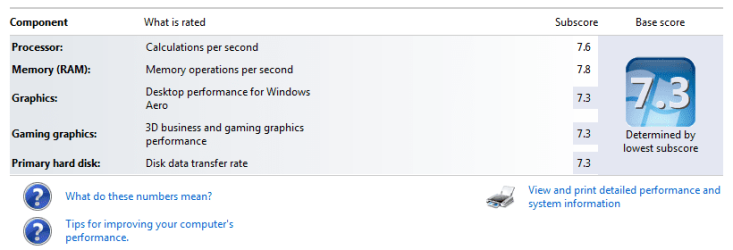
When I ran the performance index, the Hard Drive was rated at a 5.9, the slowest part of my system score.

It seems to me that the HDD would be rated higher than 5.9, is it possible I have some settings incorrect? Anyone else out there running the same hard drive with a different score?

Thanks
 

My Computer

Computer Manufacturer/Model Number
Custom
OS
Windows 7 Ultimate x64
CPU
Core i7 860
Motherboard
EVGA P55 FTW
Memory
8GB DDR3 1600
Graphics Card(s)
EVGA GTX 570
Sound Card
Realtek 2.41
Monitor(s) Displays
24" & 22" Gateway
Screen Resolution
1920x1200, 1680x1050
Hard Drives
Intel X25-V 40GB, 300GB Velociraptor, 500GB WD
PSU
750 Antec
Case
Coolermaster CMII Advanced
Cooling
Arctic Cooler
Keyboard
Logitech G19
Mouse
Logitech G9x
Internet Speed
30Mbit/s Cable
Your hardrive will almost always determine your index score. I have a 250gb Wd caviar blue index at 5.3. So your 2,800 rpm is getting you a .6 increase. Mine is 7.1./ 7.1 / 6.8 and 6.8. Fabe
 

My Computer

Computer Manufacturer/Model Number
Self Built
OS
Windows 7 ultimate 64 bit / XP Home sp3
CPU
intel Core 2 Duo E8400 3.0ghz
Motherboard
Asus P5ND bios 1401
Memory
8 gigs 1066 OCZ Fata1ty
Graphics Card(s)
EVGA GTX 580 Call of Duty Black Ops Edition
Sound Card
Creative Soundblaster Audigy 2zs
Monitor(s) Displays
Asus 24in LCD's 2MS X2
Screen Resolution
1920x1080p @60Hz
Hard Drives
WD Caviar 500 Black/ WD Caviar 200 Blue
PSU
OCZ 700W GameXtreme
Case
NZXT Apollo
Cooling
Corsair H50 CPU/120mm x3 /60mm x2 /Corsair Dominator Ram
Keyboard
Logitech Bluetooth Wireless MX5000
Mouse
Logitech Bluetooth Wireless MX1000
Internet Speed
Download 19.83 Upload 0.97
Other Info
Logitech Z2300 Speakers/ Bose Noise Cancelling Headphones/Avermedia PCI-e Hybrid TV Bravo/Epson NX415 all in one/ 4 Port Powered USB Hub/ LG 10x Bluray Burner /TSST Corp DVDRW External
but the velociraptors run at 10 000rpm
i'm running a Seagate barracuda 7 200rpm and my score is 5.9 something is definatley wrong have you checked your jumpers (outdated) on your drive maybe it's being limited
also check your drive under device manager
right click on it go to properties choose the policies tab, make sure write caching is checked.
 

Attachments

  • snip.PNG
    snip.PNG
    14.8 KB · Views: 449
Last edited:

My Computer

Computer Manufacturer/Model Number
Home Built
OS
Windows 7x64 Ultimate
CPU
Intel Core i5 750 2.66ghz
Motherboard
MSI p55a-gd65
Memory
2 x 4 gig King Max ddr3 1333
Graphics Card(s)
MSI 6870 1 Gig Gddr5
Sound Card
Realtek HD 6 Channel Audio
Monitor(s) Displays
Samsung 24 inch
Screen Resolution
1920x1080p
Hard Drives
WD green power 1TB 32 mb cache 7200 rpm
WD green power 2TB 64 mb cache 7200 rpm
PSU
1010Watt PSU
Case
Aero Cool VXE-Pro
Cooling
Case: 2x120mm CPU: Cooler Master V6 GT
Keyboard
Logitech G15
Mouse
Logitech G9
Internet Speed
1 meg line
Don't worry about it....it's just the way that the WEI works. Check performance with something like HDTune to ensure that your drive is functioning correct.

You won't score about a 5.9 using a mechanical hard drive. If you want to store better than a 5.9 you need to be running a RAID array or an SSD drive.
 

My Computer

Computer Manufacturer/Model Number
Self-Built in July 2009
OS
Windows 7 Ultimate x64
CPU
Intel Q9550 2.83Ghz OC'd to 3.40Ghz
Motherboard
Gigabyte GA-EP45-UD3R rev. 1.1, F12 BIOS
Memory
8GB G.Skill PI DDR2-800, 4-4-4-12 timings
Graphics Card(s)
EVGA 1280MB Nvidia GeForce GTX570
Sound Card
Realtek ALC899A 8 channel onboard audio
Monitor(s) Displays
23" Acer x233H
Screen Resolution
1920x1080
Hard Drives
Intel X25-M 80GB Gen 2 SSD
Western Digital 1TB Caviar Black, 32MB cache. WD1001FALS
PSU
Corsair 620HX modular
Case
Antec P182
Cooling
stock
Keyboard
ABS M1 Mechanical
Mouse
Logitech G9 Laser Mouse
Internet Speed
15/2 cable modem
Other Info
Windows and Linux enthusiast. Logitech G35 Headset.
I have a velociraptor 150 and mine is 5.9 too, I think I hit 6.0 at one point but it just really depends on what you have on your disk already. Try going to the command prompt and type in: "winsat disk" and see what you get. Here is mine:

C:\Users\Steve>winsat disk
Windows System Assessment Tool
> Running: Feature Enumeration ''
> Run Time 00:00:00.00
> Running: Storage Assessment '-seq -read -n 0'
> Run Time 00:00:05.92
> Running: Storage Assessment '-ran -read -n 0'
> Run Time 00:00:05.45
> Running: Storage Assessment '-scen 2009 -drive C:'
> Run Time 00:00:59.58
> Running: Storage Assessment '-seq -write -drive C:'
> Run Time 00:00:07.20
> Running: Storage Assessment '-flush -drive C: -seq'
> Run Time 00:00:04.72
> Running: Storage Assessment '-flush -drive C: -ran'
> Run Time 00:00:07.22
> Running: Storage Assessment '-hybrid -ran -read -n 0 -ransize 4096'
NV Cache not present.
> Run Time 00:00:00.09
> Running: Storage Assessment '-hybrid -ran -read -n 0 -ransize 16384'
NV Cache not present.
> Run Time 00:00:00.02
> Disk Sequential 64.0 Read 102.52 MB/s 6.6
> Disk Random 16.0 Read 3.01 MB/s 4.6
> Responsiveness: Average IO Rate 2.06 ms/IO 6.9
> Responsiveness: Grouped IOs 8.23 units 7.5
> Responsiveness: Long IOs 7.21 units 7.6
> Responsiveness: Overall 59.36 units 6.9
> Responsiveness: PenaltyFactor 0.0
> Disk Sequential 64.0 Write 107.26 MB/s 6.7
> Average Read Time with Sequential Writes 4.335 ms 6.2
> Latency: 95th Percentile 9.052 ms 5.8
> Latency: Maximum 19.440 ms 7.9
> Average Read Time with Random Writes 4.207 ms 6.2
> Total Run Time 00:01:31.66
C:\Users\Steve>
 

My Computer

Computer Manufacturer/Model Number
Custom by me.
OS
Windows 7 64bit RTM
CPU
Intel Core i7 920 Nehalem Over clocked to 3.5 Ghz
Motherboard
EVGA 132-BL-E758-A1 LGA 1366 Intel X58
Memory
CORSAIR DOMINATOR 6GB (3 x 2GB) 240-Pin DDR3 SDRAM DDR3 1600
Graphics Card(s)
EVGA 01G-P3-1280-AR GeForce GTX 280 1GB
Sound Card
Soundblaster X-Fi Fatal1ty
Monitor(s) Displays
2 x 20in Dell Flatpanels 3200x1200
Screen Resolution
3200x1200
Hard Drives
150GB WD Velociraptor(C:), WD 750GB (D:Games), WD 1TB Black (E:Data1), WD 1TB Green (F:Data2)
PSU
CORSAIR HX1000 1000 watt
Case
Desktop
Cooling
Air
Keyboard
Logitech G15
Mouse
Logitech Revolution MX
Internet Speed
25 MB/s
I'm getting 5.9 on my velociraptor too
 

My Computer

OS
Windows 7 64bit Home
CPU
Q9650
Motherboard
Asus P5Q E
Memory
Kingston Hyper X 4x2048
Graphics Card(s)
His 4870
Sound Card
Onboard
Monitor(s) Displays
Dell 2008WFP
Screen Resolution
1920x1200
Hard Drives
Velociraptor
PSU
Enermax Modu+ 625w
Case
Antec 300
Only way to get above 5.9 for HDs is using SSD. All other combos, no matter in raid or not will give you top score of 5.9. Me for example have 7.5x2 (for ram and cpu), 7.9x2 (for both GPU scores) and 5.9 for hard disks (raid0).
 

My Computer

Computer Manufacturer/Model Number
Custom
OS
Windows 7 SP1 x64 build 7601.21701
CPU
Intel Q9450 @3608mhz (8x451)
Motherboard
Asus Rampage Formula
Memory
6GB - 2x Corsair CM2X1024-8500C5D and 2x CM2X2048-8500C5D
Graphics Card(s)
Zotac nVidia GTX295
Sound Card
SoundMAX ADI1988B (X-FI MB)
Monitor(s) Displays
LG L227WTP & Samsung LE26R71B LCD TV
Screen Resolution
1680x1050 & 1360x768
Hard Drives
2x Seagate ST3500630NS in RAID0
PSU
Thermaltake Toughpower 750W
Case
Thermaltake
Cooling
Thermalright Ultra-120 Extreme and couple of fans
Keyboard
Logitech G15 v2
Mouse
Razer DeathAdder
Internet Speed
FTTH 50/50 (dualstack IPv4 & native IPv6)
Just hack the xml file to say what you want, then you wont have to lose sleep over a number that is basically worthless....
 

My Computer

Computer type
PC/Desktop
Computer Manufacturer/Model Number
LENOVO K450 @3.0GHZ
OS
64-bit Windows 8.1 Pro
CPU
Core(TM) i5 CPU 4330 Haswell @ 3.20GHz
Motherboard
LENOVO
Memory
12.00 GB
Graphics Card(s)
Intel(R) HD Graphics
Sound Card
Intel HD integtrated
Monitor(s) Displays
HP 25' ISP Monitor
Screen Resolution
1900/1020
Hard Drives
(1) ST1000DM003-1CH162 (2) Generic STORAGE DEVICE USB Device (3) Generic STORAGE DEVICE USB Device
Internet Speed
100mb down/10mb up
the WEI isn't completely worthless, It does scale based on your benchmark results. However, I like to run WINSAT at the command line to get the actual real world numbers.
 

My Computer

Computer Manufacturer/Model Number
Custom by me.
OS
Windows 7 64bit RTM
CPU
Intel Core i7 920 Nehalem Over clocked to 3.5 Ghz
Motherboard
EVGA 132-BL-E758-A1 LGA 1366 Intel X58
Memory
CORSAIR DOMINATOR 6GB (3 x 2GB) 240-Pin DDR3 SDRAM DDR3 1600
Graphics Card(s)
EVGA 01G-P3-1280-AR GeForce GTX 280 1GB
Sound Card
Soundblaster X-Fi Fatal1ty
Monitor(s) Displays
2 x 20in Dell Flatpanels 3200x1200
Screen Resolution
3200x1200
Hard Drives
150GB WD Velociraptor(C:), WD 750GB (D:Games), WD 1TB Black (E:Data1), WD 1TB Green (F:Data2)
PSU
CORSAIR HX1000 1000 watt
Case
Desktop
Cooling
Air
Keyboard
Logitech G15
Mouse
Logitech Revolution MX
Internet Speed
25 MB/s
Only way to get above 5.9 for HDs is using SSD. All other combos, no matter in raid or not will give you top score of 5.9. Me for example have 7.5x2 (for ram and cpu), 7.9x2 (for both GPU scores) and 5.9 for hard disks (raid0).

I've seen 6.0 on my computer at one point. And I've seen about 7 with raid stripping drives. 7.9 with stripping SSD's
 

My Computer

Computer Manufacturer/Model Number
Custom by me.
OS
Windows 7 64bit RTM
CPU
Intel Core i7 920 Nehalem Over clocked to 3.5 Ghz
Motherboard
EVGA 132-BL-E758-A1 LGA 1366 Intel X58
Memory
CORSAIR DOMINATOR 6GB (3 x 2GB) 240-Pin DDR3 SDRAM DDR3 1600
Graphics Card(s)
EVGA 01G-P3-1280-AR GeForce GTX 280 1GB
Sound Card
Soundblaster X-Fi Fatal1ty
Monitor(s) Displays
2 x 20in Dell Flatpanels 3200x1200
Screen Resolution
3200x1200
Hard Drives
150GB WD Velociraptor(C:), WD 750GB (D:Games), WD 1TB Black (E:Data1), WD 1TB Green (F:Data2)
PSU
CORSAIR HX1000 1000 watt
Case
Desktop
Cooling
Air
Keyboard
Logitech G15
Mouse
Logitech Revolution MX
Internet Speed
25 MB/s
I'm glad I stopped in here. I've been trying to figure out why my Velociraptor wasn't getting above 5.9. I had an OCZ Vertex SSD that I recently stopped using for my OS drive and even with that, I wasn't getting the high numbers that I was expecting. I've got enough storage and backups and everything else where I'd only need RAID for performance and I'm not hurting there either. The rest of my system is 7.9 so I'll live with the drive showing 5.9.

On a similar note, I just updated my chipset and audio drivers (Gigabyte MA790XT) and now my Velociraptor shows as "Disc Drive" in Device Manager. My other drivers still show the model numbers but this one does not. Is this common or do I need to find a driver, which I didn't find on the WD site. I'm running Windows 7 Ultimate x64 (RTM) thanks!
 

My Computer

OS
Windows 7 Ultimate x64
CPU
AMD Phenom II 940
Motherboard
Gigabyte MA790X-UD4P
Memory
8GB OCZ DDR2 6-6-6-18
Graphics Card(s)
Radeon HD 4850 1GB with heat sink instead of fan
Sound Card
onboard
Monitor(s) Displays
1 Asus PG 221G 1 Viewsonic Optiquest Q22wb
Screen Resolution
1680x1050
Hard Drives
1 WD Velociraptor 150
1 WD Caviar 1TB
1 Samsung Spinpoint 1TB
1 Samsung Spinpoint 300GB
PSU
Seasonic M12
Case
Antec NineHundred
Cooling
Thermaltake V1
Keyboard
Saitek Eclipse II
Mouse
Microsoft Sidewinder X5
Internet Speed
Comcast 16MB down 2MB up
5.9 is max...

Guys,

5.9 is the max you're gonna get on HDD speed tests for some reason. SSD, 10k drives, RAID will not change the score.

I currently have 2 7.2k Scorpion drives running RAID0 and the score 5.9. A single drive is 5.9. A 10k Velociraptor drive is 5.9. True throughput is, however, a very different thing. Do as suggested above and use a separate tool to test throughput.

Good luck.

jason
MCP, MCSA, MCSE, VCP, ITIL
 

My Computer

Computer Manufacturer/Model Number
Asus
OS
Windows 7 x86 build 7100
CPU
Intel Core 2 Duo
Memory
4Gb DDR2
Graphics Card(s)
Nvidia GeForce GT 120M
Internet Speed
Cable 16 MB/s
Other Info
Punishing all immature IT jerks with knowledge.
Guys,

5.9 is the max you're gonna get on HDD speed tests for some reason. SSD, 10k drives, RAID will not change the score.

I currently have 2 7.2k Scorpion drives running RAID0 and the score 5.9. A single drive is 5.9. A 10k Velociraptor drive is 5.9. True throughput is, however, a very different thing. Do as suggested above and use a separate tool to test throughput.

Good luck.

jason
MCP, MCSA, MCSE, VCP, ITIL
Nonsense, 5.9 is the best you're going to see with a conventional HHD, but not so with SSD's or a good raid setup...

Wonder why you would resurrect this old post???

Hard Drives Intel X-25M 80 Gig SSD | Intel X-25M 160 Gig SSD
 

Attachments

  • image.png
    image.png
    15.4 KB · Views: 205
Last edited:

My Computer

Computer Manufacturer/Model Number
Home Grown
OS
Windows 7 Ultimate (64)
CPU
i7-2600K
Motherboard
Asus P8P67-M Pro
Memory
G.SKILL Ripjaws X Series 8GB (2 x 4GB)
Graphics Card(s)
ATI 5750
Sound Card
On-Board
Monitor(s) Displays
LG W2486L
Screen Resolution
1920X1080
Hard Drives
Intel X-25M 80 Gig SSD | Intel X-25M 160 Gig SSD | WD Black 500MB - External eSata
PSU
Zalman ZM770-XT 770 Watts
Case
Antec 180 mini
Cooling
Cooler Master V8
Internet Speed
15MB - Cable
Other Info
Sissy OC - 4.6 @ 1.3175 24/7 | 18' Idle - 55' Load
Drivers and such..

I suspect it'll update on its own. I have found using driver agent to find all my new and updated drivers has made things very easy and keeps me current. If you get a chance, hop over to DriverAgent - Device Driver Downloads, Updates, and Scans and see what they come up with for you.

Good luck,

Jason
MCP, MCSA, MCSE, ITIL, VCP


I'm glad I stopped in here. I've been trying to figure out why my Velociraptor wasn't getting above 5.9. I had an OCZ Vertex SSD that I recently stopped using for my OS drive and even with that, I wasn't getting the high numbers that I was expecting. I've got enough storage and backups and everything else where I'd only need RAID for performance and I'm not hurting there either. The rest of my system is 7.9 so I'll live with the drive showing 5.9.

On a similar note, I just updated my chipset and audio drivers (Gigabyte MA790XT) and now my Velociraptor shows as "Disc Drive" in Device Manager. My other drivers still show the model numbers but this one does not. Is this common or do I need to find a driver, which I didn't find on the WD site. I'm running Windows 7 Ultimate x64 (RTM) thanks!
 

My Computer

Computer Manufacturer/Model Number
Asus
OS
Windows 7 x86 build 7100
CPU
Intel Core 2 Duo
Memory
4Gb DDR2
Graphics Card(s)
Nvidia GeForce GT 120M
Internet Speed
Cable 16 MB/s
Other Info
Punishing all immature IT jerks with knowledge.
Back
Top