
The problem I'm experiencing is:
A box with "HTTP://" text appears near the bottom of every page. I have headers/footers turned off in print preview. That appears on any web page I try to print. It happens whether there is an actual print button on the web page or if I just right click and choose print. If the web page has anything printed at the same location as the box appears, the box and the "HTTP://" prints on top of whatever is there. The attached print out shows the problem down towards the bottom of the page.
How do I make this stop. I simply can't print any web pages because of this messing them up and sometimes covers up whatever is supposed to print in that location.
Edition Windows 10 HomeVersion 21H1Installed on 4/16/2021OS build 19043.1110Experience Windows Feature Experience Pack 120.2212.3530.0
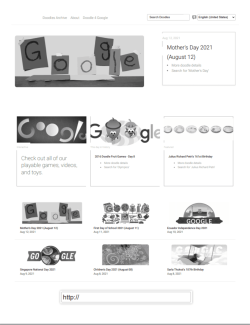
A box with "HTTP://" text appears near the bottom of every page. I have headers/footers turned off in print preview. That appears on any web page I try to print. It happens whether there is an actual print button on the web page or if I just right click and choose print. If the web page has anything printed at the same location as the box appears, the box and the "HTTP://" prints on top of whatever is there. The attached print out shows the problem down towards the bottom of the page.
How do I make this stop. I simply can't print any web pages because of this messing them up and sometimes covers up whatever is supposed to print in that location.
Edition Windows 10 HomeVersion 21H1Installed on 4/16/2021OS build 19043.1110Experience Windows Feature Experience Pack 120.2212.3530.0
My Computers
-
At a glance
windows 10AMD Ryzen 5 3500U with Radeon Vega Mobile Gfx...12GB- Computer type
- Laptop
- Computer Manufacturer/Model Number
- HP
- OS
- windows 10
- CPU
- AMD Ryzen 5 3500U with Radeon Vega Mobile Gfx 2.10 GHz
- Memory
- 12GB
- Hard Drives
- SSD
- Browser
- chrome
-
- Computer type
- PC/Desktop


