Solved Web site data to excel columns

thanku

New member
Local time
9:26 AM
Messages
21

Attachments

  • Capture.JPG
    Capture.JPG
    96.2 KB · Views: 5

My Computer My Computer

Computer type
Laptop
Computer Manufacturer/Model Number
Dell
OS
Windows 7 Ultimate x64
CPU
intel
Motherboard
intel
Memory
8 GB
Graphics Card(s)
2 GB
When you right click on the webpage and select "View source" from the context menu - do you see the info of interest; I don't. If the info were there, you could use InetGet. They know the value of the info being presented and they probably want to discourage automated data mining.

See if there is a mobile version of the webpage.
 

My Computer My Computer

Computer type
Laptop
Computer Manufacturer/Model Number
Employer provided Dell Latitude
OS
W7 Pro SP1 64bit
CPU
i7
Memory
8GB
Graphics Card(s)
Intel HD Graphics
Hard Drives
crappy SSD
Antivirus
Employer mandated Symantec Endpoint Protection
Browser
Pale Moon 64bit, IE11 64bit & Chrome 64bit
the mobile version of the site is BSE - Get Quote
only changing the last six numbers give data of different symbols.This site is more useful than the desktop version.
Ill explain my idea for autoit script.
1.a note pad contain the symbol codes(500087,500047,500030....)in different lines
2.the script use a default url- BSE - Get Quote
3.fill the space after "=" with the six no. from the note pad.thus the script can make up to 100 urls.
4.copy the required data and paste to excel columns-I dont know how to do that.
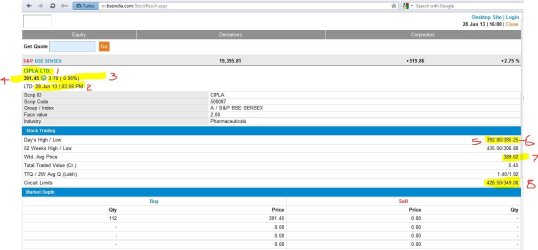
i make some change in excel columns -the "id" from html source
1-spanCname
2-strongDate
3-spanchangVal
4-strongCvalue
5,6-tdDHL ( in the site two values seperated by"/"-in excel i want two values in two columns)
7-tdWAPName
8-tdTTQW
pls reffer attached new image .
 

Attachments

  • new img.JPG
    new img.JPG
    84 KB · Views: 4

My Computer My Computer

Computer type
Laptop
Computer Manufacturer/Model Number
Dell
OS
Windows 7 Ultimate x64
CPU
intel
Motherboard
intel
Memory
8 GB
Graphics Card(s)
2 GB
edit: I see that you posted while I was creating my post below:

There is a mobile version of the website :-)


The basic flow of your script would be:

open/read the text file full of URLs into a variable
split that variable into an array
loop thru the array

for each URL, get the numbers on the end
http://www.bseindia.com/stock-share-price/dlf-ltd/dlf/532868/

use _INetGetSource to download the info into a variable
http://m.bseindia.com/StockReach.aspx?scripcd=532868
split that variable into an array
loop thru the array

use the string functions to find the info of interest
write the info to a comma delimited file

You can work on code to do the steps mentioned above. Use the other scripts that you have as a guide. Let me know what parts you cannot figure out.
 

My Computer My Computer

Computer type
Laptop
Computer Manufacturer/Model Number
Employer provided Dell Latitude
OS
W7 Pro SP1 64bit
CPU
i7
Memory
8GB
Graphics Card(s)
Intel HD Graphics
Hard Drives
crappy SSD
Antivirus
Employer mandated Symantec Endpoint Protection
Browser
Pale Moon 64bit, IE11 64bit & Chrome 64bit
~~~
4.copy the required data and paste to excel columns-I dont know how to do that.
~~~
You will not need to copy/paste anything. AutoIt can load the webpage into RAM. Then you can read thru each line of the webpage electronically while it is in RAM. There will be not browser window showing for this.

When you come upon a line that has some info of interest, you can write that info to a text file, just put a comma after the data and that comma will start a new column within Excel when you open the text file.
 

My Computer My Computer

Computer type
Laptop
Computer Manufacturer/Model Number
Employer provided Dell Latitude
OS
W7 Pro SP1 64bit
CPU
i7
Memory
8GB
Graphics Card(s)
Intel HD Graphics
Hard Drives
crappy SSD
Antivirus
Employer mandated Symantec Endpoint Protection
Browser
Pale Moon 64bit, IE11 64bit & Chrome 64bit
Code:
ConsoleWrite(_INetGetSource('http://www.autoitscript.com'))

then where i can find the data for next step? I spend a lot of time googling and try help cant solve my doubts.

I made a notepad manually with all the numbers line by line.I think thats the only thing i can do.
 

My Computer My Computer

Computer type
Laptop
Computer Manufacturer/Model Number
Dell
OS
Windows 7 Ultimate x64
CPU
intel
Motherboard
intel
Memory
8 GB
Graphics Card(s)
2 GB
~~~
The basic flow of your script would be:

open/read the text file full of URLs into a variable
split that variable into an array
loop thru the array

for each URL, get the numbers on the end
http://www.bseindia.com/stock-share-price/dlf-ltd/dlf/532868/

use _INetGetSource to download the info into a variable
BSE - Get Quote532868
split that variable into an array
loop thru the array

use the string functions to find the info of interest
write the info to a comma delimited file

You can work on code to do the steps mentioned above. Use the other scripts that you have as a guide. Let me know what parts you cannot figure out.
Try and follow the outline quoted above.

The first step is to open/read the text file full of URLs into a variable

Look back at this post:
http://www.sevenforums.com/software/293084-bat-vb-file-help-2.html#post2432220
$whole_file = FileRead($file)
The contents of the file we are currently working with is read and put into the variable named $whole_file.
So, you can use a line like:
$whole_file = FileRead("path to file with original URLs")
where path to file with original URLs is a real path to the original file that contains the URLs

Also in that tutorial is this:
$sentence_array = StringSplit($whole_file, @CRLF, 1)
So, you can use a line like:
$URL_array = StringSplit($whole_file, @CRLF, 1)


Using a combination of the AutoIt help file and the tutorial that explained a bit about the other script, you should be able to put together some code. Just take it one step at a time. Try and follow the outline quoted above. Post the code that you are having trouble with and I'll see if I can help you out.
 

My Computer My Computer

Computer type
Laptop
Computer Manufacturer/Model Number
Employer provided Dell Latitude
OS
W7 Pro SP1 64bit
CPU
i7
Memory
8GB
Graphics Card(s)
Intel HD Graphics
Hard Drives
crappy SSD
Antivirus
Employer mandated Symantec Endpoint Protection
Browser
Pale Moon 64bit, IE11 64bit & Chrome 64bit
~~~~
I made a notepad manually with all the numbers line by line.I think thats the only thing i can do.
Sorry, but you don't need that and you don't want to be doing stuff manually.

It will take us some time to work thru the outline that I posted :-(

It would be quicker if I just wrote the script for you... :-)
...but you would not learn as much if I did that :-(
 

My Computer My Computer

Computer type
Laptop
Computer Manufacturer/Model Number
Employer provided Dell Latitude
OS
W7 Pro SP1 64bit
CPU
i7
Memory
8GB
Graphics Card(s)
Intel HD Graphics
Hard Drives
crappy SSD
Antivirus
Employer mandated Symantec Endpoint Protection
Browser
Pale Moon 64bit, IE11 64bit & Chrome 64bit
Thank you very much for the advice,
##for each URL, get the numbers on the end
Stock Share Price dlf ltd | Get Quote dlf | BSE ##
we can ignore this line,My text file contain only numbers.Pls check attached file.

so we need to call each line and attach with http : // m.bseindia.com / StockReach.aspx?scripcd=
what function i use for it?
 

Attachments

My Computer My Computer

Computer type
Laptop
Computer Manufacturer/Model Number
Dell
OS
Windows 7 Ultimate x64
CPU
intel
Motherboard
intel
Memory
8 GB
Graphics Card(s)
2 GB
Sure - if you want to start with that text file with the numbers - that is good.


Put this near the top of the script...
#include<inet.au3>

...then you can use this inside your loop:
$page_source = _INetGetSource("http://m.bseindia.com/StockReach.aspx?scripcd=532532", 1)

I'll show you how to add the red part after I see your code that:
...reads the file full of numbers
...splits those lines into an array
...and loops thru each line.
 

My Computer My Computer

Computer type
Laptop
Computer Manufacturer/Model Number
Employer provided Dell Latitude
OS
W7 Pro SP1 64bit
CPU
i7
Memory
8GB
Graphics Card(s)
Intel HD Graphics
Hard Drives
crappy SSD
Antivirus
Employer mandated Symantec Endpoint Protection
Browser
Pale Moon 64bit, IE11 64bit & Chrome 64bit
Code:
#include<inet.au3>
$file = symbol.txt
        $whole_file = FileRead($file)
    $file_handle = FileOpen($file, 2)
	$word_array = StringSplit($whole_file, @CRLF, 1)
	For $i = 1 To $word_array[0]
        If $word_array[$i] = "" Then ContinueLoop
		   For $ii = 1 To $word_array[0]
            If $ii = 1 Then $word_array[$ii] &= "http://m.bseindia.com/StockReach.aspx?scripcd="i)
            If $ii = $word_array[0] Then
			   Exit
			Else
			Else
			Else
			   $page_source = _INetGetSource(i, 1)
    FileWrite($file_handle)
    FileClose($file_handle)

Thanks for the encourage,This is the maximum i can make,Pls correct and finish it when you got enough free time
 

My Computer My Computer

Computer type
Laptop
Computer Manufacturer/Model Number
Dell
OS
Windows 7 Ultimate x64
CPU
intel
Motherboard
intel
Memory
8 GB
Graphics Card(s)
2 GB
My apologies.

I misjudged your level of understanding of the past code that we have used.

I should have had you work on this in much smaller tasks.

Try this script:
Code:
Opt("TrayIconDebug", 1)

$S_running = "~stock-stuff~" ;name the script
If WinExists($S_running) Then Exit
AutoItWinSetTitle($S_running)

#include<Inet.au3>
#include <String.au3>

$whole_file = FileRead("symbol.txt")
$account_number_array = StringSplit($whole_file, @CRLF, 1)

$file_h = FileOpen("output.csv", 2)

For $i = 1 To $account_number_array[0]
    If $account_number_array[$i] = "" Then ContinueLoop ;skip empty lines

    $page_source = _INetGetSource("http://m.bseindia.com/StockReach.aspx?scripcd=" & $account_number_array[$i], 1)

    $spanCname = _StringBetween($page_source, '<span id="spanCname" class="companyname">', '</span><br>')
    $strongDate = _StringBetween($page_source, '<span id="strongDate">', '</span>')
    $spanchangVal = _StringBetween($page_source, '<span id="spanchangVal" class="srcovalue">', '</span>')
    $strongCvalue = _StringBetween($page_source, '<span class="srcovalue"><strong id="strongCvalue">', '</strong></span>')
    $tdDHL = _StringBetween($page_source, '<td id="tdDHL" class="TTRow_right">', '</td>')
    If StringInStr($tdDHL[0], "/") Then
        $tdDHL_array = StringSplit($tdDHL[0], "/", 1)
    Else
        Dim $tdDHL_array[3]
        $tdDHL_array[1] = "null"
        $tdDHL_array[2] = "null"
    EndIf
    $tdWAp = _StringBetween($page_source, '<td id="tdWAp" class="TTRow_right">', '</td>')
    $tdTTQW = _StringBetween($page_source, '<td id="tdTTQW" class="TTRow_right">', '</td>')

    FileWriteLine($file_h, _
            $account_number_array[$i] & "," & _
            $spanCname[0] & "," & _
            $strongDate[0] & "," & _
            $spanchangVal[0] & "," & _
            $strongCvalue[0] & "," & _
            $tdDHL_array[1] & "," & _
            $tdDHL_array[2] & "," & _
            $tdWAp[0] & "," & _
            $tdTTQW[0])
Next
FileClose($file_h)
I temporarily added the stock account number to the output.
 

My Computer My Computer

Computer type
Laptop
Computer Manufacturer/Model Number
Employer provided Dell Latitude
OS
W7 Pro SP1 64bit
CPU
i7
Memory
8GB
Graphics Card(s)
Intel HD Graphics
Hard Drives
crappy SSD
Antivirus
Employer mandated Symantec Endpoint Protection
Browser
Pale Moon 64bit, IE11 64bit & Chrome 64bit
Thank you very much,I dont think it simple.It will take six months for me to make a script like this.
I just add a simple msgbox at end to show its finished.
in the out put file
Code:
  $spanchangVal = _StringBetween($page_source, '<span id="spanchangVal" class="srcovalue">', '</span>')
this line gives a colum with value 37(5.3%) is it possible to split 37 in one colum and 5.3% in another column.
also i need to add heading to excel columns,

code name date change %change close high low wap ttq

These are not important and necessary!
 

My Computer My Computer

Computer type
Laptop
Computer Manufacturer/Model Number
Dell
OS
Windows 7 Ultimate x64
CPU
intel
Motherboard
intel
Memory
8 GB
Graphics Card(s)
2 GB
Do you want "LTD- " by the date?
stk.png

Added:
column headers
split change and %change
error checking to stop if output is locked by Excel
tray tip to so progress of the data pull
Code:
Opt("TrayIconDebug", 1)

$S_running = "~stock-stuff~" ;name the script
If WinExists($S_running) Then Exit
AutoItWinSetTitle($S_running)

#include<Inet.au3>
#include <String.au3>


$whole_file = FileRead("symbol.txt")
$account_number_array = StringSplit($whole_file, @CRLF, 1)

$file_h = FileOpen("output.csv", 2)
If $file_h = -1 Then
    MsgBox(0, "AutoIt", "Could not open output file. Close Excel?")
    Exit
EndIf

FileWriteLine($file_h, _
        "Code" & "," & _
        "Name" & "," & _
        "Date" & "," & _
        "Change" & "," & _
        "% Change" & "," & _
        "Close" & "," & _
        "High" & "," & _
        "Low" & "," & _
        "Wtd. Avg Price" & "," & _
        "TTQ")

For $i = 1 To $account_number_array[0]
    TrayTip("Pulling stock data ", "Stock " & $i & " of " & $account_number_array[0], 100)
    If $account_number_array[$i] = "" Then ContinueLoop ;skip empty lines

    $page_source = _INetGetSource("http://m.bseindia.com/StockReach.aspx?scripcd=" & $account_number_array[$i], 1)

    $spanCname = _StringBetween($page_source, '<span id="spanCname" class="companyname">', '</span><br>')
    If @error Then _errors($account_number_array[$i])

    $strongDate = _StringBetween($page_source, '<span id="strongDate">', '</span>')
    If @error Then _errors($account_number_array[$i])

    $spanchangVal = _StringBetween($page_source, '<span id="spanchangVal" class="srcovalue">', '</span>')
    If @error Then _errors($account_number_array[$i])
    If StringInStr($spanchangVal[0], "(") Then
        $spanchangVal_array = StringSplit($spanchangVal[0], "(", 1)
        $spanchangVal_array[1] = StringStripWS($spanchangVal_array[1], 8)
        $spanchangVal_array[2] = StringReplace($spanchangVal_array[2], ")", "")
        $spanchangVal_array[2] = StringStripWS($spanchangVal_array[2], 8)
    Else
        Global $spanchangVal_array[3]
        $spanchangVal_array[1] = "null"
        $spanchangVal_array[2] = "null"
    EndIf

    $strongCvalue = _StringBetween($page_source, '<span class="srcovalue"><strong id="strongCvalue">', '</strong></span>')
    If @error Then _errors($account_number_array[$i])

    $tdDHL = _StringBetween($page_source, '<td id="tdDHL" class="TTRow_right">', '</td>')
    If @error Then _errors($account_number_array[$i])
    If StringInStr($tdDHL[0], "/") Then
        $tdDHL_array = StringSplit($tdDHL[0], "/", 1)
    Else
        Global $tdDHL_array[3]
        $tdDHL_array[1] = "null"
        $tdDHL_array[2] = "null"
    EndIf

    $tdWAp = _StringBetween($page_source, '<td id="tdWAp" class="TTRow_right">', '</td>')
    If @error Then _errors($account_number_array[$i])

    $tdTTQW = _StringBetween($page_source, '<td id="tdTTQW" class="TTRow_right">', '</td>')
    If @error Then _errors($account_number_array[$i])

    FileWriteLine($file_h, _
            $account_number_array[$i] & "," & _
            $spanCname[0] & "," & _
            $strongDate[0] & "," & _
            $spanchangVal_array[1] & "," & _
            $spanchangVal_array[2] & "," & _
            $strongCvalue[0] & "," & _
            $tdDHL_array[1] & "," & _
            $tdDHL_array[2] & "," & _
            $tdWAp[0] & "," & _
            $tdTTQW[0])
Next
FileClose($file_h)
MsgBox(0, "AutoIt", "Finished!")

Func _errors($pass)
    MsgBox(0, "AutoIt", "Error - not a valid stock number: " & $pass)
    ShellExecute("http://m.bseindia.com/StockReach.aspx?scripcd=" & $pass)
    FileClose($file_h)
    Exit
EndFunc


edit:
Same as above - only without "LTD- " by the date:
Code:
Opt("TrayIconDebug", 1)

$S_running = "~stock-stuff~" ;name the script
If WinExists($S_running) Then Exit
AutoItWinSetTitle($S_running)

#include<Inet.au3>
#include <String.au3>


$whole_file = FileRead("symbol.txt")
$account_number_array = StringSplit($whole_file, @CRLF, 1)

$file_h = FileOpen("output.csv", 2)
If $file_h = -1 Then
    MsgBox(0, "AutoIt", "Could not open output file. Close Excel?")
    Exit
EndIf

FileWriteLine($file_h, _
        "Code" & "," & _
        "Name" & "," & _
        "Date" & "," & _
        "Change" & "," & _
        "% Change" & "," & _
        "Close" & "," & _
        "High" & "," & _
        "Low" & "," & _
        "Wtd. Avg Price" & "," & _
        "TTQ")

For $i = 1 To $account_number_array[0]
    TrayTip("Pulling stock data ", "Stock " & $i & " of " & $account_number_array[0], 100)
    If $account_number_array[$i] = "" Then ContinueLoop ;skip empty lines

    $page_source = _INetGetSource("http://m.bseindia.com/StockReach.aspx?scripcd=" & $account_number_array[$i], 1)

    $spanCname = _StringBetween($page_source, '<span id="spanCname" class="companyname">', '</span><br>')
    If @error Then _errors($account_number_array[$i])

    $strongDate = _StringBetween($page_source, '<span id="strongDate">LTD- ', '</span>')
    If @error Then _errors($account_number_array[$i])

    $spanchangVal = _StringBetween($page_source, '<span id="spanchangVal" class="srcovalue">', '</span>')
    If @error Then _errors($account_number_array[$i])
    If StringInStr($spanchangVal[0], "(") Then
        $spanchangVal_array = StringSplit($spanchangVal[0], "(", 1)
        $spanchangVal_array[1] = StringStripWS($spanchangVal_array[1], 8)
        $spanchangVal_array[2] = StringReplace($spanchangVal_array[2], ")", "")
        $spanchangVal_array[2] = StringStripWS($spanchangVal_array[2], 8)
    Else
        Global $spanchangVal_array[3]
        $spanchangVal_array[1] = "null"
        $spanchangVal_array[2] = "null"
    EndIf

    $strongCvalue = _StringBetween($page_source, '<span class="srcovalue"><strong id="strongCvalue">', '</strong></span>')
    If @error Then _errors($account_number_array[$i])

    $tdDHL = _StringBetween($page_source, '<td id="tdDHL" class="TTRow_right">', '</td>')
    If @error Then _errors($account_number_array[$i])
    If StringInStr($tdDHL[0], "/") Then
        $tdDHL_array = StringSplit($tdDHL[0], "/", 1)
    Else
        Global $tdDHL_array[3]
        $tdDHL_array[1] = "null"
        $tdDHL_array[2] = "null"
    EndIf

    $tdWAp = _StringBetween($page_source, '<td id="tdWAp" class="TTRow_right">', '</td>')
    If @error Then _errors($account_number_array[$i])

    $tdTTQW = _StringBetween($page_source, '<td id="tdTTQW" class="TTRow_right">', '</td>')
    If @error Then _errors($account_number_array[$i])

    FileWriteLine($file_h, _
            $account_number_array[$i] & "," & _
            $spanCname[0] & "," & _
            $strongDate[0] & "," & _
            $spanchangVal_array[1] & "," & _
            $spanchangVal_array[2] & "," & _
            $strongCvalue[0] & "," & _
            $tdDHL_array[1] & "," & _
            $tdDHL_array[2] & "," & _
            $tdWAp[0] & "," & _
            $tdTTQW[0])
Next
FileClose($file_h)
MsgBox(0, "AutoIt", "Finished!")

Func _errors($pass)
    MsgBox(0, "AutoIt", "Error - not a valid stock number: " & $pass)
    ShellExecute("http://m.bseindia.com/StockReach.aspx?scripcd=" & $pass)
    FileClose($file_h)
    Exit
EndFunc
stk2.png


edit2:
added some error checking as some webpages caused the script to error out.
 
Last edited:

My Computer My Computer

Computer type
Laptop
Computer Manufacturer/Model Number
Employer provided Dell Latitude
OS
W7 Pro SP1 64bit
CPU
i7
Memory
8GB
Graphics Card(s)
Intel HD Graphics
Hard Drives
crappy SSD
Antivirus
Employer mandated Symantec Endpoint Protection
Browser
Pale Moon 64bit, IE11 64bit & Chrome 64bit
Thank you very much,the second script without "LTD" is good.Its amazing im trying to add more columns and I dont want to waste your time any more.
 

My Computer My Computer

Computer type
Laptop
Computer Manufacturer/Model Number
Dell
OS
Windows 7 Ultimate x64
CPU
intel
Motherboard
intel
Memory
8 GB
Graphics Card(s)
2 GB
I sent you a PM about the last change.

Be sure that the copy that you are working with ends in EndFunc.

It should not be too hard to add columns... you can post your modified version and I'll see I notice any problems.
 

My Computer My Computer

Computer type
Laptop
Computer Manufacturer/Model Number
Employer provided Dell Latitude
OS
W7 Pro SP1 64bit
CPU
i7
Memory
8GB
Graphics Card(s)
Intel HD Graphics
Hard Drives
crappy SSD
Antivirus
Employer mandated Symantec Endpoint Protection
Browser
Pale Moon 64bit, IE11 64bit & Chrome 64bit
Code:
Opt("TrayIconDebug", 1)

$S_running = "~stock-stuff~" ;name the script
If WinExists($S_running) Then Exit
AutoItWinSetTitle($S_running)

#include<Inet.au3>
#include <String.au3>


$whole_file = FileRead("symbol.txt")
$account_number_array = StringSplit($whole_file, @CRLF, 1)

$file_h = FileOpen("output.csv", 2)
If $file_h = -1 Then
    MsgBox(0, "AutoIt", "Could not open output file. Close Excel?")
    Exit
EndIf

FileWriteLine($file_h, _
        "Code" & "," & _
        "Name" & "," & _
        "Date" & "," & _
        "Change" & "," & _
        "% Change" & "," & _
        "Close" & "," & _
        "High" & "," & _
        "Low" & "," & _
        "Wtd. Avg Price" & "," & _
	    [COLOR="red"]"TTQ" & "," & _
        "2WQ" )[/COLOR]

For $i = 1 To $account_number_array[0]
    TrayTip("Pulling stock data ", "Stock " & $i & " of " & $account_number_array[0], 100)
    If $account_number_array[$i] = "" Then ContinueLoop ;skip empty lines

    $page_source = _INetGetSource("http://m.bseindia.com/StockReach.aspx?scripcd=" & $account_number_array[$i], 1)

    $spanCname = _StringBetween($page_source, '<span id="spanCname" class="companyname">', '</span><br>')
    If @error Then _errors($account_number_array[$i])

    $strongDate = _StringBetween($page_source, '<span id="strongDate">LTD- ', '</span>')
    If @error Then _errors($account_number_array[$i])

    $spanchangVal = _StringBetween($page_source, '<span id="spanchangVal" class="srcovalue">', '</span>')
    If @error Then _errors($account_number_array[$i])
    If StringInStr($spanchangVal[0], "(") Then
        $spanchangVal_array = StringSplit($spanchangVal[0], "(", 1)
        $spanchangVal_array[1] = StringStripWS($spanchangVal_array[1], 8)
        $spanchangVal_array[2] = StringReplace($spanchangVal_array[2], ")", "")
        $spanchangVal_array[2] = StringStripWS($spanchangVal_array[2], 8)
    Else
        Global $spanchangVal_array[3]
        $spanchangVal_array[1] = "null"
        $spanchangVal_array[2] = "null"
    EndIf

    $strongCvalue = _StringBetween($page_source, '<span class="srcovalue"><strong id="strongCvalue">', '</strong></span>')
    If @error Then _errors($account_number_array[$i])

    $tdDHL = _StringBetween($page_source, '<td id="tdDHL" class="TTRow_right">', '</td>')
    If @error Then _errors($account_number_array[$i])
    If StringInStr($tdDHL[0], "/") Then
        $tdDHL_array = StringSplit($tdDHL[0], "/", 1)
    Else
        Global $tdDHL_array[3]
        $tdDHL_array[1] = "null"
        $tdDHL_array[2] = "null"
    EndIf

    $tdWAp = _StringBetween($page_source, '<td id="tdWAp" class="TTRow_right">', '</td>')
    If @error Then _errors($account_number_array[$i])

    $tdTTQW = _StringBetween($page_source, '<td id="tdTTQW" class="TTRow_right">', '</td>')
    If @error Then _errors($account_number_array[$i])
    [COLOR="red"]If StringInStr($tdTTQW[0], "/") Then
        $tdTTQW_array = StringSplit($tdTTQW[0], "/", 1)
    Else
        Global $tdTTQW_array[3]
        $tdTTQW_array[1] = "null"
        $tdTTQW_array[2] = "null"
    EndIf[/COLOR]

    FileWriteLine($file_h, _
            $account_number_array[$i] & "," & _
            $spanCname[0] & "," & _
            $strongDate[0] & "," & _
            $spanchangVal_array[1] & "," & _
            $spanchangVal_array[2] & "," & _
            $strongCvalue[0] & "," & _
            $tdDHL_array[1] & "," & _
            $tdDHL_array[2] & "," & _
            $tdWAp[0] & "," & _
            [COLOR="red"]$tdTTQW_array[1] & "," & _
            $tdTTQW_array[2] & "," & _[/COLOR]

Next
FileClose($file_h)
MsgBox(0, "AutoIt", "Finished!")

Func _errors($pass)
    MsgBox(0, "AutoIt", "Error - not a valid stock number: " & $pass)
    ShellExecute("http://m.bseindia.com/StockReach.aspx?scripcd=" & $pass)
    FileClose($file_h)
    Exit
EndFunc


I try a small change just to split last column TTQ to TTQ and 2WQ
but it shows the error "parsing function all"
 

My Computer My Computer

Computer type
Laptop
Computer Manufacturer/Model Number
Dell
OS
Windows 7 Ultimate x64
CPU
intel
Motherboard
intel
Memory
8 GB
Graphics Card(s)
2 GB
try this:
Code:
Opt("TrayIconDebug", 1)

$S_running = "~stock-stuff~" ;name the script
If WinExists($S_running) Then Exit
AutoItWinSetTitle($S_running)

#include<Inet.au3>
#include <String.au3>


$whole_file = FileRead("symbol.txt")
$account_number_array = StringSplit($whole_file, @CRLF, 1)

$file_h = FileOpen("output.csv", 2)
If $file_h = -1 Then
    MsgBox(0, "AutoIt", "Could not open output file. Close Excel?")
    Exit
EndIf

FileWriteLine($file_h, _
        "Code" & "," & _
        "Name" & "," & _
        "Date" & "," & _
        "Change" & "," & _
        "% Change" & "," & _
        "Close" & "," & _
        "High" & "," & _
        "Low" & "," & _
        "Wtd. Avg Price" & "," & _
        "TTQ" & "," & _
        "2WQ")

For $i = 1 To $account_number_array[0]
    TrayTip("Pulling stock data ", "Stock " & $i & " of " & $account_number_array[0], 100)
    If $account_number_array[$i] = "" Then ContinueLoop ;skip empty lines

    $page_source = _INetGetSource("http://m.bseindia.com/StockReach.aspx?scripcd=" & $account_number_array[$i], 1)

    $spanCname = _StringBetween($page_source, '<span id="spanCname" class="companyname">', '</span><br>')
    If @error Then _errors($account_number_array[$i])

    $strongDate = _StringBetween($page_source, '<span id="strongDate">LTD- ', '</span>')
    If @error Then _errors($account_number_array[$i])

    $spanchangVal = _StringBetween($page_source, '<span id="spanchangVal" class="srcovalue">', '</span>')
    If @error Then _errors($account_number_array[$i])
    If StringInStr($spanchangVal[0], "(") Then
        $spanchangVal_array = StringSplit($spanchangVal[0], "(", 1)
        $spanchangVal_array[1] = StringStripWS($spanchangVal_array[1], 8)
        $spanchangVal_array[2] = StringReplace($spanchangVal_array[2], ")", "")
        $spanchangVal_array[2] = StringStripWS($spanchangVal_array[2], 8)
    Else
        Global $spanchangVal_array[3]
        $spanchangVal_array[1] = "null"
        $spanchangVal_array[2] = "null"
    EndIf

    $strongCvalue = _StringBetween($page_source, '<span class="srcovalue"><strong id="strongCvalue">', '</strong></span>')
    If @error Then _errors($account_number_array[$i])

    $tdDHL = _StringBetween($page_source, '<td id="tdDHL" class="TTRow_right">', '</td>')
    If @error Then _errors($account_number_array[$i])
    If StringInStr($tdDHL[0], "/") Then
        $tdDHL_array = StringSplit($tdDHL[0], "/", 1)
    Else
        Global $tdDHL_array[3]
        $tdDHL_array[1] = "null"
        $tdDHL_array[2] = "null"
    EndIf

    $tdWAp = _StringBetween($page_source, '<td id="tdWAp" class="TTRow_right">', '</td>')
    If @error Then _errors($account_number_array[$i])

    $tdTTQW = _StringBetween($page_source, '<td id="tdTTQW" class="TTRow_right">', '</td>')
    If @error Then _errors($account_number_array[$i])
    If StringInStr($tdTTQW[0], "/") Then
        $tdTTQW_array = StringSplit($tdTTQW[0], "/", 1)
    Else
        Global $tdTTQW_array[3]
        $tdTTQW_array[1] = "null"
        $tdTTQW_array[2] = "null"
    EndIf

    FileWriteLine($file_h, _
            $account_number_array[$i] & "," & _
            $spanCname[0] & "," & _
            $strongDate[0] & "," & _
            $spanchangVal_array[1] & "," & _
            $spanchangVal_array[2] & "," & _
            $strongCvalue[0] & "," & _
            $tdDHL_array[1] & "," & _
            $tdDHL_array[2] & "," & _
            $tdWAp[0] & "," & _
            $tdTTQW_array[1] & "," & _
            $tdTTQW_array[2])
Next
FileClose($file_h)
MsgBox(0, "AutoIt", "Finished!")

Func _errors($pass)
    MsgBox(0, "AutoIt", "Error - not a valid stock number: " & $pass)
    ShellExecute("http://m.bseindia.com/StockReach.aspx?scripcd=" & $pass)
    FileClose($file_h)
    Exit
EndFunc   ;==>_errors
I changed this
$tdTTQW_array[2] & "," & _
to this
$tdTTQW_array[2])
 

My Computer My Computer

Computer type
Laptop
Computer Manufacturer/Model Number
Employer provided Dell Latitude
OS
W7 Pro SP1 64bit
CPU
i7
Memory
8GB
Graphics Card(s)
Intel HD Graphics
Hard Drives
crappy SSD
Antivirus
Employer mandated Symantec Endpoint Protection
Browser
Pale Moon 64bit, IE11 64bit & Chrome 64bit
Thank you very much for the script and your support.
 

My Computer My Computer

Computer type
Laptop
Computer Manufacturer/Model Number
Dell
OS
Windows 7 Ultimate x64
CPU
intel
Motherboard
intel
Memory
8 GB
Graphics Card(s)
2 GB
You are welcome.

Let's hope that they don't change the website's layout :-)
 

My Computer My Computer

Computer type
Laptop
Computer Manufacturer/Model Number
Employer provided Dell Latitude
OS
W7 Pro SP1 64bit
CPU
i7
Memory
8GB
Graphics Card(s)
Intel HD Graphics
Hard Drives
crappy SSD
Antivirus
Employer mandated Symantec Endpoint Protection
Browser
Pale Moon 64bit, IE11 64bit & Chrome 64bit
Back
Top