
Website doesn't render/load properly

Ufokrazy

New member
Local time
2:02 PM
Messages
9
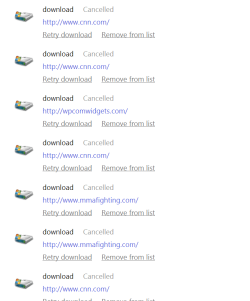
I recently installed a fresh windows 7 x64 home premium on my computer + some niche drivers from my computer's manufacturer. On random occasions, when I try visiting a website, it loads gibberish source of the webpage or it download's a download file as seen in screenshot below. Does anyone know what might be causing this problem?
 

Attachments
  • Capture.PNG
    Capture.PNG
    25 KB · Views: 3

My Computer

OS
Windows 7 Ultimate x86

My Computer

Computer type
PC/Desktop
Computer Manufacturer/Model Number
custom built
OS
Windows 7 ultimate 64-bit
CPU
Intel I7 2600K 3.4ghz
Motherboard
Asus Evo P8P67
Memory
Corsair 16gb ddr3 1600mhz
Graphics Card(s)
Nvidia Geforce gt 430
Sound Card
Sound Blaster Titanium x-fi pci express
Monitor(s) Displays
Dell E198WFP
Hard Drives
1 western digital 2TB drive.
PSU
Antec 1200 watt
Case
Inwin Dragon Rider
Cooling
6 case supplied cooling fans
Keyboard
logitech mk700
Mouse
logitech m705
Internet Speed
25-50mbps download; 10mbps upload(i think)
Antivirus
avg free 2014
Browser
mozilla firefox
Other Info
Also have a pretty bad speaker setup which is a klipsch promedia 5.1 surround speaker setup with huge subwoofer and lg blu ray player/writer. Also a hp officejet pro 8600 plus wireless all in one and a logitech s7500 webcam.
If the problem was repeatable you could see if the same behavior occurs in Safe Mode with Networking.

Since you say this is random on a fresh install, and on all browsers, you can assume a system issue. Malware is certainly a possibility, have you run any scans? Suggest scan with MalwareBytes, and Superantispyware.

Choose the free versions

Malwarebytes : Malwarebytes Anti-Malware FREE

SUPERAntiSpyware | Remove Malware | Remove Spyware - AntiMalware, AntiSpyware, AntiAdware!

I'd also download and run AdwCleaner (choose the Download@ Bleeping Computer link)

AdwCleaner Download

AdwCleaner Download | malwareremovalguides

The downloads you show, where do you find them? Do you type an address in the address bar of a browser, and get a download dialog, or?

A Guy
 

My Computer

Computer type
PC/Desktop
OS
Windows 10 Home x64
CPU
INTEL Core i5-750 Quad-Core 3.37GHz
Motherboard
ASUS P7P55D
Memory
HyperX Fury Black Series 8GB (2 x 4GB) 1866Mhz
Graphics Card(s)
EVGA GeForce GTX 750 Superclocked 1GB 128-Bit GDDR5
Monitor(s) Displays
LG 32MA68HY 32" IPS
Screen Resolution
1920 x 1080
Hard Drives
Samsung 840 Evo 120GB, SEAGATE 500GB Barracuda® 7200.12, SATA 3 Gb/s, 7200 RPM, 16MB cache
PSU
ANTEC TruePower New TP-550, 80 PLUS, 550W
Case
ANTEC Three Hundred Illusion
Cooling
COOLER MASTER Hyper 212 Plus, 4 x 120mm 1 x 140mm Noctua's
Internet Speed
85 + Mbps
Antivirus
Avast
Browser
Vivaldi
Back
Top