Solved WEI - DDR2 vs DDR3

lehnerus2000

New member
Guru
Gold Member
VIP
Local time
10:40 PM
Messages
4,058
Location
Adelaide
This might not be in the correct section. :(

After a series of disasters I have just upgraded(?) my system.
I haven't adjusted my system specs info yet (so you can still see my previous setup info).

My new system:


  • AMD AM3 x6 Phenom II 1055T.
  • 4 GB of DDR3 (1333).
My new setup seems smoother overall (although Firefox seems to take longer to shutdown). :confused:

I noticed something disappointing/strange after refreshing my WEI score:

  • 8 GB of DDR2 ( 800) - 7.2
  • 4 GB of DDR3 (1333) - 5.9
I was under the impression that:

  • DDR3 was faster than DDR2.
  • 1333 was faster than 800.
I'm sure that my old system was using the default settings (i.e. no overclocking).

Is the WEI memory score actually based on capacity, speed and type?
Do I need to adjust my BIOS settings?


Also when I run System Information Tool:

  • XP SP3 CPU Power - 140W.
  • W7 CPU Power - 70W.
According to AMD it is rated at 125W.
AMD Phenom
All other values (e.g. voltages and temperatures) seem to be basically the same.
The temperatures seem to be basically the same in Ubuntu as well.
 

My Computer

Computer type
PC/Desktop
Computer Manufacturer/Model Number
n/a
OS
W7 Ultimate SP1, LM19.2 MATE, W10 Home 1703, W10 Pro 1703 VM, #All 64 bit
CPU
AMD Phenom II x6 1100T, 3.3 GHz
Motherboard
ASUS M4A88T-M/USB3 (AM3)
Memory
12GB DDR3 1333 G-Skill (4GB x 2), G-Skill (2GB x 2)
Graphics Card(s)
NVIDIA GeForce GTX 660
Sound Card
Realtek?
Monitor(s) Displays
Samsung S23B350
Screen Resolution
1920x1080
Hard Drives
WD Green 2TB (SATA), WD Green 3TB (SATA), WD Blue 4TB (SATA), WD Blue 6TB (SATA)
PSU
Cooler Master
Case
Antec GX300 Tower
Cooling
3x Antec TRICOOL 120mm Fans
Mouse
Wired Optical
Internet Speed
DSL
Antivirus
Avast
Browser
Pale Moon (64 bit)
Other Info
2018-12-27 Upgraded HDDs
2015-12-10 Upgraded case, graphics card, storage
2015-08-15 Upgraded motherboard & RAM
2015-07-15 Upgraded LM17.1 to LM17.2
It is faster, but you've halved the memory amount. Double to 8GB and it will shoot up to 7.8 or so.
 

My Computer

OS
Debian Squeeze Stable 64-bit
Yes, I'd suspect that you'd get a higher WEI core for DDR2 based on........

  • 8 GB of DDR2 ( 800)
  • 4 GB of DDR3 (1333)
 

My Computer

Computer type
PC/Desktop
Computer Manufacturer/Model Number
Custom Build
OS
Windows 7 Home Premium 64 bit
CPU
Intel Core i7-4790
Motherboard
GA-Z87X-D3H
Memory
G.SKILL 8GB (2 x 4GB) DDR3 F3-10666CL9D-8GBNT
Graphics Card(s)
AMD Radeon R7 250
Sound Card
Realtek ALC892
Monitor(s) Displays
Samsung UN32EH5000, Dell 1703FPT
Screen Resolution
1920 x 1080, 1280 x 1024
Hard Drives
WD5003AZEX
WD10EZEX
Samsung HD103SJ
Samsung 128 GB 840 PRO
PSU
SeaSonic M12II SS-500GM
Case
Fractal Design Define R4
Cooling
Zalman CNPS9900ALED
Keyboard
Logitech K800
Mouse
Logitech M705
Internet Speed
16 Mbps
Antivirus
Avast
Browser
Firefox
Other Info
Bose Companion 2 Multimedia Speakers
Thanks Guys

Thanks Guys. :D
So the WEI score is based on capacity, speed and type.

Unfortunately my new motherboard only has two slots and since I was short of cash, I had to choose a 4 GB kit.
Also my old setup refused to take advantage of the 8 GB, so I didn't think that I would lose out.

C'est la vie. :rolleyes:
 

My Computer

Computer type
PC/Desktop
Computer Manufacturer/Model Number
n/a
OS
W7 Ultimate SP1, LM19.2 MATE, W10 Home 1703, W10 Pro 1703 VM, #All 64 bit
CPU
AMD Phenom II x6 1100T, 3.3 GHz
Motherboard
ASUS M4A88T-M/USB3 (AM3)
Memory
12GB DDR3 1333 G-Skill (4GB x 2), G-Skill (2GB x 2)
Graphics Card(s)
NVIDIA GeForce GTX 660
Sound Card
Realtek?
Monitor(s) Displays
Samsung S23B350
Screen Resolution
1920x1080
Hard Drives
WD Green 2TB (SATA), WD Green 3TB (SATA), WD Blue 4TB (SATA), WD Blue 6TB (SATA)
PSU
Cooler Master
Case
Antec GX300 Tower
Cooling
3x Antec TRICOOL 120mm Fans
Mouse
Wired Optical
Internet Speed
DSL
Antivirus
Avast
Browser
Pale Moon (64 bit)
Other Info
2018-12-27 Upgraded HDDs
2015-12-10 Upgraded case, graphics card, storage
2015-08-15 Upgraded motherboard & RAM
2015-07-15 Upgraded LM17.1 to LM17.2
DDR3 isn't inherently faster than DDR2. It is, however, capable of clocking higher.

DDR3 1066 and DDR2 1066 will perform near-identically at equal amounts. The DDR2 may very well have tighter timings, and therefore perform slightly better.

Phenom IIs are pretty poor at taking advantage of high memory bandwidth, anyway.
 

My Computer

OS
Windows 7 Ultimate x64
CPU
Intel Core i5 2500K
Motherboard
Gigabyte GA-Z68A-D3-B3
Memory
8GB G.SKILL Ripjaws X DDR3 2133
Graphics Card(s)
nVidia Geforce 9500GT
Monitor(s) Displays
Acer H233H
Screen Resolution
1920x1080
Case
Antec Three Hundred
If your board has onboard graphics, your bios will have a setting for sideport, UMA or Sideport+UMA. It will usually be default at Sideport+UMA. Change the setting to Sideport. Save and exit. Run WEI again.
 

My Computers

System One System Two

  • Computer type
    PC/Desktop
    Computer Manufacturer/Model Number
    ALWAYS UNDER CONSTRUCTION
    OS
    Windows 11 Pro
    CPU
    Ryzen 9 5900X
    Motherboard
    Asus X570 Crosshair Viii Hero
    Memory
    32GB G Skill DDR4-3600
    Graphics Card(s)
    EVGA RTX 3080 FTW 3 Ultra
    Sound Card
    On Board/Sennheiser PC37X Headset
    Monitor(s) Displays
    3 X Asus 27"
    Screen Resolution
    2560x1440
    Hard Drives
    2 X 1 TB NVME drives
    PSU
    EVGA 850
    Case
    Phanteks Eclipse P400A
    Cooling
    EVGA 280 AIO
    Keyboard
    Logitech G510s/ Logitech G13
    Mouse
    Logitech G502
    Internet Speed
    24/1
    Antivirus
    ESET/MBAM Pro/SAS Pro
    Browser
    Chrome/ Firefox/ Edge
  • Computer type
    Laptop
    System Manufacturer/Model Number
    Dell 16 Plus
    OS
    Windows 11 Pro
    CPU
    Intel Ultra 9 288V
    Memory
    32 GB LPDDR5X 8533
    Monitor(s) Displays
    16" Mini-LED HDR600 Touch 90 Hz
    Screen Resolution
    2560X1600
    Hard Drives
    1 TB NVME
Check with the RAM maker's site for a forum on overclocking the memory, timing, Bus frequency etc. An AMD platform supposedly won't support DDR3 1600, but it will, I have one (see specs), but will take some tweaking.
WEI memory rating, while not a real benchmark, will give a user an idea about THAT PC's performance when a change is made. The memory rating takes both its speed and amount available to get the score. My setup my set up gets 7.6.
 

My Computer

Computer type
PC/Desktop
Computer Manufacturer/Model Number
Home Built Desktop By DataTech
OS
Windows 7 Ultimate X64 SP1
CPU
Intel i5-2550K, Differing ~4.4-4.8GHz No built in GPU
Motherboard
ASUS P8Z68-V PRO/GEN3
Memory
16GB G.Skill Sniper 1866MHz @ 2133MHz 2x8GB
Graphics Card(s)
ASUS GTX650TIB-DC2OC-2GD5, (650TI Boost)
Sound Card
Onboard Realtek 5-1
Monitor(s) Displays
Samsung P2570HD
Screen Resolution
1920x1080
Hard Drives
Samsung 840 Pro 256GB SSD for OS, 500GB Seagate Constellation (Enterprise drive) for Data
PSU
Corsair HX650W
Case
Inwin Dragon Rider
Cooling
Hyper 212 EVO w/two Noctua fans, push-pull, @1300 RPM
Keyboard
E-Z Eyes, bright yellow keys with large characters
Mouse
steelseries SENSEI Laser Pro Gaming
Internet Speed
48-51Mbs Mbs down, 11 Mbs up Xfinity Cable
Antivirus
Norton Internet Security 2013
Browser
IE 10, Opera, Pale Moon if needed
Other Info
4 case fans, LG BluRay-RE, ASUS DVD-RW, Mr. Fusion power supply, 1.21 gigawatts.
Running a K10's memory at anything above 1333 give sminimal benefit. 1333 doesn't really perform much better than 1066 most of the time, really. Even Sandy Bridge has minimal gains with RAM above 1333 MHz.
 

My Computer

OS
Windows 7 Ultimate x64
CPU
Intel Core i5 2500K
Motherboard
Gigabyte GA-Z68A-D3-B3
Memory
8GB G.SKILL Ripjaws X DDR3 2133
Graphics Card(s)
nVidia Geforce 9500GT
Monitor(s) Displays
Acer H233H
Screen Resolution
1920x1080
Case
Antec Three Hundred
Thanks Guys (Once Again)

Thanks for your input/suggestions. :)

DDR3 isn't inherently faster than DDR2. It is, however, capable of clocking higher.
...
Phenom IIs are pretty poor at taking advantage of high memory bandwidth, anyway.

I read something about that earlier today.
Someone posted an article about it on these forums.

If your board has onboard graphics, your bios will have a setting for sideport, UMA or Sideport+UMA. It will usually be default at Sideport+UMA. Change the setting to Sideport. Save and exit. Run WEI again.

My board must be too cheap. :D
It only has UMA or Disable.

Check with the RAM maker's site for a forum on overclocking the memory, timing, Bus frequency etc. An AMD platform supposedly won't support DDR3 1600, but it will, I have one (see specs), but will take some tweaking.

I'm too paranoid to overclock my system.
I've only had these new parts for a few days and I don't want to risk cooking them. :D

I reinstalled my NVIDIA GeForce 8500 GT card and disabled the on-board graphics.
My WEI memory score increased to 7.4 (from 5.9)
 

My Computer

Computer type
PC/Desktop
Computer Manufacturer/Model Number
n/a
OS
W7 Ultimate SP1, LM19.2 MATE, W10 Home 1703, W10 Pro 1703 VM, #All 64 bit
CPU
AMD Phenom II x6 1100T, 3.3 GHz
Motherboard
ASUS M4A88T-M/USB3 (AM3)
Memory
12GB DDR3 1333 G-Skill (4GB x 2), G-Skill (2GB x 2)
Graphics Card(s)
NVIDIA GeForce GTX 660
Sound Card
Realtek?
Monitor(s) Displays
Samsung S23B350
Screen Resolution
1920x1080
Hard Drives
WD Green 2TB (SATA), WD Green 3TB (SATA), WD Blue 4TB (SATA), WD Blue 6TB (SATA)
PSU
Cooler Master
Case
Antec GX300 Tower
Cooling
3x Antec TRICOOL 120mm Fans
Mouse
Wired Optical
Internet Speed
DSL
Antivirus
Avast
Browser
Pale Moon (64 bit)
Other Info
2018-12-27 Upgraded HDDs
2015-12-10 Upgraded case, graphics card, storage
2015-08-15 Upgraded motherboard & RAM
2015-07-15 Upgraded LM17.1 to LM17.2
Glad to hear you have it sorted out!
 

My Computer

Computer type
PC/Desktop
Computer Manufacturer/Model Number
Home Built Desktop By DataTech
OS
Windows 7 Ultimate X64 SP1
CPU
Intel i5-2550K, Differing ~4.4-4.8GHz No built in GPU
Motherboard
ASUS P8Z68-V PRO/GEN3
Memory
16GB G.Skill Sniper 1866MHz @ 2133MHz 2x8GB
Graphics Card(s)
ASUS GTX650TIB-DC2OC-2GD5, (650TI Boost)
Sound Card
Onboard Realtek 5-1
Monitor(s) Displays
Samsung P2570HD
Screen Resolution
1920x1080
Hard Drives
Samsung 840 Pro 256GB SSD for OS, 500GB Seagate Constellation (Enterprise drive) for Data
PSU
Corsair HX650W
Case
Inwin Dragon Rider
Cooling
Hyper 212 EVO w/two Noctua fans, push-pull, @1300 RPM
Keyboard
E-Z Eyes, bright yellow keys with large characters
Mouse
steelseries SENSEI Laser Pro Gaming
Internet Speed
48-51Mbs Mbs down, 11 Mbs up Xfinity Cable
Antivirus
Norton Internet Security 2013
Browser
IE 10, Opera, Pale Moon if needed
Other Info
4 case fans, LG BluRay-RE, ASUS DVD-RW, Mr. Fusion power supply, 1.21 gigawatts.
That was the point of my post #6. UMA on an AMD board assigns a certain amount of ram to graphics exclusively. It is therefore not available to the OS. WEI penalizes you for the reduced amount of ram. Glad you got it fixed right.
 

My Computers

System One System Two

  • Computer type
    PC/Desktop
    Computer Manufacturer/Model Number
    ALWAYS UNDER CONSTRUCTION
    OS
    Windows 11 Pro
    CPU
    Ryzen 9 5900X
    Motherboard
    Asus X570 Crosshair Viii Hero
    Memory
    32GB G Skill DDR4-3600
    Graphics Card(s)
    EVGA RTX 3080 FTW 3 Ultra
    Sound Card
    On Board/Sennheiser PC37X Headset
    Monitor(s) Displays
    3 X Asus 27"
    Screen Resolution
    2560x1440
    Hard Drives
    2 X 1 TB NVME drives
    PSU
    EVGA 850
    Case
    Phanteks Eclipse P400A
    Cooling
    EVGA 280 AIO
    Keyboard
    Logitech G510s/ Logitech G13
    Mouse
    Logitech G502
    Internet Speed
    24/1
    Antivirus
    ESET/MBAM Pro/SAS Pro
    Browser
    Chrome/ Firefox/ Edge
  • Computer type
    Laptop
    System Manufacturer/Model Number
    Dell 16 Plus
    OS
    Windows 11 Pro
    CPU
    Intel Ultra 9 288V
    Memory
    32 GB LPDDR5X 8533
    Monitor(s) Displays
    16" Mini-LED HDR600 Touch 90 Hz
    Screen Resolution
    2560X1600
    Hard Drives
    1 TB NVME
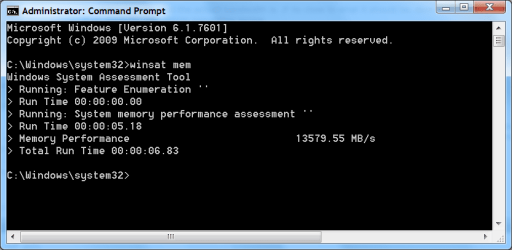
Open a cmd promyt as admin and do:
winsat mem

Itll give a idea of what the actuall bandwidth is. If its close to what it should be, dont worry.
If its extremly low, theres something wrong.

The WEI scores themselves rteally don't give much to go by.
 

My Computer

Computer Manufacturer/Model Number
Custom (Self Build)
OS
Windows 7 Home Premium 64bit
CPU
Intel Core i7 2700k
Motherboard
eVGA P67 SLI
Memory
8GB Mushkin Redline Ridgebacks @1866
Graphics Card(s)
EVGA GTX570 SC
Sound Card
XiFi Titanium HD
Monitor(s) Displays
LG W2453V
Screen Resolution
1920x1080
Hard Drives
Intel 320 80GB -- Intel X25-V 40GB --WD Black 1TB x2 -- WD Blue 640GB
PSU
Seasonic x750
Case
Corsair 600T SE White
Cooling
eVGA Superclocked CPU Cooler
Keyboard
Saitek Cyborg
Antivirus
Kaspersky
Browser
IE
Other Info
LG BD/DVD
As another suggestion, try an actual benchmark and see how the system is running. WEI should be used once to ensure Aero is enabled, and that's it. It serves no other purpose, is horribly unreliable, and can be edited to show whatever score you'd like. Putting any thought or effort into it is just a waste.
 

My Computer

OS
Windows 7 Ultimate x64 SP1
CPU
Intel Core i7-2600
Motherboard
Gigabyte GA-P67A-UD3P-B3
Memory
12 GB Patriot Extreme DDR3-1333
Graphics Card(s)
Nvidia GTX 470
Monitor(s) Displays
Dell UltraSharp 2209WA
Hard Drives
OCZ Agility3 240 GB, WD5001AALS, WD7501AALS
PSU
OCZ ModStream 700W
Case
CoolerMaster HAF 912 Advanced
Cooling
CoolerMaster Hyper 212 Plus
Thanks Guys (Yet Again)

Thanks (yet again) to everyone for your input/suggestions.
smile.gif


Open a cmd promyt as admin and do:
winsat mem

Itll give a idea of what the actuall bandwidth is. If its close to what it should be, dont worry.
If its extremly low, theres something wrong.

The WEI scores themselves rteally don't give much to go by.

Here is a screenshot of the cmd prompt output:
WinSAT.png

Here is a link to the product info (F3-10600CL9-2GBNT):
G.SKILL-Products

How do I relate the 2 bits of info?
I read a review on the more expensive version of my MB (ASRock 880GMH - I have the LE version).
The reviewer's test result was ~12.5 GB/s, so I guess mine is performing pretty well. :)

The weird thing is that my NVIDIA graphics card performance dropped slightly (WEI 4.5 to 4.3).
This isn't a problem as I don't play any modern games.

Thanks to everyone (once again). :D

Additional
It looks like a $1 capacitor disabled my previous MB.
It should be easy enough to repair.
 
Last edited:

My Computer

Computer type
PC/Desktop
Computer Manufacturer/Model Number
n/a
OS
W7 Ultimate SP1, LM19.2 MATE, W10 Home 1703, W10 Pro 1703 VM, #All 64 bit
CPU
AMD Phenom II x6 1100T, 3.3 GHz
Motherboard
ASUS M4A88T-M/USB3 (AM3)
Memory
12GB DDR3 1333 G-Skill (4GB x 2), G-Skill (2GB x 2)
Graphics Card(s)
NVIDIA GeForce GTX 660
Sound Card
Realtek?
Monitor(s) Displays
Samsung S23B350
Screen Resolution
1920x1080
Hard Drives
WD Green 2TB (SATA), WD Green 3TB (SATA), WD Blue 4TB (SATA), WD Blue 6TB (SATA)
PSU
Cooler Master
Case
Antec GX300 Tower
Cooling
3x Antec TRICOOL 120mm Fans
Mouse
Wired Optical
Internet Speed
DSL
Antivirus
Avast
Browser
Pale Moon (64 bit)
Other Info
2018-12-27 Upgraded HDDs
2015-12-10 Upgraded case, graphics card, storage
2015-08-15 Upgraded motherboard & RAM
2015-07-15 Upgraded LM17.1 to LM17.2
AMDs sometimes tend to have slightly higher Memory bandwith at a given speed Vs a Intel setup.
His lower results could be due to Memory settings in the bios. Many possible reasons for it.


Those results look fine to me. I wouldn't worry to much about it TBH.

Although as DeaconFrost suggested, a actual Memory Benchmark will give you much more accurate, and more detailed results. if this is something you are interested in.

The windows one is more of a ballpark figure, but usually pretty close.
 

My Computer

Computer Manufacturer/Model Number
Custom (Self Build)
OS
Windows 7 Home Premium 64bit
CPU
Intel Core i7 2700k
Motherboard
eVGA P67 SLI
Memory
8GB Mushkin Redline Ridgebacks @1866
Graphics Card(s)
EVGA GTX570 SC
Sound Card
XiFi Titanium HD
Monitor(s) Displays
LG W2453V
Screen Resolution
1920x1080
Hard Drives
Intel 320 80GB -- Intel X25-V 40GB --WD Black 1TB x2 -- WD Blue 640GB
PSU
Seasonic x750
Case
Corsair 600T SE White
Cooling
eVGA Superclocked CPU Cooler
Keyboard
Saitek Cyborg
Antivirus
Kaspersky
Browser
IE
Other Info
LG BD/DVD
AMDs certainly do not have higher bandwidth. A Nehalem or Sandy Bridge will destroy any AMD in bandwidth.
 

My Computer

OS
Windows 7 Ultimate x64
CPU
Intel Core i5 2500K
Motherboard
Gigabyte GA-Z68A-D3-B3
Memory
8GB G.SKILL Ripjaws X DDR3 2133
Graphics Card(s)
nVidia Geforce 9500GT
Monitor(s) Displays
Acer H233H
Screen Resolution
1920x1080
Case
Antec Three Hundred
Benchmark Programs

Just out of interest, which benchmark programs do people recommend? :geek:
 
Last edited:

My Computer

Computer type
PC/Desktop
Computer Manufacturer/Model Number
n/a
OS
W7 Ultimate SP1, LM19.2 MATE, W10 Home 1703, W10 Pro 1703 VM, #All 64 bit
CPU
AMD Phenom II x6 1100T, 3.3 GHz
Motherboard
ASUS M4A88T-M/USB3 (AM3)
Memory
12GB DDR3 1333 G-Skill (4GB x 2), G-Skill (2GB x 2)
Graphics Card(s)
NVIDIA GeForce GTX 660
Sound Card
Realtek?
Monitor(s) Displays
Samsung S23B350
Screen Resolution
1920x1080
Hard Drives
WD Green 2TB (SATA), WD Green 3TB (SATA), WD Blue 4TB (SATA), WD Blue 6TB (SATA)
PSU
Cooler Master
Case
Antec GX300 Tower
Cooling
3x Antec TRICOOL 120mm Fans
Mouse
Wired Optical
Internet Speed
DSL
Antivirus
Avast
Browser
Pale Moon (64 bit)
Other Info
2018-12-27 Upgraded HDDs
2015-12-10 Upgraded case, graphics card, storage
2015-08-15 Upgraded motherboard & RAM
2015-07-15 Upgraded LM17.1 to LM17.2
memory bandwidth

AMDs certainly do not have higher bandwidth. A Nehalem or Sandy Bridge will destroy any AMD in bandwidth.

That is ridiculous, First, the Amd cpu comes with memory controller integrated into CPU to lower the cost of manfunaturing, Second, Amd CPU has be to tweaked to go higher clock frequencies to take advantage of more memory bandwidth.
 

My Computer

OS
windows 7 Ultimate x64
AMDs certainly do not have higher bandwidth. A Nehalem or Sandy Bridge will destroy any AMD in bandwidth.

That is ridiculous, First, the Amd cpu comes with memory controller integrated into CPU to lower the cost of manfunaturing, Second, Amd CPU has be to tweaked to go higher clock frequencies to take advantage of more memory bandwidth.

You're a little out-of-date as regards Intel. The Nehalem and Sandy Bridge CPUs have integrated memory controllers, similar to what AMD has been doing for years. Synthetic benchmarks (such as Core i5 2500K and Core i7 2600K review) show that the high-end Intel CPUs have better memory performance than AMD's finest. I doubt that the real-world differences are that large.

The price/performance trade is more complex. Most of the budget gaming system guides I've seen in the past year or so use AMD CPUs.
 

My Computer

Computer Manufacturer/Model Number
homegrown
OS
Windows 7 Pro X64 SP1
CPU
Intel Core I7-3930k
Motherboard
Asus P9X79 Pro
Memory
16 GB Gskill DDR3-2133
Graphics Card(s)
eVGA GTX680
Sound Card
Creative X-Fi Titanium
Monitor(s) Displays
As PA246Q
Screen Resolution
1920 X 1200
Hard Drives
Corsair Force GT, 120 GB
WDC 1.5TB Caviar Black
PSU
PCP&C Silencer 750 Crossfire
Case
Silverstone FT02
Cooling
Noctua NH-D14
Keyboard
cheap Logitech USB
Mouse
Microsoft Intellimouse Explorer (old optical) USB
Internet Speed
6Mb cable
Other Info
Pioneer BDR-205
Samsung SH-203B
Monsoon 5.1 speakers
You can overclock the Northbridge and use high frequency RAM all you want on an AMD system. The truth is that it simply doesn't affect memory bandwidth to any notable degree. Even Thuban, the six-core K10 model, doesn't see any real benefit from RAM above DDR3 1333. Sandy Bridge similarly sees minimal gains from anything above 1333.
 

My Computer

OS
Windows 7 Ultimate x64
CPU
Intel Core i5 2500K
Motherboard
Gigabyte GA-Z68A-D3-B3
Memory
8GB G.SKILL Ripjaws X DDR3 2133
Graphics Card(s)
nVidia Geforce 9500GT
Monitor(s) Displays
Acer H233H
Screen Resolution
1920x1080
Case
Antec Three Hundred
Back
Top